SharedPreferences数据存储持久化技术
简介
一、SharedPreferences数据存储put...
获取SharedPreferences 对象
1. Context 类中获取getSharedPreferences() 方法

SharedPreferences sp = getSharedPreferences("data",MODE_PRIVATE);2.Activity 类中的getPreferences() 方法
这个方法和Context中的getSharedPreferences() 方法很相似,不过它只接收一个操作模式参数,因为使用这个方法时会自动将当前活动的类名作为SharedPreferences的文件名。

SharedPreferences sp = getPreferences(MODE_PRIVATE);3.PreferenceManager 类中的getDefaultSharedPreferences() 方法
这是一个静态方法,它接收一个Context 参数,并自动使用当前应用程序的包名作为前缀来命名SharedPreferences文件。得到了SharedPreferences 对象之后,就可以开始向SharedPreferences文件中存储数据了,主要可以分为如下图3步实现(sp.edit().putString("555","666").apply();)sp.edit().putString().apply。
获取SharedPreferences的方法添加数据
调用SharedPreferences 对象的edit() 方法来获取一个SharedPreferences.Editor 对象。向SharedPreferences.Editor 对象中添加数据,比如添加一个布尔型数据就使用putBoolean() 方法,添加一个字符串则使用putString() 方法,以此类推。调用apply() 方法将添加的数据提交,从而完成数据存储操作。

SharedPreferences sp = getSharedPreferences("data",MODE_PRIVATE);
        sp.edit().putString("555","666").apply();
所有put...方法一览
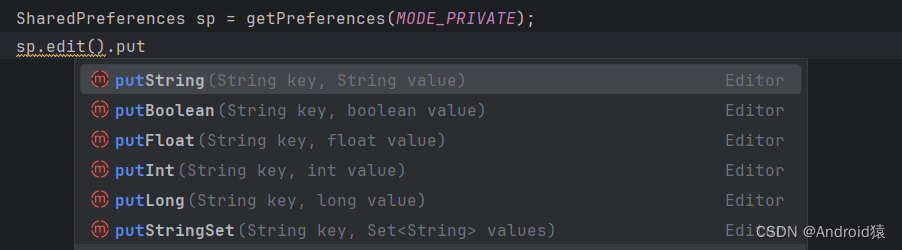
二、SharedPreferences中读取数据get...
SharedPreferences 对象中提供了一系列的get 方法,用于对存储的数据进行读取,每种get 方法都对应了SharedPreferences.Editor 中的一种put 方法,比如读取一个布尔型数据就使用getBoolean() 方法,读取一个字符串就使用getString() 方法。这些get 方法都接收两个参数,第一个参数是键,传入存储数据时使用的键就可以得到相应的值了;第二个参数是默认值,即表示当传入的键找不到对应的值时会以什么样的默认值进行返回。
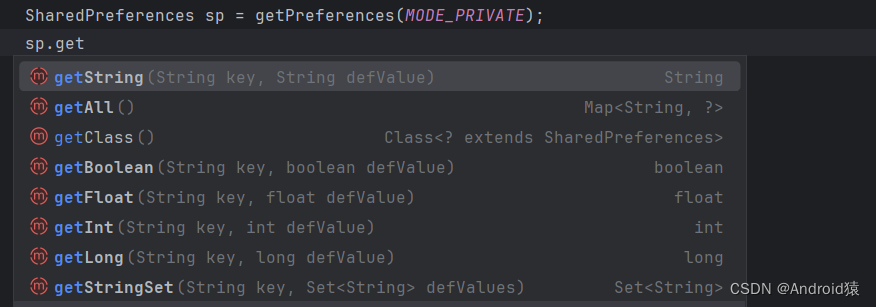
三、SharedPreferences检索键值对contains(键)
检索此SharedPreferences文件中是否存在有此键值对存在,则返回True不存在,则返回False,属于boolean类型的数据。

String name1 = name.getText().toString().trim();
boolean Name = sp.contains(name1);四、SharedPreferences删除remove(键)
删除此SharedPreferences文件中的此键值对即使键不存在,也可使用,clear()删除此SharedPreferences文件

五、提交更新
对SharedPreferences的所有操作,最后必须提交,才可以更新。apply()立即更改内存中的SharedPreferences对象,但将更新异步写入磁盘,
commit()立即更新内存中的SharedPreferences对象,但将更新同步写入磁盘官方建议:尽量避免从主线程调用

六、用户账号注册登录修改综合应用
用户登录
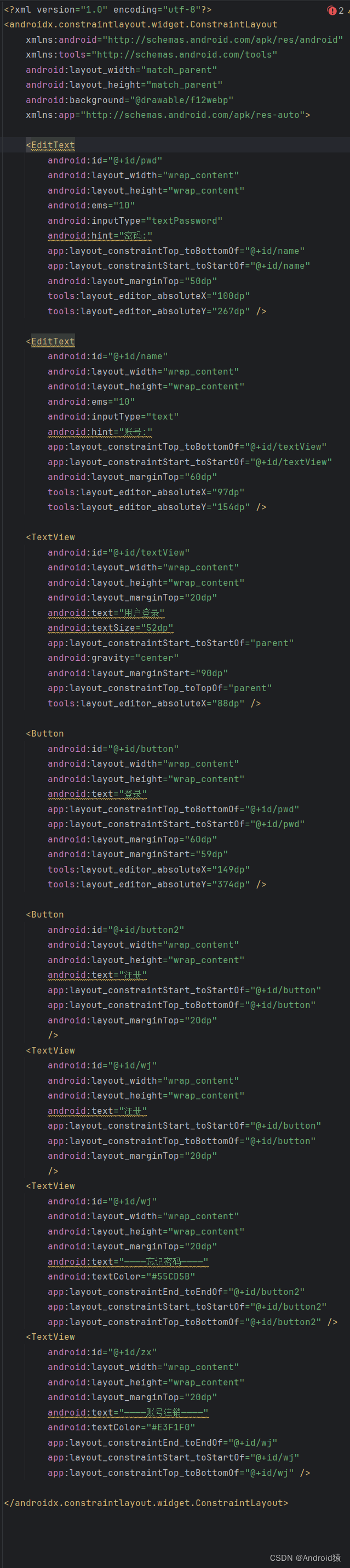
xml文件,波浪线不影响程序执行(开发软件本身问题)
<?xml version="1.0" encoding="utf-8"?>
<androidx.constraintlayout.widget.ConstraintLayout
    xmlns:android="http://schemas.android.com/apk/res/android"
    xmlns:tools="http://schemas.android.com/tools"
    android:layout_width="match_parent"
    android:layout_height="match_parent"
    android:background="@drawable/f12webp"
    xmlns:app="http://schemas.android.com/apk/res-auto">

    <EditText
        android:id="@+id/pwd"
        android:layout_width="wrap_content"
        android:layout_height="wrap_content"
        android:ems="10"
        android:inputType="textPassword"
        android:hint="密码:"
        app:layout_constraintTop_toBottomOf="@+id/name"
        app:layout_constraintStart_toStartOf="@+id/name"
        android:layout_marginTop="50dp"
        tools:layout_editor_absoluteX="100dp"
        tools:layout_editor_absoluteY="267dp" />

    <EditText
        android:id="@+id/name"
        android:layout_width="wrap_content"
        android:layout_height="wrap_content"
        android:ems="10"
        android:inputType="text"
        android:hint="账号:"
        app:layout_constraintTop_toBottomOf="@+id/textView"
        app:layout_constraintStart_toStartOf="@+id/textView"
        android:layout_marginTop="60dp"
        tools:layout_editor_absoluteX="97dp"
        tools:layout_editor_absoluteY="154dp" />

    <TextView
        android:id="@+id/textView"
        android:layout_width="wrap_content"
        android:layout_height="wrap_content"
        android:layout_marginTop="20dp"
        android:text="用户登录"
        android:textSize="52dp"
        app:layout_constraintStart_toStartOf="parent"
        android:gravity="center"
        android:layout_marginStart="90dp"
        app:layout_constraintTop_toTopOf="parent"
        tools:layout_editor_absoluteX="88dp" />

    <Button
        android:id="@+id/button"
        android:layout_width="wrap_content"
        android:layout_height="wrap_content"
        android:text="登录"
        app:layout_constraintTop_toBottomOf="@+id/pwd"
        app:layout_constraintStart_toStartOf="@+id/pwd"
        android:layout_marginTop="60dp"
        android:layout_marginStart="59dp"
        tools:layout_editor_absoluteX="149dp"
        tools:layout_editor_absoluteY="374dp" />

    <Button
        android:id="@+id/button2"
        android:layout_width="wrap_content"
        android:layout_height="wrap_content"
        android:text="注册"
        app:layout_constraintStart_toStartOf="@+id/button"
        app:layout_constraintTop_toBottomOf="@+id/button"
        android:layout_marginTop="20dp"
        />
    <TextView
        android:id="@+id/wj"
        android:layout_width="wrap_content"
        android:layout_height="wrap_content"
        android:layout_marginTop="20dp"
        android:text="————忘记密码————"
        android:textColor="#55CD5B"
        app:layout_constraintEnd_toEndOf="@+id/button2"
        app:layout_constraintStart_toStartOf="@+id/button2"
        app:layout_constraintTop_toBottomOf="@+id/button2" />
    <TextView
        android:id="@+id/zx"
        android:layout_width="wrap_content"
        android:layout_height="wrap_content"
        android:layout_marginTop="20dp"
        android:text="————账号注销————"
        android:textColor="#E3F1F0"
        app:layout_constraintEnd_toEndOf="@+id/wj"
        app:layout_constraintStart_toStartOf="@+id/wj"
        app:layout_constraintTop_toBottomOf="@+id/wj" />

</androidx.constraintlayout.widget.ConstraintLayout>
代码:
public class MainActivity extends AppCompatActivity {
    @Override
    protected void onCreate(@Nullable Bundle savedInstanceState) {
        super.onCreate(savedInstanceState);
        setContentView(R.layout.activity_main);
        SharedPreferences sp = getPreferences(MODE_PRIVATE);
        Button button = findViewById(R.id.button);
        Button button2 = findViewById(R.id.button2);
        EditText name = findViewById(R.id.name);
        EditText pwd = findViewById(R.id.pwd);
        TextView wj = findViewById(R.id.wj);
        TextView zx = findViewById(R.id.zx);
        zx.setOnClickListener(new View.OnClickListener() {
            @Override
            public void onClick(View v) {
                Intent intent = new Intent(MainActivity.this, MainActivity4.class);
                startActivity(intent);
            }
        });
        wj.setOnClickListener(new View.OnClickListener() {
            @Override
            public void onClick(View v) {
                Intent intent = new Intent(MainActivity.this, MainActivity3.class);
                startActivity(intent);
            }
        });
        button.setOnClickListener(new View.OnClickListener() {
            @Override
            public void onClick(View v) {
                String name1 = name.getText().toString().trim();
                String pwd1 = pwd.getText().toString().trim();
                String Name = sp.getString(name1,"");
                if(name1.length()!=0&&pwd1.length()!=0)
                {
                    if (pwd1.equals(Name))
                    {
                        Intent intent = new Intent(MainActivity.this, MainActivity2.class);
                        startActivity(intent);
                        Toast.makeText(MainActivity.this, "登录成功", Toast.LENGTH_SHORT).show();
                    }
                    else
                    {
                        Toast.makeText(MainActivity.this, "账号或密码错误", Toast.LENGTH_SHORT).show();
                    }
                }
                else
                {
                    Toast.makeText(MainActivity.this, "账号或密码不能为空", Toast.LENGTH_SHORT).show();
                }

            }
        });
        button2.setOnClickListener(new View.OnClickListener() {
            @Override
            public void onClick(View v) {
                Intent intent = new Intent(MainActivity.this, MainActivity5.class);
                startActivity(intent);
            }
        });
    }
}
最总效果
张贴代码只是登陆部分,完整代码:SharedPreferences用户账号注册登录修改综合应用-CSDN博客


魔乐社区(Modelers.cn) 是一个中立、公益的人工智能社区,提供人工智能工具、模型、数据的托管、展示与应用协同服务,为人工智能开发及爱好者搭建开放的学习交流平台。社区通过理事会方式运作,由全产业链共同建设、共同运营、共同享有,推动国产AI生态繁荣发展。
更多推荐


 29
29 0
0- 0


 已为社区贡献1条内容

所有评论(0)