centos7安装pgsql10并自定义数据存储路径
参考:https://blog.csdn.net/qq_42280510/article/details/93461474默认情况下,在CentOS 7上,PostgreSQL 10数据目录位于/var/lib/pgsql/10/data中。防范于未然,在安装PostgreSQL数据库的时候就要把存储路径更改到一个合适的地方。官网地址 (官网有详细安装说明)https://yum.postgres
参考:https://blog.csdn.net/qq_42280510/article/details/93461474
默认情况下,在CentOS 7上,PostgreSQL 10数据目录位于/var/lib/pgsql/10/data中。
防范于未然,在安装PostgreSQL数据库的时候就要把存储路径更改到一个合适的地方。
官网地址 (官网有详细安装说明)
https://yum.postgresql.org/repopackages.php
https://www.postgresql.org/download/linux/redhat/
1、下载:
yum install https://download.postgresql.org/pub/repos/yum/reporpms/EL-7-ppc64le/pgdg-redhat-repo-latest.noarch.rpm -y
2、安装服务:
yum install postgresql10-contrib postgresql10-server -y
3、自定义systemd服务
这时不急着初始化数据库,我们自定义systemd服务。
systemctl edit postgresql-10.service
写入以下内容:(我这边是打算把数据存放在/home/pgdata/)
[Service]
Environment=PGDATA=/home/pgdata/10/data # 更改为你自己的目录
自定义配置将在/etc/systemd/system/postgresql-10.service.d/override.conf。
检查其内容:
# cat /etc/systemd/system/postgresql-10.service.d/override.conf
[Service]
Environment=PGDATA=/home/pgdata/10/data
4、启动数据库并设置开机启动
重新加载系统:
systemctl daemon-reload
初始化PostgreSQL数据目录:
/usr/pgsql-10/bin/postgresql-10-setup initdb
启动并启用该服务:
systemctl enable postgresql-10
systemctl start postgresql-10
5、登录postgresql并设置密码
postgresql在安装时默认添加用户postgres
su - postgres
psql
设置密码:
ALTER USER postgres WITH PASSWORD '密码';
ctrl+d退出
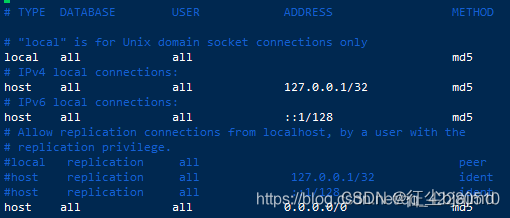
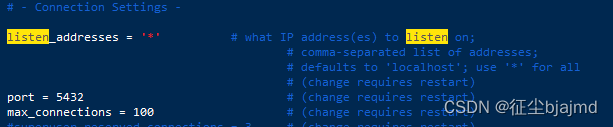
6、设置支持远程登录
vim /home/pgdata/10/data/pg_hba.conf
vim /home/pgdata/10/data/postgresql.conf
7、重启postgresql
systemctl restart postgresql-10
现在可以远程密码登录,注意要服务器上要开通5423端口。
8、最后可以访问了

魔乐社区(Modelers.cn) 是一个中立、公益的人工智能社区,提供人工智能工具、模型、数据的托管、展示与应用协同服务,为人工智能开发及爱好者搭建开放的学习交流平台。社区通过理事会方式运作,由全产业链共同建设、共同运营、共同享有,推动国产AI生态繁荣发展。
更多推荐

 0
0 0
0- 0


 已为社区贡献4条内容

所有评论(0)