【人脸识别】基于KL变换人脸识别matlab源码含GUI
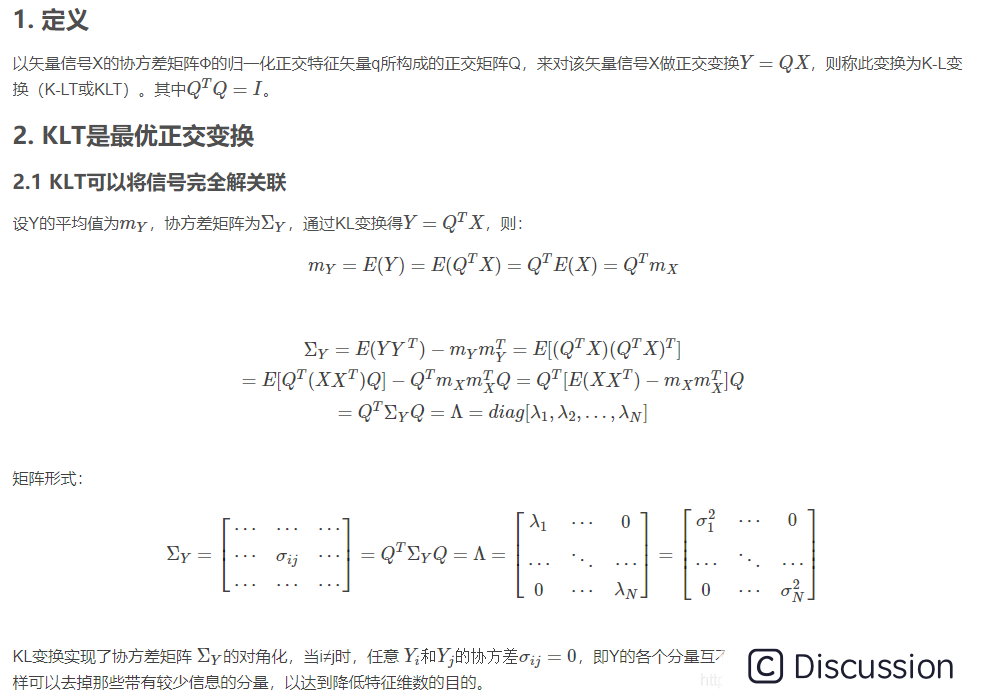
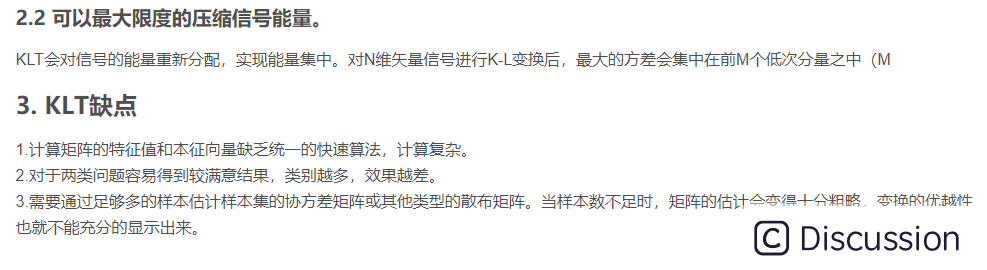
一、简介
二、源代码
``` function varargout = renlian(varargin) % RENLIAN MATLAB code for renlian.fig % RENLIAN, by itself, creates a new RENLIAN or raises the existing % singleton. % % H = RENLIAN returns the handle to a new RENLIAN or the handle to % the existing singleton. % % RENLIAN('CALLBACK',hObject,eventData,handles,...) calls the local % function named CALLBACK in RENLIAN.M with the given input arguments. % % RENLIAN('Property','Value',...) creates a new RENLIAN or raises the % existing singleton*. Starting from the left, property value pairs are % applied to the GUI before renlianOpeningFcn gets called. An % unrecognized property name or invalid value makes property application % stop. All inputs are passed to renlianOpeningFcn via varargin. % % *See GUI Options on GUIDE's Tools menu. Choose "GUI allows only one % instance to run (singleton)". % % See also: GUIDE, GUIDATA, GUIHANDLES
% Edit the above text to modify the response to help renlian
% L
% Begin initialization code - DO NOT EDIT guiSingleton = 1; guiState = struct('guiName', mfilename, ... 'guiSingleton', guiSingleton, ... 'guiOpeningFcn', @renlianOpeningFcn, ... 'guiOutputFcn', @renlianOutputFcn, ... 'guiLayoutFcn', [] , ... 'guiCallback', []); if nargin && ischar(varargin{1}) guiState.gui_Callback = str2func(varargin{1}); end
if nargout [varargout{1:nargout}] = guimainfcn(guiState, varargin{:}); else guimainfcn(guiState, varargin{:}); end % End initialization code - DO NOT EDIT
% --- Executes just before renlian is made visible. function renlian_OpeningFcn(hObject, eventdata, handles, varargin) % This function has no output args, see OutputFcn. % hObject handle to figure % eventdata reserved - to be defined in a future version of MATLAB % handles structure with handles and user data (see GUIDATA) % varargin command line arguments to renlian (see VARARGIN)
% Choose default command line output for renlian handles.output = hObject;
% Update handles structure guidata(hObject, handles);
% UIWAIT makes renlian wait for user response (see UIRESUME) % uiwait(handles.figure1);
% --- Outputs from this function are returned to the command line. function varargout = renlian_OutputFcn(hObject, eventdata, handles) % varargout cell array for returning output args (see VARARGOUT); % hObject handle to figure % eventdata reserved - to be defined in a future version of MATLAB % handles structure with handles and user data (see GUIDATA)
% Get default command line output from handles structure varargout{1} = handles.output;
% --- Executes on selection change in listbox1. function listbox1_Callback(hObject, eventdata, handles) str=get(handles.listbox1,'string'); v=get(handles.listbox1,'value'); a=[str{v} '.bmp']; axes(handles.axes1) imshow(a); % hObject handle to listbox1 (see GCBO) % eventdata reserved - to be defined in a future version of MATLAB % handles structure with handles and user data (see GUIDATA)
% Hints: contents = cellstr(get(hObject,'String')) returns listbox1 contents as cell array % contents{get(hObject,'Value')} returns selected item from listbox1
% --- Executes during object creation, after setting all properties. function listbox1_CreateFcn(hObject, eventdata, handles) % hObject handle to listbox1 (see GCBO) % eventdata reserved - to be defined in a future version of MATLAB % handles empty - handles not created until after all CreateFcns called
% Hint: listbox controls usually have a white background on Windows. % See ISPC and COMPUTER. if ispc && isequal(get(hObject,'BackgroundColor'), get(0,'defaultUicontrolBackgroundColor')) set(hObject,'BackgroundColor','white'); end
% --- Executes on button press in pushbutton1. function pushbutton1_Callback(hObject, eventdata, handles) N=75; q=5; x=zeros(10000,15); for i=1:N a=[num2str(i) '.bmp']; h=imread(a); [m n]=size(h); x(:,i)=reshape(h,m*n,1); end
pingjun=mean(x,2); d=repmat(pingjun,1,N); A=x-d; y=A'*A; [v u]=eig(y); tezhengzhi=sum(u); [tezhengzhi,xulie]=sort(tezhengzhi,2,'descend');
for i=1:q tezhenglian(:,i)=Av(:,xulie(i))(tezhengzhi(i)^(-0.5));%特征脸 end
for i=1:N P(:,i)=tezhenglian'A(:,i); end str=get(handles.listbox1,'string'); v=get(handles.listbox1,'value'); a=[str{v} '.bmp']; z=zeros(10000,1); h=imread(a); [m n]=size(h); z(:,1)=reshape(h,mn,1); shibie=tezhenglian'*(z-pingjun);%投影
chonggou=tezhenglianshibie+pingjun;%重构 fangcha=((z-chonggou)'(z-chonggou))^0.5; yuzhi=0; for i=1:N for j=i:N zanshiyuzhi=((P(:,i)-P(:,j))'*(P(:,i)-P(:,j)))^0.5; if zanshiyuzhi>yuzhi yuzhi=zanshiyuzhi; end end end yuzhi=yuzhi/2;
juli=9e+009; for i=1:N bijiao=((shibie-P(:,i))'*(shibie-P(:,i)))^0.5; if bijiao
if fangcha>=yuzhi flag=1; elseif fangcha=yuzhi flag==2; elseif fangcha if flag==1 a=[ '0.png']; axes(handles.axes3) imshow(a); set(handles.edit1,'string','未被识别,请重新采集'); elseif flag==2 a=[ '0.png']; axes(handles.axes3) imshow(a); set(handles.edit1,'string','输入图像包含未知人脸');
elseif flag==3 if k>15 ren=rem(k-1,15)+1; else ren=k; end a=[num2str(k) '.bmp']; axes(handles.axes3) imshow(a); set(handles.edit1,'string',ren) end
% hObject handle to pushbutton1 (see GCBO) % eventdata reserved - to be defined in a future version of MATLAB % handles structure with handles and user data (see GUIDATA) ```
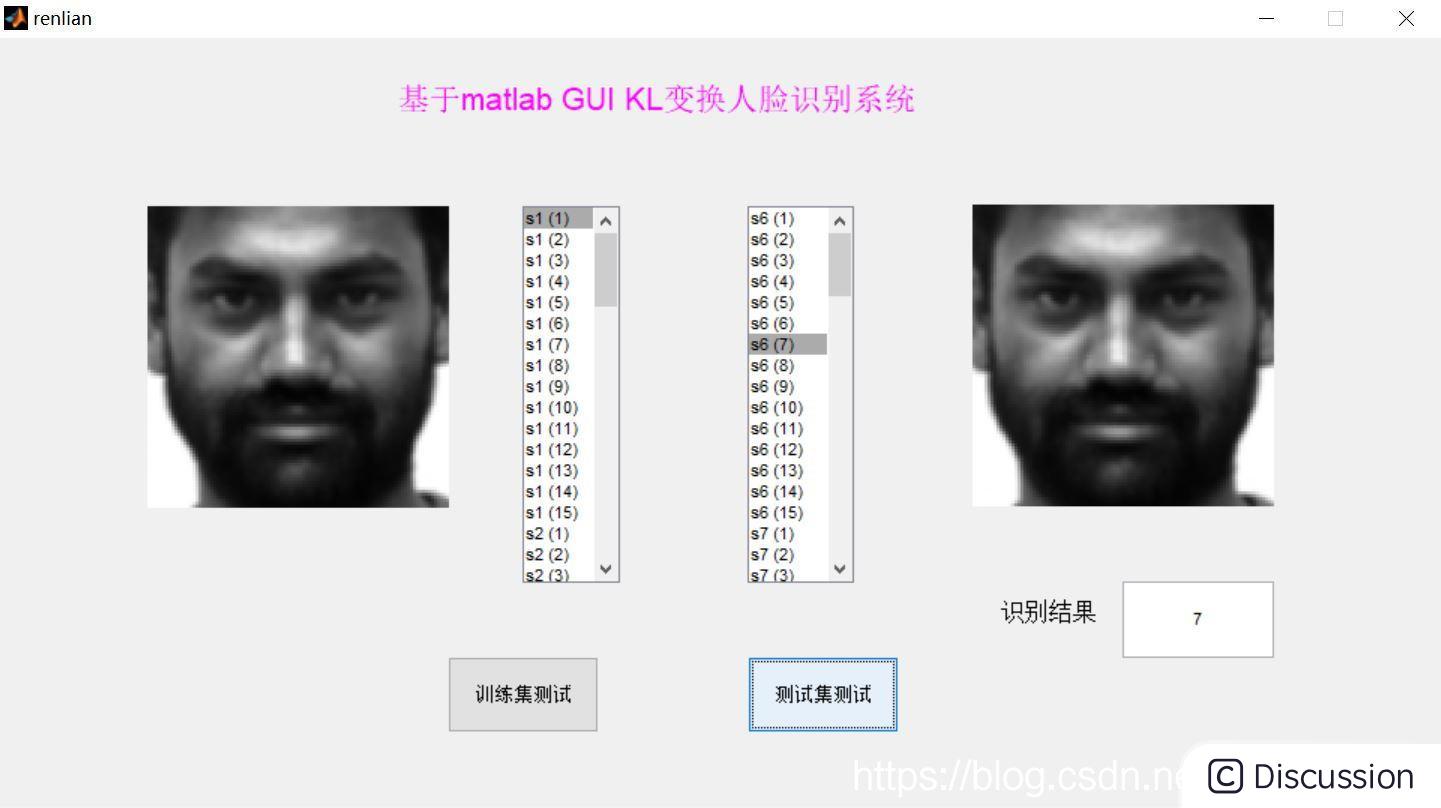
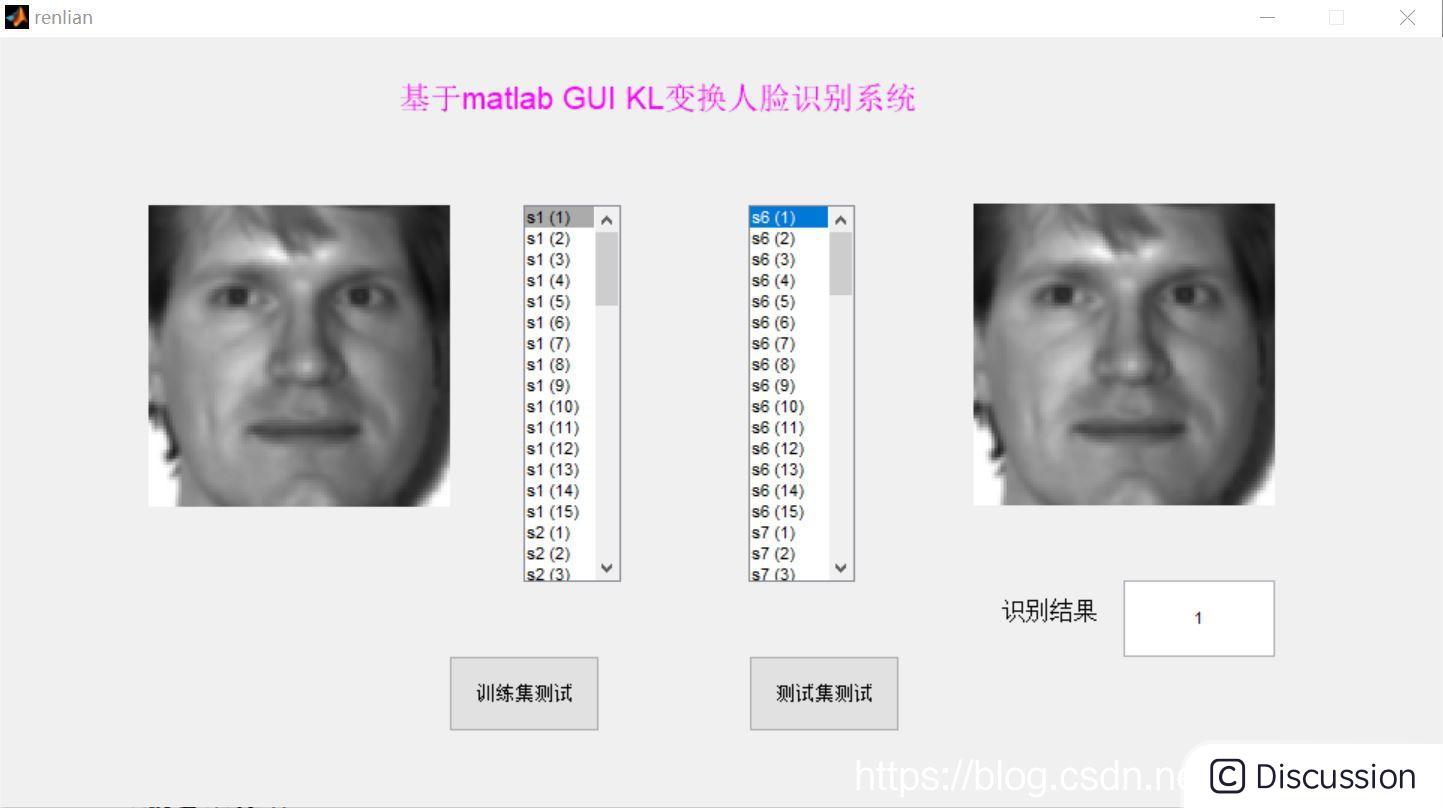
三、运行结果
 \
\ 
🎈 部分理论引用网络文献,若有侵权联系博主删除
👇 关注我领取海量matlab电子书和数学建模资料
🎁 私信完整代码和数据获取及论文数模仿真定制
🌈 各类智能优化算法改进及应用
生产调度、经济调度、装配线调度、充电优化、车间调度、发车优化、水库调度、三维装箱、物流选址、货位优化、公交排班优化、充电桩布局优化、车间布局优化、集装箱船配载优化、水泵组合优化、解医疗资源分配优化、设施布局优化、可视域基站和无人机选址优化、背包问题、 风电场布局、时隙分配优化、 最佳分布式发电单元分配、多阶段管道维修、 工厂-中心-需求点三级选址问题、 应急生活物质配送中心选址、 基站选址、 道路灯柱布置、 枢纽节点部署、 输电线路台风监测装置、 集装箱调度、 机组优化、 投资优化组合、云服务器组合优化、 天线线性阵列分布优化、CVRP问题、VRPPD问题、多中心VRP问题、多层网络的VRP问题、多中心多车型的VRP问题、 动态VRP问题、双层车辆路径规划(2E-VRP)、充电车辆路径规划(EVRP)、油电混合车辆路径规划、混合流水车间问题、 订单拆分调度问题、 公交车的调度排班优化问题、航班摆渡车辆调度问题、选址路径规划问题、港口调度、港口岸桥调度、停机位分配、机场航班调度、泄漏源定位
🌈 机器学习和深度学习时序、回归、分类、聚类和降维
2.1 bp时序、回归预测和分类
2.2 ENS声神经网络时序、回归预测和分类
2.3 SVM/CNN-SVM/LSSVM/RVM支持向量机系列时序、回归预测和分类
2.4 CNN|TCN|GCN卷积神经网络系列时序、回归预测和分类
2.5 ELM/KELM/RELM/DELM极限学习机系列时序、回归预测和分类
2.6 GRU/Bi-GRU/CNN-GRU/CNN-BiGRU门控神经网络时序、回归预测和分类
2.7 ELMAN递归神经网络时序、回归\预测和分类
2.8 LSTM/BiLSTM/CNN-LSTM/CNN-BiLSTM/长短记忆神经网络系列时序、回归预测和分类
2.9 RBF径向基神经网络时序、回归预测和分类
2.10 DBN深度置信网络时序、回归预测和分类
2.11 FNN模糊神经网络时序、回归预测
2.12 RF随机森林时序、回归预测和分类
2.13 BLS宽度学习时序、回归预测和分类
2.14 PNN脉冲神经网络分类
2.15 模糊小波神经网络预测和分类
2.16 时序、回归预测和分类
2.17 时序、回归预测预测和分类
2.18 XGBOOST集成学习时序、回归预测预测和分类
2.19 Transform各类组合时序、回归预测预测和分类
方向涵盖风电预测、光伏预测、电池寿命预测、辐射源识别、交通流预测、负荷预测、股价预测、PM2.5浓度预测、电池健康状态预测、用电量预测、水体光学参数反演、NLOS信号识别、地铁停车精准预测、变压器故障诊断
🌈图像处理方面
图像识别、图像分割、图像检测、图像隐藏、图像配准、图像拼接、图像融合、图像增强、图像压缩感知
🌈 路径规划方面
旅行商问题(TSP)、车辆路径问题(VRP、MVRP、CVRP、VRPTW等)、无人机三维路径规划、无人机协同、无人机编队、机器人路径规划、栅格地图路径规划、多式联运运输问题、 充电车辆路径规划(EVRP)、 双层车辆路径规划(2E-VRP)、 油电混合车辆路径规划、 船舶航迹规划、 全路径规划规划、 仓储巡逻
🌈 无人机应用方面
无人机路径规划、无人机控制、无人机编队、无人机协同、无人机任务分配、无人机安全通信轨迹在线优化、车辆协同无人机路径规划
🌈 通信方面
传感器部署优化、通信协议优化、路由优化、目标定位优化、Dv-Hop定位优化、Leach协议优化、WSN覆盖优化、组播优化、RSSI定位优化、水声通信、通信上传下载分配
🌈 信号处理方面
信号识别、信号加密、信号去噪、信号增强、雷达信号处理、信号水印嵌入提取、肌电信号、脑电信号、信号配时优化、心电信号、DOA估计、编码译码、变分模态分解、管道泄漏、滤波器、数字信号处理+传输+分析+去噪、数字信号调制、误码率、信号估计、DTMF、信号检测
🌈电力系统方面
微电网优化、无功优化、配电网重构、储能配置、有序充电、MPPT优化、家庭用电
🌈 元胞自动机方面
交通流 人群疏散 病毒扩散 晶体生长 金属腐蚀
🌈 雷达方面
卡尔曼滤波跟踪、航迹关联、航迹融合、SOC估计、阵列优化、NLOS识别
🌈 车间调度
零等待流水车间调度问题NWFSP 、 置换流水车间调度问题PFSP、 混合流水车间调度问题HFSP 、零空闲流水车间调度问题NIFSP、分布式置换流水车间调度问题 DPFSP、阻塞流水车间调度问题BFSP

魔乐社区(Modelers.cn) 是一个中立、公益的人工智能社区,提供人工智能工具、模型、数据的托管、展示与应用协同服务,为人工智能开发及爱好者搭建开放的学习交流平台。社区通过理事会方式运作,由全产业链共同建设、共同运营、共同享有,推动国产AI生态繁荣发展。
更多推荐


 0
0 0
0- 0


 已为社区贡献531条内容

所有评论(0)