springboot(3.2.5)初步集成MinIO(8.5.9)开发记录
【代码】springboot(3.2.5)初步集成MinIO(8.5.9)开发记录。
·
springboot初步集成MinIO开发记录
说明
- 这里只是作者开发的记录,已备将来完善和复习!内容很简单,大佬请路过。
一:引入maven依赖
- 在项目
pom中添加minio maven依赖
<dependency>
	<groupId>io.minio</groupId>
	<artifactId>minio</artifactId>
	<version>8.5.9</version>
</dependency>
二:手动注入minioClient
- 由于minio官方没有提供
spring-boot-starter-minio的启动类,所以,这里选择手动注入! - 在项目根目录下创建
config软件包,创建config类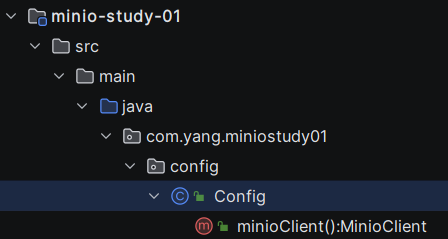
import io.minio.MinioClient;
import org.springframework.context.annotation.Bean;
import org.springframework.context.annotation.Configuration;

@Configuration
public class Config {
    //链式编程 构建MinioClient对象
    @Bean
    public MinioClient minioClient(){
        return MinioClient.builder()
                // .region("zh-east-8") 可选注意和minio的区域配置一致
                .endpoint("http://ip:9000")
                .credentials("minioadmin","minioadmin") // 默认 用户和秘密
                .build();
    }
}
三:创建service类
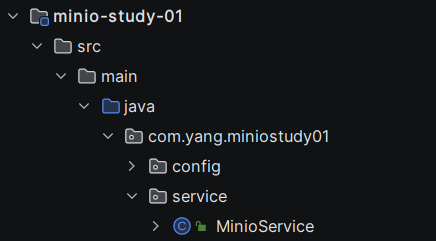
import io.minio.MinioClient;
import jakarta.annotation.Resource;
import org.springframework.stereotype.Service;

@Service
public class MinioService {
    @Resource
    private MinioClient minioClient;
    public void testMinioClient(){
        System.out.print(minioClient);
    }
}
四:测试打印连接信息
- 在测试类中测试打印连接信息
@SpringBootTest
class MinioApplicationTests {
	@Resource
	private MinioService minioService;
	@Resource
	private MinioClient minioClient;
	@Test
	void test() {
		minioService.testMinioClient();
	}
}
- 测试结果
io.minio.MinioClient@7302ff13
五:时区转化工具类
- 如果你困惑于文件最后修改时间和代码程序查询结果不一致,参看Minio(官方docker版)容器部署时区问题研究记录
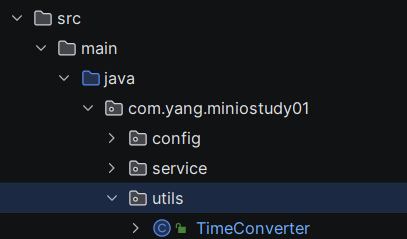
package com.yang.miniostudy01.utils;

import java.lang.annotation.Retention;
import java.time.Instant;
import java.time.ZoneId;
import java.time.ZonedDateTime;
import java.time.format.DateTimeFormatter;
import java.time.format.DateTimeFormatterBuilder;

public class TimeConverter {

    // 使用自定义格式化模式
    private static final DateTimeFormatter isoFormatter = new DateTimeFormatterBuilder()
            .append(DateTimeFormatter.ISO_LOCAL_DATE)
            .appendLiteral('T')
            .append(DateTimeFormatter.ISO_LOCAL_TIME)
            .optionalStart()
            .appendOffsetId()
            .optionalEnd()
            .toFormatter();

    private static final DateTimeFormatter customFormatter = new DateTimeFormatterBuilder()
            .append(DateTimeFormatter.ISO_LOCAL_DATE)
            .appendLiteral('T')
            .append(DateTimeFormatter.ISO_LOCAL_TIME)
            .appendLiteral('Z') // 添加字面值 'Z' 表示时区偏移量
            .toFormatter();

    /**
     * 将UTC时间转换为指定时区的时间,格式保持ISO-8601 默认时区为东八区
     * @param utcTimeString UTC时间字符串(ISO-8601格式)
     * @return 指定时区的时间字符串(ISO-8601格式)
     */
    public static String convertUtcToLocal(String utcTimeString) {
        String zoneIdString="Asia/Shanghai";
        return convertUtcToLocal(utcTimeString,zoneIdString);
    }

    /**
     * 将UTC时间转换为指定时区的时间,格式保持ISO-8601
     * @param utcTimeString UTC时间字符串(ISO-8601格式)
     * @param zoneIdString 时区ID,如"Asia/Shanghai"
     * @return 指定时区的时间字符串(ISO-8601格式)
     */
    public static String convertUtcToLocal(String utcTimeString, String zoneIdString) {
        Instant utcTime = Instant.parse(utcTimeString);
        ZonedDateTime localTime = utcTime.atZone(ZoneId.of(zoneIdString));
        DateTimeFormatter formatter = customFormatter.withZone(ZoneId.of(zoneIdString));
        return formatter.format(localTime);
    }

    /**
     * 将本地时间转换为UTC时间
     * @param localTimeString 本地时间字符串(ISO-8601格式)
     * @param zoneIdString 时区ID,如"Asia/Shanghai"
     * @return UTC时间字符串(ISO-8601格式)
     */
    public static String convertLocalToUtc(String localTimeString) {
        String zoneIdString="Asia/Shanghai";
        return convertLocalToUtc(localTimeString,zoneIdString);
    }
    /**
     * 将本地时间转换为UTC时间
     * @param localTimeString 本地时间字符串(ISO-8601格式)
     * @param zoneIdString 时区ID,如"Asia/Shanghai"
     * @return UTC时间字符串(ISO-8601格式)
     */
    public static String convertLocalToUtc(String localTimeString, String zoneIdString) {
        ZonedDateTime localTime = ZonedDateTime.parse(localTimeString, customFormatter.withZone(ZoneId.of(zoneIdString)));
        Instant utcTime = localTime.toInstant();
        return isoFormatter.format(utcTime.atZone(ZoneId.of("UTC")));
    }
}
六:常用操作演示
package com.yang.miniostudy01;

import com.yang.miniostudy01.service.MinioService;
import com.yang.miniostudy01.utils.TimeConverter;
import io.minio.*;
import io.minio.errors.*;
import io.minio.http.Method;
import io.minio.messages.Bucket;
import io.minio.messages.Item;
import jakarta.annotation.Resource;
import org.junit.jupiter.api.Test;
import org.springframework.boot.test.context.SpringBootTest;
import java.io.File;
import java.io.FileInputStream;
import java.io.FileOutputStream;
import java.io.IOException;
import java.lang.reflect.Field;
import java.security.InvalidKeyException;
import java.security.NoSuchAlgorithmException;
import java.time.ZonedDateTime;
import java.util.List;
import java.util.concurrent.TimeUnit;

@SpringBootTest
class MinioApplicationTests {
	@Resource
	private MinioService minioService;
	@Resource
	private MinioClient minioClient;

	/**
	 * 判断桶是否存在
	 */
	@Test
	void testBucketExists(){
        try {
			boolean exists = minioClient.bucketExists(BucketExistsArgs.builder().bucket("test1").build());
			System.out.println("桶存在:"+exists);
		} catch (ErrorResponseException | XmlParserException | InsufficientDataException | InternalException |
                 ServerException | InvalidKeyException | InvalidResponseException | IOException |
                 NoSuchAlgorithmException e) {
            throw new RuntimeException(e);
        }
    }
	/**
	 * 创建桶
	 */
	@Test
	void testBucketCreate() throws Exception {
		boolean exists = minioClient.bucketExists(BucketExistsArgs.builder().bucket("test02").build());
		if (!exists){
			minioClient.makeBucket(MakeBucketArgs.builder().bucket("test02").build());
		}
		System.out.println("bucket已存在,无需创建");
	}
	/**
	 * 获取桶列表
	 */
	@Test
	void testBucketList() throws Exception {
		List<Bucket> buckets = minioClient.listBuckets();
		buckets.forEach(bucket-> System.out.println(bucket.name()+"--"+bucket.creationDate()));
	}

	/**
	 * 删除桶
	 */
	@Test
	void testBucketRemove() throws Exception {
		minioClient.removeBucket(RemoveBucketArgs.builder().bucket("test02").build());
	}

	/**
	 * 上传文件
	 */

	@Test
	void testObjectPut() throws Exception{
		File file = new File("src/main/resources/picture/image.jpg");
		ObjectWriteResponse response = minioClient.putObject(
				PutObjectArgs.builder()
						.bucket("test02")
						.object("image.jpg")
						.stream(new FileInputStream(file),file.length(),-1)
						.build()
		);
		System.out.print(response);
	}

	/**
	 * 简单上传文件
	 */
	@Test
	void testObjectUpload() throws Exception {
		ObjectWriteResponse response = minioClient.uploadObject(
				UploadObjectArgs.builder()
						.bucket("test02")
						.object("image3.jpg")
						.filename("src/main/resources/picture/image.jpg")
						.build()
		);
		System.out.println(response);
	}

	/**
	 * 判断文件是否存在
	 */
	@Test
	void testObjectExists() throws Exception {
		StatObjectResponse response = minioClient.statObject(
				StatObjectArgs.builder()
						.bucket("test02")
						.object("image.jpg")
						.build()
		);
		System.out.println("修改前文件信息:"+response);

		String localLastModifiedTime = TimeConverter.convertUtcToLocal(response.lastModified().toString());
		ZonedDateTime localLastModified = ZonedDateTime.parse(localLastModifiedTime);
		//通过反射 修改文件信息 不影响minio存储的文件信息
		try {
			Field lastModifiedField = response.getClass().getDeclaredField("lastModified");
			lastModifiedField.setAccessible(true);
			lastModifiedField.set(response, localLastModified);
		} catch (NoSuchFieldException | IllegalAccessException e) {
			e.printStackTrace();
		}

		System.out.println("修改后文件信息:"+response);
	}

	/**
	 * 获取文件访问路径
	 */
	@Test
	void testObjectUrl() throws Exception {
		String objectUrl = minioClient.getPresignedObjectUrl(
				GetPresignedObjectUrlArgs.builder()
						.bucket("test02")
						.object("image.jpg")
						.method(Method.GET)
						.expiry(5, TimeUnit.MINUTES)
						.build()
		);
		System.out.println(objectUrl);
	}

	/**
	 * 配置桶自定义权限
	 */
	@Test
	void testBucketCreateWithPrivilege() throws Exception {
		String bucketName="test02";
		boolean exists = minioClient.bucketExists(BucketExistsArgs.builder().bucket(bucketName).build());
		if (!exists){
			minioClient.makeBucket(MakeBucketArgs.builder().bucket(bucketName).build());
		}else{
			System.out.println("bucket已存在,无需创建");
		}

		// 定义存储桶的访问策略为公开
		// 定义公共访问策略
		String policyJson = "{\n" +
				"    \"Version\": \"2012-10-17\",\n" +
				"    \"Statement\": [\n" +
				"        {\n" +
				"            \"Sid\": \"PublicRead\",\n" +
				"            \"Effect\": \"Allow\",\n" +
				"            \"Principal\": \"*\",\n" +
				"            \"Action\": \"s3:GetObject\",\n" +
				"            \"Resource\": \"arn:aws:s3:::" + bucketName + "/*\"\n" +
				"        }\n" +
				"    ]\n" +
				"}";

		minioClient.setBucketPolicy(
				SetBucketPolicyArgs.builder()
						.bucket(bucketName)
						.config(policyJson)
						.build()
		);
	}

	/**
	 * 文件下载
	 */
	@Test
	public void testObjectDownload() throws Exception {
		GetObjectResponse objectFile = minioClient.getObject(
				GetObjectArgs.builder()
						.bucket("test02")
						.object("image.jpg")
						.build()
		);
		System.out.println(objectFile.transferTo(new FileOutputStream("src/main/resources/picture/test.jpg")));
	}

	/**
	 * 获取桶内文件信息
	 */
	@Test
	public void testObjectList(){
		Iterable<Result<Item>> results = minioClient.listObjects(
				ListObjectsArgs.builder()
						.bucket("test02")
						.build()
		);
		results.forEach((itemResult)->{
            try {
				Item item = itemResult.get();
				System.out.println(item.objectName()+" \t"+item.lastModified()+"\t"+item.size());
            } catch (ErrorResponseException | XmlParserException | ServerException | NoSuchAlgorithmException |
                     InvalidResponseException | InsufficientDataException | InvalidKeyException | IOException |
                     InternalException e) {
                throw new RuntimeException(e);
            }
        });
	}

	/**
	 * 删除文件
	 */
	@Test
	public void testRemoveObject() throws Exception {
		minioClient.removeObject(
				RemoveObjectArgs.builder()
						.bucket("test02")
						.object("5g3pl8.jpg")
						.build()
		);
	}
}

魔乐社区(Modelers.cn) 是一个中立、公益的人工智能社区,提供人工智能工具、模型、数据的托管、展示与应用协同服务,为人工智能开发及爱好者搭建开放的学习交流平台。社区通过理事会方式运作,由全产业链共同建设、共同运营、共同享有,推动国产AI生态繁荣发展。
更多推荐

 5
5 0
0- 0


 已为社区贡献36条内容

所有评论(0)