关于idea+springboot项目打包及启动报错的问题
idea+springboot项目打包及启动报错的问题和解决办法问题一、子项目b引用子项目a中的类打包失败问题二、聚合项目子项目打包失败问题三、因为使用到MyBatisPlus而引起的加载文件失败的问题1. MyBatisPlus代码构造器生成的mapper.xml文件加载问题问题一、子项目b引用子项目a中的类打包失败问题:一般boot项目都会建一个api-commons的公用项目放一些公用的类-
·
idea+springboot项目打包及启动报错的问题和解决办法
问题一、子项目b引用子项目a中的类打包失败
- 问题:一般boot项目都会建一个api-commons的公用项目放一些公用的类-项目a,如果这个项目是boot项目其他类引用在本地使用没问题,但打包时会报找不到类
- 解决:在此项目的pom下添加如下
<classifier>exec</classifier>
<build>
        <plugins>
            <plugin>
                <groupId>org.springframework.boot</groupId>
                <artifactId>spring-boot-maven-plugin</artifactId>
                <configuration>
                    <classifier>exec</classifier>
                </configuration>
            </plugin>
        </plugins>
    </build>
最好在最外层父项目中添加(或者在b项目)
<build>
        <plugins>
            <plugin>
                <groupId>org.springframework.boot</groupId>
                <artifactId>spring-boot-maven-plugin</artifactId>
                <executions>
                    <execution>
                        <goals>
                            <goal>repackage</goal>
                        </goals>
                    </execution>
                </executions>
            </plugin>
        </plugins>
    </build>
问题二、聚合项目子项目打包失败
- 问题:[ERROR] Failed to execute goal on project cloud-provider-payment8001: Could not resolve dependencies for project com.hao.springcloud:cloud-provider-payment8001:jar:1.0-SNAPSHOT: Failed to collect dependencies at com.hao.springcloud:cloud-api-commons:jar:1.0-SNAPSHOT: Failed to read artifact descriptor for com.hao.springcloud:cloud-api-commons:jar:1.0-SNAPSHOT: Failure to find com.hao.springcloud:springcloud2020:pom:1.0-SNAPSHOT in http://maven.aliyun.com/nexus/content/groups/public/ was cached in the local repository, resolution will not be reattempted until the update interval of alimaven has elapsed or updates are forced -> [Help 1]
如下结构的聚合maven项目8001项目引用api项目,8001想要install或者打包时报错。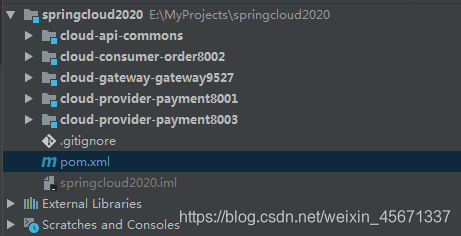
- 解决:2020项目和api项目都需要先install之后才可启动
问题三、因为使用到MyBatisPlus而引起的加载文件失败的问题
1. MyBatisPlus代码构造器生成的mapper.xml文件加载问题
因为自动生成的mapper.xml在java包下,没有在resources下,所以在pom下的<build>中添加了<resources>
		<resources>
            <resource>
                <directory>src/main/java</directory>
                <includes>
                    <include>**/*.xml</include>
                    <include>**/*.yml</include>
                </includes>
            </resource>
            <resource>
                <directory>src/main/resources</directory>
                <includes>
                    <include>**/*.xml</include>
                    <include>**/*.yml</include>
                </includes>
            </resource>
        </resources>
上面是最终正确的写法,一步都不能少,下面说一下因为没写正确而引发的错误。下边说的错误都是打成jar包之后启动的错误
- 错误一:
			<resource>
                <directory>src/main/java</directory>
                <includes>
                    <include>**/*.xml</include>
                    <include>**/*.yml</include>
                </includes>
            </resource>
这样配置之后原来的resources下的配置文件就失效了,没配之前能起作用的原因是springboot帮我们配置了,但如果自己配置的话就覆盖了默认配置。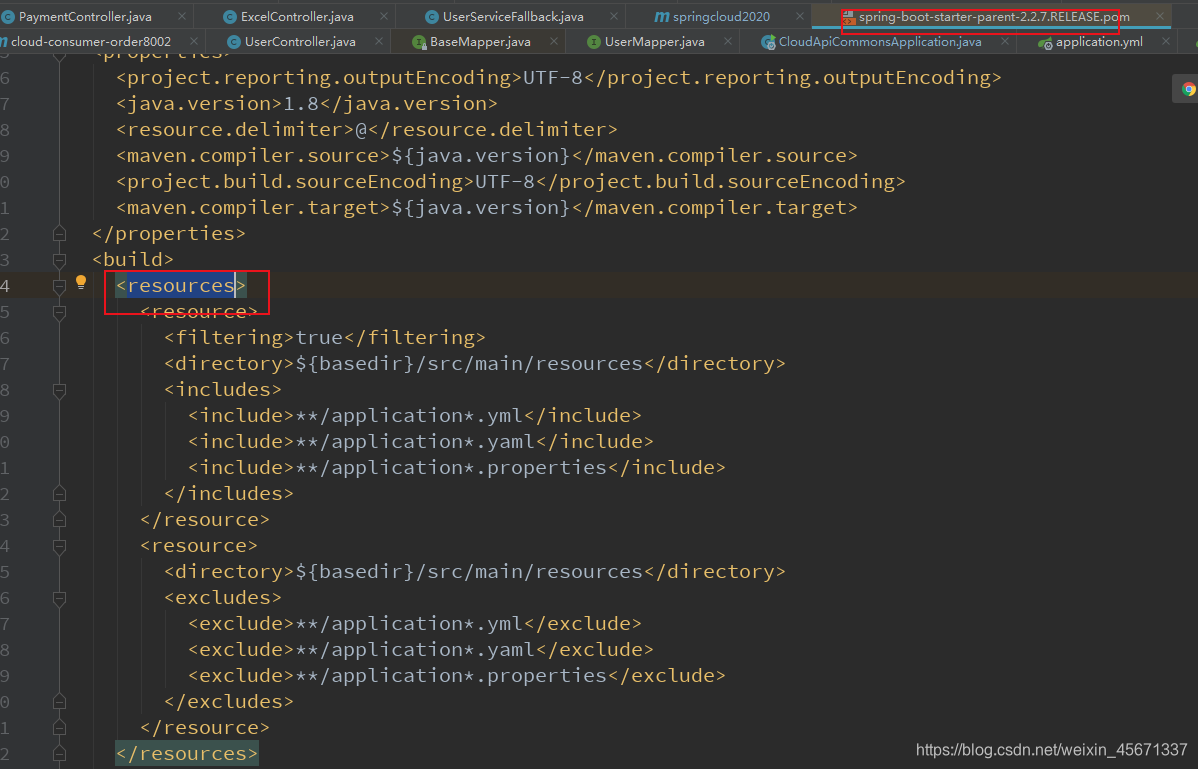
2. 错误二:
			<resource>
                <directory>src/main</directory>
                <includes>
                    <include>**/*.xml</include>
                    <include>**/*.yml</include>
                </includes>
            </resource>
这样配置之后生成的jar包启动的时候找不到jar包,结构如下
然而正确的jar的classes下应该是没有java和resources的,应该直接就会配置文件的,因为springboot加载配置文件的顺序为:
工程根目录:./config/
工程根目录:./
classpath:/config/
classpath:/
下边是正确的jar包的结构:

魔乐社区(Modelers.cn) 是一个中立、公益的人工智能社区,提供人工智能工具、模型、数据的托管、展示与应用协同服务,为人工智能开发及爱好者搭建开放的学习交流平台。社区通过理事会方式运作,由全产业链共同建设、共同运营、共同享有,推动国产AI生态繁荣发展。
更多推荐


 0
0 0
0- 0


 已为社区贡献2条内容

所有评论(0)