linux下yum不能使用怎么办,linux下centos无法使用yum问题解决(已解决)
前言刚安装的centos系统,发现无法使用yum指令出现以下错误:One of the configured repositories failed (Unknown),and yum doesn’t have enough cached data to continue. At this point the onlysafe thing yum can do is fail. There are
前言
刚安装的centos系统,发现无法使用yum指令
出现以下错误:
One of the configured repositories failed (Unknown),
and yum doesn’t have enough cached data to continue. At this point the only
safe thing yum can do is fail. There are a few ways to work “fix” this:
1. Contact the upstream for the repository and get them to fix the problem.
2. Reconfigure the baseurl/etc. for the repository, to point to a working upstream. This is most often useful if you are using a newer distribution release than is supported by the repository (and the packages for the previous distribution release still work).
3. Disable the repository, so yum won't use it by default. Yum will then just ignore the repository until you permanently enable it again or use --enablerepo for temporary usage: yum-config-manager --disable
4. Configure the failing repository to be skipped, if it is unavailable. Note that yum will try to contact the repo. when it runs most commands, so will have to try and fail each time (and thus. yum will be be much slower). If it is a very temporary problem though, this is often a nice compromise: yum-config-manager --save --setopt=.skip_if_unavailable=true1
2
3
4
5
6
7
8
9
10
11
12
13
14
15
16
17
18
19
20
24
1
One of the configured repositories failed (Unknown),
2
and yum doesn’t have enough cached data to continue. At this point the only
3
safe thing yum can do is fail. There are a few ways to work “fix” this:
4
5
1. Contact the upstream for the repository and get them to fix the problem.
6
7
2. Reconfigure the baseurl/etc. for the repository, to point to a working
8
upstream. This is most often useful if you are using a newer
9
distribution release than is supported by the repository (and the
10
packages for the previous distribution release still work).
11
12
3. Disable the repository, so yum won’t use it by default. Yum will then
13
just ignore the repository until you permanently enable it again or use
14
–enablerepo for temporary usage:
15
16
yum-config-manager --disable
17
18
4. Configure the failing repository to be skipped, if it is unavailable.
19
Note that yum will try to contact the repo. when it runs most commands,
20
so will have to try and fail each time (and thus. yum will be be much
21
slower). If it is a very temporary problem though, this is often a nice
22
compromise:
23
24
yum-config-manager --save --setopt=.skip_if_unavailable=true
问题分析:
无法使用yum的原因在于刚安装的Linux系统并没有自动启动网卡开机自动开启服务
因此我们需要手动开启网卡开机自启动
解决方法:
1、进入/etc/sysconfig/network-scripts 目录。即输入命令 "cd /etc/sysconfig/network-scripts"

2、修改ifcfg-ens33的网卡配置文件,输入命令 “vi ifcfg-ens33” 进入vi编辑器,按下"i"或者"insert"键进入编辑模式。

3、将 “ONBOOT” 的值修改为 “yes” ,之后按esc退出编辑模式,输入 “:wq” 保存退出
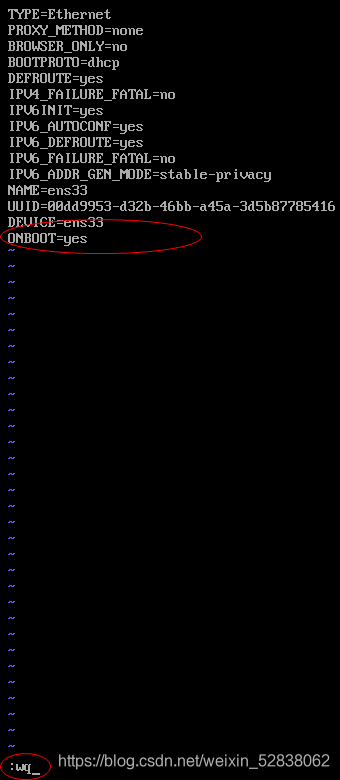
但是在此笔者发现一个问题:
即在修改文件时并没有权限,出现保存文件时,提示“readonly option is set”
解决方法:
1.按Esc键
2.输入:set noreadonly
3.输入::wq (保存并退出)
如果依旧报错“is read-only (add ! to override)”:
1、首先强制退出vi模式:q!
2、退出后执行sudo !!
3、再次编辑后输入: :wq!(强制保存并退出)
参考:
https://www.cnblogs.com/crowsong/p/9371216.html
https://blog.csdn.net/longerandlonger/article/details/7266055
https://www.cnblogs.com/mabc/p/13784398.html
文章来源: blog.csdn.net,作者:weixin_52838062,版权归原作者所有,如需转载,请联系作者。
原文链接:blog.csdn.net/weixin_52838062/article/details/112231866

魔乐社区(Modelers.cn) 是一个中立、公益的人工智能社区,提供人工智能工具、模型、数据的托管、展示与应用协同服务,为人工智能开发及爱好者搭建开放的学习交流平台。社区通过理事会方式运作,由全产业链共同建设、共同运营、共同享有,推动国产AI生态繁荣发展。
更多推荐

 0
0 0
0- 0


 已为社区贡献2条内容

所有评论(0)