html+spring boot简单的ajax数据传输实现
·
本篇讲解在前后端不分离情况下的html+spring boot的项目数据传输实现
首先,后台我写了三个接口
package com.demo.ajax.controller;

import com.demo.ajax.Entity.Person;
import lombok.extern.slf4j.Slf4j;
import org.jboss.logging.Param;
import org.springframework.web.bind.annotation.RequestMapping;
import org.springframework.web.bind.annotation.ResponseBody;
import org.springframework.web.bind.annotation.RestController;

import java.util.LinkedList;
import java.util.List;

@Slf4j
@RestController
@RequestMapping("/hello")
public class HelloController {
	//这个接口保证数据传输的进行
    @RequestMapping("/hello")
    public @ResponseBody String hello(){

        log.info("调用到了");
      	 return "调用到了";

    }
    /*这个接口保证我的前台能够获取到后台查询到的数据*/
    @RequestMapping("/hello2")
    public @ResponseBody List hello2(){

        Person person =new Person("林丹","男",33);
        Person person2 =new Person("李宗伟","男",33);
        Person person3 =new Person("马林","男",22);
        List<Person> list = new LinkedList<>();
        list.add(person);
        list.add(person2);
        list.add(person3);
        return list;

    }
    /*这个接口保证我后台能够接受到前台传过来的数据*/
    @RequestMapping("/hello3")
    public @ResponseBody Person hello3(@Param String name,String gender,int age){

        Person person=new Person(name,gender,age);
        log.info(person.toString());
        return person;

    }
}
这里我创建了一个实体类,以供上面的对象创建
package com.demo.ajax.Entity;

import lombok.AllArgsConstructor;
import lombok.Data;
import lombok.NoArgsConstructor;

@Data
@AllArgsConstructor
@NoArgsConstructor
public class Person{

    private String name;
    private String gender;
    private int age;

}
接着就是前端的书写
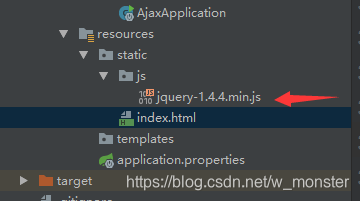
我将页面放在了resource目录下的static下
这里注意:使用ajax首先需要引入jQuery插件
接着就是页面了
<!DOCTYPE html>
<html lang="en">
<script src="js/jquery-1.4.4.min.js"></script>
<head>
    <meta charset="UTF-8">
    <title>测试</title>
</head>
<body>

<input type="button" value="button" onclick="whenClick1/2/3();">

<table id="tab">


</table>
</body>
</html>
<script>


    function whenClick1(){
        // 在这里,根据后台是否有返回值、是否有参数,来变换,首先是第一个
        $.ajax( {
            url:'hello/hello',		//请求地址
            async: false,			//异步开关
            type:'post',			//请求方式
            data: {

            },
            datatype : "json",//"xml", "html", "script", "json", "jsonp", "text".
            success : function(data) {
                alert("data);
            },
            error : function() {
                alert("异常!!!");

            }
        });

    }
 function whenClick2(){

        $.ajax( {
            url:'hello/hello2',		//请求地址
            async: false,			//异步开关
            type:'post',			//请求方式
            data: {

            },
            datatype : "json",//"xml", "html", "script", "json", "jsonp", "text".
            success : function(data) {
                $.each(data, function (n, item) {
                //这里调用了下面最后一个方法,以在页面展示我从后台获取到的内容
            		 addPerson(n,item);
        		 });
            },
            error : function() {
                alert("异常!!!");

            }
        });

    }
     function whenClick3(){

        $.ajax( {
            url:'hello/hello3',		//请求地址
            async: false,			//异步开关
            type:'post',			//请求方式
            data: {
                name:'刘某',
                gender:'男',
                age:23
            },
            datatype : "json",//"xml", "html", "script", "json", "jsonp", "text".
            success : function(data) {
                alert("名字是:"+data.name);
            },
            error : function() {
                alert("异常!!!");

            }
        });

    }
    function addPerson(n,item) {
        var val = "<tr>" +
            "<td>"+(n+1)+"</td>" +
            "<td>"+item.name+"</td>" +
            "<td>"+item.gender+"</td>" +
            "<td>"+item.age+"</td>" +
            "</tr>";
        $("#tab").append(val);
    }

</script>
最后总结一小下:@ResponseBody是能够让后台返回的数据自动转换为json格式的,所以前台ajax这里的data用json格式接受,如果是动态数组或者链表,则用
$.each(data, function (n, item) {

 });
来将它循环遍历开。
有问题可以联系我,以上!

魔乐社区(Modelers.cn) 是一个中立、公益的人工智能社区,提供人工智能工具、模型、数据的托管、展示与应用协同服务,为人工智能开发及爱好者搭建开放的学习交流平台。社区通过理事会方式运作,由全产业链共同建设、共同运营、共同享有,推动国产AI生态繁荣发展。
更多推荐


 3
3 0
0- 0


 已为社区贡献10条内容

所有评论(0)