springBoot启动报错Error running ‘Application‘: Command line is too long. Shorten command
·
springBoot启动报错Error running ‘Application’: Command line is too long. Shorten command
1.报错信息
Error running 'Application': Command line is too long. Shorten command
2.报错原因
springboot项目启动命令过长
3.解决办法
方法一:修改IDEA设置
点击项目启动配置项 -> shorten command line 选项选择 classpath file 或 jar manifest 选项 -> 重新启动工程运行即可

方法二:修改idea配置文件
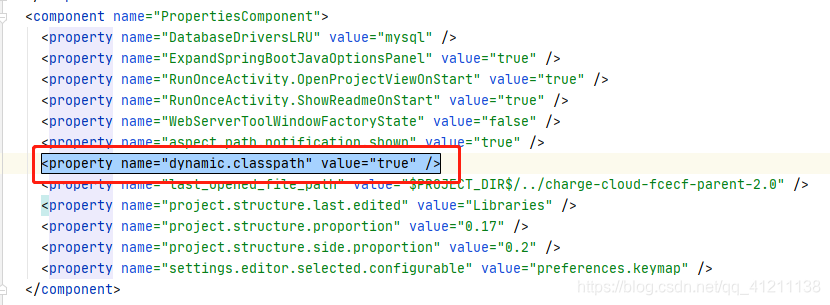
打开 /.idea/workspace.xml 文件, Ctrl+F ,搜索 PropertiesComponent ,在
<component name="PropertiesComponent">
    ...
</component>
中加入一行:
<property name="dynamic.classpath" value="true" />
这个属性应该是为整个项目配置自动缩短命令行
参考
【1】:https://blog.csdn.net/lzc4869/article/details/88912161
【2】:https://blog.csdn.net/sinat_40770656/article/details/100750368

魔乐社区(Modelers.cn) 是一个中立、公益的人工智能社区,提供人工智能工具、模型、数据的托管、展示与应用协同服务,为人工智能开发及爱好者搭建开放的学习交流平台。社区通过理事会方式运作,由全产业链共同建设、共同运营、共同享有,推动国产AI生态繁荣发展。
更多推荐


 3
3 0
0- 0


 已为社区贡献1条内容

所有评论(0)