创新实训(五) xml文件还原场景
·
数据库中的的化学分子模型为xml格式,unity读取需要另行编写脚本
参照网上的资料后,代码如下:
创建加载场景信息的文件 LoaderScene.cs
using UnityEngine;
using System.Collections;
using System.Xml;
using System.IO;
public class LoaderScene : MonoBehaviour
{

	// Use this for initialization
	void Start()
	{

		//用标签判断路径
#if UNITY_EDITOR
		string filepath = Application.dataPath +"/StreamingAssets"+"/my.xml";
#elif UNITY_IPHONE
	  string filepath = Application.dataPath +"/Raw"+"/my.xml";
#endif
		//如果文件存在开始解析。
		if (File.Exists(filepath))
		{
			XmlDocument xmlDoc = new XmlDocument();
			xmlDoc.Load(filepath);
			XmlNodeList nodeList = xmlDoc.SelectSingleNode("gameObjects").ChildNodes;
			foreach (XmlElement scene in nodeList)
			{

				if (!scene.GetAttribute("name").Equals("Assets/StarTrooper.unity"))
				{
					continue;
				}

				foreach (XmlElement gameObjects in scene.ChildNodes)
				{

					string asset = "Prefab/" + gameObjects.GetAttribute("name");
					Vector3 pos = Vector3.zero;
					Vector3 rot = Vector3.zero;
					Vector3 sca = Vector3.zero;
					foreach (XmlElement transform in gameObjects.ChildNodes)
					{
						foreach (XmlElement prs in transform.ChildNodes)
						{
							if (prs.Name == "position")
							{
								foreach (XmlElement position in prs.ChildNodes)
								{
									switch (position.Name)
									{
										case "x":
											pos.x = float.Parse(position.InnerText);
											break;
										case "y":
											pos.y = float.Parse(position.InnerText);
											break;
										case "z":
											pos.z = float.Parse(position.InnerText);
											break;
									}
								}
							}
							else if (prs.Name == "rotation")
							{
								foreach (XmlElement rotation in prs.ChildNodes)
								{
									switch (rotation.Name)
									{
										case "x":
											rot.x = float.Parse(rotation.InnerText);
											break;
										case "y":
											rot.y = float.Parse(rotation.InnerText);
											break;
										case "z":
											rot.z = float.Parse(rotation.InnerText);
											break;
									}
								}
							}
							else if (prs.Name == "scale")
							{
								foreach (XmlElement scale in prs.ChildNodes)
								{
									switch (scale.Name)
									{
										case "x":
											sca.x = float.Parse(scale.InnerText);
											break;
										case "y":
											sca.y = float.Parse(scale.InnerText);
											break;
										case "z":
											sca.z = float.Parse(scale.InnerText);
											break;
									}
								}
							}
						}

						//拿到 旋转 缩放 平移 以后克隆新对象
						GameObject ob = (GameObject)Instantiate(Resources.Load(asset), pos, Quaternion.Euler(rot));
						ob.transform.localScale = sca;

					}
				}
			}
		}
	}

	// Update is called once per frame
	void Update()
	{

	}

	void OnGUI()
	{
		if (GUI.Button(new Rect(0, 0, 200, 200), "XML WORLD"))
		{
			Application.LoadLevel("JSONScene");
		}

	}

}
创建InitObject.cs加载到unity对象中
using UnityEngine;
using System.Collections;
using System.Xml;
public class InitObject : MonoBehaviour
{
void Awake()
{
string xmlPath = Application.dataPath + "/Assets/MainScene.xml";
string prefabPath = "file:///" + Application.dataPath + "/Assets/{0}.assetbundle";
XmlDocument xmlDocument = new XmlDocument();
xmlDocument.Load (xmlPath);

//获取所有 gameObject 节点
XmlNodeList xmlNodeList = xmlDocument.SelectNodes("//gameObject");
foreach(XmlNode xmlNode in xmlNodeList)
{
string gameObjectName = xmlNode.Attributes["objectName"].Value;
string prefabName = xmlNode.Attributes["objectAsset"].Value;
AssetBundle assetBundle = WwwDataManager.instance.GetDataAssetBundle(string.Format(prefabPath, prefabName));
if(assetBundle != null)
{
GameObject assetObject = (GameObject)assetBundle.Load(prefabName, typeof(GameObject));
if(assetObject != null)
{
GameObject gameObject = (GameObject)Instantiate(assetObject);
// 获取 位置、旋转、缩放数据
XmlNode positionXmlNode = xmlNode.SelectSingleNode("descendant::position");
XmlNode rotationXmlNode = xmlNode.SelectSingleNode("descendant::rotation");
XmlNode scaleXmlNode = xmlNode.SelectSingleNode("descendant::scale");

if(positionXmlNode != null && rotationXmlNode != null && scaleXmlNode != null)
{
gameObject.transform.position = new Vector3(float.Parse(positionXmlNode.Attributes["x"].Value), float.Parse(positionXmlNode.Attributes["y"].Value), float.Parse(positionXmlNode.Attributes["z"].Value));
gameObject.transform.rotation = Quaternion.Euler(new Vector3(float.Parse(rotationXmlNode.Attributes["x"].Value), float.Parse(rotationXmlNode.Attributes["y"].Value), float.Parse(rotationXmlNode.Attributes["z"].Value)));
gameObject.transform.localScale = new Vector3(float.Parse(scaleXmlNode.Attributes["x"].Value), float.Parse(scaleXmlNode.Attributes["y"].Value), float.Parse(scaleXmlNode.Attributes["z"].Value));
}
}
assetBundle.Unload(false);
}
}
xmlDocument = null;
}
}
创建一个空物体将InitObject挂载上,运行。
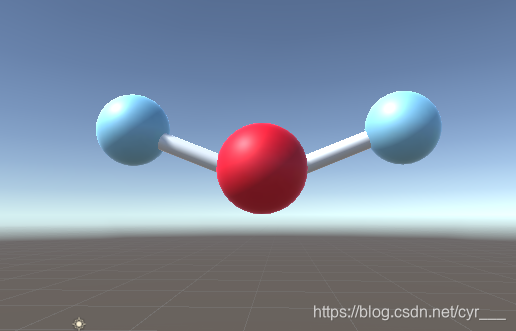
附加从unity场景中打包xml
创建ExportSceneToXml.cs
using System.Collections.Generic;
using System.Xml;
using System.IO;
using System.Text;
public class ExportSceneToXml : Editor
{
    [MenuItem("Assets/Export Scene To XML From Selection")]
    static void ExportXML()
    {
        string path = EditorUtility.SaveFilePanel("Save Resource", "", "New Resource", "xml");
        if (path.Length != 0)
        {
            Object[] selectedAssetList = Selection.GetFiltered(typeof(Object), SelectionMode.DeepAssets);

            //遍历所有的游戏对象
            foreach (Object selectObject in selectedAssetList)
            {
                // 场景名称
                string sceneName = selectObject.name;
                // 场景路径
                string scenePath = AssetDatabase.GetAssetPath(selectObject);
                // 场景文件
                if (File.Exists(path)) File.Delete(path);
                // 打开这个关卡
                EditorApplication.OpenScene(scenePath);
                XmlDocument xmlDocument = new XmlDocument();
                // 创建XML属性
                XmlDeclaration xmlDeclaration = xmlDocument.CreateXmlDeclaration("1.0", "utf-8", null);
                xmlDocument.AppendChild(xmlDeclaration);
                // 创建XML根标志
                XmlElement rootXmlElement = xmlDocument.CreateElement("root");
                // 创建场景标志
                XmlElement sceneXmlElement = xmlDocument.CreateElement("scene");
                sceneXmlElement.SetAttribute("sceneName", sceneName);

                foreach (GameObject sceneObject in Object.FindObjectsOfType(typeof(GameObject)))
                {
                    if (sceneObject.transform.parent == null && sceneObject.activeSelf)
                    {

                        if (PrefabUtility.GetPrefabType(sceneObject) == PrefabType.PrefabInstance)
                        {
                            // 获取预制体
                            Object prefabObject = EditorUtility.GetPrefabParent(sceneObject);
                            if (prefabObject != null)
                            {
                                XmlElement gameObjectXmlElement = xmlDocument.CreateElement("gameObject");
                                gameObjectXmlElement.SetAttribute("objectName", sceneObject.name);
                                gameObjectXmlElement.SetAttribute("objectAsset", prefabObject.name);

                                XmlElement transformXmlElement = xmlDocument.CreateElement("transform");

                                // 位置信息
                                XmlElement positionXmlElement = xmlDocument.CreateElement("position");
                                positionXmlElement.SetAttribute("x", sceneObject.transform.position.x.ToString());
                                positionXmlElement.SetAttribute("y", sceneObject.transform.position.y.ToString());
                                positionXmlElement.SetAttribute("z", sceneObject.transform.position.z.ToString());

                                // 旋转信息
                                XmlElement rotationXmlElement = xmlDocument.CreateElement("rotation");
                                rotationXmlElement.SetAttribute("x", sceneObject.transform.rotation.eulerAngles.x.ToString());
                                rotationXmlElement.SetAttribute("y", sceneObject.transform.rotation.eulerAngles.y.ToString());
                                rotationXmlElement.SetAttribute("z", sceneObject.transform.rotation.eulerAngles.z.ToString());

                                // 缩放信息
                                XmlElement scaleXmlElement = xmlDocument.CreateElement("scale");
                                scaleXmlElement.SetAttribute("x", sceneObject.transform.localScale.x.ToString());
                                scaleXmlElement.SetAttribute("y", sceneObject.transform.localScale.y.ToString());
                                scaleXmlElement.SetAttribute("z", sceneObject.transform.localScale.z.ToString());

                                transformXmlElement.AppendChild(positionXmlElement);
                                transformXmlElement.AppendChild(rotationXmlElement);
                                transformXmlElement.AppendChild(scaleXmlElement);

                                gameObjectXmlElement.AppendChild(transformXmlElement);
                                sceneXmlElement.AppendChild(gameObjectXmlElement);
                            }
                        }
                    }
                }
                rootXmlElement.AppendChild(sceneXmlElement);
                xmlDocument.AppendChild(rootXmlElement);
                // 保存场景数据
                xmlDocument.Save(path);

                AssetDatabase.Refresh();
            }
        }
    }
}
需要打包的场景上右键点击选项打包

魔乐社区(Modelers.cn) 是一个中立、公益的人工智能社区,提供人工智能工具、模型、数据的托管、展示与应用协同服务,为人工智能开发及爱好者搭建开放的学习交流平台。社区通过理事会方式运作,由全产业链共同建设、共同运营、共同享有,推动国产AI生态繁荣发展。
更多推荐


 0
0 0
0- 0


 已为社区贡献2条内容

所有评论(0)