【Mybatis-Plus】idea配置mybatis-plus环境遇到mybatis和mybatis-plus版本不兼容及java.lang.NullPointerException报错时的解决方法
·
作者:CSDN-PleaSure乐事
欢迎大家阅读我的博客 希望大家喜欢
使用环境:IDEA
Mybatis-plus环境配置官网
上为Mybatis-plus配置官网,供小伙伴们查阅。
小伙伴们可以按照官网上的方法,点击快速开始来开始配置。
配置过程中提示mybatis和mybatis-plus版本不兼容无法正常运行
这里我的解决方案是使用国内的源将Java版本调整到Java8,jdk使用1.8,并设置两者的版本分别如下:
<mybatis.version>3.5.7</mybatis.version>
<mybatis-plus.version>3.5.2</mybatis-plus.version>
最终的xml文件配置如下:
<dependencies>
    <dependency>
        <groupId>org.springframework.boot</groupId>
        <artifactId>spring-boot-starter-web</artifactId>
    </dependency>
    <!-- 使用 MyBatis-Plus -->
    <dependency>
        <groupId>com.baomidou</groupId>
        <artifactId>mybatis-plus-boot-starter</artifactId>
        <version>${mybatis-plus.version}</version>
    </dependency>
    <!-- 测试依赖 -->
    <dependency>
        <groupId>org.springframework.boot</groupId>
        <artifactId>spring-boot-starter-test</artifactId>
        <scope>test</scope>
    </dependency>
    <dependency>
        <groupId>junit</groupId>
        <artifactId>junit</artifactId>
        <version>4.13.2</version>
        <scope>test</scope>
    </dependency>
    <!-- 开发工具 -->
    <dependency>
        <groupId>org.springframework.boot</groupId>
        <artifactId>spring-boot-devtools</artifactId>
        <scope>runtime</scope>
        <optional>true</optional>
    </dependency>
    <!-- MySQL 连接器 -->
    <dependency>
        <groupId>com.mysql</groupId>
        <artifactId>mysql-connector-j</artifactId>
        <version>8.2.0</version>
        <scope>runtime</scope>
    </dependency>
    <!-- Lombok -->
    <dependency>
        <groupId>org.projectlombok</groupId>
        <artifactId>lombok</artifactId>
        <optional>true</optional>
    </dependency>
    <!-- 配置处理器 -->
    <dependency>
        <groupId>org.springframework.boot</groupId>
        <artifactId>spring-boot-configuration-processor</artifactId>
        <optional>true</optional>
    </dependency>
</dependencies>
<dependencyManagement>
    <dependencies>
        <dependency>
            <groupId>org.springframework.boot</groupId>
            <artifactId>spring-boot-dependencies</artifactId>
            <version>${spring-boot.version}</version>
            <type>pom</type>
            <scope>import</scope>
        </dependency>
        <dependency>
            <groupId>org.mybatis.spring.boot</groupId>
            <artifactId>mybatis-spring-boot-starter</artifactId>
            <version>${mybatis.version}</version>
        </dependency>
    </dependencies>
</dependencyManagement>
PS:其中我的数据库使用的是8.0.26的版本,springboot使用的是2.6.13版本。
使用该xml配置应该可以解决mybatis的版本冲突问题。
java.lang.NullPointerException
使用官网的配置文件,完成SampleTest的配置之后,可能会遇到空指针的问题:
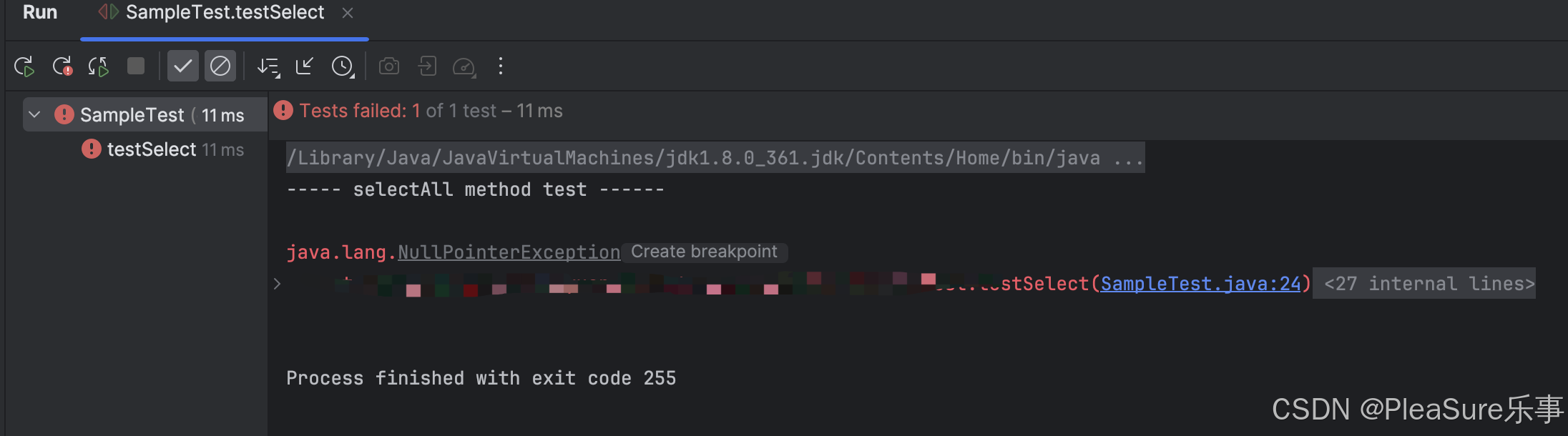
此时,我们添加RunWith代码,即可解决问题:
@RunWith(SpringRunner.class)
完整的SimpleTest代码如下:
@SpringBootTest
@RunWith(SpringRunner.class)
public class SampleTest {

    @Resource
    private UserMapper userMapper;

    @Test
    public void testSelect() {
        System.out.println(("----- selectAll method test ------"));
        List<User> userList = userMapper.selectList(null);
        Assert.isTrue(5 == userList.size(), "");
        userList.forEach(System.out::println);
    }

}
此时就可以顺利输出和官网上一致的结果了。
作者:CSDN-PleaSure乐事
希望我的博客对您有帮助,也希望在对您有帮助时您可以为我留下点赞收藏与关注,这对我真的很重要,谢谢!

魔乐社区(Modelers.cn) 是一个中立、公益的人工智能社区,提供人工智能工具、模型、数据的托管、展示与应用协同服务,为人工智能开发及爱好者搭建开放的学习交流平台。社区通过理事会方式运作,由全产业链共同建设、共同运营、共同享有,推动国产AI生态繁荣发展。
更多推荐


 5
 0
- 0


 已为社区贡献2条内容

所有评论(0)