springboot配置mybatis的多数据源以及事务的处理
前言
一、大部分情况下我们的数据库可能不止一个,比如sqlserver或者mysql等等,或者不在同一个服务器中,不在同一个端口等等,但是我们的一个项目又需要获取所有的数据库信息做后台,所以就用到了mybatis多数据源的配置
一、整体逻辑
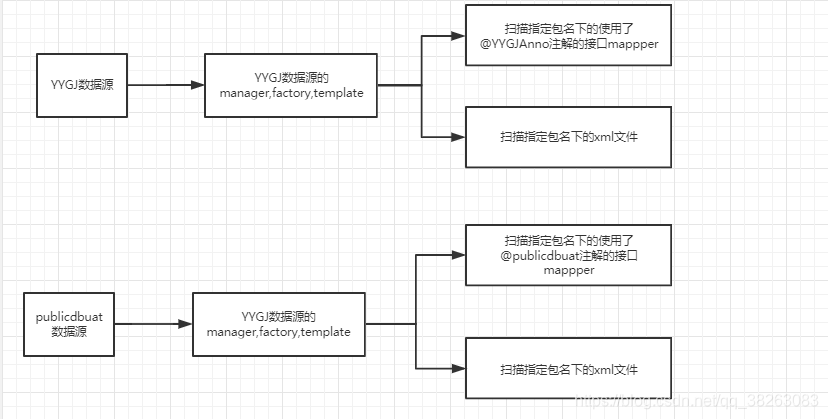
二、配置
2.1、在application.yml中配置数据源(多个数据库的连接地址),列子如下:
spring:
  datasource:
    dspublicdbuat:
      driver-class-name: com.mysql.jdbc.Driver
      url: jdbc:mysql://91.150.232.255:3306/public_db_uat?useUnicode=true&characterEncoding=utf-8&useSSL=false
      username: ioplj
      password: jhjhujhj
    dsyygj:
      driver-class-name: com.microsoft.sqlserver.jdbc.SQLServerDriver
      url: jdbc:sqlserver://59.160.284.185:1433;DatabaseName=YYGJ
      username: dty
      password: disdusad
2.2、配置对应的数据源映射bean
package cn.gxm.test.config;

import org.springframework.beans.factory.annotation.Qualifier;
import org.springframework.boot.autoconfigure.jdbc.DataSourceProperties;
import org.springframework.boot.context.properties.ConfigurationProperties;
import org.springframework.context.annotation.Bean;
import org.springframework.context.annotation.Configuration;
import org.springframework.context.annotation.Primary;

import javax.sql.DataSource;

/**
 * @author GXM
 * @date 2019/10/9
 */
@Configuration
public class DataSourceConfig {

    /**
     * 主数据库 YYGJ 的数据源
     * @return
     */
    @Primary
    @Bean(name = "dsyygjDataSourceProperties")
    @ConfigurationProperties(prefix = "spring.datasource.dsyygj")
    public DataSourceProperties dsyygjDataSourceProperties() {
        return new DataSourceProperties();
    }

    /**
     * 主数据库
     * @param dataSourceProperties
     * @return
     */
    @Primary
    @Bean(name = "dsyygjDataSource")
    public DataSource dsyygjDataSource(
            @Qualifier("dsyygjDataSourceProperties") DataSourceProperties dataSourceProperties) {
        return dataSourceProperties.initializeDataSourceBuilder().build();
    }

    /**
     * 数据库 publicdbuat 的数据源
     * @return
     */
    @Bean(name = "dspublicdbuatDataSourceProperties")
    @ConfigurationProperties(prefix = "spring.datasource.dspublicdbuat")
    public DataSourceProperties dspublicdbuatDataSourceProperties() {
        return new DataSourceProperties();
    }

    /**
     * 数据库 publicdbuat
     * @param dataSourceProperties
     * @return
     */
    @Bean(name = "dspublicdbuatDataSource")
    public DataSource dspublicdbuatDataSource(
            @Qualifier("dspublicdbuatDataSourceProperties") DataSourceProperties dataSourceProperties) {
        return dataSourceProperties.initializeDataSourceBuilder().build();
    }
}
2.3、配置每一个数据源对应的注解(代替mybatis原生的@mapper注解)
每一个不同的注解都表明这个mapper使用那个数据源
连接YYGJ数据是mapper使用的注解
/**
 * @author GXM
 * @date 2019/10/9
 */
@Target(ElementType.TYPE)
@Retention(RetentionPolicy.RUNTIME)
public @interface YYGJAnno {
    String value() default "";
}
连接PublicDbUat数据是mapper使用的注解
/**
 * @author GXM
 * @date 2019/10/9
 */
@Target(ElementType.TYPE)
@Retention(RetentionPolicy.RUNTIME)
public @interface PublicDbUatAnno {
    String value() default "";
}
2.4、为每一个数据源配置一整套 manager,factory,template
2.4.1、配置 YYGJ数据库的manager,factory,template
package cn.gxm.test.config;

import cn.gxm.test.annotation.YYGJAnno;
import org.apache.ibatis.io.VFS;
import org.apache.ibatis.plugin.Interceptor;
import org.apache.ibatis.session.SqlSessionFactory;
import org.mybatis.spring.SqlSessionFactoryBean;
import org.mybatis.spring.SqlSessionTemplate;
import org.mybatis.spring.annotation.MapperScan;
import org.mybatis.spring.boot.autoconfigure.SpringBootVFS;
import org.springframework.beans.factory.annotation.Qualifier;
import org.springframework.beans.factory.annotation.Value;
import org.springframework.context.annotation.Bean;
import org.springframework.context.annotation.Configuration;
import org.springframework.context.annotation.Primary;
import org.springframework.core.io.support.PathMatchingResourcePatternResolver;
import org.springframework.jdbc.datasource.DataSourceTransactionManager;

import javax.sql.DataSource;

@Configuration
@MapperScan(basePackages = {
		"cn.gxm.test.mapper" }, annotationClass = YYGJAnno.class, sqlSessionTemplateRef = "dsyygjSqlSessionTemplate")
public class MybatisDSYYGJConfig {

	/**
	 * 在cn.gxm.test.mapper包下的使用YYGJAnno注解的 mapper接口类,才使用该配置数据源(以及一整套 manager,factory,template)
	 * 对应的mapper.xml文件 (PathMatchingResourcePatternResolver().getResources())
	 */


	/**
	 * 主数据源 YYGJ数据源
	 * @param dataSource
	 * @return
	 * @throws Exception
	 */
	@Primary
	@Bean("dsyygjSqlSessionFactory")
	public SqlSessionFactory dsyygjSqlSessionFactory(@Qualifier("dsyygjDataSource") DataSource dataSource)
			throws Exception {

		SqlSessionFactoryBean sqlSessionFactory = new SqlSessionFactoryBean();
		sqlSessionFactory.setDataSource(dataSource);
		sqlSessionFactory.setMapperLocations(
				new PathMatchingResourcePatternResolver().getResources("classpath*:mapper/yygj/*Mapper.xml"));

		sqlSessionFactory.setConfigLocation(
				new PathMatchingResourcePatternResolver().getResource("classpath:mapper/mybatis-config.xml"));
		sqlSessionFactory.setVfs(SpringBootVFS.class);
		VFS.addImplClass(SpringBootVFS.class);
		// 添加插件
		sqlSessionFactory.setPlugins(new Interceptor[] { MybatisCommon.getPageHelper() });

		// 扫描别名
//		sqlSessionFactory.setTypeAliasesPackage(String.join(",", MybatisCommon.getPackages(typeAliasesPackage)));
		return sqlSessionFactory.getObject();
	}

	@Primary
	@Bean(name = "dsyygjTransactionManager")
	public DataSourceTransactionManager dsyygjTransactionManager(@Qualifier("dsyygjDataSource") DataSource dataSource) {
		return new DataSourceTransactionManager(dataSource);
	}

	@Primary
	@Bean(name = "dsyygjSqlSessionTemplate")
	public SqlSessionTemplate dsyygjSqlSessionTemplate(
			@Qualifier("dsyygjSqlSessionFactory") SqlSessionFactory sqlSessionFactory) {
		return new SqlSessionTemplate(sqlSessionFactory);
	}
}
2.4.2、配置 publicdbuat数据库的manager,factory,template
package cn.gxm.test.config;

import cn.gxm.test.annotation.PublicDbUatAnno;
import org.apache.ibatis.io.VFS;
import org.apache.ibatis.plugin.Interceptor;
import org.apache.ibatis.session.SqlSessionFactory;
import org.mybatis.spring.SqlSessionFactoryBean;
import org.mybatis.spring.SqlSessionTemplate;
import org.mybatis.spring.annotation.MapperScan;
import org.mybatis.spring.boot.autoconfigure.SpringBootVFS;
import org.springframework.beans.factory.annotation.Qualifier;
import org.springframework.context.annotation.Bean;
import org.springframework.context.annotation.Configuration;
import org.springframework.core.io.support.PathMatchingResourcePatternResolver;
import org.springframework.jdbc.datasource.DataSourceTransactionManager;

import javax.sql.DataSource;

@Configuration
@MapperScan(basePackages = {
		"cn.gxm.test.mapper" }, annotationClass = PublicDbUatAnno.class, sqlSessionTemplateRef = "dspublicdbuatSqlSessionTemplate")
public class MybatisPublicDBUatConfig {


	/**
	 *  publicdbuat
	 * @param dataSource
	 * @return
	 * @throws Exception
	 */
	@Bean("dspublicdbuatSqlSessionFactory")
	public SqlSessionFactory dspublicdbuatSqlSessionFactory(@Qualifier("dspublicdbuatDataSource") DataSource dataSource)
			throws Exception {

		SqlSessionFactoryBean sqlSessionFactory = new SqlSessionFactoryBean();
		sqlSessionFactory.setDataSource(dataSource);
		sqlSessionFactory.setMapperLocations(
				new PathMatchingResourcePatternResolver().getResources("classpath*:mapper/public_db_uat/*Mapper.xml"));

		sqlSessionFactory.setConfigLocation(
				new PathMatchingResourcePatternResolver().getResource("classpath:mapper/mybatis-config.xml"));
		sqlSessionFactory.setVfs(SpringBootVFS.class);
		VFS.addImplClass(SpringBootVFS.class);
		// 添加插件
		sqlSessionFactory.setPlugins(new Interceptor[] { MybatisCommon.getPageHelper() });
		return sqlSessionFactory.getObject();
	}

	@Bean(name = "dspublicdbuatTransactionManager")
	public DataSourceTransactionManager dspublicdbuatTransactionManager(@Qualifier("dspublicdbuatDataSource") DataSource dataSource) {
		return new DataSourceTransactionManager(dataSource);
	}

	@Bean(name = "dspublicdbuatSqlSessionTemplate")
	public SqlSessionTemplate dspublicdbuatSqlSessionTemplate(
			@Qualifier("dspublicdbuatSqlSessionFactory") SqlSessionFactory sqlSessionFactory) {
		return new SqlSessionTemplate(sqlSessionFactory);
	}
}
2.5、为每一个数据源配置对应的放置mapper接口的包名
需要与MybatisDSYYGJConfig中的basePackages配置一致

YYGJ数据库的mapper(注意各个接口上的注解不再是@mapper而是对应的数据源的自定义注解)
/**
 * @author GXM www.guokangjie.cn
 * @date 2019/8/29
 */
@Component
//@Mapper
@YYGJAnno
public interface BaseConfigMapper {
    BaseConfig selectOne();

    int createTable(String tableName);

    BaseConfig selectByTempTable(String tableName);
}
PublicDBUat数据库的mapper
/**
 * @author GXM www.guokangjie.cn
 * @date 2019/8/29
 */
@Component
//@Mapper
@PublicDbUatAnno
public interface DBConfigMapper {
    DbConfig selectOne();
}
2.6、为每一个数据源配置对应的防止mapperms.xml文件的包名
对应的xml文件的位置需要与之前java代码配置中写明的一致
new PathMatchingResourcePatternResolver().getResources("classpath*:mapper/yygj/*Mapper.xml"));
new PathMatchingResourcePatternResolver().getResources("classpath*:mapper/public_db_uat/*Mapper.xml"));
DBConfigMapper.xml
<?xml version="1.0" encoding="UTF-8"?>
<!DOCTYPE mapper PUBLIC "-//mybatis.org//DTD Mapper 3.0//EN" "http://mybatis.org/dtd/mybatis-3-mapper.dtd">
<mapper namespace="cn.gxm.test.mapper.DBConfigMapper">

    <select id="selectOne" resultType="DbConfig">
        select * from db_config where id = 1
    </select>
</mapper>
BaseConfigMapper.xml
<?xml version="1.0" encoding="UTF-8"?>
<!DOCTYPE mapper PUBLIC "-//mybatis.org//DTD Mapper 3.0//EN" "http://mybatis.org/dtd/mybatis-3-mapper.dtd">
<mapper namespace="cn.gxm.test.mapper.BaseConfigMapper">

    <select id="selectOne" resultType="BaseConfig">
        select * from BaseConfig where ID = 1
    </select>


    <!-- 创建零时表的时候 ## 表示全局临时表 #代表零时表   -->
    <update id="createTable" parameterType="string">
		  select * into ##TB from BaseConfig;
    </update>

    <select id="selectByTempTable" parameterType="string" resultType="BaseConfig">
        select * from ##TB where  id = 1
    </select>
</mapper>
全局的mybatis的config配置如下(mybatis-config.xml)
<?xml version="1.0" encoding="UTF-8" ?>
<!DOCTYPE configuration  PUBLIC "-//mybatis.org//DTD Config 3.0//EN"
   "http://mybatis.org/dtd/mybatis-3-config.dtd">

<configuration>

	<settings>
		<setting name="cacheEnabled" value="true" />
		<setting name="lazyLoadingEnabled" value="true" />
		<setting name="multipleResultSetsEnabled" value="true" />
		<setting name="useColumnLabel" value="true" />
		<setting name="useGeneratedKeys" value="false" />
		<setting name="autoMappingBehavior" value="PARTIAL" />
		<setting name="defaultExecutorType" value="SIMPLE" />
		<setting name="defaultStatementTimeout" value="250" />
		<setting name="safeRowBoundsEnabled" value="false" />
		<setting name="mapUnderscoreToCamelCase" value="false" />
		<setting name="localCacheScope" value="SESSION" />
		<setting name="jdbcTypeForNull" value="OTHER" />
		<setting name="lazyLoadTriggerMethods" value="equals,clone,hashCode,toString" />
		<setting name="logImpl" value="SLF4J"/>
	</settings>

	<typeAliases>
		<!-- spring中的那个扫描器 -->
		<package name="cn.gxm.test.model" />
	</typeAliases>

</configuration>
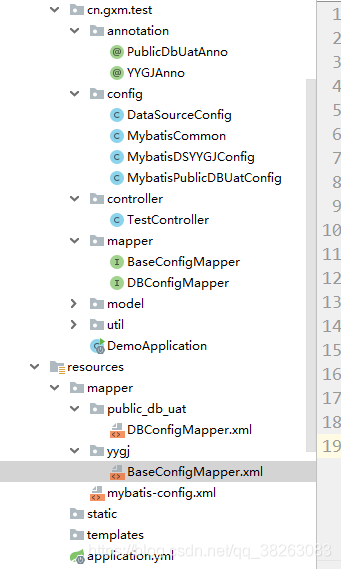
最后整体的目录如下
三、多事务配置
本身springboot如果加入了数据库的连接查询,那么springboot就会默认会开启和当前数据库一致的事务处理,以前直接在类上放上注解就可以了,如下
	@Transactional()
	@LogAnno(module = "公有模块-基础配置", operate = "添加")
	@PostMapping("/add")
	public CommonResult add(@RequestBody BaseConfig model) {
但是现在我们有多个数据源,如果还是这样写,它就会提示,不知道使用哪一个数据源的事务处理器,如下
org.springframework.beans.factory.NoUniqueBeanDefinitionException: No qualifying bean of type 'org.springframework.transaction.PlatformTransactionManager' available: more than one 'primary' bean found among candidates: [dspublicdbuatTransactionManager, dsyygjTransactionManager]
错误信息告诉我们我们有很多数据源以及事务,所以我们在使用的时候需要指定哪一个事务管理器,如下
@Transactional(value = "dsyygjTransactionManager")
	@LogAnno(module = "公有模块-基础配置", operate = "添加")
	@PostMapping("/add")
	public CommonResult add(@RequestBody BaseConfig model) {
那么就ok了
3.1、解释说明:
数据库事务隔离级别-- 脏读、幻读、不可重复读(清晰解释)
3.2、详细配置事务(设置隔离级别等等)
简单使用,直接在注解上表明要是的隔离级别以及事务传播类型
//方法上注解属性会覆盖类注解上的相同属性
  @Transactional(readOnly = false, propagation = Propagation.REQUIRES_NEW)
  public void updateFoo(Foo foo) {
具体可以参考:
SpringBoot设置事务隔离等级
3.3、 分布式事务
参考文章
【分布式事务】使用atomikos+jta解决分布式事务问题

魔乐社区(Modelers.cn) 是一个中立、公益的人工智能社区,提供人工智能工具、模型、数据的托管、展示与应用协同服务,为人工智能开发及爱好者搭建开放的学习交流平台。社区通过理事会方式运作,由全产业链共同建设、共同运营、共同享有,推动国产AI生态繁荣发展。
更多推荐


 0
0 0
0- 0


 已为社区贡献8条内容

所有评论(0)