xml中引用系统环境变量_Spring系列八:Spring 中读取文件-ResourceLoaderAware
重叠泪痕缄锦字,人生只有情难死。概述本文将了解资源或文件(例如文本文件、XML文件、属性文件或图像文件)加载到Spring应用程序上下文中的不同实现。Spring ResourceLoader为我们提供了一个统一的getResource()方法来通过资源路径检索外部资源。资源(Resource)接口Resource是Spring中用于表示外部资源的通用接口。Spring为Resource接口提供了
重叠泪痕缄锦字,人生只有情难死。

概述
本文将了解资源或文件(例如文本文件、XML文件、属性文件或图像文件)加载到Spring应用程序上下文中的不同实现。Spring ResourceLoader为我们提供了一个统一的getResource()方法来通过资源路径检索外部资源。
资源(Resource)接口
Resource是Spring中用于表示外部资源的通用接口。
Spring为Resource接口提供了以下6种实现。
- UrlResource
- ClassPathResource
- FileSystemResource
- ServletContextResource
- InputStreamResource
- ByteArrayResource
我们可以指定不同的前缀来创建路径以从不同位置加载资源
前缀示例说明classpath:classpath:com/myapp/config.xml从类路径加载file:file:///data/config.xml从文件系统作为URL加载。http:https://myserver/logo.png从URL加载(none)/data/config.xml取决于底层的ApplicationContext
ResourceLoader
它用于加载资源(例如类路径或文件系统资源)。它有两种方法:
//Expose the ClassLoader used by this ResourceLoader.ClassLoader getClassLoader()//Return a Resource handle for the specified resource location.Resource getResource(String location)getResource()方法将根据资源路径决定要实例化的Resource实现。 要获取ResourceLoader的引用,请实现ResourceLoaderAware接口。
Resource banner = resourceLoader.getResource("file:c:/temp/filesystemdata.txt");使用ApplicationContext加载资源
在Spring中,所有应用程序上下文都实现ResourceLoader接口。因此,所有应用程序上下文都可用于获取资源实例。
要获取ApplicationContext的引用,请实现ApplicationContextAware接口。
Resource banner = ctx.getResource("file:c:/temp/filesystemdata.txt");使用ResourceLoaderAware加载资源
为了演示下面的各种示例,我将一个具有相同名称的文件放置在不同的位置,并且我将演示如何加载每个文件。
CustomResourceLoader.java的编写如下,它将已加载的资源文件的内容打印到控制台中。
import java.io.BufferedReader;import java.io.IOException;import java.io.InputStream;import java.io.InputStreamReader;import org.springframework.context.ResourceLoaderAware;import org.springframework.core.io.Resource;import org.springframework.core.io.ResourceLoader;public class CustomResourceLoader implements ResourceLoaderAware{ private ResourceLoader resourceLoader; public void setResourceLoader(ResourceLoader resourceLoader) { this.resourceLoader = resourceLoader; } public void showResourceData() throws IOException { //This line will be changed for all versions of other examples Resource banner = resourceLoader.getResource("file:c:/temp/filesystemdata.txt"); InputStream in = banner.getInputStream(); BufferedReader reader = new BufferedReader(new InputStreamReader(in)); while (true) { String line = reader.readLine(); if (line == null) break; System.out.println(line); } reader.close(); }}该文件的applicationContext.xml文件条目如下:
为了测试CustomResourceLoader bean并调用showResourceData()方法,使用了以下代码:
@SuppressWarnings("resource")public static void main(String[] args) throws Exception{ ApplicationContext context = new ClassPathXmlApplicationContext("applicationContext.xml"); CustomResourceLoader customResourceLoader = (CustomResourceLoader) context.getBean("customResourceLoader"); customResourceLoader.showResourceData();}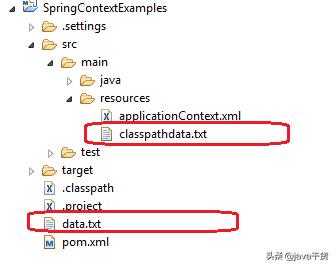
由于我们正在通过Spring的资源加载器访问资源,因此自定义资源加载器必须实现ApplicationContextAware接口或ResourceLoaderAware接口。
加载外部资源
从应用程序根文件夹加载资源
要从应用程序文件夹加载文件,请使用以下模板:
Resource banner = resourceLoader.getResource("file:data.txt");从类路径加载资源
要从类路径加载文件,请使用以下模板:
Resource banner = resourceLoader.getResource("classpath:classpathdata.txt");从文件系统加载资源
要从应用程序文件夹外部的文件系统加载文件,请使用以下模板:
Resource banner = resourceLoader.getResource("file:c:/temp/filesystemdata.txt");从URL加载资源
要从任何URL加载文件,请使用以下模板:
Resource banner = resourceLoader.getResource("//howtodoinjava.com/readme.txt");以上所有示例将从其位置加载资源文件,你可以按需要使用它们。
如何注入外部文件
在上面的示例中,我们在CustomResourceLoader中对资源名称进行了硬编码,很多人可能不喜欢它,并且希望通过上下文文件对其进行配置。使用下面的代码模板可以配置外部资源名称。
classpath:classpathdata.txtfile:data.txtCustomResourceLoader如下所示:
public class CustomResourceLoader { private Resource resource; public Resource getResource() { return resource; } public void setResource(Resource resource) { this.resource = resource; }}在上下文初始化后,资源将注入到CustomResourceLoader的resource属性中。在Spring Boot Resourceloader示例中也可以使用相同的代码。
原文链接:Spring ResourceLoaderAware – Read file in Spring

魔乐社区(Modelers.cn) 是一个中立、公益的人工智能社区,提供人工智能工具、模型、数据的托管、展示与应用协同服务,为人工智能开发及爱好者搭建开放的学习交流平台。社区通过理事会方式运作,由全产业链共同建设、共同运营、共同享有,推动国产AI生态繁荣发展。
更多推荐

 1
1 0
0- 0


 已为社区贡献8条内容

所有评论(0)