输入框文字输入完成后ajax,ajax实现输入框文字改变展示下拉列表的效果示例
1.样式2. html脚本........省略常规脚本汽车品牌名: disabled="disabled"onfocus="showAndHide('List1','show');" onblur="showAndHide('List1','hide');"/>必填*--%>宝马--%>奥迪--%>--%>........省略常规脚本汽车厂商名: disabled..
1.样式
2. html脚本
........省略常规脚本
汽车品牌名:disabled="disabled" onfocus="showAndHide('List1','show');" onblur="showAndHide('List1','hide');"/>
必填*
--%>
宝马--%>
奥迪--%>
--%>
........省略常规脚本
汽车厂商名:disabled="disabled" onfocus="showAndHide('List2','show');" onblur="showAndHide('List2','hide');" />
必填*
3.通过JS来实现ajax异步请求 根据输入的内容过滤
//页面加载的时候
jQuery(function($) {
if (navigator.userAgent.indexOf("MSIE") > 0) {
document.getElementById('generalBrandName').attachEvent("onPropertyChange", appendList);
document.getElementById('brandName').attachEvent("onPropertyChange", appendList);
}
else if (navigator.userAgent.indexOf("Firefox") > 0) {
document.getElementById('generalBrandName').addEventListener("input", appendList, false);
document.getElementById('brandName').addEventListener("input", appendList, false);
}
});
//////// 预加载
jQuery(function($) {
txtValue = $("#generalBrandName").val();
//////// 给txtbox绑定键盘事件
$("#generalBrandName").bind("keyup", function() {
var currentValue = $(this).val();
if (currentValue != txtValue) {
appendList('List1',currentValue);
txtValue = currentValue;
}
});
txtValue = $("#brandName").val();
//////// 给txtbox绑定键盘事件
$("#brandName").bind("keyup", function() {
var currentValue = $(this).val();
if (currentValue != txtValue) {
appendList('List2',currentValue);
txtValue = currentValue;
}
});
});
//实现动态显示下拉列表内容的function
//根据输入框中的值来筛选obj中的值
function appendList(obj,value){
value = encodeURIComponent(value); value = encodeURIComponent(value); //两次使用encodeURI()
switch(obj){
case "List1": //根据车品牌名来刷选List1中的值
$.getJSON(
ctx + "/car/carmodel/**.do",
{keyWord : value, id : new Date().getTime()},
function (json) {
createLis('ListLi1',json);
}
);
break;
case "List2": //根据车厂商名来刷选List2中的值
$.getJSON(
ctx + "/car/carmodel/**.do",
{keyWord : value, id : new Date().getTime()},
function (json) {
createLis('ListLi2',json);
}
);
break;
}
}
function createLis(obj,json){
switch(obj){
case "ListLi1": //根据车品牌名来刷选List1中的值
var executerDiv = document.getElementById(obj); //动态生成下拉列表框
executerDiv.innerHTML="";
var ul=document.createElement("ul");
$.each(json, function (i, item) {
var li=document.createElement("li");
var str = "getValue('generalBrandName','"+item.brandNameGeneral+"','brandIdGeneral','"+item.brandIdGeneral+"');showAndHide('List1','hide')";
li.setAttribute("onmousedown",str);
li.appendChild(document.createTextNode(item.brandNameGeneral));
ul.appendChild(li);
});
executerDiv.appendChild(ul);
break;
case "ListLi2": //根据车厂商名来刷选List2中的值
var executerDiv = document.getElementById(obj); //动态生成下拉列表框
executerDiv.innerHTML="";
var ul=document.createElement("ul");
$.each(json, function (i, item) {
var li=document.createElement("li");
var str = "getValue('brandName','"+item.brandName+"','brandId','"+item.brandId+"');showAndHide('List1','hide')";
li.setAttribute("onmousedown",str);
li.appendChild(document.createTextNode(item.brandName));
ul.appendChild(li);
});
executerDiv.appendChild(ul);
break;
}
}
//显示或者隐藏层
function showAndHide(obj,types){
var Layer=window.document.getElementById(obj);
switch(types){
case "show":
Layer.style.display="block";
appendList(obj,'');
break;
case "hide":
Layer.style.display="none";
break;
}
}
//获取选中节点的内容
function getValue(obj1,str,obj2,idx){
var input=window.document.getElementById(obj1);
input.value=str;
var input=window.document.getElementById(obj2);
input.value=idx;
}
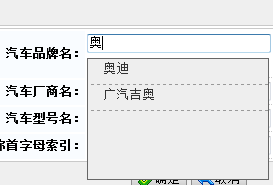
4.展示效果

魔乐社区(Modelers.cn) 是一个中立、公益的人工智能社区,提供人工智能工具、模型、数据的托管、展示与应用协同服务,为人工智能开发及爱好者搭建开放的学习交流平台。社区通过理事会方式运作,由全产业链共同建设、共同运营、共同享有,推动国产AI生态繁荣发展。
更多推荐


 0
0 0
0- 0


 已为社区贡献5条内容

所有评论(0)