springboot使用RestTemplate(基于2.6.7,返回泛型)
一、示例依赖<dependencies><dependency><groupId>org.springframework.boot</groupId><artifactId>spring-boot-starter-web</artifactId></dependency><dependency>
·
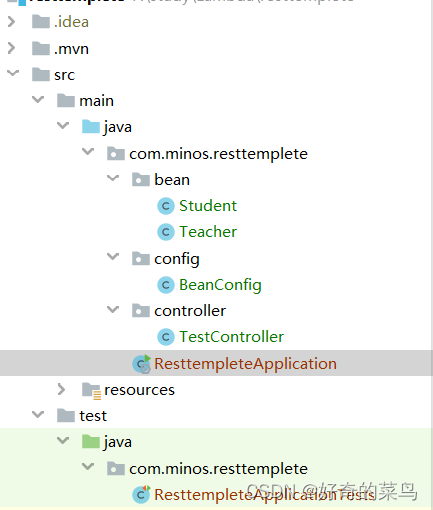
一、示例依赖
  <dependencies>
        <dependency>
            <groupId>org.springframework.boot</groupId>
            <artifactId>spring-boot-starter-web</artifactId>
        </dependency>

        <dependency>
            <groupId>org.projectlombok</groupId>
            <artifactId>lombok</artifactId>
            <optional>true</optional>
        </dependency>
        <dependency>
            <groupId>org.springframework.boot</groupId>
            <artifactId>spring-boot-starter-test</artifactId>
            <scope>test</scope>
        </dependency>
        <dependency>
            <groupId>com.alibaba.fastjson2</groupId>
            <artifactId>fastjson2</artifactId>
            <version>2.0.3.android</version>
        </dependency>
    </dependencies>
二、将RestTemplate加入spring管理
import org.springframework.context.annotation.Bean;
import org.springframework.context.annotation.Configuration;
import org.springframework.http.client.ClientHttpRequestFactory;
import org.springframework.http.client.SimpleClientHttpRequestFactory;
import org.springframework.web.client.RestTemplate;

@Configuration
public class BeanConfig {

    @Bean
    public RestTemplate restTemplate(ClientHttpRequestFactory factory) {
        RestTemplate restTemplate = new RestTemplate(factory);
        return restTemplate;
    }

    @Bean
    public ClientHttpRequestFactory simpleClientHttpRequestFactory() {
        SimpleClientHttpRequestFactory factory = new SimpleClientHttpRequestFactory();
        //建⽴连接所⽤的时间,适⽤于⽹络状况正常的情况下,两端连接所⽤的时间。单位毫秒
        factory.setConnectTimeout(15000);
        //建⽴连接后从服务器读取到可⽤资源所⽤的时间。单位毫秒
        factory.setReadTimeout(5000);
        return factory;
    }
}
三、请求基础数据
server.port=8089
import lombok.Data;

@Data
public class Student {
    private String name;
    private Integer age;

}
import lombok.Data;
@Data
public class Teacher {
private String name;
private String phone;
}
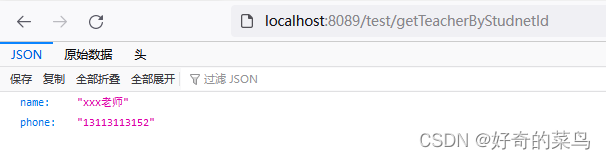
准备两个请求,一个get一个post
#get地址
http://localhost:8089/test/getTeacherByStudnetId
#post地址
http://localhost:8089/test/saveStudent
http://localhost:8089/test/saveStudent2
import com.minos.resttemplete.bean.Student;
import com.minos.resttemplete.bean.Teacher;
import org.springframework.web.bind.annotation.GetMapping;
import org.springframework.web.bind.annotation.PostMapping;
import org.springframework.web.bind.annotation.RequestBody;
import org.springframework.web.bind.annotation.RequestMapping;
import org.springframework.web.bind.annotation.RestController;
@RestController
@RequestMapping("/test")
public class TestController {
/*普通get请求*/
@GetMapping("/getTeacherByStudnetId")
public Teacher getTeacher(Long studentId) {
System.out.println("根据学生:" + studentId + "查询老师");
Teacher teacher = new Teacher();
teacher.setName("xxx老师");
teacher.setPhone("13113113152");
return teacher;
}
/*普通post请求*/
@PostMapping("/saveStudent")
public Student addStudnet(Student student) {
System.out.println(student.toString());
return student;
}
/*@RequestBody形势post请求*/
@PostMapping("/saveStudent2")
public Student addStudnet2(@RequestBody Student student) {
System.out.println(student.toString());
return student;
}
}
四、RestTemplate之get请求
1、getForObject
 @Autowired
    RestTemplate restTemplate;
 @Test
    void testGetForObject() {
        String url = "http://localhost:8089/test/getTeacherByStudnetId";
        Map<String, Long> paramMap = new HashMap<>();
        paramMap.put("studentId", 5L);
        //只能返回响应体
        Teacher teacher = restTemplate.getForObject(url, Teacher.class, paramMap);
        System.out.println(JSON.toJSONString(teacher));
        //    {"name":"xxx老师","phone":"13113113152"}
    }
2、 getForEntity
 @Autowired
    RestTemplate restTemplate;

@Test
    void testGetForEntity() {
        String url = "http://localhost:8089/test/getTeacherByStudnetId?studentId=1";
        Map<String, Long> paramMap = new HashMap<>();
        paramMap.put("studentId", 5L);
        //返回形体、http头信息、http状态
        ResponseEntity<Teacher> forEntity = restTemplate.getForEntity(url, Teacher.class, paramMap);
        HttpStatus statusCode = forEntity.getStatusCode();
        int statusCodeValue = forEntity.getStatusCodeValue();
        Teacher teacher = forEntity.getBody();
        HttpHeaders headers = forEntity.getHeaders();
        System.out.println(JSON.toJSONString(statusCode));
        System.out.println(JSON.toJSONString(statusCodeValue));
        System.out.println(JSON.toJSONString(teacher));
        System.out.println(JSON.toJSONString(headers));
        //    "OK"
        //200
        //{"name":"xxx老师","phone":"13113113152"}
        //{"Content-Type":["application/json"],"Transfer-Encoding":["chunked"],"Date":["Wed, 18 May 2022 01:39:01 GMT"],"Keep-Alive":["timeout=60"],"Connection":["keep-alive"]}
    }
五、RestTemplate之post请求
@Autowired
    RestTemplate restTemplate;

 @Test
    void testPosttForObject1_1() {
        String url = "http://localhost:8089/test/saveStudent";
        Student stu = new Student();
        stu.setName("zhangsan");
        stu.setAge(50);
        //只能返回响应体
        Student student = restTemplate.postForObject(url, stu, Student.class);
        System.out.println(JSON.toJSONString(student));
        //    {}
    }

    @Test
    void testPosttForObject1_2() {
        String url = "http://localhost:8089/test/saveStudent";
        MultiValueMap<String, Object> paramMap = new LinkedMultiValueMap<>();
        paramMap.add("name", "zhangsan2");
        paramMap.add("age", 15);
        //只能返回响应体
        Student student = restTemplate.postForObject(url, paramMap, Student.class);
        System.out.println(JSON.toJSONString(student));
        //    {"age":15,"name":"zhangsan2"}
    }

    @Test
    void testPostForEntity1() {
        String url = "http://localhost:8089/test/saveStudent";
        MultiValueMap<String, Object> paramMap = new LinkedMultiValueMap<>();
        paramMap.add("name", "zhangsan2");
        paramMap.add("age", 15);
        //返回形体、http头信息、http状态
        ResponseEntity<Student> studentResponseEntity = restTemplate.postForEntity(url, paramMap, Student.class);
        System.out.println(JSON.toJSONString(studentResponseEntity.getStatusCode()));
        System.out.println(JSON.toJSONString(studentResponseEntity.getStatusCodeValue()));
        System.out.println(JSON.toJSONString(studentResponseEntity.getHeaders()));
        System.out.println(JSON.toJSONString(studentResponseEntity.getBody()));
        //    "OK"
        //200
        //{"Content-Type":["application/json"],"Transfer-Encoding":["chunked"],"Date":["Wed, 18 May 2022 01:37:01 GMT"],"Keep-Alive":["timeout=60"],"Connection":["keep-alive"]}
        //{"age":15,"name":"zhangsan2"}

    }

    @Test
    void testPosttForObject2_1() {
        String url = "http://localhost:8089/test/saveStudent2";
        Student stu = new Student();
        stu.setName("zhangsan");
        stu.setAge(50);
        //只能返回响应体
        Student student = restTemplate.postForObject(url, stu, Student.class);
        System.out.println(JSON.toJSONString(student));
    }

    @Test
    void testPosttForObject2_2() {
        String url = "http://localhost:8089/test/saveStudent2";
        HttpHeaders headers = new HttpHeaders();
        //设置请求头为json
        headers.setContentType(MediaType.APPLICATION_JSON);
        Student stu = new Student();
        stu.setName("zhangsan");
        stu.setAge(50);
        HttpEntity<Student> request = new HttpEntity<>(stu, headers);
        //只能返回响应体
        Student student = restTemplate.postForObject(url, request, Student.class);
        System.out.println(JSON.toJSONString(student));
        //    {"age":50,"name":"zhangsan"}
    }

    @Test
    void testPostForEntity2() {
        String url = "http://localhost:8089/test/saveStudent2";
        HttpHeaders headers = new HttpHeaders();
        //设置请求头为json
        headers.setContentType(MediaType.APPLICATION_JSON);
        Student stu = new Student();
        stu.setName("zhangsan");
        stu.setAge(50);
        HttpEntity<Student> request = new HttpEntity<>(stu, headers);
        //返回形体、http头信息、http状态
        ResponseEntity<Student> studentResponseEntity = restTemplate.postForEntity(url, request, Student.class);
        System.out.println(JSON.toJSONString(studentResponseEntity.getStatusCode()));
        System.out.println(JSON.toJSONString(studentResponseEntity.getStatusCodeValue()));
        System.out.println(JSON.toJSONString(studentResponseEntity.getHeaders()));
        System.out.println(JSON.toJSONString(studentResponseEntity.getBody()));
        //"OK"
        //200
        //{"Content-Type":["application/json"],"Transfer-Encoding":["chunked"],"Date":["Wed, 18 May 2022 01:38:00 GMT"],"Keep-Alive":["timeout=60"],"Connection":["keep-alive"]}
        //{"age":50,"name":"zhangsan"}

    }
六、RestTemplatelUtil工具类
可以返回泛型参数
@Component
public class RestTemplatelUtil {
    @Autowired
    RestTemplate restTemplate;
    /**
     *
     * @param url 请求的参数
     * @param method 请求的方法  HttpMethod.POST  GET, HEAD, POST, PUT,  PATCH, DELETE, OPTIONS,TRACE;
     * @param responseBodyType 返回的数据结构
     * @param requestBody 请求的数据
     * @param <T> 返回的数据泛型
     * @param <A> 请求的数据
     * @return
     */
    public  <T, A> T exchange(String url, HttpMethod method, ParameterizedTypeReference<T> responseBodyType, A requestBody) {
        RestTemplate restTemplate = new RestTemplate();
        // 请求头
        HttpHeaders headers = new HttpHeaders();
        MimeType mimeType = MimeTypeUtils.parseMimeType("application/json");
        MediaType mediaType = new MediaType(mimeType.getType(), mimeType.getSubtype(), Charset.forName("UTF-8"));
        // 请求体
        headers.setContentType(mediaType);
        // 发送请求
        HttpEntity<A> entity = new HttpEntity<>(requestBody, headers);
        ResponseEntity<T> resultEntity = restTemplate.exchange(url, method, entity, responseBodyType);
        return resultEntity.getBody();
    }
}
使用方法
    public ResponseToken getToken() {
        //构造请求参数数据
        RequestData requestData = new RequestData();
        RequestLogin login = new RequestLogin();
        requestData.setData(login);
        //URL
        String url = RequestConstantsUrl.thloginUrl;
        //发起请求
        ResponseData<ResponseToken> exchange = restTemplatelUtil.exchange(url, HttpMethod.POST, new ParameterizedTypeReference<ResponseData<ResponseToken>>() {
        }, requestData);
        //获取数据
        return exchange.getReturnData();
    }
总结:
1、xxForObject和xxForEntity区别:xxForObject返回返回体,xxForEntity返回http头部信息、http状态码、返回体。一般使用xxForEntity,判断getStatusCodeValue()为200时候,再getBody;
2、post请求和get请求,第一个参数都是URL,第二个参数post是请求的参数,get是返回接受的类;第三个参数post是返回接受的类,get是请求的参数。
restTemplate.postForEntity(url, request, Student.class);
restTemplate.getForEntity(url, Teacher.class, paramMap);
魔乐社区(Modelers.cn) 是一个中立、公益的人工智能社区,提供人工智能工具、模型、数据的托管、展示与应用协同服务,为人工智能开发及爱好者搭建开放的学习交流平台。社区通过理事会方式运作,由全产业链共同建设、共同运营、共同享有,推动国产AI生态繁荣发展。
更多推荐

 4
4 0
0- 0


 已为社区贡献29条内容

所有评论(0)