Mobile-Agent重磅来袭:视觉感知+多模态智能助理,玩手机更高效!
随着多模态大语言模型(Multimodal Large Language Model, MLLM)的迅速发展,基于 MLLM 的多模态智能代理(agent)正在逐步应用于各种实际场景。这种技术的进步让利用多模态 agent 作为手机操作助手成为了现实,通过视觉感知和多模态交互,智能化地完成复杂任务。本文将为您解读一项最新研究——,该研究展示了如何借助多模态 agent 实现 AI 自动操作手机的技
随着多模态大语言模型(Multimodal Large Language Model, MLLM)的迅速发展,基于 MLLM 的多模态智能代理(agent)正在逐步应用于各种实际场景。这种技术的进步让利用多模态 agent 作为手机操作助手成为了现实,通过视觉感知和多模态交互,智能化地完成复杂任务。
本文将为您解读一项最新研究——《Mobile-Agent: Autonomous Multi-Modal Mobile Device Agent with Visual Perception》,该研究展示了如何借助多模态 agent 实现 AI 自动操作手机的技术突破。这一成果不仅扩展了移动设备的智能化边界,也为未来的自动化场景带来了全新可能性。
在本文中,我们介绍了一项具有里程碑意义的研究成果——Mobile-Agent,这是一种自主的多模态移动设备代理,能够通过视觉感知实现智能化的手机操作。

Mobile-Agent 的核心优势在于其视觉感知能力。它能够准确识别和定位应用前端界面中的视觉和文本元素,基于感知到的视觉上下文自主规划并分解复杂的操作任务。随后,它会通过逐步执行操作步骤导航移动应用。这种以视觉为中心的设计,使得Mobile-Agent 不再依赖应用的 XML 文件或移动系统的元数据,从而具备更强的适应性,能够在多样化的移动操作系统环境中工作,避免了系统定制的繁琐要求。
为了评估 Mobile-Agent 的性能,研究团队提出了MobileEval,一个专门用于评估移动设备操作能力的基准数据集。通过 MobileEval 的全面测试表明,Mobile-Agent 在操作准确性和任务完成率上都表现出了显著优势。即使在面临复杂指令(如跨应用操作)的情况下,它仍能够高效完成任务。
为了推动相关领域的发展,研究团队宣布将代码和模型开源,地址为https://github.com/X-PLUG/MobileAgent。这项成果不仅展示了多模态代理在移动设备领域的潜力,还为未来更复杂、更智能的移动操作系统代理奠定了坚实基础。
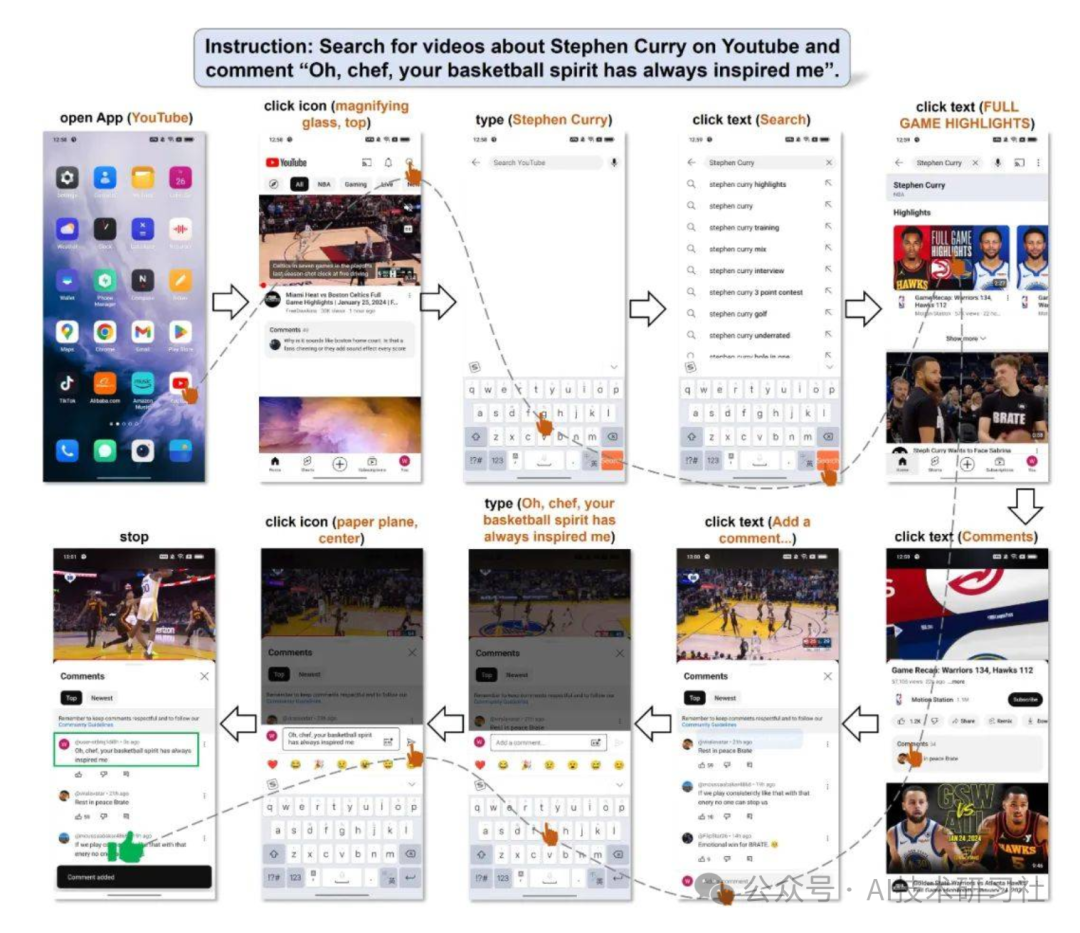
以下是一个利用 Mobile-Agent 在 YouTube 上搜索相关视频并发表评论的示例。用户的任务是让 Mobile-Agent 在 YouTube 上搜索某位明星的相关视频,找到合适的内容后,发布一条评论。在整个操作过程中,Mobile-Agent 准确无误地完成了任务,没有发生任何错误、不必要或无效的操作,展现了其强大的稳定性和执行能力。
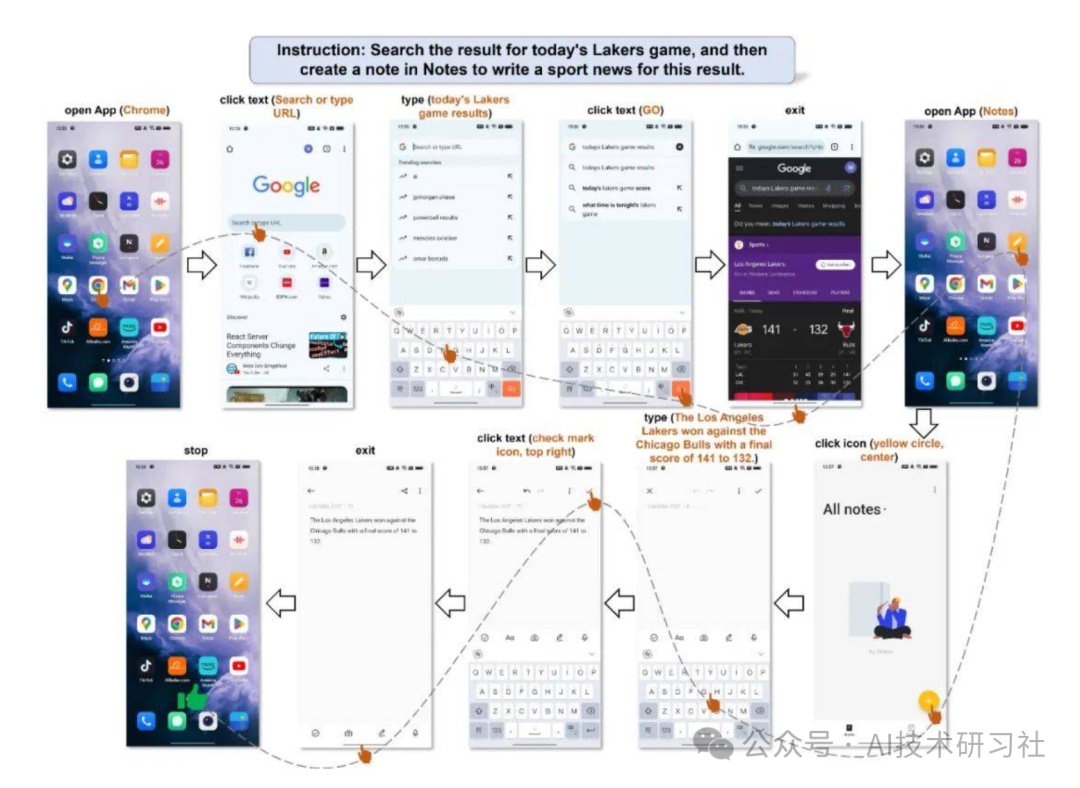
接下来是一个操作多 App 的例子,用户的要求是先去查询今天的比赛结果,然后根据结果写一个新闻。这个任务的挑战性在于,前后要使用两个 App 完成两个子任务,并且需要将第一个子任务的结果作为第二个子任务的输入。Mobile-Agent 首先完成了查询比赛结果,随后退出浏览器并打开笔记,最后将比赛结果精准地写出,并以新闻的方式呈现。
为了便于将文本描述的操作转化为屏幕上的操作,Mobile-Agent 生成的操作必须在一个定义好的操作空间内。这个空间共有 8 个操作,分别是:
打开 App(App 名字)``点击文本(文本内容)``点击图标(图标描述)``打字(文本内容)``上翻、下翻``返回上一页``退出 App``停止
其中,点击文本和点击图标是两个需要操作定位的操作,因此 Mobile-Agent 在使用这两个操作时,必须输出括号内的参数,以实现定位。
部分代码:
import numpy as np``def calculate_iou(box1, box2):` `x1_min, y1_min, x1_max, y1_max = box1` `x2_min, y2_min, x2_max, y2_max = box2` `inter_x_min = max(x1_min, x2_min)` `inter_y_min = max(y1_min, y2_min)` `inter_x_max = min(x1_max, x2_max)` `inter_y_max = min(y1_max, y2_max)` `inter_area = max(0, inter_x_max - inter_x_min) * max(0, inter_y_max - inter_y_min)` `box1_area = (x1_max - x1_min) * (y1_max - y1_min)` `box2_area = (x2_max - x2_min) * (y2_max - y2_min)` `union_area = box1_area + box2_area - inter_area` `iou = inter_area / union_area` `return iou``def compute_iou(box1, box2):` `"""` `Compute the Intersection over Union (IoU) of two bounding boxes.` `Parameters:` `- box1: list or array [x1, y1, x2, y2]` `- box2: list or array [x1, y1, x2, y2]` `Returns:` `- iou: float, IoU value` `"""` `x1_inter = max(box1[0], box2[0])` `y1_inter = max(box1[1], box2[1])` `x2_inter = min(box1[2], box2[2])` `y2_inter = min(box1[3], box2[3])` `# print(x2_inter, x1_inter, y2_inter, y1_inter)` `inter_area = max(0, x2_inter - x1_inter + 1) * max(0, y2_inter - y1_inter + 1)` `box1_area = (box1[2] - box1[0] + 1) * (box1[3] - box1[1] + 1)` `box2_area = (box2[2] - box2[0] + 1) * (box2[3] - box2[1] + 1)` `iou = inter_area / float(box1_area + box2_area - inter_area)` `return iou``def merge_boxes(box1, box2):` `x1_min, y1_min, x1_max, y1_max = box1` `x2_min, y2_min, x2_max, y2_max = box2` `merged_box = [min(x1_min, x2_min), min(y1_min, y2_min), max(x1_max, x2_max), max(y1_max, y2_max)]` `return merged_box``def merge_boxes_and_texts(texts, boxes, iou_threshold=0):` `"""` `Merge bounding boxes and their corresponding texts based on IoU threshold.` `Parameters:` `- boxes: List of bounding boxes, with each box represented as [x1, y1, x2, y2].` `- texts: List of texts corresponding to each bounding box.` `- iou_threshold: Intersection-over-Union threshold for merging boxes.` `Returns:` `- merged_boxes: List of merged bounding boxes.` `- merged_texts: List of merged texts corresponding to the bounding boxes.` `"""` `if len(boxes) == 0:` `return [], []` `# boxes = np.array(boxes)` `merged_boxes = []` `merged_texts = []` `while len(boxes) > 0:` `box = boxes[0]` `text = texts[0]` `boxes = boxes[1:]` `texts = texts[1:]` `to_merge_boxes = [box]` `to_merge_texts = [text]` `keep_boxes = []` `keep_texts = []` `for i, other_box in enumerate(boxes):` `if compute_iou(box, other_box) > iou_threshold:` `to_merge_boxes.append(other_box)` `to_merge_texts.append(texts[i])` `else:` `keep_boxes.append(other_box)` `keep_texts.append(texts[i])` `# Merge the to_merge boxes into a single box` `if len(to_merge_boxes) > 1:` `x1 = min(b[0] for b in to_merge_boxes)` `y1 = min(b[1] for b in to_merge_boxes)` `x2 = max(b[2] for b in to_merge_boxes)` `y2 = max(b[3] for b in to_merge_boxes)` `merged_box = [x1, y1, x2, y2]` `merged_text = " ".join(to_merge_texts) # You can change the merging strategy here` `merged_boxes.append(merged_box)` `merged_texts.append(merged_text)` `else:` `merged_boxes.extend(to_merge_boxes)` `merged_texts.extend(to_merge_texts)` `# boxes = np.array(keep_boxes)` `boxes = keep_boxes` `texts = keep_texts` `return merged_texts, merged_boxes``def is_contained(bbox1, bbox2):` `x1_min, y1_min, x1_max, y1_max = bbox1` `x2_min, y2_min, x2_max, y2_max = bbox2` `if (x1_min >= x2_min and y1_min >= y2_min and x1_max <= x2_max and y1_max <= y2_max):` `return True` `elif (x2_min >= x1_min and y2_min >= y1_min and x2_max <= x1_max and y2_max <= y1_max):` `return True` `return False``def is_overlapping(bbox1, bbox2):` `x1_min, y1_min, x1_max, y1_max = bbox1` `x2_min, y2_min, x2_max, y2_max = bbox2` `inter_xmin = max(x1_min, x2_min)` `inter_ymin = max(y1_min, y2_min)` `inter_xmax = min(x1_max, x2_max)` `inter_ymax = min(y1_max, y2_max)` `if inter_xmin < inter_xmax and inter_ymin < inter_ymax:` `return True` `return False``def get_area(bbox):` `x_min, y_min, x_max, y_max = bbox` `return (x_max - x_min) * (y_max - y_min)``def merge_all_icon_boxes(bboxes):` `result_bboxes = []` `while bboxes:` `bbox = bboxes.pop(0)` `to_add = True` `for idx, existing_bbox in enumerate(result_bboxes):` `if is_contained(bbox, existing_bbox):` `if get_area(bbox) > get_area(existing_bbox):` `result_bboxes[idx] = existing_bbox` `to_add = False` `break` `elif is_overlapping(bbox, existing_bbox):` `if get_area(bbox) < get_area(existing_bbox):` `result_bboxes[idx] = bbox` `to_add = False` `break` `if to_add:` `result_bboxes.append(bbox)` `return result_bboxes``def merge_bbox_groups(A, B, iou_threshold=0.8):` `i = 0` `while i < len(A):` `box_a = A[i]` `has_merged = False` `for j in range(len(B)):` `box_b = B[j]` `iou = calculate_iou(box_a, box_b)` `if iou > iou_threshold:` `merged_box = merge_boxes(box_a, box_b)` `A[i] = merged_box` `B.pop(j)` `has_merged = True` `break` `if has_merged:` `i -= 1` `i += 1` `return A, B``def bbox_iou(boxA, boxB):` `# Calculate Intersection over Union (IoU) between two bounding boxes` `xA = max(boxA[0], boxB[0])` `yA = max(boxA[1], boxB[1])` `xB = min(boxA[2], boxB[2])` `yB = min(boxA[3], boxB[3])` `interArea = max(0, xB - xA + 1) * max(0, yB - yA + 1)` `boxAArea = (boxA[2] - boxA[0] + 1) * (boxA[3] - boxA[1] + 1)` `boxBArea = (boxB[2] - boxB[0] + 1) * (boxB[3] - boxB[1] + 1)` `iou = interArea / float(boxAArea + boxBArea - interArea)` `return iou``def merge_boxes_and_texts_new(texts, bounding_boxes, iou_threshold=0):` `if not bounding_boxes:` `return [], []` `bounding_boxes = np.array(bounding_boxes)` `merged_boxes = []` `merged_texts = []` `used = np.zeros(len(bounding_boxes), dtype=bool)` `for i, boxA in enumerate(bounding_boxes):` `if used[i]:` `continue` `x_min, y_min, x_max, y_max = boxA` `# text = texts[i]` `text = ''` `overlapping_indices = [i] # []` `for j, boxB in enumerate(bounding_boxes):` `# print(i,j, bbox_iou(boxA, boxB))` `if i != j and not used[j] and bbox_iou(boxA, boxB) > iou_threshold:` `overlapping_indices.append(j)` `# Sort overlapping boxes by vertical position (top to bottom)` `overlapping_indices.sort(key=lambda idx: (bounding_boxes[idx][1] + bounding_boxes[idx][3])/2) # TODO` `for idx in overlapping_indices:` `boxB = bounding_boxes[idx]` `x_min = min(x_min, boxB[0])` `y_min = min(y_min, boxB[1])` `x_max = max(x_max, boxB[2])` `y_max = max(y_max, boxB[3])` `# text += " " + texts[idx]` `text += texts[idx]` `used[idx] = True` `merged_boxes.append([x_min, y_min, x_max, y_max])` `merged_texts.append(text)` `used[i] = True` `return merged_texts, merged_boxes
import math``import cv2``import numpy as np``from PIL import Image, ImageDraw, ImageFont``import clip``import torch``def crop_image(img, position):` `def distance(x1,y1,x2,y2):` `return math.sqrt(pow(x1 - x2, 2) + pow(y1 - y2, 2))`` position = position.tolist()` `for i in range(4):` `for j in range(i+1, 4):` `if(position[i][0] > position[j][0]):` `tmp = position[j]` `position[j] = position[i]` `position[i] = tmp` `if position[0][1] > position[1][1]:` `tmp = position[0]` `position[0] = position[1]` `position[1] = tmp` `if position[2][1] > position[3][1]:` `tmp = position[2]` `position[2] = position[3]` `position[3] = tmp` `x1, y1 = position[0][0], position[0][1]` `x2, y2 = position[2][0], position[2][1]` `x3, y3 = position[3][0], position[3][1]` `x4, y4 = position[1][0], position[1][1]` `corners = np.zeros((4,2), np.float32)` `corners[0] = [x1, y1]` `corners[1] = [x2, y2]` `corners[2] = [x4, y4]` `corners[3] = [x3, y3]` `img_width = distance((x1+x4)/2, (y1+y4)/2, (x2+x3)/2, (y2+y3)/2)` `img_height = distance((x1+x2)/2, (y1+y2)/2, (x4+x3)/2, (y4+y3)/2)` `corners_trans = np.zeros((4,2), np.float32)` `corners_trans[0] = [0, 0]` `corners_trans[1] = [img_width - 1, 0]` `corners_trans[2] = [0, img_height - 1]` `corners_trans[3] = [img_width - 1, img_height - 1]` `transform = cv2.getPerspectiveTransform(corners, corners_trans)` `dst = cv2.warpPerspective(img, transform, (int(img_width), int(img_height)))` `return dst``def calculate_size(box):` `return (box[2]-box[0]) * (box[3]-box[1])``def calculate_iou(box1, box2):` `xA = max(box1[0], box2[0])` `yA = max(box1[1], box2[1])` `xB = min(box1[2], box2[2])` `yB = min(box1[3], box2[3])`` ` `interArea = max(0, xB - xA) * max(0, yB - yA)` `box1Area = (box1[2] - box1[0]) * (box1[3] - box1[1])` `box2Area = (box2[2] - box2[0]) * (box2[3] - box2[1])` `unionArea = box1Area + box2Area - interArea` `iou = interArea / unionArea`` ` `return iou``def crop(image, box, i, text_data=None):` `image = Image.open(image)` `if text_data:` `draw = ImageDraw.Draw(image)` `draw.rectangle(((text_data[0], text_data[1]), (text_data[2], text_data[3])), outline="red", width=5)` `# font_size = int((text_data[3] - text_data[1])*0.75)` `# font = ImageFont.truetype("arial.ttf", font_size)` `# draw.text((text_data[0]+5, text_data[1]+5), str(i), font=font, fill="red")` `cropped_image = image.crop(box)` `cropped_image.save(f"./temp/{i}.jpg")`` ``def in_box(box, target):` `if (box[0] > target[0]) and (box[1] > target[1]) and (box[2] < target[2]) and (box[3] < target[3]):` `return True` `else:` `return False`` ``def crop_for_clip(image, box, i, position):` `image = Image.open(image)` `w, h = image.size` `if position == "left":` `bound = [0, 0, w/2, h]` `elif position == "right":` `bound = [w/2, 0, w, h]` `elif position == "top":` `bound = [0, 0, w, h/2]` `elif position == "bottom":` `bound = [0, h/2, w, h]` `elif position == "top left":` `bound = [0, 0, w/2, h/2]` `elif position == "top right":` `bound = [w/2, 0, w, h/2]` `elif position == "bottom left":` `bound = [0, h/2, w/2, h]` `elif position == "bottom right":` `bound = [w/2, h/2, w, h]` `else:` `bound = [0, 0, w, h]`` ` `if in_box(box, bound):` `cropped_image = image.crop(box)` `cropped_image.save(f"./temp/{i}.jpg")` `return True` `else:` `return False`` `` ``def clip_for_icon(clip_model, clip_preprocess, images, prompt):` `image_features = []` `for image_file in images:` `image = clip_preprocess(Image.open(image_file)).unsqueeze(0).to(next(clip_model.parameters()).device)` `image_feature = clip_model.encode_image(image)` `image_features.append(image_feature)` `image_features = torch.cat(image_features)`` ` `text = clip.tokenize([prompt]).to(next(clip_model.parameters()).device)` `text_features = clip_model.encode_text(text)` `image_features /= image_features.norm(dim=-1, keepdim=True)` `text_features /= text_features.norm(dim=-1, keepdim=True)` `similarity = (100.0 * image_features @ text_features.T).softmax(dim=0).squeeze(0)` `_, max_pos = torch.max(similarity, dim=0)` `pos = max_pos.item()`` ` `return pos
如何学习大模型 AI ?
由于新岗位的生产效率,要优于被取代岗位的生产效率,所以实际上整个社会的生产效率是提升的。
但是具体到个人,只能说是:
“最先掌握AI的人,将会比较晚掌握AI的人有竞争优势”。
这句话,放在计算机、互联网、移动互联网的开局时期,都是一样的道理。
我在一线互联网企业工作十余年里,指导过不少同行后辈。帮助很多人得到了学习和成长。
我意识到有很多经验和知识值得分享给大家,也可以通过我们的能力和经验解答大家在人工智能学习中的很多困惑,所以在工作繁忙的情况下还是坚持各种整理和分享。但苦于知识传播途径有限,很多互联网行业朋友无法获得正确的资料得到学习提升,故此将并将重要的AI大模型资料包括AI大模型入门学习思维导图、精品AI大模型学习书籍手册、视频教程、实战学习等录播视频免费分享出来。

第一阶段(10天):初阶应用
该阶段让大家对大模型 AI有一个最前沿的认识,对大模型 AI 的理解超过 95% 的人,可以在相关讨论时发表高级、不跟风、又接地气的见解,别人只会和 AI 聊天,而你能调教 AI,并能用代码将大模型和业务衔接。
- 大模型 AI 能干什么?
- 大模型是怎样获得「智能」的?
- 用好 AI 的核心心法
- 大模型应用业务架构
- 大模型应用技术架构
- 代码示例:向 GPT-3.5 灌入新知识
- 提示工程的意义和核心思想
- Prompt 典型构成
- 指令调优方法论
- 思维链和思维树
- Prompt 攻击和防范
- …
第二阶段(30天):高阶应用
该阶段我们正式进入大模型 AI 进阶实战学习,学会构造私有知识库,扩展 AI 的能力。快速开发一个完整的基于 agent 对话机器人。掌握功能最强的大模型开发框架,抓住最新的技术进展,适合 Python 和 JavaScript 程序员。
- 为什么要做 RAG
- 搭建一个简单的 ChatPDF
- 检索的基础概念
- 什么是向量表示(Embeddings)
- 向量数据库与向量检索
- 基于向量检索的 RAG
- 搭建 RAG 系统的扩展知识
- 混合检索与 RAG-Fusion 简介
- 向量模型本地部署
- …
第三阶段(30天):模型训练
恭喜你,如果学到这里,你基本可以找到一份大模型 AI相关的工作,自己也能训练 GPT 了!通过微调,训练自己的垂直大模型,能独立训练开源多模态大模型,掌握更多技术方案。
到此为止,大概2个月的时间。你已经成为了一名“AI小子”。那么你还想往下探索吗?
- 为什么要做 RAG
- 什么是模型
- 什么是模型训练
- 求解器 & 损失函数简介
- 小实验2:手写一个简单的神经网络并训练它
- 什么是训练/预训练/微调/轻量化微调
- Transformer结构简介
- 轻量化微调
- 实验数据集的构建
- …
第四阶段(20天):商业闭环
对全球大模型从性能、吞吐量、成本等方面有一定的认知,可以在云端和本地等多种环境下部署大模型,找到适合自己的项目/创业方向,做一名被 AI 武装的产品经理。
- 硬件选型
- 带你了解全球大模型
- 使用国产大模型服务
- 搭建 OpenAI 代理
- 热身:基于阿里云 PAI 部署 Stable Diffusion
- 在本地计算机运行大模型
- 大模型的私有化部署
- 基于 vLLM 部署大模型
- 案例:如何优雅地在阿里云私有部署开源大模型
- 部署一套开源 LLM 项目
- 内容安全
- 互联网信息服务算法备案
- …
学习是一个过程,只要学习就会有挑战。天道酬勤,你越努力,就会成为越优秀的自己。
如果你能在15天内完成所有的任务,那你堪称天才。然而,如果你能完成 60-70% 的内容,你就已经开始具备成为一名大模型 AI 的正确特征了。
这份完整版的大模型 AI 学习资料已经上传CSDN,朋友们如果需要可以微信扫描下方CSDN官方认证二维码免费领取【保证100%免费】


魔乐社区(Modelers.cn) 是一个中立、公益的人工智能社区,提供人工智能工具、模型、数据的托管、展示与应用协同服务,为人工智能开发及爱好者搭建开放的学习交流平台。社区通过理事会方式运作,由全产业链共同建设、共同运营、共同享有,推动国产AI生态繁荣发展。
更多推荐

 10
10 0
0- 0


 已为社区贡献151条内容

所有评论(0)