OpenCore黑苹果之拯救者14(HD4600)开启HDMI音频
一般外接显示器用不到HDMI音频,但是回家外接电视机有点用。禁用HDMI音频<?xml version="1.0" encoding="UTF-8"?><!DOCTYPE plist PUBLIC "-//Apple//DTD PLIST 1.0//EN" "http://www.apple.com/DTDs/PropertyList-1.0.dtd"><plist
·
一般外接显示器用不到HDMI音频,但是回家外接电视机有点用。
我的型号:联想(Lenovo)拯救者 14.0英寸游戏本(i7-4720HQ 8G 128G SSD+1T GTX960M )笔记本
禁用HDMI音频
<?xml version="1.0" encoding="UTF-8"?>
<!DOCTYPE plist PUBLIC "-//Apple//DTD PLIST 1.0//EN" "http://www.apple.com/DTDs/PropertyList-1.0.dtd">
<plist version="1.0">
<dict>
	<key>PciRoot(0x0)/Pci(0x3,0x0)</key>
	<dict>
		<key>external-audio</key>
		<data>
		AQ==
		</data>
	</dict>
</dict>
</plist>
启用HDMI音频
<?xml version="1.0" encoding="UTF-8"?>
<!DOCTYPE plist PUBLIC "-//Apple//DTD PLIST 1.0//EN" "http://www.apple.com/DTDs/PropertyList-1.0.dtd">
<plist version="1.0">
<dict>
	<key>PciRoot(0x0)/Pci(0x3,0x0)</key>
	<dict>
		<key>AAPL,slot-name</key>
		<string>Internal@0,3,0</string>
		<key>device_type</key>
		<string>Audio device</string>
		<key>hda-gfx</key>
		<string>onboard-1</string>
		<key>layout-id</key>
		<integer>14</integer>
		<key>model</key>
		<string>Intel Haswell HD4600 HDMI</string>
		<key>no-controller-patch</key>
		<integer>1</integer>
	</dict>
</dict>
</plist>
Kexts
Kexts放入FakePCIID.kext和FakePCIID_Intel_HDMI_Audio.kext文件,文章末尾会提供下载链接。
ProperTree
这里推荐使用 ProperTree 来配置config.plist文件,建议不要使用第三方的配置工具。
ProperTree是基于python开发的跨平台的工具。使用前,如果没有安装过python3需要先安装python3。
python3下载
需要注意的是放入新的kexts后,要用执行OC Clean Snapshot(Ctrl + Shift +R),然后选择OC目录。后才生效。
效果
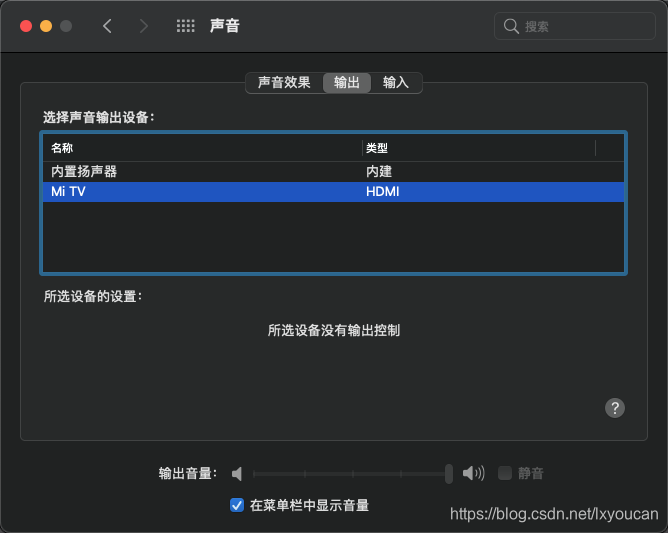
这下HDMI插电视上也有声音啦。以前声音都是从笔记本电视出来的,这下声音舒服多了。
相关文件下载

魔乐社区(Modelers.cn) 是一个中立、公益的人工智能社区,提供人工智能工具、模型、数据的托管、展示与应用协同服务,为人工智能开发及爱好者搭建开放的学习交流平台。社区通过理事会方式运作,由全产业链共同建设、共同运营、共同享有,推动国产AI生态繁荣发展。
更多推荐
 3
3 0
0- 0


 已为社区贡献24条内容

所有评论(0)