vue2保持屏幕缩放比例, 禁止浏览器缩放
·
vue2的书写方式点击:vue2的书写方式
放大500倍数 界面仍然保持不变

缩小25倍数 界面仍然保持不变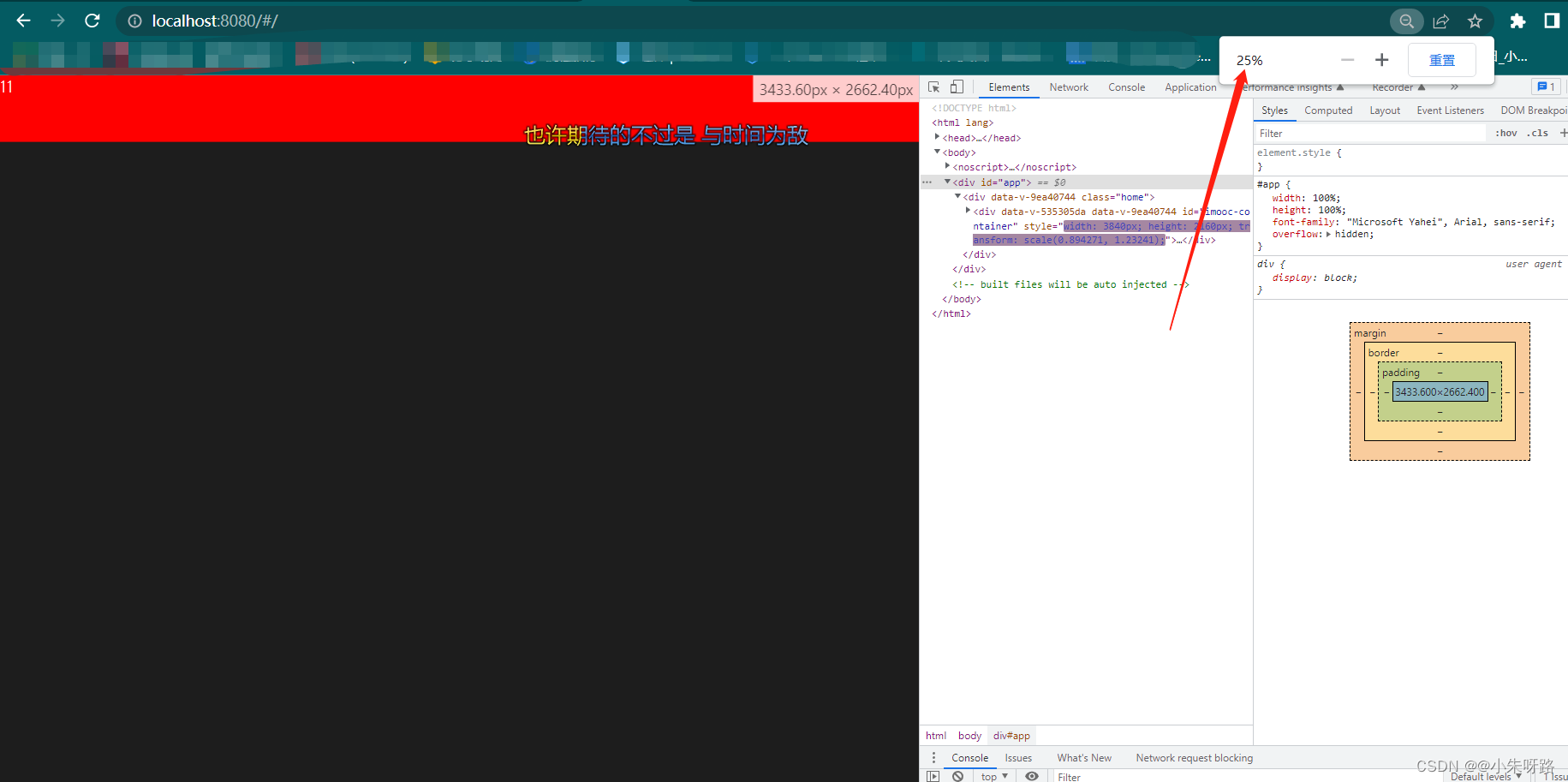
定义一个插槽
<template>
  <div id="imooc-container" ref="refName">
    <slot></slot>
  </div>
</template>

<script>
export default {
  name: "container",
  props: {
    options: Object,
  },
  data() {
    return {
      width: 0,
      height: 0,
      originalWidth: 0,
      originalHeight: 0,
      dom: null,
    };
  },
  methods: {
    // 获取
    initSize() {
      return new Promise((resolve) => {
        this.$nextTick(() => {
          this.dom = this.$refs.refName;
          // 获取大屏的真实尺寸
          if (this.options && this.options.width && this.options.height) {
            this.width = this.options.width;
            this.height = this.options.height;
          } else {
            this.width = this.dom.clientWidth;
            this.height = this.dom.clientHeight;
          }
          // 获取画布尺寸
          if (!this.originalWidth || !this.originalHeight) {
            this.originalWidth = window.screen.width;
            this.originalHeight = window.screen.height;
          }
          console.log(
            this.width,
            this.height,
            this.originalWidth,
            this.originalHeight
          );
          resolve();
        });
      });
    },
    // 赋值宽高
    updateSize() {
      // 如果  上面的init方法的ifelse都不成立  那么使用originalWidth
      if (this.width && this.height) {
        this.dom.style.width = `${this.width}px`;
        this.dom.style.height = `${this.height}px`;
      } else {
        this.dom.style.width = `${this.originalWidth}px`;
        this.dom.style.height = `${this.originalHeight}px`;
      }
    },

    // 赋值缩放
    updateScale() {
      //获取的是body的区域  因为缩放的时候缩放的是body而不是整体的浏览器的大小
      // 获取的是真实的视口尺寸
      const currentWidth = document.body.clientWidth;
      const clientHeight = document.body.clientHeight;
      // 获取大屏的最终的宽高
      //width没有值的时候获取originalWidth的值
      const realWidth = this.width || this.originalWidth;
      const realHeight = this.height || this.originalHeight;
      const widthScale = currentWidth / realWidth;
      const heightScale = clientHeight / realHeight; //6.35
      this.dom &&
        (this.dom.style.transform = `scale(${widthScale},${heightScale})`);
      console.log(realWidth, "realWidth");
      console.log(realHeight, "realHeight");
      console.log(clientHeight, "clientHeight");
      console.log(currentWidth, "currentWidth");
    },
    async onResize() {
      console.log("res");
      await this.initSize();
      this.updateScale();
    },
  },
  async mounted() {
    console.log(this.$refs.refName, "name");
    console.log(this.options, "props");
    await this.initSize();
    this.updateSize();
    this.updateScale();
    window.addEventListener("resize", this.onResize);
  },
};
</script>

<style lang="less" scoped>
#imooc-container {
  position: fixed;
  height: 100%;
  top: 0;
  left: 0;
  overflow: hidden;
  transform-origin: left top;
  z-index: 999;
}
</style>
使用插槽
<template>
  <div class="home">
    <container :options="{ width: 3840, height: 2160 }">
      <div class="fist">11</div>
    </container>
  </div>
</template>

<script>
// @ is an alias to /src
import container from "@/components/container/container.vue";
import { baseURL } from "@/config/env.js";
export default {
  name: "HomeView",
  components: {
    container,
  },
  mounted() {
    console.log(baseURL, "baseURL");
  },
};
</script>
<style lang="less" scoped>
.home {
  position: relative;
  // display: flex;
  // flex-direction: column;
  // align-items: center;
  // justify-content: center;
  width: 100%;
  height: 100%;
  background: rgba(29, 29, 29);
  color: #fff;
  font-size: 48px;
  #imooc-container {
    width: 100%;
    // display: flex;
    // flex-direction: column;
    // align-items: center;
    // justify-content: center;
    .fist {
      width: 100%;
      height: 200px;
      background: red;
    }
  }
}
</style>
App.vue样式
<style lang="scss">
html,
body {
  margin: 0;
  padding: 0;
  width: 100%;
  height: 100%;
}

#app {
  width: 100%;
  height: 100%;
  font-family: "Microsoft Yahei", Arial, sans-serif;
  overflow: hidden;
}
</style>
总结 你的那个路由跳转之后的组件需要保持这个缩放的时候 就使用这个插槽即可
一般在大屏进行使用的比较多

魔乐社区(Modelers.cn) 是一个中立、公益的人工智能社区,提供人工智能工具、模型、数据的托管、展示与应用协同服务,为人工智能开发及爱好者搭建开放的学习交流平台。社区通过理事会方式运作,由全产业链共同建设、共同运营、共同享有,推动国产AI生态繁荣发展。
更多推荐


 0
0 0
0- 0


 已为社区贡献2条内容

所有评论(0)