科大讯飞语音听写在vue2中的使用
·
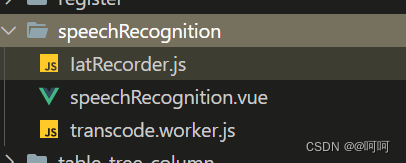
安装 worker-loader版本是2.0.0
vue.config.js的配置如下
chainWebpack:(config)=>{
	config.output.globalObject("this");
},
configureWebpack: (config) => {
	config.module.rules.push({
      test: /\.worker.js$/,
      use: {
        loader: "worker-loader",
        options: { inline: true, name: "workerName.[hash].js" },
      },
    });
}
transcode.worker.js文件
// (function(){
  self.onmessage = function(e){
    transAudioData.transcode(e.data)
  }
  let transAudioData = {
    transcode(audioData) {
      let output = transAudioData.to16kHz(audioData)
      output = transAudioData.to16BitPCM(output)
      output = Array.from(new Uint8Array(output.buffer))
      self.postMessage(output)
      // return output
    },
    to16kHz(audioData) {
      var data = new Float32Array(audioData)
      var fitCount = Math.round(data.length * (16000 / 44100))
      var newData = new Float32Array(fitCount)
      var springFactor = (data.length - 1) / (fitCount - 1)
      newData[0] = data[0]
      for (let i = 1; i < fitCount - 1; i++) {
        var tmp = i * springFactor
        var before = Math.floor(tmp).toFixed()
        var after = Math.ceil(tmp).toFixed()
        var atPoint = tmp - before
        newData[i] = data[before] + (data[after] - data[before]) * atPoint
      }
      newData[fitCount - 1] = data[data.length - 1]
      return newData
    },
    to16BitPCM(input) {
      var dataLength = input.length * (16 / 8)
      var dataBuffer = new ArrayBuffer(dataLength)
      var dataView = new DataView(dataBuffer)
      var offset = 0
      for (var i = 0; i < input.length; i++, offset += 2) {
        var s = Math.max(-1, Math.min(1, input[i]))
        dataView.setInt16(offset, s < 0 ? s * 0x8000 : s * 0x7fff, true)
      }
      return dataView
    },
  }
// })()
crypto-js如有需要安装
IatRecorder.js
import CryptoJS from "crypto-js";
import TransWorker from "@/components/speechRecognition/transcode.worker";
import { getWebsocket } from "@/api/websocket/websocket";
let transWorker = new TransWorker();
//APPID,APISecret,APIKey在控制台-我的应用-语音听写(流式版)页面获取
 const APPID = " "
 const API_SECRET = " "
 const API_KEY = " "

/**
 * 获取websocket url
 * 该接口需要后端提供,这里为了方便前端处理
 */
function getWebSocketUrl() {
  return new Promise((resolve, reject) => {
    // 请求地址根据语种不同变化
    getWebsocket().then((res) => {
      resolve(res.data.data.url);
    });
  });
}
export default class IatRecorder {
  constructor({ language, accent, appId } = {}) {
    let self = this;
    this.status = "null";
    this.language = language || "zh_cn";
    this.accent = accent || "mandarin";
    this.appId = appId || APPID;
    // 记录音频数据
    this.audioData = [];
    // 记录听写结果
    this.resultText = "";
    // wpgs下的听写结果需要中间状态辅助记录
    this.resultTextTemp = "";
    transWorker.onmessage = function (event) {
      self.audioData.push(...event.data);
    };
  }
  // 修改录音听写状态
  setStatus(status) {
    this.onWillStatusChange &&
      this.status !== status &&
      this.onWillStatusChange(this.status, status);
    this.status = status;
  }
  setResultText({ resultText, resultTextTemp } = {}) {
    this.onTextChange && this.onTextChange(resultTextTemp || resultText || "");
    resultText !== undefined && (this.resultText = resultText);
    resultTextTemp !== undefined && (this.resultTextTemp = resultTextTemp);
  }
  // 修改听写参数
  setParams({ language, accent } = {}) {
    language && (this.language = language);
    accent && (this.accent = accent);
  }
  // 连接websocket
  connectWebSocket() {
    return getWebSocketUrl().then((url) => {
      let iatWS;
      if ("WebSocket" in window) {
        iatWS = new WebSocket(url);
      } else if ("MozWebSocket" in window) {
        iatWS = new MozWebSocket(url);
      } else {
        alert("浏览器不支持WebSocket");
        return;
      }
      this.webSocket = iatWS;
      this.setStatus("init");
      iatWS.onopen = (e) => {
        this.setStatus("ing");
        // 重新开始录音
        setTimeout(() => {
          this.webSocketSend();
        }, 500);
      };
      iatWS.onmessage = (e) => {
        this.result(e.data);
      };
      iatWS.onerror = (e) => {
        this.recorderStop();
      };
      iatWS.onclose = (e) => {
        this.recorderStop();
      };
    });
  }
  // 初始化浏览器录音
  recorderInit() {
    navigator.getUserMedia =
      navigator.getUserMedia ||
      navigator.webkitGetUserMedia ||
      navigator.mozGetUserMedia ||
      navigator.msGetUserMedia;

    // 创建音频环境
    try {
      this.audioContext = new (window.AudioContext ||
        window.webkitAudioContext)();
      this.audioContext.resume();
      if (!this.audioContext) {
        alert("浏览器不支持webAudioApi相关接口");
        return;
      }
    } catch (e) {
      if (!this.audioContext) {
        alert("浏览器不支持webAudioApi相关接口");
        return;
      }
    }

    // 获取浏览器录音权限
    if (navigator.mediaDevices && navigator.mediaDevices.getUserMedia) {
      navigator.mediaDevices
        .getUserMedia({
          audio: true,
          video: false,
        })
        .then((stream) => {
          getMediaSuccess(stream);
        })
        .catch((e) => {
          getMediaFail(e);
        });
    } else if (navigator.getUserMedia) {
      navigator.getUserMedia(
        {
          audio: true,
          video: false,
        },
        (stream) => {
          getMediaSuccess(stream);
        },
        function (e) {
          getMediaFail(e);
        }
      );
    } else {
      if (
        navigator.userAgent.toLowerCase().match(/chrome/) &&
        location.origin.indexOf("https://") < 0
      ) {
        alert(
          "chrome下获取浏览器录音功能,因为安全性问题,需要在localhost或127.0.0.1或https下才能获取权限"
        );
      } else {
        alert("无法获取浏览器录音功能,请升级浏览器或使用chrome");
      }
      this.audioContext && this.audioContext.close();
      return;
    }
    // 获取浏览器录音权限成功的回调
    let getMediaSuccess = (stream) => {
      console.log("getMediaSuccess");
      // 创建一个用于通过JavaScript直接处理音频
      this.scriptProcessor = this.audioContext.createScriptProcessor(0, 1, 1);
      this.scriptProcessor.onaudioprocess = (e) => {
        // 去处理音频数据
        if (this.status === "ing") {
          transWorker.postMessage(e.inputBuffer.getChannelData(0));
        }
      };
      // 创建一个新的MediaStreamAudioSourceNode 对象,使来自MediaStream的音频可以被播放和操作
      this.mediaSource = this.audioContext.createMediaStreamSource(stream);
      // 连接
      this.mediaSource.connect(this.scriptProcessor);
      this.scriptProcessor.connect(this.audioContext.destination);
      this.connectWebSocket();
    };

    let getMediaFail = (e) => {
      alert("请求麦克风失败");
      console.log(e);
      this.audioContext && this.audioContext.close();
      this.audioContext = undefined;
      // 关闭websocket
      if (this.webSocket && this.webSocket.readyState === 1) {
        this.webSocket.close();
      }
    };
  }
  recorderStart() {
    if (!this.audioContext) {
      this.recorderInit();
    } else {
      this.audioContext.resume();
      this.connectWebSocket();
    }
  }
  // 暂停录音
  recorderStop() {
    // safari下suspend后再次resume录音内容将是空白,设置safari下不做suspend
    if (
      !(
        /Safari/.test(navigator.userAgent) && !/Chrome/.test(navigator.userAgen)
      )
    ) {
      this.audioContext && this.audioContext.suspend();
    }
    this.setStatus("end");
  }
  // 处理音频数据
  // transAudioData(audioData) {
  //   audioData = transAudioData.transaction(audioData)
  //   this.audioData.push(...audioData)
  // }
  // 对处理后的音频数据进行base64编码,
  toBase64(buffer) {
    var binary = "";
    var bytes = new Uint8Array(buffer);
    var len = bytes.byteLength;
    for (var i = 0; i < len; i++) {
      binary += String.fromCharCode(bytes[i]);
    }
    return window.btoa(binary);
  }
  // 向webSocket发送数据
  webSocketSend() {
    if (this.webSocket.readyState !== 1) {
      return;
    }
    let audioData = this.audioData.splice(0, 1280);
    var params = {
      common: {
        app_id: this.appId,
      },
      business: {
        language: this.language, //小语种可在控制台--语音听写(流式)--方言/语种处添加试用
        domain: "iat",
        accent: this.accent, //中文方言可在控制台--语音听写(流式)--方言/语种处添加试用
        vad_eos: 5000,
        dwa: "wpgs", //为使该功能生效,需到控制台开通动态修正功能(该功能免费)
      },
      data: {
        status: 0,
        format: "audio/L16;rate=16000",
        encoding: "raw",
        audio: this.toBase64(audioData),
      },
    };
    this.webSocket.send(JSON.stringify(params));
    this.handlerInterval = setInterval(() => {
      // websocket未连接
      if (this.webSocket.readyState !== 1) {
        this.audioData = [];
        clearInterval(this.handlerInterval);
        return;
      }
      if (this.audioData.length === 0) {
        if (this.status === "end") {
          this.webSocket.send(
            JSON.stringify({
              data: {
                status: 2,
                format: "audio/L16;rate=16000",
                encoding: "raw",
                audio: "",
              },
            })
          );
          this.audioData = [];
          clearInterval(this.handlerInterval);
        }
        return false;
      }
      audioData = this.audioData.splice(0, 1280);
      // 中间帧
      this.webSocket.send(
        JSON.stringify({
          data: {
            status: 1,
            format: "audio/L16;rate=16000",
            encoding: "raw",
            audio: this.toBase64(audioData),
          },
        })
      );
    }, 40);
  }
  result(resultData) {
    // 识别结束
    let jsonData = JSON.parse(resultData);
    if (jsonData.data && jsonData.data.result) {
      let data = jsonData.data.result;
      let str = "";
      let resultStr = "";
      let ws = data.ws;
      for (let i = 0; i < ws.length; i++) {
        str = str + ws[i].cw[0].w;
      }
      // 开启wpgs会有此字段(前提:在控制台开通动态修正功能)
      // 取值为 "apd"时表示该片结果是追加到前面的最终结果;取值为"rpl" 时表示替换前面的部分结果,替换范围为rg字段
      if (data.pgs) {
        if (data.pgs === "apd") {
          // 将resultTextTemp同步给resultText
          this.setResultText({
            resultText: this.resultTextTemp,
          });
        }
        // 将结果存储在resultTextTemp中
        this.setResultText({
          resultTextTemp: this.resultText + str,
        });
      } else {
        this.setResultText({
          resultText: this.resultText + str,
        });
      }
    }
    if (jsonData.code === 0 && jsonData.data.status === 2) {
      this.webSocket.close();
    }
    if (jsonData.code !== 0) {
      this.webSocket.close();
      console.log(`${jsonData.code}:${jsonData.message}`);
    }
  }
  start() {
    this.recorderStart();
    this.setResultText({ resultText: "", resultTextTemp: "" });
  }
  stop() {
    this.recorderStop();
  }
}
IatRecorder.js
import CryptoJS from "crypto-js";
import TransWorker from "@/components/speechRecognition/transcode.worker";
import { getWebsocket } from "@/api/websocket/websocket";
let transWorker = new TransWorker();
//APPID,APISecret,APIKey在控制台-我的应用-语音听写(流式版)页面获取
// const APPID = appId.APPID
// const API_SECRET = appId.API_SECRET
// const API_KEY = appId.API_KEY
const APPID = "8afcd789";
const API_SECRET = "Y2E4MTE5ODRiYTFhNTA5Yzg5Y2E3NzA0";
const API_KEY = "9d6f9a61713deea63e229714308a4b57";
/**
 * 获取websocket url
 * 该接口需要后端提供,这里为了方便前端处理
 */
function getWebSocketUrl() {
  return new Promise((resolve, reject) => {
    // 请求地址根据语种不同变化
    getWebsocket().then((res) => {
      resolve(res.data.data.url);
    });
  });
}
export default class IatRecorder {
  constructor({ language, accent, appId } = {}) {
    let self = this;
    this.status = "null";
    this.language = language || "zh_cn";
    this.accent = accent || "mandarin";
    this.appId = appId || APPID;
    // 记录音频数据
    this.audioData = [];
    // 记录听写结果
    this.resultText = "";
    // wpgs下的听写结果需要中间状态辅助记录
    this.resultTextTemp = "";
    transWorker.onmessage = function (event) {
      self.audioData.push(...event.data);
    };
  }
  // 修改录音听写状态
  setStatus(status) {
    this.onWillStatusChange &&
      this.status !== status &&
      this.onWillStatusChange(this.status, status);
    this.status = status;
  }
  setResultText({ resultText, resultTextTemp } = {}) {
    this.onTextChange && this.onTextChange(resultTextTemp || resultText || "");
    resultText !== undefined && (this.resultText = resultText);
    resultTextTemp !== undefined && (this.resultTextTemp = resultTextTemp);
  }
  // 修改听写参数
  setParams({ language, accent } = {}) {
    language && (this.language = language);
    accent && (this.accent = accent);
  }
  // 连接websocket
  connectWebSocket() {
    return getWebSocketUrl().then((url) => {
      let iatWS;
      if ("WebSocket" in window) {
        iatWS = new WebSocket(url);
      } else if ("MozWebSocket" in window) {
        iatWS = new MozWebSocket(url);
      } else {
        alert("浏览器不支持WebSocket");
        return;
      }
      this.webSocket = iatWS;
      this.setStatus("init");
      iatWS.onopen = (e) => {
        this.setStatus("ing");
        // 重新开始录音
        setTimeout(() => {
          this.webSocketSend();
        }, 500);
      };
      iatWS.onmessage = (e) => {
        this.result(e.data);
      };
      iatWS.onerror = (e) => {
        this.recorderStop();
      };
      iatWS.onclose = (e) => {
        this.recorderStop();
      };
    });
  }
  // 初始化浏览器录音
  recorderInit() {
    navigator.getUserMedia =
      navigator.getUserMedia ||
      navigator.webkitGetUserMedia ||
      navigator.mozGetUserMedia ||
      navigator.msGetUserMedia;

    // 创建音频环境
    try {
      this.audioContext = new (window.AudioContext ||
        window.webkitAudioContext)();
      this.audioContext.resume();
      if (!this.audioContext) {
        alert("浏览器不支持webAudioApi相关接口");
        return;
      }
    } catch (e) {
      if (!this.audioContext) {
        alert("浏览器不支持webAudioApi相关接口");
        return;
      }
    }

    // 获取浏览器录音权限
    if (navigator.mediaDevices && navigator.mediaDevices.getUserMedia) {
      navigator.mediaDevices
        .getUserMedia({
          audio: true,
          video: false,
        })
        .then((stream) => {
          getMediaSuccess(stream);
        })
        .catch((e) => {
          getMediaFail(e);
        });
    } else if (navigator.getUserMedia) {
      navigator.getUserMedia(
        {
          audio: true,
          video: false,
        },
        (stream) => {
          getMediaSuccess(stream);
        },
        function (e) {
          getMediaFail(e);
        }
      );
    } else {
      if (
        navigator.userAgent.toLowerCase().match(/chrome/) &&
        location.origin.indexOf("https://") < 0
      ) {
        alert(
          "chrome下获取浏览器录音功能,因为安全性问题,需要在localhost或127.0.0.1或https下才能获取权限"
        );
      } else {
        alert("无法获取浏览器录音功能,请升级浏览器或使用chrome");
      }
      this.audioContext && this.audioContext.close();
      return;
    }
    // 获取浏览器录音权限成功的回调
    let getMediaSuccess = (stream) => {
      console.log("getMediaSuccess");
      // 创建一个用于通过JavaScript直接处理音频
      this.scriptProcessor = this.audioContext.createScriptProcessor(0, 1, 1);
      this.scriptProcessor.onaudioprocess = (e) => {
        // 去处理音频数据
        if (this.status === "ing") {
          transWorker.postMessage(e.inputBuffer.getChannelData(0));
        }
      };
      // 创建一个新的MediaStreamAudioSourceNode 对象,使来自MediaStream的音频可以被播放和操作
      this.mediaSource = this.audioContext.createMediaStreamSource(stream);
      // 连接
      this.mediaSource.connect(this.scriptProcessor);
      this.scriptProcessor.connect(this.audioContext.destination);
      this.connectWebSocket();
    };

    let getMediaFail = (e) => {
      alert("请求麦克风失败");
      console.log(e);
      this.audioContext && this.audioContext.close();
      this.audioContext = undefined;
      // 关闭websocket
      if (this.webSocket && this.webSocket.readyState === 1) {
        this.webSocket.close();
      }
    };
  }
  recorderStart() {
    if (!this.audioContext) {
      this.recorderInit();
    } else {
      this.audioContext.resume();
      this.connectWebSocket();
    }
  }
  // 暂停录音
  recorderStop() {
    // safari下suspend后再次resume录音内容将是空白,设置safari下不做suspend
    if (
      !(
        /Safari/.test(navigator.userAgent) && !/Chrome/.test(navigator.userAgen)
      )
    ) {
      this.audioContext && this.audioContext.suspend();
    }
    this.setStatus("end");
  }
  // 处理音频数据
  // transAudioData(audioData) {
  //   audioData = transAudioData.transaction(audioData)
  //   this.audioData.push(...audioData)
  // }
  // 对处理后的音频数据进行base64编码,
  toBase64(buffer) {
    var binary = "";
    var bytes = new Uint8Array(buffer);
    var len = bytes.byteLength;
    for (var i = 0; i < len; i++) {
      binary += String.fromCharCode(bytes[i]);
    }
    return window.btoa(binary);
  }
  // 向webSocket发送数据
  webSocketSend() {
    if (this.webSocket.readyState !== 1) {
      return;
    }
    let audioData = this.audioData.splice(0, 1280);
    var params = {
      common: {
        app_id: this.appId,
      },
      business: {
        language: this.language, //小语种可在控制台--语音听写(流式)--方言/语种处添加试用
        domain: "iat",
        accent: this.accent, //中文方言可在控制台--语音听写(流式)--方言/语种处添加试用
        vad_eos: 5000,
        dwa: "wpgs", //为使该功能生效,需到控制台开通动态修正功能(该功能免费)
      },
      data: {
        status: 0,
        format: "audio/L16;rate=16000",
        encoding: "raw",
        audio: this.toBase64(audioData),
      },
    };
    this.webSocket.send(JSON.stringify(params));
    this.handlerInterval = setInterval(() => {
      // websocket未连接
      if (this.webSocket.readyState !== 1) {
        this.audioData = [];
        clearInterval(this.handlerInterval);
        return;
      }
      if (this.audioData.length === 0) {
        if (this.status === "end") {
          this.webSocket.send(
            JSON.stringify({
              data: {
                status: 2,
                format: "audio/L16;rate=16000",
                encoding: "raw",
                audio: "",
              },
            })
          );
          this.audioData = [];
          clearInterval(this.handlerInterval);
        }
        return false;
      }
      audioData = this.audioData.splice(0, 1280);
      // 中间帧
      this.webSocket.send(
        JSON.stringify({
          data: {
            status: 1,
            format: "audio/L16;rate=16000",
            encoding: "raw",
            audio: this.toBase64(audioData),
          },
        })
      );
    }, 40);
  }
  result(resultData) {
    // 识别结束
    let jsonData = JSON.parse(resultData);
    if (jsonData.data && jsonData.data.result) {
      let data = jsonData.data.result;
      let str = "";
      let resultStr = "";
      let ws = data.ws;
      for (let i = 0; i < ws.length; i++) {
        str = str + ws[i].cw[0].w;
      }
      // 开启wpgs会有此字段(前提:在控制台开通动态修正功能)
      // 取值为 "apd"时表示该片结果是追加到前面的最终结果;取值为"rpl" 时表示替换前面的部分结果,替换范围为rg字段
      if (data.pgs) {
        if (data.pgs === "apd") {
          // 将resultTextTemp同步给resultText
          this.setResultText({
            resultText: this.resultTextTemp,
          });
        }
        // 将结果存储在resultTextTemp中
        this.setResultText({
          resultTextTemp: this.resultText + str,
        });
      } else {
        this.setResultText({
          resultText: this.resultText + str,
        });
      }
    }
    if (jsonData.code === 0 && jsonData.data.status === 2) {
      this.webSocket.close();
    }
    if (jsonData.code !== 0) {
      this.webSocket.close();
    }
  }
  start() {
    this.recorderStart();
    this.setResultText({ resultText: "", resultTextTemp: "" });
  }
  stop() {
    this.recorderStop();
  }
}
speechRecognition.vue
<template>
  <div v-if="isShow">
    <div class="asr-stop-click" @click="onlyCloseModal">
      <div class="asr-dialog" @click.stop="" v-loading="loading">
        <h3>语音识别</h3>
        <div style="text-align: center; align-items: center;">
          <div>
            <div class="animation" v-if="status === 2">
              <div class="animationName"></div>
              <div class="animationName"></div>
              <div class="animationName"></div>
              <div class="animationName"></div>
              <div class="animationName"></div>
            </div>
            <div v-if="status === 1" style="width: 1px; height: 80px"></div>
            <el-button @click="translationStart" type="primary" v-if="status === 1">开始识别
              <span style="font-size: 12px">
                (普通话)
              </span>
            </el-button>
            <el-button @click="translationEnd" type="primary" v-if="status === 2">结束识别</el-button>
          </div>
        </div>
        <div style="text-align: left;padding: 0 30px; line-height: 28px; margin-top: 10px">
          <h4>说明:</h4>
          <p>1.点击开始识别,随后说出您想表达的内容.</p>
          <p>2.完成后点击结束识别,系统会自动帮您将内容填充到表单.</p>
          <p>3.如果识别时间较长,系统需要花费大量时间处理,你可以直接点击页面其他区域返回.</p>
        </div>
      </div>
    </div>
  </div>
</template>
<script>
import IatRecorder from '@/components/speechRecognition/IatRecorder';
const iatRecorder = new IatRecorder()
export default {
  data() {
    return {
      status: 1,
      readyData: '',
      isShow: false,
      loading: false
    };
  },
  methods: {
    init() {
      this.isShow = true
    },
    translationStart() {
      iatRecorder.start();
      this.status = 2
    },
    translationEnd() {
      iatRecorder.onTextChange = (text) => {
        let inputText = text;
        this.readyData = inputText.substring(0, inputText.length - 1); //文字处理,因为不知道为什么识别输出的后面都带‘。’,这个方法是去除字符串最后一位
        this.$emit("onlyClose", this.readyData)
      };
      iatRecorder.stop();
      this.status = 1
      this.isShow = false
    },
    onlyCloseModal() {
     if (this.status === 2) {
        this.translationEnd()
        this.isShow = false
      }else{
        this.isShow = false
      }
    },
  }
};
</script>

<style scoped lang="scss">
.asr-stop-click {
  position: fixed;
  top: 40px;
  right: 0;
  bottom: 0;
  left: 0;
  /*background-color: rgba(211, 207, 207, 0.5);*/
  /*background-color: unset;*/
  width: 100vw;
  height: calc(100vh - 40px);
  z-index: 9999999;
}

.asr-dialog {
  width: 40vw;
  height: 45vh;
  padding: 0 10px;
  background-color: white;
  border-radius: 5px;
  box-shadow: 0 0 20px #bababa;
  position: fixed;
  left: 30vw;
  top: 50vh;
  overflow-y: auto;
}

.asr-content {}

.icon-mkf {
  /*background-color: #3d8b40;*/
  border-radius: 100px;
  width: 70px;
  height: 70px;
  -webkit-user-drag: none;
}

/*css部分  */
.animation {
  /* 父框 */
  width: 100px;
  height: 80px;
  display: flex;
  align-items: center;
  justify-content: center;
  margin: 0 auto;
}

.animation>div:nth-of-type(1) {
  width: 12px;
  height: 20px;
  background-color: #11bac2;
  animation-delay: .4s;
  /*动画延迟  */
}

.animation>div:nth-of-type(2) {
  width: 12px;
  height: 40px;
  background-color: #09c1bc;
  animation-delay: .8s;
}

.animation>div:nth-of-type(3) {
  width: 16px;
  height: 50px;
  background-color: #11bac2;
  animation-delay: .1s;
}

.animation>div:nth-of-type(4) {
  width: 12px;
  height: 40px;
  background-color: #09c1bc;
  animation-delay: .8s;
}

.animation>div:nth-of-type(5) {
  width: 12px;
  height: 20px;
  background-color: #11bac2;
  animation-delay: .4s;
}

.animation>div {
  /* 动画统一属性 */
  margin: 0 2px;
  border-radius: 7px;
  transform: all .7s;
  animation-duration: .8s;
  animation-timing-function: linear;
  animation-iteration-count: infinite;
  animation-direction: alternate;
  animation-play-state: running;
  animation-fill-mode: both;

}

.animationName {
  animation-name: animName;
  /*单独类名方便统一控制动画 */

}

@keyframes animName {

  /* 规则 */
  from {
    transform: scale(0);
  }

  to {
    transform: scale(1);

  }
}
</style>
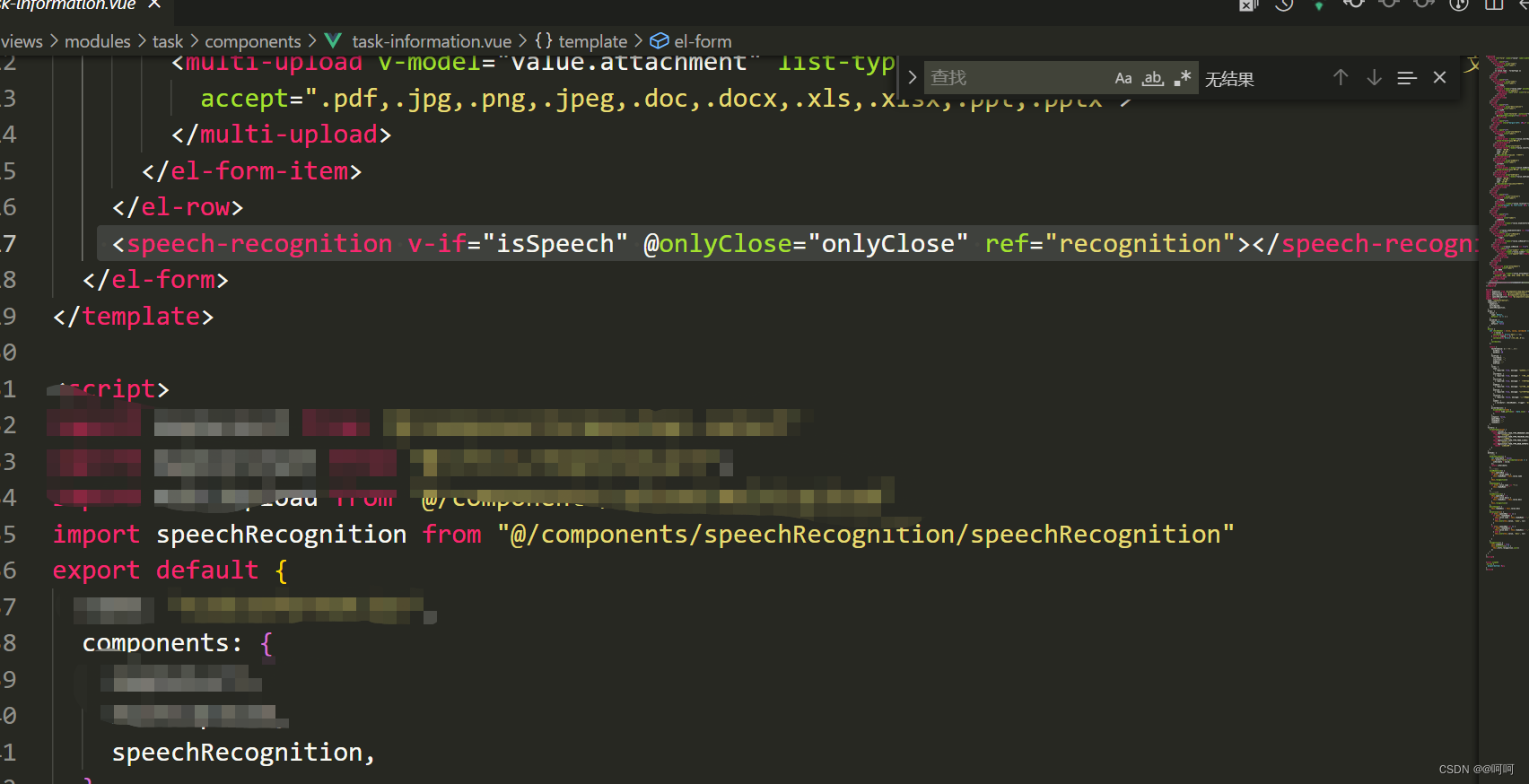
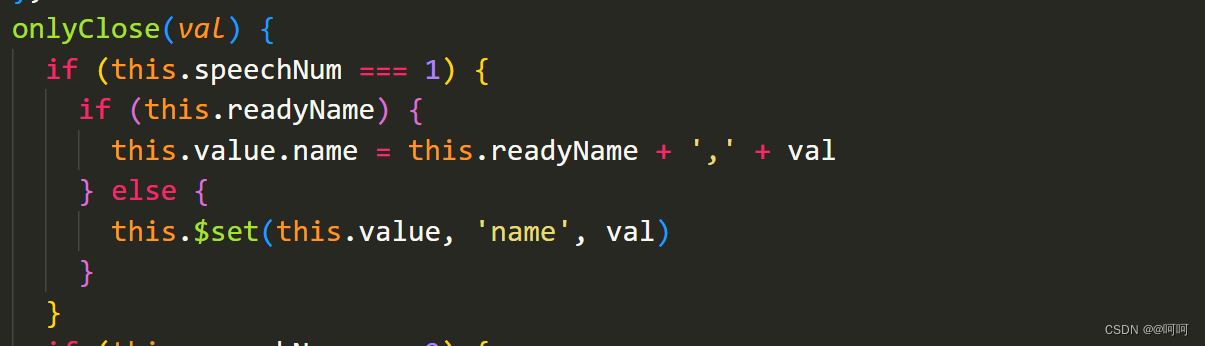
主要代码已经贴出,speechRecognition.vue语音识别的弹窗,做成组件子啊需要的页面引入即可
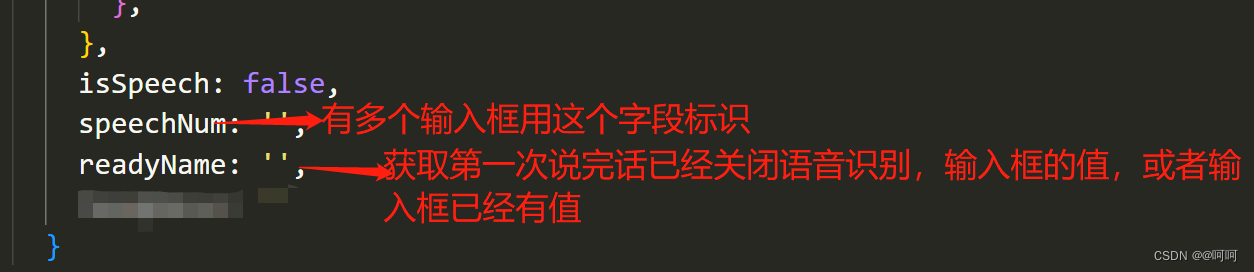
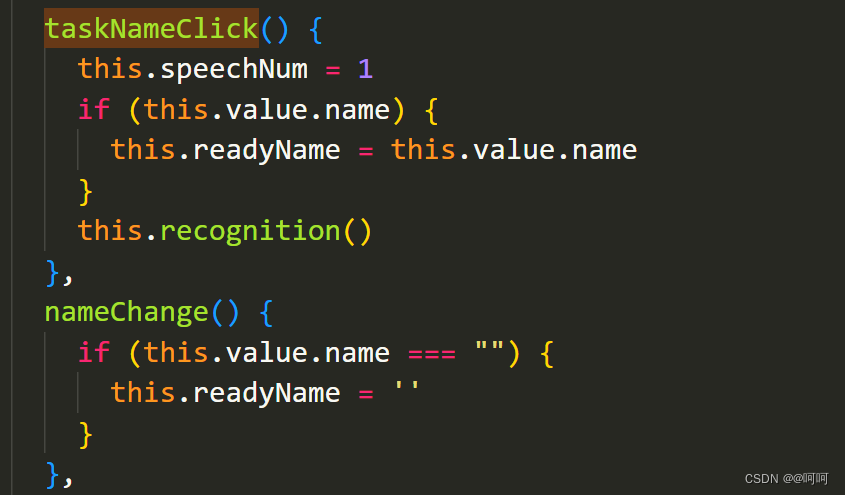
如下


魔乐社区(Modelers.cn) 是一个中立、公益的人工智能社区,提供人工智能工具、模型、数据的托管、展示与应用协同服务,为人工智能开发及爱好者搭建开放的学习交流平台。社区通过理事会方式运作,由全产业链共同建设、共同运营、共同享有,推动国产AI生态繁荣发展。
更多推荐


 0
0 0
0- 0


 已为社区贡献3条内容

所有评论(0)