vue中怎么根据不同的(分屏模式)调整【自定义不同视频布局】?
html:视频布局部分分屏弹窗部分js: 根据获取到的第几个视频,用js来调整video_item,meet_left父元素,videos视频盒子元素的宽高以及位置handleSelect(id){if(id){this.Indexy=id}letaEles=document.getElementsByClassName('video_item')letbEles...
·
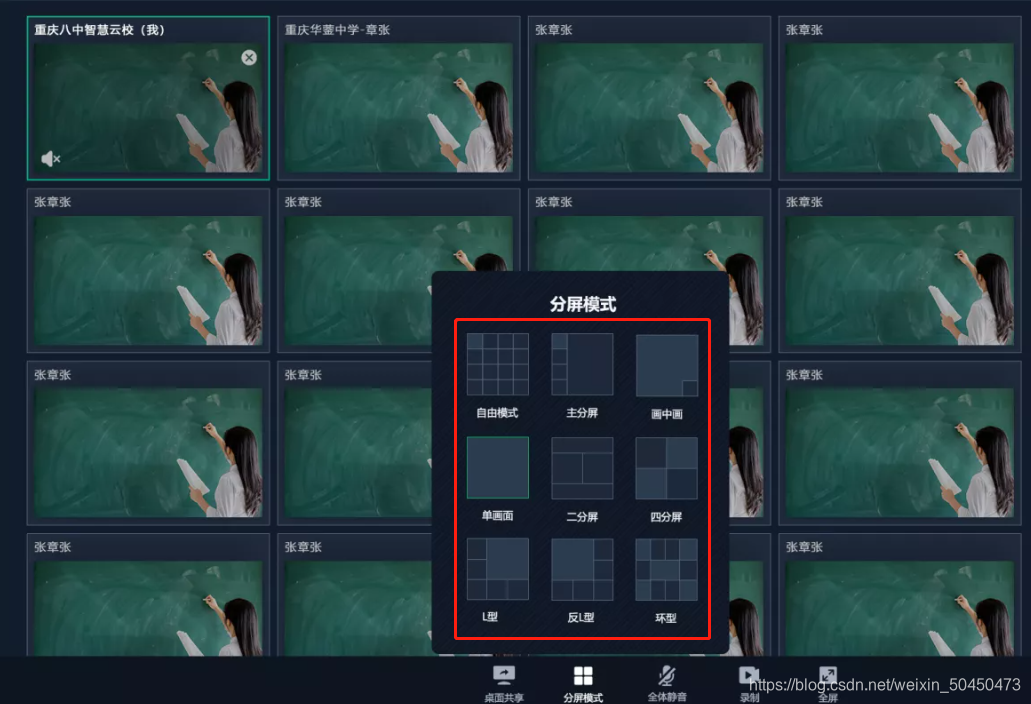
html:
视频布局部分
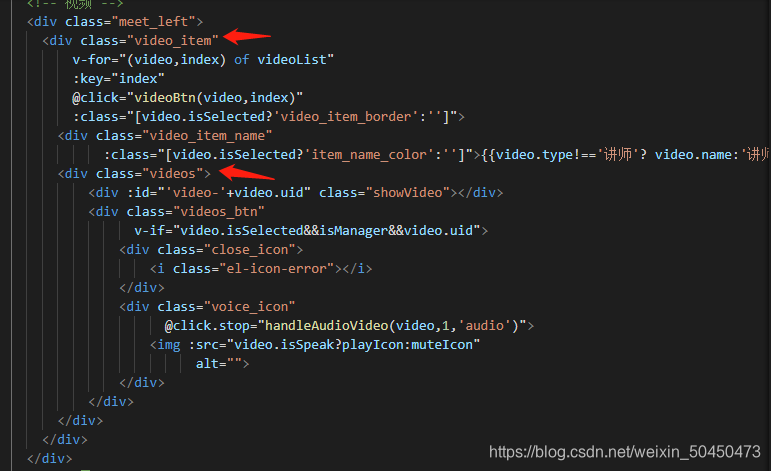
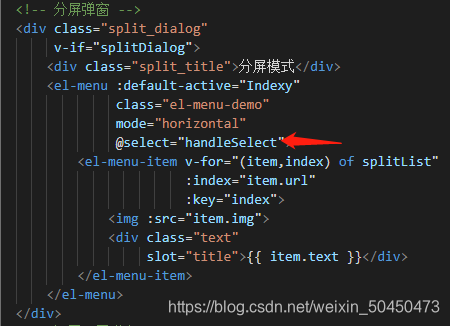
分屏弹窗部分
js: 根据获取到的第几个视频,用js来调整video_item,meet_left父元素,videos视频盒子元素的宽高以及位置
handleSelect (id) {

      if (id) {

        this.Indexy = id

      }

      let aEles = document.getElementsByClassName('video_item')

      let bEles = document.getElementsByClassName('videos')

      let meetLeft = document.getElementsByClassName('meet_left')

      let vEles = meetLeft[0].getElementsByTagName('video')

      let a, b, video

      this.videoList.forEach((item, i) => {

        a = aEles[i] // 视频模块

        b = bEles[i]

        video = vEles[i] // 视频

        if (id === '0' && i < 16) {

          // 自由模式

          a.style.display = ''

          a.style.width = '24.49%'

          a.style.height = '24.7%'

          a.style.float = ''

          b.style.width = '100%'

          b.style.height = '100%'

          if (video) {

            video.style.width = '100%'

            video.style.height = '100%'

          }

          a.style.marginTop = '0%'

          a.style.marginBottom = '0%'

        } else if (id === '1') {

          // 主分屏

          if (i <= 4) {

            a.style.display = ''

            a.style.width = '30%'

            a.style.height = '24.7%'

            b.style.width = '100%'

            b.style.height = '100%'

            if (video) {

              video.style.width = '100%'

              video.style.height = '100%'

            }

            a.style.marginTop = '0%'

            a.style.marginBottom = '.22%'

            a.style.float = 'left'

            if (i === 1) {

              a.style.position = 'inherit'

              a.style.bottom = '0px'

              a.style.right = '0px'

              a.style.float = 'right'

              a.style.height = '100%'

              a.style.width = '68.9%'

              b.style.height = '100%'

              if (video) {

                video.style.height = '100%'

              }

            }

          } else {

            a.style.display = 'none'

          }

        } else if (id === '2') {

          // 画中画

          if (i < 2) {

            a.style.display = ''

            a.style.width = '99.5%'

            a.style.height = '100%'

            b.style.width = '100%'

            b.style.height = '100%'

            if (video) {

              video.style.width = '100%'

              video.style.height = '100%'

            }

            a.style.marginTop = '0%'

            a.style.marginBottom = '0%'

            if (i === 1) {

              a.style.backgroundColor = '#131C2C'

              a.style.width = '25%'

              a.style.height = '30%'

              a.style.position = 'absolute'

              a.style.bottom = '20px'

              a.style.right = '20px'

              b.style.height = '100%'

              if (video) {

                video.style.height = '100%'

              }

            }

          } else {

            a.style.display = 'none'

          }

        } else if (id === '3') {

          // 单画面

          if (i === 0) {

            a.style.display = ''

            a.style.width = '99.5%'

            a.style.height = '100%'

            b.style.width = '100%'

            b.style.height = '100%'

            if (video) {

              video.style.width = '100%'

              video.style.height = '100%'

            }

            a.style.marginTop = '0%'

            a.style.marginBottom = '0%'

          } else {

            a.style.display = 'none'

          }

        } else if (id === '4') {

          // 二分屏

          if (i < 2) {

            a.style.display = ''

            a.style.width = '49.49%'

            a.style.height = '60%'

            a.style.marginTop = '10%'

            a.style.marginBottom = '20%'

            b.style.width = '100%'

            b.style.height = '100%'

            if (video) {

              video.style.width = '100%'

              video.style.height = '100%'

            }

            if (i === 1) {

              a.style.position = 'inherit'

              a.style.bottom = '0px'

              a.style.right = '0px'

              a.style.float = 'inherit'

            }

          } else {

            a.style.display = 'none'

          }

        } else if (id === '5') {

          // 四分屏

          if (i < 4) {

            a.style.display = ''

            a.style.width = '49.49%'

            a.style.height = '49.6%'

            b.style.width = '100%'

            b.style.height = '100%'

            if (video) {

              video.style.width = '100%'

              video.style.height = '100%'

            }

            a.style.marginTop = '0%'

            a.style.marginBottom = '.2%'

            if (i === 1) {

              a.style.position = 'inherit'

              a.style.bottom = '0px'

              a.style.right = '0px'

              a.style.float = 'inherit'

            }

          } else {

            a.style.display = 'none'

          }

        } else if (id === '6') {

          // L型

          if (i < 6) {

            a.style.display = ''

            a.style.width = '32.8%'

            a.style.height = '33%'

            b.style.width = '100%'

            b.style.height = '100%'

            if (video) {

              video.style.width = '100%'

              video.style.height = '100%'

            }

            a.style.marginTop = '0%'

            a.style.marginBottom = '.2%'

            a.style.float = 'left'

            if (i === 1) {

              a.style.position = 'inherit'

              a.style.bottom = '0px'

              a.style.right = '0px'

              a.style.float = 'right'

              a.style.height = '66.4%'

              a.style.width = '66.16%'

              b.style.height = '100%'

              if (video) {

                video.style.height = '100%'

              }

            }

          } else {

            a.style.display = 'none'

          }

        } else if (id === '7') {

          // 反L型

          if (i < 6) {

            a.style.display = ''

            a.style.width = '32.8%'

            a.style.height = '33%'

            b.style.width = '100%'

            b.style.height = '100%'

            if (video) {

              video.style.width = '100%'

              video.style.height = '100%'

            }

            a.style.marginTop = '0%'

            a.style.marginBottom = '.2%'

            a.style.float = 'right'

            if (i === 0) {

              a.style.height = '66.4%'

              a.style.width = '66.16%'

              b.style.height = '100%'

              if (video) {

                video.style.height = '100%'

              }

              a.style.float = 'left'

            }

            if (i === 1) {

              a.style.position = 'inherit'

              a.style.bottom = '0px'

              a.style.right = '0px'

            }

          } else {

            a.style.display = 'none'

          }

        } else if (id === '8') {

          // 环型

          if (i < 11) {

            a.style.display = ''

            a.style.width = '24.49%'

            a.style.height = '33.1%'

            b.style.width = '100%'

            b.style.height = '100%'

            if (video) {

              video.style.width = '100%'

              video.style.height = '100%'

            }

            a.style.marginTop = '0%'

            a.style.marginBottom = '0%'

            if (i === 1) {

              a.style.position = 'inherit'

              a.style.bottom = '0px'

              a.style.right = '0px'

              a.style.float = 'inherit'

            } else if (i === 5) {

              a.style.width = '49.49%'

            }

          } else {

            a.style.display = 'none'

          }

        }

      })

  }
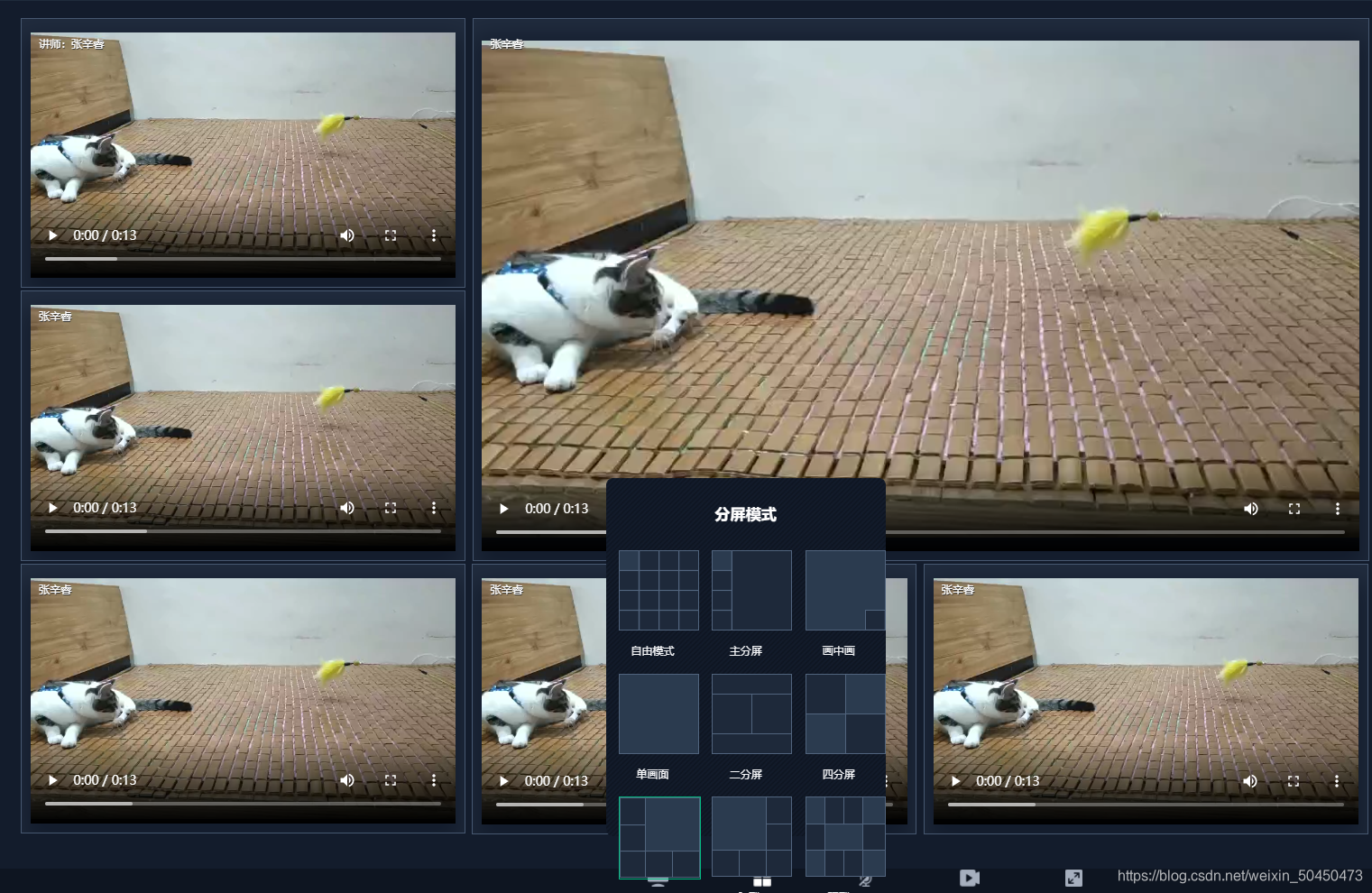
切换之后如下图所示:
希望我的愚见能够帮助你哦~,若有不足之处,还望指出,你们有更好的解决方法,欢迎大家在评论区下方留言支持,大家一起相互学习参考呀~

魔乐社区(Modelers.cn) 是一个中立、公益的人工智能社区,提供人工智能工具、模型、数据的托管、展示与应用协同服务,为人工智能开发及爱好者搭建开放的学习交流平台。社区通过理事会方式运作,由全产业链共同建设、共同运营、共同享有,推动国产AI生态繁荣发展。
更多推荐


 4
4 0
0- 0


 已为社区贡献3条内容

所有评论(0)