vue3+ts中 vuex-table 实现表单的拖拽功能
·
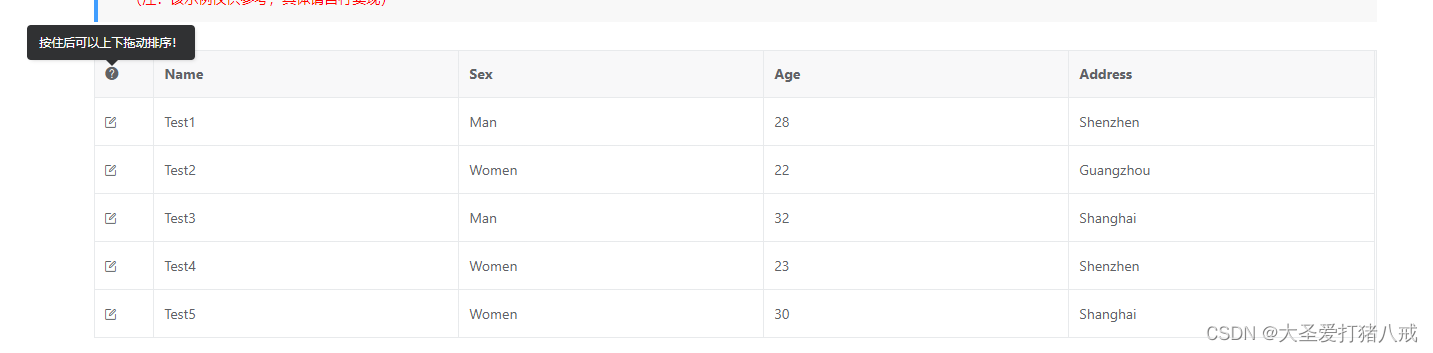
一。前置机条件:
1.1 下载SortableJS:
1.1.1 npm下载:
npm install sortablejs --save
1.1.2 官网地址:
1.2 下载 vuex-table:
1.2.1 npm下载:
npm install xe-utils vxe-table
1.2.2 main.ts引用
import { createApp } from 'vue'
import 'xe-utils'
import VXETable from 'vxe-table'
import 'vxe-table/lib/style.css'
createApp(App).use(VXETable).mount('#app')
1.2.3 github地址:
1.2.4 开发指南:
二。vuex-table 实现表单的拖拽功能
2.1 代码如下:
<template>
  <page-container :title="$route.meta.title">
    <a-card :title="$route.params.layoutName">
      <a-row :gutter="20">
        <a-col>图片添加</a-col>
        <a-col flex="1">
          <a-space direction="vertical" style="width: 100%">
            <a-button type="primary" @click="showModel">添加</a-button>
            <vxe-table
              ref="layoutTable"
              border
              class="sortable-row-demo"
              :row-config="{ useKey: true }"
              :scroll-y="{ enabled: false }"
              :data="tableData"
            >
              <vxe-column width="60">
                <template #default>
                  <span class="drag-btn">
                    <icon-font type="icon-plus"></icon-font>
                  </span>
                </template>
                <template #header>拖拽</template>
              </vxe-column>
              <vxe-column field="name" title="图片">
                <template #default="{ row }">
                  <a-image :width="50" :preview="false" :src="row.url" />
                </template>
              </vxe-column>
              <vxe-column field="title" title="图片名称"></vxe-column>
              <vxe-column field="address" title="跳转链接"></vxe-column>

              <vxe-column title="操作" width="250">
                <template #default="{ row }">
                  <a-space>
                    <a-button type="link" @click="showModel">编辑</a-button>
                    <a-button type="link" @click="deleteLayout">删除</a-button>
                  </a-space>
                </template>
              </vxe-column>
            </vxe-table>
            <a-space>
              <a-button type="primary">保存</a-button>
              <a-button>取消</a-button>
            </a-space>
          </a-space>
        </a-col>
      </a-row>
    </a-card>
  </page-container>
</template>
<script lang="ts" setup>
import Sortable from 'sortablejs';
import { IconFont } from '@/components/icon-font/IconFont';
const layoutTable = ref();
const tableData = ref<any>([
  { url: '', title: '名称1', type: '1' },
  { url: '', title: '名称2', type: '2' },
  { url: '', title: '名称3', type: '3' },
]); //table信息

//添加或编辑弹窗
const showModel = () => {};
// 删除
const deleteLayout = () => {

};

let sortableLayout: any;
const rowDrop = () => {
  const $table = layoutTable.value;
  sortableLayout = Sortable.create(
    $table.$el.querySelector('.body--wrapper>.vxe-table--body tbody'),
    {
      handle: '.drag-btn',
      onEnd: (sortableEvent: any) => {
        const newIndex = sortableEvent.newIndex as number;
        const oldIndex = sortableEvent.oldIndex as number;
        const currRow = tableData.value.splice(oldIndex, 1)[0];
        tableData.value.splice(newIndex, 0, currRow);
      },
    },
  );
};

let initTime: any;
nextTick(() => {
  // 加载完成之后在绑定拖动事件
  initTime = setTimeout(() => {
    rowDrop();
  }, 500);
});

onUnmounted(() => {
  clearTimeout(initTime);
  if (sortableLayout) {
    sortableLayout.destroy();
  }
});
</script>
2.2 vuex-table 集成第三方库地址:

魔乐社区(Modelers.cn) 是一个中立、公益的人工智能社区,提供人工智能工具、模型、数据的托管、展示与应用协同服务,为人工智能开发及爱好者搭建开放的学习交流平台。社区通过理事会方式运作,由全产业链共同建设、共同运营、共同享有,推动国产AI生态繁荣发展。
更多推荐


 0
 0
- 0


 已为社区贡献1条内容

所有评论(0)