Fabric学习(三)----搭建一个生产网络
在完成前面的概念和架构的学习之后,在本节中更加的注重实战,将会一步步的搭建一个真实的生产网络。more。
Fabric官方文档:https://hyperledger-fabric.readthedocs.io/en/release-2.2/
0.前言
在完成前面的概念和架构的学习之后,在本节中更加的注重实战,将会一步步的搭建一个真实的生产网络。
1.使用 cryptogen 创建证书文件
1.1准备工作
首先我们别忘记把上一节中的fabric网络都关掉,然后在合适的地方新建文件夹来完成我们的网络搭建。
./network.sh down
mkdir myfabric
cd myfabric
首先,我们要使用CA来创建身份,这里我们使用官方文档中提供的命令cryptogen,它共有5个子命令。
- help
- generate
- showtemplate
- extend
- version
1.2 创建模板
我们可以showtemplate命令来创建一个配置模板。
cryptogen showtemplate > crypto-config.yaml
注意:在使用此命令之前,我们要确保fabric-samples里面的bin目录已经加载到环境目录下了哦!
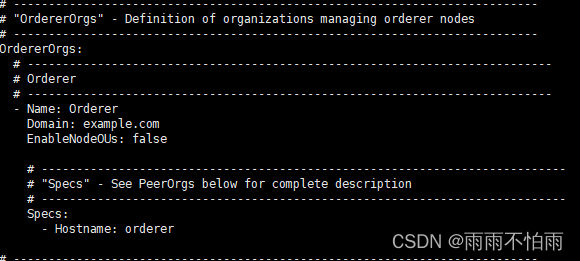
使用VIM命令打开后 ,以下图片包括排序节点的相关配置信息,有名字、domain(根域名,排序节点组织的根域名,在实际开发环境中需要使用真实已经备案的域名,测试环境下自己随便起就可以)、是否配置 OU(OU为组织单元,可以简单理解是一个组织中特殊的一群人,如果不配置,那么MSP中的所有身份(由根 CA 和中间 CA 文件夹指出)都会被认为是组织的成员)。这里将false修改成true。
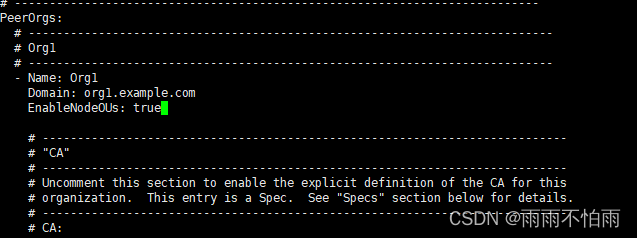
同样的,在底下还有peer节点的相关配置信息,我们同样修改ou为true。
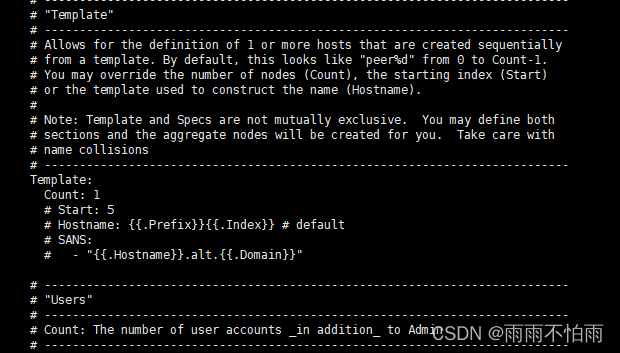
这里的template里面,count表示组织下共有几个节点,我们这里选择一个节点。
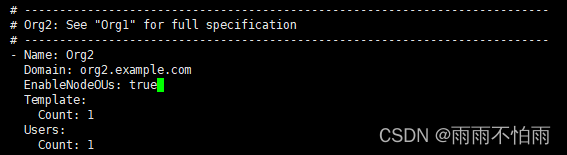
最底下还有组织2的相关信息,我们这里也是将OU修改为true开启状态。
1.3 根据配置生成证书文件
我们使用 crypotogen里面的生成命令,可以看到命令输入格式,我们按要求输入命令。
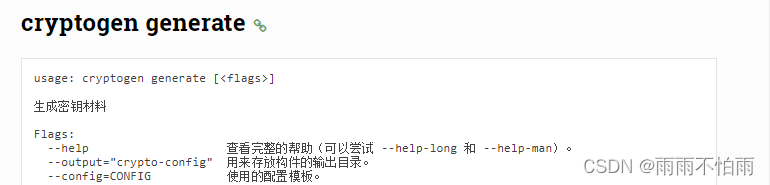
cryptogen generate --config=crypto-config.yaml
生成后 我们可以查看目录结构,生成了配置文件中指定的证书。
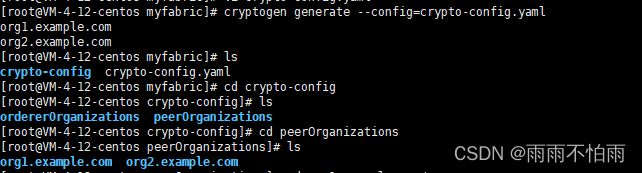
2.创建通道
我们使用fabric-samples里面的configtx.yaml 模型来进行通道构建。
2.1复制configtx.yaml
使用cp命令将configtx.yaml复制到当前文件夹下:
cp ../fabric-samples/test-network/configtx/configtx.yaml ./
然后我们修改配置文件:
将所有的mspdir修改为正确的路径:

raft相关的路径也要修改

**注意:**2.3版本后,最后的 Profile会有点不同。如果前面配置的节点信息中,domain不是默认的example.com,则还需修改host的值。
2.2使用configtxgen生成通道和创世块
我们可以看到configtxgen命令的用法:
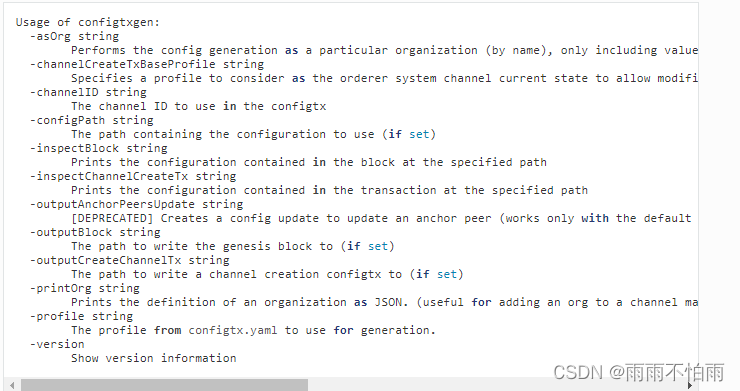
使用如下命令来创建通道:
//创建创世块
configtxgen -profile TwoOrgsOrdererGenesis -outputBlock ./channel-artifacts/genesis.block -channelID fabric-channel
//创建通道
configtxgen -profile TwoOrgsChannel -outputCreateChannelTx ./channel-artifacts/channel.tx -channelID mychannel

//创建锚节点
configtxgen -profile TwoOrgsChannel -outputAnchorPeersUpdate ./channel-artifacts/Org1MSPanchors.tx -channelID mychannel -asOrg Org1MSP
configtxgen -profile TwoOrgsChannel -outputAnchorPeersUpdate ./channel-artifacts/Org2MSPanchors.tx -channelID mychannel -asOrg Org2MSP
创建后,可以查看目录信息,我们创建了创世块和通道。

**注意:**如果出现Error on inspectChannelCreateTx: org ‘Org1MSP’ does not have any anchor peers defined报错,需要重新配置刚才的配置文件,在其中加入:
    AnchorPeers:
        - Host: peer0.org2.yucoding.club
          Port: 7051
3.配置部署对等节点和排序节点
3.1 节点运行环境:docker
对等节点和排序节点都是运行在docker容器中的,所以我们想启动节点的话,就需要docker。我们可以先上docker官网,看看fabric-peer镜像中启动节点的介绍。
进入docker官网 https://hub.docker.com/搜索hyperledger项目,找到fabric-peer,里面有很详尽的介绍,我们一起看看有三点是必须的:
- core.yaml是必须的
- msp文件相关配置
- tls相关配置(如果有配置的话)
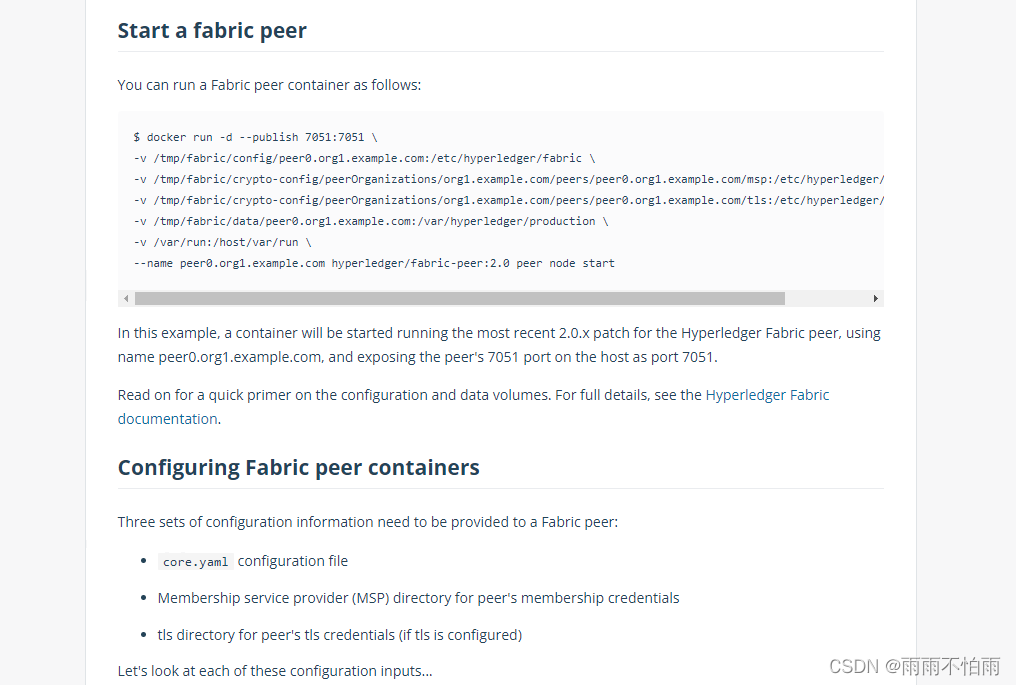
首先要搞定必须的core.yaml。查看官网后,幸运的发现core.yaml是fabric内置的,有一个默认值,如果我们没有特殊需求的话,不需要额外进行core.yaml配置的编写,具体文件内容和配置解析可以查看以下网站:
https://github.com/hyperledger/fabric/blob/main/sampleconfig/core.yaml
**注意,**如果不想使用默认的core.yaml进行节点的部署。就需要在启动节点时,编写docker启动的配置文件来覆盖一部分默认定义。具体定义的方式如下:
- 使用所有大写字母、相关短语之间的下划线和前缀,从core.yaml文件中的参数推断环境变量。例如,对等配置变量称为
peer.localMSPid(它是localMSPid内侧可变peer结构部分)在core.yaml将被呈现为所谓的环境变量CORE_PEER_LOCALMSPID,而订购服务环境变量General.LocalMSPID在General所述的部分orderer.yaml的配置文件将被呈现为所谓的环境变量ORDERER_GENERAL_LOCALMSPID。
3.2 编写部署代码
我们直接基于官方提供的fabric-samples里面的yaml文件进行修改,文件链接如下:
https://github.com/hyperledger/fabric-samples/blob/main/test-network/docker/docker-compose-test-net.yaml
修改好后的代码如下:
# Copyright IBM Corp. All Rights Reserved.
#
# SPDX-License-Identifier: Apache-2.0
#

version: '2'

volumes:
  orderer.yucoding.club:
  peer0.org1.yucoding.club:
  peer0.org2.yucoding.club:
  cli1:
  cli2:


networks: # 节点所属的网络
  yzy_test:


services:
  orderer.yucoding.club:
    container_name: orderer.yucoding.club
    image: hyperledger/fabric-orderer:latest
    environment:
      - FABRIC_LOGGING_SPEC=INFO
      - ORDERER_GENERAL_LISTENADDRESS=0.0.0.0
      - ORDERER_GENERAL_LISTENPORT=7050
      - ORDERER_GENERAL_GENESISMETHOD=file
      - ORDERER_GENERAL_GENESISFILE=/var/hyperledger/orderer/orderer.genesis.block
      - ORDERER_GENERAL_LOCALMSPID=OrdererMSP
      - ORDERER_GENERAL_LOCALMSPDIR=/var/hyperledger/orderer/msp
      # enabled TLS
      - ORDERER_GENERAL_TLS_ENABLED=true
      - ORDERER_GENERAL_TLS_PRIVATEKEY=/var/hyperledger/orderer/tls/server.key
      - ORDERER_GENERAL_TLS_CERTIFICATE=/var/hyperledger/orderer/tls/server.crt
      - ORDERER_GENERAL_TLS_ROOTCAS=[/var/hyperledger/orderer/tls/ca.crt]
      - ORDERER_KAFKA_TOPIC_REPLICATIONFACTOR=1
      - ORDERER_KAFKA_VERBOSE=true
      - ORDERER_GENERAL_CLUSTER_CLIENTCERTIFICATE=/var/hyperledger/orderer/tls/server.crt
      - ORDERER_GENERAL_CLUSTER_CLIENTPRIVATEKEY=/var/hyperledger/orderer/tls/server.key
      - ORDERER_GENERAL_CLUSTER_ROOTCAS=[/var/hyperledger/orderer/tls/ca.crt]
      - ORDERER_ADMIN_LISTENADDRESS=0.0.0.0:7053
    working_dir: /opt/gopath/src/github.com/hyperledger/fabric
    command: orderer
    volumes:
        - ./channel-artifacts/genesis.block:/var/hyperledger/orderer/orderer.genesis.block
        - ./crypto-config/ordererOrganizations/yucoding.club/orderers/orderer.yucoding.club/msp:/var/hyperledger/orderer/msp
        - ./crypto-config/ordererOrganizations/yucoding.club/orderers/orderer.yucoding.club/tls/:/var/hyperledger/orderer/tls
        - orderer.yucoding.club:/var/hyperledger/production/orderer     #卷标挂载
    ports:
      - 7050:7050
      - 7053:7053
    networks:
      - yzy_test

  peer0.org1.yucoding.club:
    container_name: peer0.org1.yucoding.club
    image: hyperledger/fabric-peer:latest
    environment:
      #Generic peer variables
      - CORE_VM_ENDPOINT=unix:///host/var/run/docker.sock
      # the following setting starts chaincode containers on the same
      # bridge network as the peers
      # https://docs.docker.com/compose/networking/
      - CORE_VM_DOCKER_HOSTCONFIG_NETWORKMODE=yzy_test
      - FABRIC_LOGGING_SPEC=INFO
      #- FABRIC_LOGGING_SPEC=DEBUG
      - CORE_PEER_TLS_ENABLED=true
      - CORE_PEER_PROFILE_ENABLED=true
      - CORE_PEER_TLS_CERT_FILE=/etc/hyperledger/fabric/tls/server.crt
      - CORE_PEER_TLS_KEY_FILE=/etc/hyperledger/fabric/tls/server.key
      - CORE_PEER_TLS_ROOTCERT_FILE=/etc/hyperledger/fabric/tls/ca.crt
      # Peer specific variabes
      - CORE_PEER_ID=peer0.org1.yucoding.club
      - CORE_PEER_ADDRESS=peer0.org1.yucoding.club:7051
      - CORE_PEER_LISTENADDRESS=0.0.0.0:7051
      - CORE_PEER_CHAINCODEADDRESS=peer0.org1.yucoding.club:7052
      - CORE_PEER_CHAINCODELISTENADDRESS=0.0.0.0:7052
      - CORE_PEER_GOSSIP_BOOTSTRAP=peer0.org1.yucoding.club:7051
      - CORE_PEER_GOSSIP_EXTERNALENDPOINT=peer0.org1.yucoding.club:7051
      - CORE_PEER_LOCALMSPID=Org1MSP
    volumes:
      - /var/run/docker.sock:/host/var/run/docker.sock
      - ./crypto-config/peerOrganizations/org1.yucoding.club/peers/peer0.org1.yucoding.club/msp:/etc/hyperledger/fabric/msp
      - ./crypto-config/peerOrganizations/org1.yucoding.club/peers/peer0.org1.yucoding.club/tls:/etc/hyperledger/fabric/tls
      - peer0.org1.yucoding.club:/var/hyperledger/production
    working_dir: /opt/gopath/src/github.com/hyperledger/fabric/peer
    command: peer node start
    ports:
      - 7051:7051
    networks:
      - yzy_test


  peer0.org2.yucoding.club:
    container_name: peer0.org2.yucoding.club
    image: hyperledger/fabric-peer:latest
    environment:
      #Generic peer variables
      - CORE_VM_ENDPOINT=unix:///host/var/run/docker.sock
      # the following setting starts chaincode containers on the same
      # bridge network as the peers
      # https://docs.docker.com/compose/networking/
      - CORE_VM_DOCKER_HOSTCONFIG_NETWORKMODE=yzy_test
      - FABRIC_LOGGING_SPEC=INFO
      #- FABRIC_LOGGING_SPEC=DEBUG
      - CORE_PEER_TLS_ENABLED=true
      - CORE_PEER_PROFILE_ENABLED=true
      - CORE_PEER_TLS_CERT_FILE=/etc/hyperledger/fabric/tls/server.crt
      - CORE_PEER_TLS_KEY_FILE=/etc/hyperledger/fabric/tls/server.key
      - CORE_PEER_TLS_ROOTCERT_FILE=/etc/hyperledger/fabric/tls/ca.crt
      # Peer specific variabes
      - CORE_PEER_ID=peer0.org2.yucoding.club
      - CORE_PEER_ADDRESS=peer0.org2.yucoding.club:7051
      - CORE_PEER_LISTENADDRESS=0.0.0.0:7051
      - CORE_PEER_CHAINCODEADDRESS=peer0.org2.yucoding.club:7052
      - CORE_PEER_CHAINCODELISTENADDRESS=0.0.0.0:7052
      - CORE_PEER_GOSSIP_BOOTSTRAP=peer0.org2.yucoding.club:7051
      - CORE_PEER_GOSSIP_EXTERNALENDPOINT=peer0.org2.yucoding.club:7051
      - CORE_PEER_LOCALMSPID=Org2MSP
    volumes:
      - /var/run/docker.sock:/host/var/run/docker.sock
      - ./crypto-config/peerOrganizations/org2.yucoding.club/peers/peer0.org2.yucoding.club/msp:/etc/hyperledger/fabric/msp
      - ./crypto-config/peerOrganizations/org2.yucoding.club/peers/peer0.org2.yucoding.club/tls:/etc/hyperledger/fabric/tls
      - peer0.org2.yucoding.club:/var/hyperledger/production
    working_dir: /opt/gopath/src/github.com/hyperledger/fabric/peer
    command: peer node start
    ports:
      - 9051:9051
    networks:
      - yzy_test


  # 配置两个客户端节点1
  cli1:
    container_name: cli1
    image: hyperledger/fabric-tools:latest
    tty: true
    stdin_open: true
    environment:
      - GOPATH=/opt/gopath
      - CORE_VM_ENDPOINT=unix:///host/var/run/docker.sock
      - FABRIC_LOGGING_SPEC=INFO
      - CORE_PEER_ADDRESS=peer0.org1.yucoding.club:7051
      - CORE_PEER_TLS_ENABLED=true
      - CORE_PEER_LOCALMSPID="Org1MSP"
      # 根目录证书
      - CORE_PEER_TLS_ROOTCERT_FILE=/opt/gopath/src/github.com/hyperledger/fabric/peer/crypto/peerOrganizations/org1.yucoding.club/peers/peer0.yucoding.club/tls/ca.crt

      # 指定当前客户端的身份,用户的证书
      - CORE_PEER_MSPCONFIGPATH=/opt/gopath/src/github.com/hyperledger/fabric/peer/crypto/peerOrganizations/org1.yucoding.club/users/Admin@yucoding.club/msp
        # 私钥文件
      - CORE_PEER_TLS_KEY_FILE=/opt/gopath/src/github.com/hyperledger/fabric/peer/crypto/peerOrganizations/org1.yucoding.club/peers/peer0.yucoding.club/tls/server.key
        # 证书文件 这些文件对应的是客户端要连接peer节点的证书目录
      - CORE_PEER_TLS_CERT_FILE=/opt/gopath/src/github.com/hyperledger/fabric/peer/crypto/peerOrganizations/org1.yucoding.club/peers/peer0.yucoding.club/tls/server.crt

      # - FABRIC_LOGGING_SPEC=DEBUG
    working_dir: /opt/gopath/src/github.com/hyperledger/fabric/peer
    command: /bin/bash
    volumes:
      - /var/run/:/host/var/run/
      - ./chaincode:/opt/gopath/src/github.com/chaincode
      - ./crypto-config:/opt/gopath/src/github.com/hyperledger/fabric/peer/crypto/
      - ./channel-artifacts:/opt/gopath/src/github.com/hyperledger/fabric/peer/channel-artifacts
    depends_on:
      - peer0.org1.yucoding.club
    networks:
      - yzy_test
  # 配置两个客户端节点2

  cli2:
    container_name: cli2
    image: hyperledger/fabric-tools:latest
    tty: true
    stdin_open: true
    environment:
      - GOPATH=/opt/gopath
      - CORE_VM_ENDPOINT=unix:///host/var/run/docker.sock
      - FABRIC_LOGGING_SPEC=INFO
      - CORE_PEER_ADDRESS=peer0.org2.yucoding.club:9051
      - CORE_PEER_TLS_ENABLED=true
      - CORE_PEER_LOCALMSPID="Org2MSP"
      # 根目录证书
      - CORE_PEER_TLS_ROOTCERT_FILE=/opt/gopath/src/github.com/hyperledger/fabric/peer/crypto/peerOrganizations/org2.yucoding.club/peers/peer0.yucoding.club/tls/ca.crt

      # 指定当前客户端的身份,用户的证书
      - CORE_PEER_MSPCONFIGPATH=/opt/gopath/src/github.com/hyperledger/fabric/peer/crypto/peerOrganizations/org2.yucoding.club/users/Admin@yucoding.club/msp
        # 私钥文件
      - CORE_PEER_TLS_KEY_FILE=/opt/gopath/src/github.com/hyperledger/fabric/peer/crypto/peerOrganizations/org2.yucoding.club/peers/peer0.yucoding.club/tls/server.key
        # 证书文件 这些文件对应的是客户端要连接peer节点的证书目录
      - CORE_PEER_TLS_CERT_FILE=/opt/gopath/src/github.com/hyperledger/fabric/peer/crypto/peerOrganizations/org2.yucoding.club/peers/peer0.yucoding.club/tls/server.crt

      #- FABRIC_LOGGING_SPEC=DEBUG
    working_dir: /opt/gopath/src/github.com/hyperledger/fabric/peer
    command: /bin/bash
    volumes:
      - /var/run/:/host/var/run/
      - ./chaincode:/opt/gopath/src/github.com/chaincode
      - ./crypto-config:/opt/gopath/src/github.com/hyperledger/fabric/peer/crypto/
      - ./channel-artifacts:/opt/gopath/src/github.com/hyperledger/fabric/peer/channel-artifacts
    depends_on:
      - peer0.org2.yucoding.club
    networks:
      - yzy_test
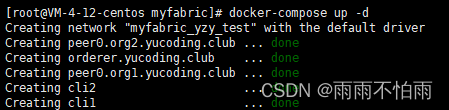
运行
docker-compose up -d
看到运行成功

魔乐社区(Modelers.cn) 是一个中立、公益的人工智能社区,提供人工智能工具、模型、数据的托管、展示与应用协同服务,为人工智能开发及爱好者搭建开放的学习交流平台。社区通过理事会方式运作,由全产业链共同建设、共同运营、共同享有,推动国产AI生态繁荣发展。
更多推荐

 0
0 0
0- 0


 已为社区贡献1条内容

所有评论(0)