nwjs自动更新 node-webkit-updater
·
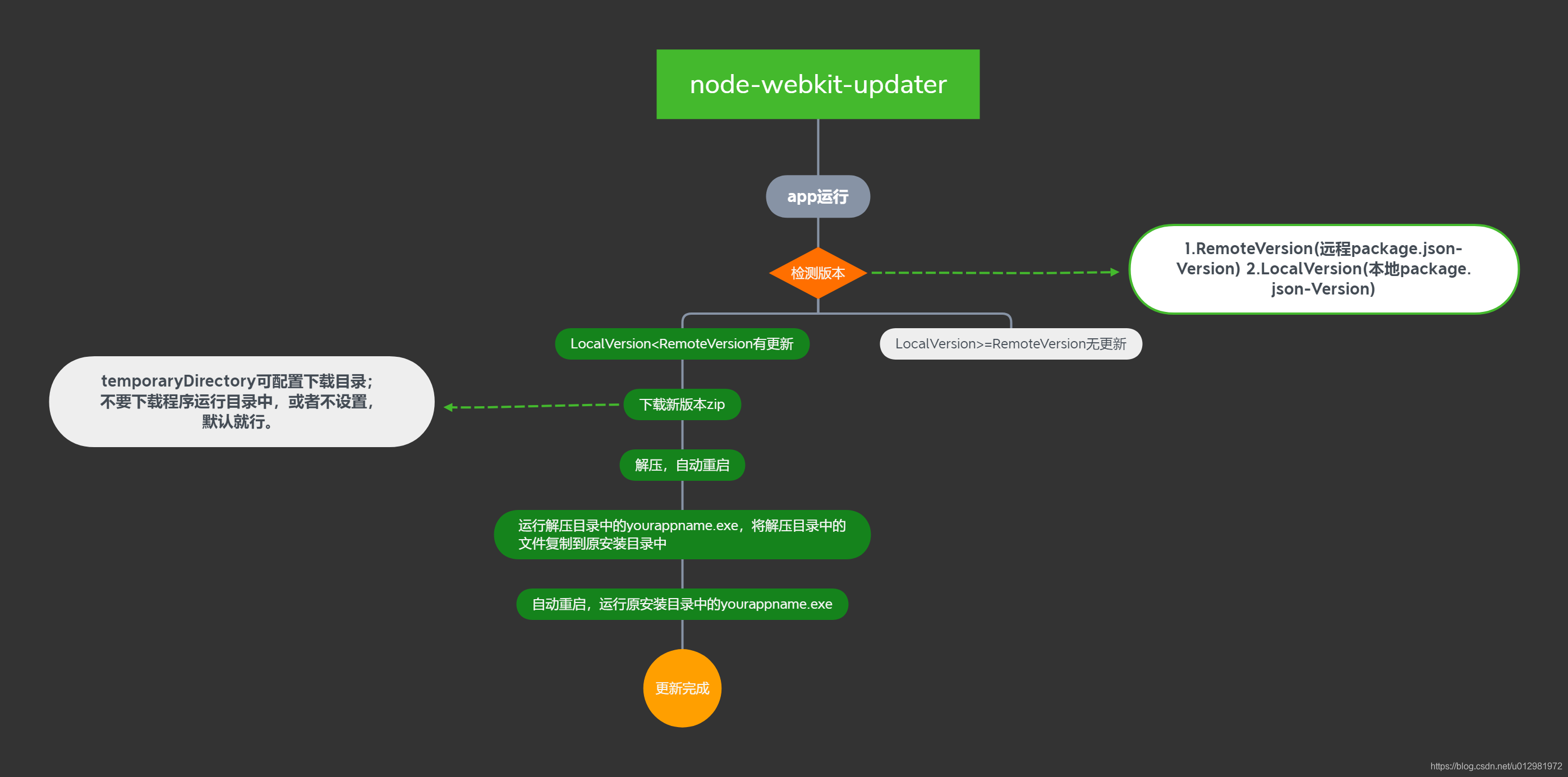
更新流程图解(全程自动更新,无需人工干预):
一、打包
- 使用node-webkit-updater更新,打包方式必须是官方打包方式中的
方式 2. ZIP文件 - 具体步骤:
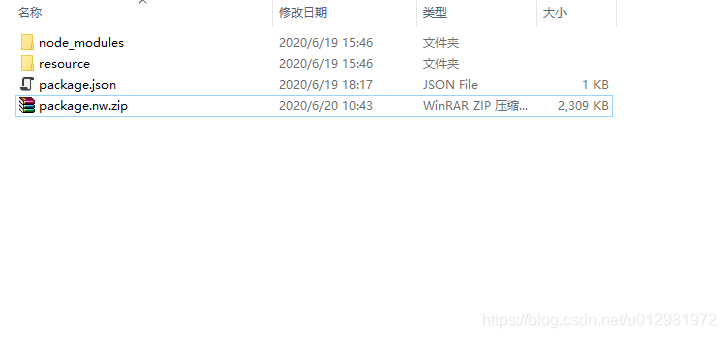
将package.json,项目文件,node包压缩为zip,然后重命名为package.nw
- 注:
不要压缩外层文件夹,直接压缩这三个文件 - 将
package.nw复制到与nw.exe同级的目录中,cmd cd该目录,执行copy /b nw.exe+package.nw yourappname.exe,当前目录会生成一个yourappname.exe,即为主程序,nw.exe、package.nw可删除。
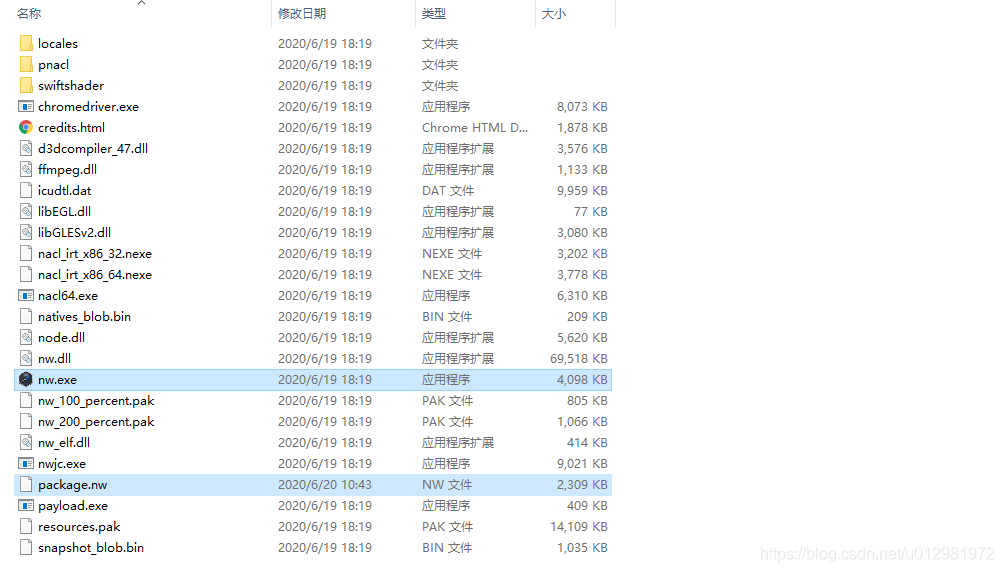
注:这种打包方式,在程序运行的时候,先执行解压工作(C:\Users\xx\AppData\Local),然后执行exe程序,如果程序文件较多,程序启动就会越慢,官方也有说明。
二、node-webkit-updater使用
- 安装。
cmd cd至package.json所在文件夹,执行npm install node-webkit-updater安装模块。
注:小编是.neter,前端er可以用VSCode执行各种命令 - 安装成功后,新建js如下:
/*
 1. Check the manifest for version (from your running "old" app).
 2. If the version is different from the running one, download new package to a temp directory.
 3. Unpack the package in temp.
 4. Run new app from temp and kill the old one (i.e. still all from the running app).
 5. The new app (in temp) will copy itself to the original folder, overwriting the old app.
 6. The new app will run itself from original folder and exit the process.
*/

var gui = require('nw.gui');
var pkg = require('../package.json'); // Insert your app's manifest here
var updater = require('node-webkit-updater');
var upd = new updater(pkg);
var path = require("path");

//此处自定义下载目录
//var parentPath= path.resolve(gui.__dirname, '.')
//upd.options.temporaryDirectory=path.dirname(parentPath)
var copyPath, execPath;

console.log(gui.App.argv.length);

// Args passed when new app is launched from temp dir during update
if(gui.App.argv.length>0) {
	console.log(gui.App.argv);
    // ------------- Step 5 -------------
    copyPath = gui.App.argv[0];
    execPath = gui.App.argv[1];
console.log(copyPath,execPath);
    // Replace old app, Run updated app from original location and close temp instance
    upd.install(copyPath, function(err) {
        if(!err) {
            // ------------- Step 6 -------------
			try{
				upd.run(execPath,[],null);
                gui.App.quit();
			}catch(e){
				console.log(e);
			}

        }
    });
}
else { // if no arguments were passed to the app
    // ------------- Step 1 -------------
    upd.checkNewVersion(function(error, newVersionExists, manifest) {
        if (!error && newVersionExists) {
            // ------------- Step 2 -------------
            var newApp= upd.download(function(error, filename) {
				console.log(error,filename)
                if (!error) {
                    // ------------- Step 3 -------------
                    upd.unpack(filename, function(error, newAppPath) {
						console.log(error,newAppPath);
                        if (!error) {
                            // ------------- Step 4 -------------
                             upd.runInstaller(newAppPath, [upd.getAppPath(), upd.getAppExec()],{});
                             gui.App.quit();
                        }
                    }, manifest);
                }
            }, manifest);

            //进度条
			 var loaded=0;
			 newApp.on('data',function(chunk){
				 loaded+=chunk.length;
				 console.log( "New version loading " + Math.floor(loaded / newApp['content-length'] * 100) + '%');
				 document.getElementById('loaded').innerHTML="New version loading " + Math.floor(loaded / newApp['content-length'] * 100) + '%';
			 });
        }
    });
}
注:该js最好放在远程服务器,更新js文件不用更新客户端
- 本地
package.json
{
  "name": "yourappname",
  "main": "/resource/index.html",
  "single-instance": true,
  "description": "",
  "version": "1.2.0",
  "product_string": "com.yourcompanyname.appname",
  "manifestUrl": "http://xxx.xxx.com/package.json",
  "window": {
    "icon": "/resource/logo.png",
    "width": 623,
    "height": 421,
    "toolbar": false,
    "frame": false,
    "resizable": false,
    "position": "center",
    "transparent": true,
    "show": false //解决双击后白屏,窗体异常问题,页面渲染完成,记得win.show();
  },
  "node-remote": "*://*",
  "webkit": {
    "plugin": true
  }
}
注:version和manifestUrl为更新必须字段。manifestUrl为服务器端package.json路径。
- 服务器端
package.json
{
"version": "2.1.0",
"packages": {
        "mac": {
           "url": "http://xxx.xxx.com/path to your zip/app.zip"
        },
        "win": {
           "url": "http://xxx.xxx.com/path to your zip/app.zip",
           "execPath":"app.exe"//解压完成后运行的exe名称,也就是zip包里面的exe名称
        },
        "linux32": {
           "url": "http://xxx.xxx.com/path to your zip/app.zip"
        }
    }
}
注:zip是您的exe所在文件夹的所有文件的压缩(Ctrl+A然后压缩),不是压缩您的项目文件夹!服务器端package.json中的Version需与zip中package.json中的版本保持一致!
在app登陆页,或者首页,添加js的引用,让服务器端version大于本地version即可触发升级。
2020.11.11新增用独立exe文件实现更新
好运~~~

魔乐社区(Modelers.cn) 是一个中立、公益的人工智能社区,提供人工智能工具、模型、数据的托管、展示与应用协同服务,为人工智能开发及爱好者搭建开放的学习交流平台。社区通过理事会方式运作,由全产业链共同建设、共同运营、共同享有,推动国产AI生态繁荣发展。
更多推荐


 3
3 0
0- 0


 已为社区贡献1条内容

所有评论(0)