selenium截图模糊_selenium web driver 实现截图功能
在验证某些关键步骤时,需要截个图来记录一下当时的情况
Webdriver截图时,需要引入
importjava.io.File;importjava.io.IOException;importorg.apache.commons.io.FileUtils;importorg.openqa.selenium.OutputType;import org.openqa.selenium.TakesScreenshot;
截图方法
public static voidsnapshot(TakesScreenshot drivername, String filename)
{//this method will take screen shot ,require two parameters ,one is driver name, another is file name
String currentPath= System.getProperty("user.dir"); //get current work folder
System.out.println(currentPath);
File scrFile=drivername.getScreenshotAs(OutputType.FILE);//Now you can do whatever you need to do with it, for example copy somewhere
try{
System.out.println("save snapshot path is:"+currentPath+"/"+filename);
FileUtils.copyFile(scrFile,new File(currentPath+"\\"+filename));
}catch(IOException e) {//TODO Auto-generated catch block
System.out.println("Can't save screenshot");
e.printStackTrace();
}finally{
System.out.println("screen shot finished");
}
}
以下任务:
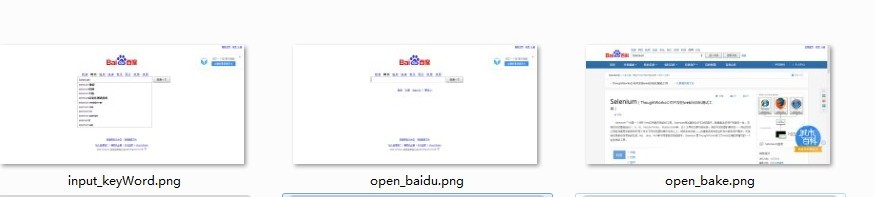
1.使用selenium打开百度,截图;
2.输入selenium关键字,截图;
3.搜索 并打开 selenium的百度百科,截图;
具体代码如下:
1 packagebaidu;2
3
4
5 importjava.io.File;6 importjava.io.IOException;7
8
9
10 importorg.apache.commons.io.FileUtils;11
12 importorg.openqa.selenium.By;13 importorg.openqa.selenium.OutputType;14 importorg.openqa.selenium.TakesScreenshot;15 importorg.openqa.selenium.WebDriver;16 //import org.openqa.selenium.WebDriver.Navigation;
17 importorg.openqa.selenium.WebElement;18 importorg.openqa.selenium.chrome.ChromeDriver;19
20
21
22
23 public classselenium {24
25
26
27 public static voidsnapshot(TakesScreenshot drivername, String filename)28 {29 //this method will take screen shot ,require two parameters ,one is driver name, another is file name
30
31
32 File scrFile =drivername.getScreenshotAs(OutputType.FILE);33 //Now you can do whatever you need to do with it, for example copy somewhere
34 try{35 System.out.println("save snapshot path is:E:/"+filename);36 FileUtils.copyFile(scrFile, new File("E:\\"+filename));37 } catch(IOException e) {38 //TODO Auto-generated catch block
39 System.out.println("Can't save screenshot");40 e.printStackTrace();41 }42 finally
43 {44 System.out.println("screen shot finished");45 }46 }47
48 public static void main (String [] args) throwsInterruptedException49 {50
51
52 String URL="http://www.baidu.com";53 System.setProperty("webdriver.chrome.driver", "E:\\chromedriver.exe");54 WebDriver driver = newChromeDriver();55 driver.get(URL);56 //max size the browser
57 driver.manage().window().maximize();58 /*
59 Navigation navigation = driver.navigate();60 navigation.to(URL);*/
61 Thread.sleep(2000);62 snapshot((TakesScreenshot)driver,"open_baidu.png");63 //WebElement reg=driver.findElement(By.name("tj_reg"));64 //reg.click();65 //WebElement keyWord = driver.findElement(By.id("kw1"));66
67 //find the element
68 WebElement keyWord = driver.findElement(By.xpath("//input[@id='kw1']"));69 keyWord.clear();70 //send key words
71 keyWord.sendKeys("Selenium");72 Thread.sleep(3000);73 snapshot((TakesScreenshot)driver,"input_keyWord.png");74
75
76
77 WebElement submit = driver.findElement(By.id("su1"));78
79 System.out.println(submit.getLocation());80 submit.click();81 //System.out.println(driver.getWindowHandle());
82 Thread.sleep(5000);83
84 //System.out.println(driver.getPageSource());
85
86 String pageSource=driver.getPageSource();87 //System.out.println(pageSource);88 //WebElement link =driver.findElement(By.xpath(SELENIUM_LINK));
89 WebElement link =driver.findElement(By.xpath("//*[@id=\"1\"]/h3/a")); //*[@id="1"]/h3/a
90 link.click();91 Thread.sleep(5000);92 driver.switchTo().window(driver.getWindowHandles().toArray(new String[0])[1]);93
94 //get page title
95 System.out.println(driver.getTitle());96 Thread.sleep(5000);97 //navigation.back();
98 snapshot((TakesScreenshot)driver,"open_bake.png");99 System.out.println(driver.getTitle()+"\n"+driver.getCurrentUrl());100
101
102
103 driver.quit();104
105
106 }107
108 }
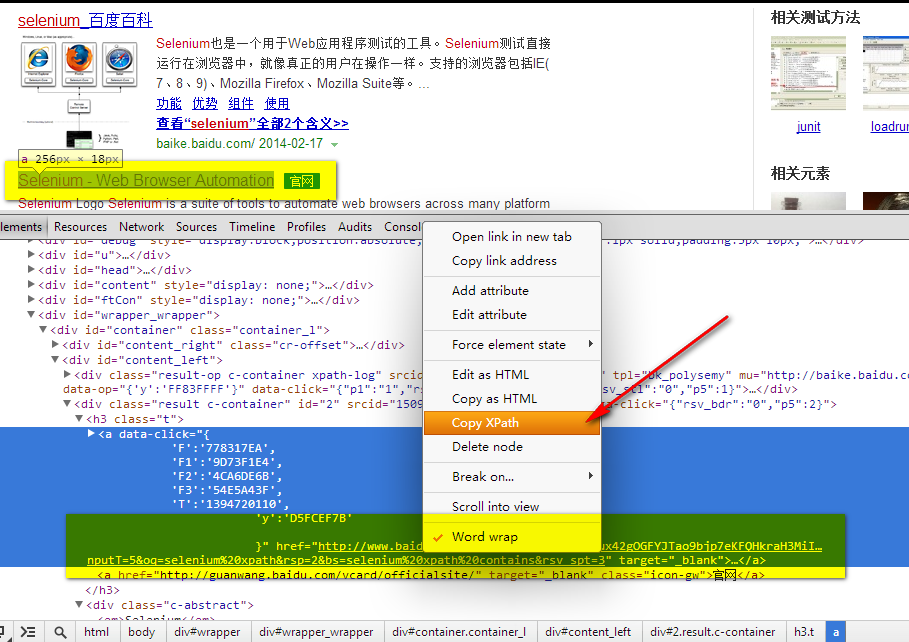
在百度搜索结果中,拿到你想要的elements,可以使用浏览器的查看元素,通过xpath方法获取
运行此代码后截图效果如下:
console输出:
Starting ChromeDriver (v2.9.248315) on port 33834
save snapshot path is:E:/open_baidu.png
screen shot finished
save snapshot path is:E:/input_keyWord.png
screen shot finished
(858, 179)
Selenium_百度百科
save snapshot path is:E:/open_bake.png
screen shot finished
Selenium_百度百科
http://baike.baidu.com/subview/478050/6464537.htm?fr=aladdin

魔乐社区(Modelers.cn) 是一个中立、公益的人工智能社区,提供人工智能工具、模型、数据的托管、展示与应用协同服务,为人工智能开发及爱好者搭建开放的学习交流平台。社区通过理事会方式运作,由全产业链共同建设、共同运营、共同享有,推动国产AI生态繁荣发展。
更多推荐


 0
0 0
0- 0


 已为社区贡献3条内容

所有评论(0)