Arduinojson官网序列化示例教程
Arduinojson官网序列化示例教程
·
Arduinojson官网序列化示例教程
📝示例代码
#include <ArduinoJson.h>

void setup() {
  // Initialize Serial port
  Serial.begin(9600);
  while (!Serial) continue;

  // Allocate the JSON document
  //
  // Inside the brackets, 200 is the RAM allocated to this document.
  // Don't forget to change this value to match your requirement.
  // Use arduinojson.org/v6/assistant to compute the capacity.
  StaticJsonDocument<200> doc;

  // StaticJsonObject allocates memory on the stack, it can be
  // replaced by DynamicJsonDocument which allocates in the heap.
  //
  // DynamicJsonDocument  doc(200);

  // Add values in the document
  //
  doc["sensor"] = "gps";
  doc["time"] = 1351824120;

  // Add an array.
  //
  JsonArray data = doc.createNestedArray("data");
  data.add(48.756080);
  data.add(2.302038);

  // Generate the minified JSON and send it to the Serial port.
  //
  serializeJson(doc, Serial);
  // The above line prints:
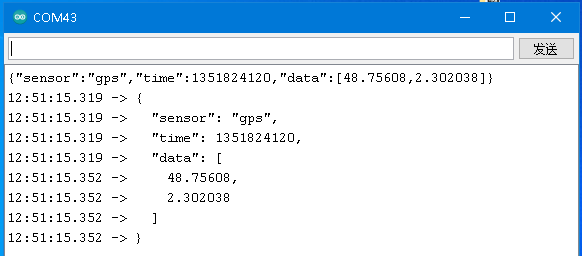
  // {"sensor":"gps","time":1351824120,"data":[48.756080,2.302038]}

  // Start a new line
  Serial.println();

  // Generate the prettified JSON and send it to the Serial port.
  //
  serializeJsonPretty(doc, Serial);
  // The above line prints:
  // {
  //   "sensor": "gps",
  //   "time": 1351824120,
  //   "data": [
  //     48.756080,
  //     2.302038
  //   ]
  // }
}

void loop() {
  // not used in this example
}
- 📋串口打印信息

魔乐社区(Modelers.cn) 是一个中立、公益的人工智能社区,提供人工智能工具、模型、数据的托管、展示与应用协同服务,为人工智能开发及爱好者搭建开放的学习交流平台。社区通过理事会方式运作,由全产业链共同建设、共同运营、共同享有,推动国产AI生态繁荣发展。
更多推荐


 0
0 0
0- 0


 已为社区贡献10条内容

所有评论(0)