基于phantomjs从后端将echart图表转换为图片
·
背景
定时任务将后台echart图表转化为图片,然后通过飞书通知推送(后续接入了飞书内置的vchart图表,该方法未正式上线)
操作步骤
准备
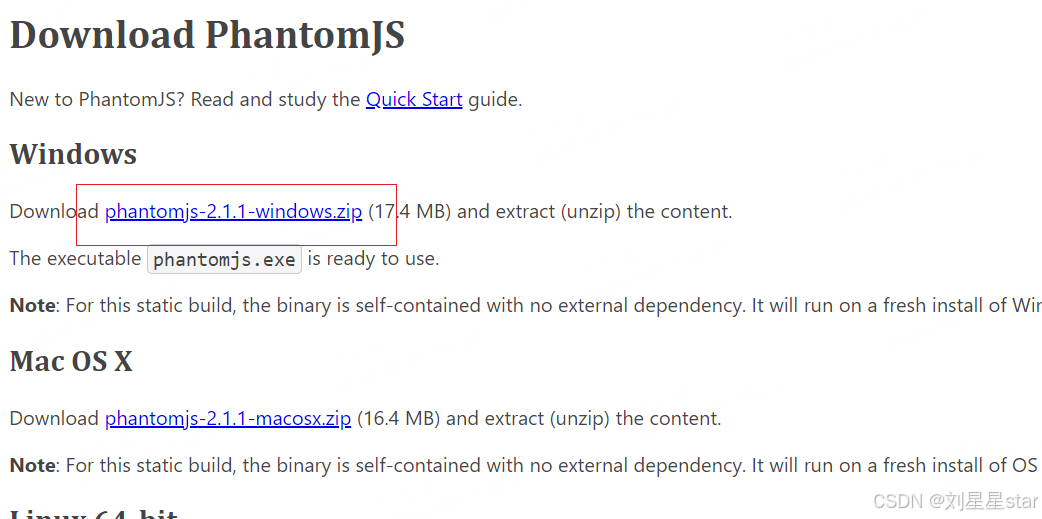
下载phantomjs、jquery、echarts.min.js、echarts-convert.js,将上述四个文件都放入项目resources中,后面三个文件在同一目录下
- phantomjs下载:https://phantomjs.org/download.html,解压bin目录下有一个exe文件
- echarts-convert.js文件
(function() {
    var system = require('system');
    var fs = require('fs');
    var config = {
        // define the location of js files
        JQUERY : 'jquery-1.9.1.min.js',
        ECHARTS3 : 'echarts.min.js',
        //ECHARTS3 : 'echarts.min_4.js',
        // default container width and height
        DEFAULT_WIDTH : '1000',
        DEFAULT_HEIGHT : '600'
    }, parseParams, render;

    usage = function() {
        console.log("\nUsage: phantomjs echarts-convert.js -options options -outfile filename -width width -height height"
            + "OR"
            + "Usage: phantomjs echarts-convert.js -infile URL -outfile filename -width width -height height\n");
    };

    pick = function() {
        var args = arguments, i, arg, length = args.length;
        for (i = 0; i < length; i += 1) {
            arg = args[i];
            if (arg !== undefined && arg !== null && arg !== 'null' && arg != '0') {
                return arg;
            }
        }
    };
    var base64Pad = '=';
    var toBinaryTable = [-1, -1, -1, -1, -1, -1, -1, -1, -1, -1, -1, -1, -1, -1, -1, -1, -1, -1, -1, -1, -1, -1, -1, -1, -1, -1, -1, -1, -1, -1, -1, -1, -1, -1, -1, -1, -1, -1, -1, -1, -1, -1, -1, 62, -1, -1, -1, 63,
        52, 53, 54, 55, 56, 57, 58, 59, 60, 61, -1, -1, -1, 0, -1, -1, -1, 0, 1, 2, 3, 4, 5, 6, 7, 8, 9, 10, 11, 12, 13, 14,
        15, 16, 17, 18, 19, 20, 21, 22, 23, 24, 25, -1, -1, -1, -1, -1, -1, 26, 27, 28, 29, 30, 31, 32, 33, 34, 35, 36, 37, 38, 39, 40,
        41, 42, 43, 44, 45, 46, 47, 48, 49, 50, 51, -1, -1, -1, -1, -1
    ];
    base64ToString = function(data) {
        //console.log("data  = "+data);
        var result = '';
        var leftbits = 0; // number of bits decoded, but yet to be appended
        var leftdata = 0; // bits decoded, but yet to be appended
        // Convert one by one.
        for (var i = 0; i < data.length; i++) {
            var c = toBinaryTable[data.charCodeAt(i) & 0x7f];
            //console.log("i  = "+c);
            var padding = (data.charCodeAt(i) == base64Pad.charCodeAt(0));
            // Skip illegal characters and whitespace
            if (c == -1) continue;

            // Collect data into leftdata, update bitcount
            leftdata = (leftdata << 6) | c;
            leftbits += 6;

            // If we have 8 or more bits, append 8 bits to the result
            if (leftbits >= 8) {
                leftbits -= 8;
                // Append if not padding.
                if (!padding)
                    result += String.fromCharCode((leftdata >> leftbits) & 0xff);
                leftdata &= (1 << leftbits) - 1;
            }

        }
        console.log(result);
//        if (leftbits)
//            throw Components.Exception('Corrupted base64 string');

        return result;
    };

    getParams = function() {
        var map={}, i, key;
        if (system.args.length < 2) {
            usage();
            phantom.exit();
        }
        for (i = 0; i < system.args.length; i += 1) {
            if (system.args[i].charAt(0) === '-') {
                key = system.args[i].substr(1, i.length);
                if (key === 'infile') {
                    key = 'path';
                    try {
                        var vals = system.args[i + 1];
                        console.log("vals  =  "+vals);
                        map[key] = vals;
                    } catch (e) {
                        console.log('Error: cannot find file, ' + system.args[i + 1]);
                        phantom.exit();
                    }
                } else {
                    map[key]= system.args[i + 1];
                }
            }
        }
        return map;
    };
    parseParams = function() {
        var map = {};
        var data= getParams();
        var dataPath=data.path;
        console.log("+++++dataPath++++++++")
        console.log("dataPath-----"+dataPath)
        var fs = require('fs');
        var str = fs.read(dataPath);
        map['options']=str;
        map['outfile']=data.outfile;
        return map;
    };

    render = function(params) {
        var page = require('webpage').create(), createChart;

        page.onConsoleMessage = function(msg) {
            console.log(msg);
        };

        page.onAlert = function(msg) {
            console.log(msg);
        };

        createChart = function(inputOption, width, height) {
            var counter = 0;
            function decrementImgCounter() {
                counter -= 1;
                if (counter < 1) {
                    console.log(messages.imagesLoaded);
                }
            }

            function loadScript(varStr, codeStr) {
                var script = $('<script>').attr('type', 'text/javascript');
                script.html('var ' + varStr + ' = ' + codeStr);
                document.getElementsByTagName("head")[0].appendChild(script[0]);
                if (window[varStr] !== undefined) {
                    console.log('Echarts.' + varStr + ' has been parsed');
                }
            }

            function loadImages() {
                var images = $('image'), i, img;
                if (images.length > 0) {
                    counter = images.length;
                    for (i = 0; i < images.length; i += 1) {
                        img = new Image();
                        img.onload = img.onerror = decrementImgCounter;
                        img.src = images[i].getAttribute('href');
                    }
                } else {
                    console.log('The images have been loaded');
                }
            }
            // load opitons
            if (inputOption != 'undefined') {
                // parse the options
                loadScript('options', inputOption);
                // disable the animation
                options.animation = false;
            }

            // we render the image, so we need set background to white.
            $(document.body).css('backgroundColor', 'white');
            var container = $("<div>").appendTo(document.body);
            container.attr('id', 'container');
            container.css({
                width : width,
                height : height
            });

            // render the chart
            var myChart = echarts.init(document.getElementById("container"));
            myChart.setOption(options);
            // load images
            loadImages();
        };

        // parse the params
        page.open("about:blank", function(status) {
            // inject the dependency js
            page.injectJs(config.JQUERY);
            page.injectJs(config.ECHARTS3);

            var width = pick(params.width, config.DEFAULT_WIDTH);
            var height = pick(params.height, config.DEFAULT_HEIGHT);

            // create the chart
            page.evaluate(createChart, params.options, width, height);

            // define the clip-rectangle
            page.clipRect = {
                top : 0,
                left : 0,
                width : width,

                height : height
            };
            // render the image
            page.render(params.outfile);
            console.log('render complete:' + params.outfile);
            // exit
            phantom.exit();
        });
    };
    // get the args
    var params = parseParams();

    // validate the params
    if (params.options === undefined || params.options.length === 0) {
        console.log("ERROR: No options or infile found.");
        usage();
        phantom.exit();
    }

    // set the default out file
    if (params.outfile === undefined) {
        var tmpDir = fs.workingDirectory + '/tmp';
        // exists tmpDir and is it writable?
        if (!fs.exists(tmpDir)) {
            try {
                fs.makeDirectory(tmpDir);
            } catch (e) {
                console.log('ERROR: Cannot make tmp directory');
            }
        }
        params.outfile = tmpDir + "/" + new Date().getTime() + ".png";
    }

    // render the image
    render(params);
}());
- jquery-1.9.1.min.js和echarts.min.js就自行去下载吧
java代码
直接运行main方法,会在对应目录输出名为output.png的图片,给了两个options的例子
public class PhantomJSTest {

    public static void main(String[] args) throws IOException, URISyntaxException, InterruptedException {
        String options0 = "{\"title\":{\"text\":\"销售图\",\"subtext\":\"销售统计\",\"x\":\"CENTER\"},\"toolbox\": {\"feature\": {\"saveAsImage\": {\"show\": true,}}},\"tooltip\": {\"show\": true},\"legend\": {\"data\":[\"直接访问\",\"邮件营销\",\"联盟广告\",\"视频广告\",\"搜索引擎\"]}, \"series\":[{\"name\":\"访问来源\",\"type\":\"pie\",\"radius\": '55%',\"center\": ['50%', '60%'],\"data\":[{\"value\":335, \"name\":\"直接访问\"},{\"value\":310, \"name\":\"邮件营销\"},{\"value\":234, \"name\":\"联盟广告\"},{\"value\":135, \"name\":\"视频广告\"},{\"value\":1548, \"name\":\"搜索引擎\"}]}]}";
        String options = "{title:{text:'真实金币变化曲线图',x:400},legend:{data:['2024-04-18','2024-04-19','2024-04-20','2024-04-21','2024-04-22','2024-04-23','2024-04-24','2024-04-25'],bottom:20},grid:{left:'3%',right:'4%',bottom:'10%',containLabel:true},xAxis:{data:['01:00','02:00','03:00','04:00','05:00','06:00','07:00','08:00','09:00','10:00','11:00','12:00','13:00','14:00','15:00','16:00','17:00','18:00','19:00','20:00','21:00','22:00','23:00','24:00']},yAxis:{min:null,axisLabel:{formatter:function(value){if(value>100000000||value<-100000000){value/=100000000;return value+'E'}else if(value>1000000||value<-1000000){value/=1000000;return value+'W'}else{return value;}}}},series:[{name:'2024-04-18',type:'line',symbol:'circle',symbolSize:8,data:[414841921968,417972763445,507881369571,550597188659,501655824607,475463856451,501437226838,567534205921,670573738071,633014511368,559562497270,589783374789,504055112766,569564027123,618018237985,621385933388,696371205421,729237440912,773326670181,743664095821,845956586764,791039749709,818267194443,792358170409],color:\"#BA55D3\"},{name:'2024-04-19',type:'line',symbol:'diamond',symbolSize:8,data:[986910411930,1105138090321,1100131384656,1116065084803,1088877200084,1144356348281,1199254573501,1214453794007,1224256296886,1212754558446,1214371704764,1317121593578,1246727234649,1250691178291,1359604143221,1424936658826,1479637379364,1383688303848,1505703529275,1429220754425,1546153969341,1513343872013,1530856997429,1603252932738],color:\"#00b6f9\"},{name:'2024-04-20',type:'line',symbol:'rect',symbolSize:8,data:[1857276375325,1875039707361,1963223263742,2081696636466,2031025070083,2083393518713,2161341945524,2155073044873,2178216377588,2149117882715,2075879044552,2058526675440,2113328329310,2122581255124,1999237708329,2052631117439,2073926923710,2031710062665,1978145548089,1966285910559,1991358075785,1969647372425,1919944512520,1976797997282],color:\"#211d1d\"},{name:'2024-04-21',type:'line',symbol:'triangle',symbolSize:8,data:[2172804430628,2215184979704,2164886309529,2142472832424,2137928318800,2144934699774,2191005396540,2153767204154,2198997219715,2229039468313,2201816877310,2298957622187,2373714262679,2372908244233,2316627526561,2423933295171,2280239034397,2298524896191,2275554888409,2369402955345,2336521753584,2389602593669,2341502860891,2344334065580],color:\"#EEEE00\"},{name:'2024-04-22',type:'line',symbol:'triangle',symbolSize:8,data:[2476218310289,2536417900685,2510973466886,2498909407704,2433601548249,2443129077494,2439176969712,2401758165716,2440077883338,2421989032416,2394554688287,2465518673804,2637685745078,2710522763347,2703188135860,2640439887699,2644177974501,2696504274158,2702753829196,2696017610287,2618296415951,2584896157853,2622528375256,2716203891335],color:\"#55FF55\"},{name:'2024-04-23',type:'line',symbol:'circle',symbolSize:8,data:[2671076265086,2678062798055,2673533878729,2762294832903,2705609507898,2719307000030,2710172962344,2753721474127,2756281283351,2768929041656,2832234292176,2805208339654,2853664372038,2785277126127,2778064507141,2752267270248,2761446973310,2704038998951,2782418661735,2654158590391,2653751029541,2742164452606,2777194135101,2704471558657],color:\"#5555FF\"},{name:'2024-04-24',type:'line',symbol:'diamond',symbolSize:8,data:[2795345728543,2770537498716,2848693928875,2879294960206,2829430999039,2849647752433,2827855116803,2777173261371,2672531448737,2708498760900,2724420673186,2683263921824,2551573734630,2540040470040,2611260499265,2494440645986,2507397085207,2545644433064,2571607348266,2615244520485,2589092279713,2573813759977,2607021410987,2597987212199],color:\"#0033ff\"},{name:'2024-04-25',type:'line',symbol:'rect',symbolSize:8,data:[2649617372744,2691068161793,2726432757352,2703412698379,2703412698379,2703333859847,2703333670437,2703333765437,2733273245745,2800456223566,2947912976766,2966394055376,2996232169269,2968603122907,3233179406498,3315290057674,3268076359406,3139014682972,3279041690228,3289050578510,3284721985419,3314554816985,3306711392349,null],color:\"#FF5555\"}]}";
        writeJsonConfig(options);
        getEchartPng();
    }

    public static void writeJsonConfig(String config) throws URISyntaxException, IOException {
        String jsonFilePath = new File(Objects.requireNonNull(PhantomJSTest.class.getResource("/")).toURI()).getParent() + File.separator + "classes/exportEchartPng/echart.json";
        // 写入 JSON 文件
        try (BufferedWriter writer = new BufferedWriter(new OutputStreamWriter(new FileOutputStream(jsonFilePath), StandardCharsets.UTF_8))) {
            writer.write(config);
        }
    }
    public static void getEchartPng() throws IOException, InterruptedException, URISyntaxException {
        // 将 .exe 文件从资源中提取到临时目录
        File tempExe = File.createTempFile("phantomjs", ".exe");
        // 程序结束时删除临时文件
        tempExe.deleteOnExit();

        try (InputStream in = PhantomJSTest.class.getResourceAsStream("/exportEchartPng/phantomjs.exe");
             FileOutputStream out = new FileOutputStream(tempExe)) {
            byte[] buffer = new byte[4096];
            int bytesRead;
            while ((bytesRead = in.read(buffer)) != -1) {
                out.write(buffer, 0, bytesRead);
            }
        }

        // 获取其他资源的路径
        String scriptPath = new File(Objects.requireNonNull(PhantomJSTest.class.getResource("/exportEchartPng/echarts-convert.js")).toURI()).getAbsolutePath();
        String inputFile = new File(Objects.requireNonNull(PhantomJSTest.class.getResource("/exportEchartPng/echart.json")).toURI()).getAbsolutePath();
        // 输出文件的路径
        String outputFile = new File(Objects.requireNonNull(PhantomJSTest.class.getResource("/")).toURI()).getParent() + File.separator + "classes/exportEchartPng/output.png";

        // 执行命令
        ProcessBuilder processBuilder = new ProcessBuilder(tempExe.getAbsolutePath(), scriptPath, "-infile", inputFile, "-outfile", outputFile);
        processBuilder.redirectErrorStream(true);

        Process process = processBuilder.start();
        BufferedReader reader = new BufferedReader(new InputStreamReader(process.getInputStream()));
        String line;
        while ((line = reader.readLine()) != null) {
            // 输出命令执行的结果
            System.out.println(line);
        }

        int exitCode = process.waitFor();
        // 输出退出代码
        System.out.println("Exited with code: " + exitCode);
    }
}

魔乐社区(Modelers.cn) 是一个中立、公益的人工智能社区,提供人工智能工具、模型、数据的托管、展示与应用协同服务,为人工智能开发及爱好者搭建开放的学习交流平台。社区通过理事会方式运作,由全产业链共同建设、共同运营、共同享有,推动国产AI生态繁荣发展。
更多推荐


 4
4 0
0- 0


 已为社区贡献1条内容

所有评论(0)