wpf c# canvas 绘图 - 直方图
·
wpf c# canvas 绘图 - 直方图
使用基础控件绘图
效果
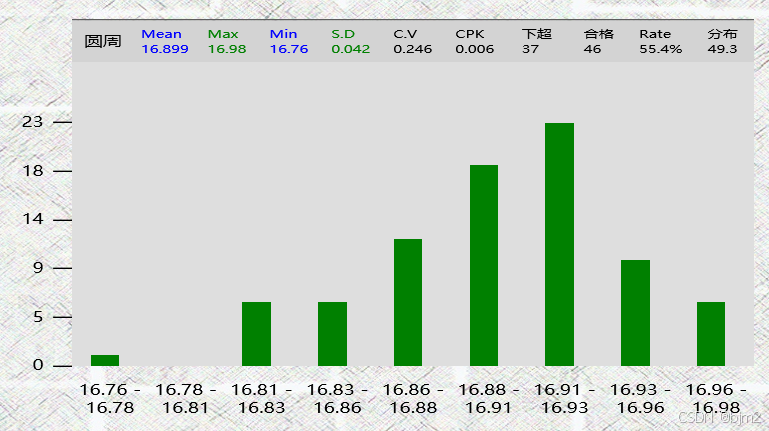
说明
包含刻度 x轴 y轴,不包含图上面的统计数据,写得比较原生态是为了适配客户特殊定制需求。
代码
   #region 直方图
   if (chartValues.ChartType == ChartTypeEnum.Histogram)
   {
       List<double> data = chartValues.Values.Select(x => x.Y).ToList();

       int numberOfBins = 9; // 确保至少有   个区间
       double minValue = data.Min();
       double maxValue = data.Max();

       // 处理所有值相同的情况
       if (minValue == maxValue)
       {
           maxValue += 1; // 增加最大值以避免除零错误
       }

       double binWidth = (maxValue - minValue) / numberOfBins;

       // 初始化每个区间的计数
       int[] bins = new int[numberOfBins];

       // 将数据分配到区间
       foreach (var value in data)
       {
           int binIndex = (int)((value - minValue) / binWidth);
           if (binIndex >= numberOfBins)
               binIndex = numberOfBins - 1; // 确保不会越界
           if (binIndex < 0)
               binIndex = 0; // 确保不会出现负值
           bins[binIndex]++;
       }

       double YRate = 0.8;
       double virtualYRate = (double)data.Count / bins.Max() * YRate;

       // 绘制直方图
       double canvasHeight = cvs.ActualHeight;
       double maxHeight = cvs.ActualHeight * YRate; // 刻度
       double virtualHeight = cvs.ActualHeight * virtualYRate;

       double canvasWidth = cvs.ActualWidth;
       double barWidth = canvasWidth / numberOfBins;

       // 计算Y轴刻度数量和刻度间距
       int numberOfTicks = 5; // 刻度数量
       double tickHeight = maxHeight / numberOfTicks; // 刻度间距
       //double maxBinCount = data.Count; // 最高的计数值
       double maxBinCount = bins.Max(); // 最高的计数值

       // 确保从0开始
       for (int i = 0; i <= numberOfTicks; i++)
       {
           // 计算刻度值
           double tickValue = (maxBinCount / numberOfTicks) * i;
           double yPosition = (maxHeight - (i * tickHeight)) + (canvasHeight - maxHeight); // 反转Y坐标
           //double yPosition = (maxHeight - (i * tickHeight)) ; // 反转Y坐标

           // 绘制刻度线
           Line tickLine = new Line
           {
               X1 = 0,
               Y1 = yPosition,
               X2 = -10,
               Y2 = yPosition,
               Stroke = Brushes.Black
           };
           cvs.Children.Add(tickLine);

           // 绘制刻度标签
           TextBlock tickLabel = new TextBlock
           {
               Text = tickValue.ToString("0"),
               FontSize = 10, // 设置字体大小,可以根据需要调整
               Foreground = Brushes.Black,
               TextAlignment = TextAlignment.Right,
               Width = 20
           };
           Canvas.SetLeft(tickLabel, -20 - 15);
           Canvas.SetTop(tickLabel, yPosition - 7);
           cvs.Children.Add(tickLabel);
       }

       double totalBarWidth = barWidth * numberOfBins; // 计算条形总宽度
       double leftMargin = barWidth / 2 / 2; // 计算左边距以实现居中

       // 添加X轴和区间标签
       for (int i = 0; i < numberOfBins; i++)
       {
           double rangeStart = minValue + i * binWidth; // 当前区间起始值
           double rangeEnd = rangeStart + binWidth; // 当前区间结束值

           int remainCntMax = 2;
           if (statisticsFormat.ContainsKey(DataStatisticsItemType.Max))
           {
               remainCntMax = statisticsFormat[DataStatisticsItemType.Max].RemainCnt;
           }
           rangeStart = Math.Round(rangeStart, remainCntMax);
           rangeEnd = Math.Round(rangeEnd, remainCntMax);

           // 绘制直方图
           double barHeight = (bins[i] / (double)data.Count) * virtualHeight;
           Rectangle bar = new Rectangle
           {
               Width = barWidth / 2 - 5,
               Height = barHeight,
               Fill = Brushes.Green
           };

           Canvas.SetLeft(bar, leftMargin + i * barWidth); // 使用左边距调整位置
           Canvas.SetBottom(bar, 0); // 从底部开始绘制
           cvs.Children.Add(bar);

           // 绘制X轴区间标签
           TextBlock rangeLabel = new TextBlock
           {
               Text = $"{rangeStart} - {rangeEnd}", // 格式化为两个小数位
               Foreground = Brushes.Black,
               FontSize = 10 - (numberOfBins > 7 ? 0 : 1), // 设置字体大小,可以根据需要调整
               Width = barWidth, // 设置宽度以控制换行
               Height = 30, // 设置宽度以控制换行
               TextAlignment = TextAlignment.Center, // 设置宽度以控制换行
               TextWrapping = TextWrapping.Wrap // 启用换行
           };
           Canvas.SetLeft(rangeLabel, i * barWidth); // 使用左边距调整标签位置
           Canvas.SetBottom(rangeLabel, -30 - 10); // 将标签放在直方图下方
           cvs.Children.Add(rangeLabel);
       }

   }
   #endregion

魔乐社区(Modelers.cn) 是一个中立、公益的人工智能社区,提供人工智能工具、模型、数据的托管、展示与应用协同服务,为人工智能开发及爱好者搭建开放的学习交流平台。社区通过理事会方式运作,由全产业链共同建设、共同运营、共同享有,推动国产AI生态繁荣发展。
更多推荐


 5
5 0
0- 0


 已为社区贡献1条内容

所有评论(0)