vue仿微信聊天框(vue组件)
·
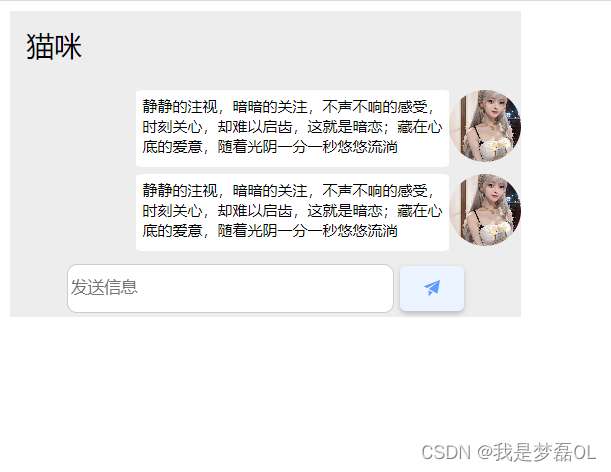
1,效果截图
2,源码
链接:https://pan.baidu.com/s/1KxNDBiPdifv20nnenMclHA?pwd=oix1
提取码:oix1
–来自百度网盘超级会员V4的分享
3,代码
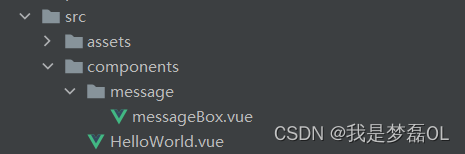
messageBox.vue
<template>
<div class="wrapper" :style="{'--width':width,'--oneheight':oneheight,'--twoheight':twoheight,'--threeheight':threeheight,'--fourheight':fourheight,
'--onefontpaddingtop':onefontpaddingtop,'--onefontpaddingleft':onefontpaddingleft,'--twoofonecolwidth':twoofonecolwidth,
'--twooftwocolwidth':twooftwocolwidth,
'--inputwidth':inputwidth,'--inputheight':inputheight,
'--buttonwidth':buttonwidth,'--buttonheight':buttonheight}">
  <div class="one" :style="{'font-size':fontsize1}">
    猫咪
  </div>
  <div class="two" v-for="item in list" :key="item.url">
<!--    第二行第二列-->
    <div class="twooftwocol" :style="{'font-size':fontsize2}">
      {{item.contentstxt}}
    </div>

    <div class="twoofone" >
      <el-image
          style="border-radius: 50%"
          fit="cover"
          :style="{'width':twoofonecolwidth,'height':twoofonecolwidth}"
          :src="url"
          :preview-src-list="[item.url]">
      </el-image>
    </div>

  </div>


  <div class="three">
      <input type="text" name="name" v-model="text" placeholder="发送信息">
      <button @click="addsession"> <span class="el-icon-s-promotion"></span></button>
  </div>

</div>
</template>

<script>
export default {
  name: "messageBox",
  data(){
    return{
      //双向v-model中的input的值
      text:'',
      list:[
        {
          //聊天内容
          contentstxt:'静静的注视,暗暗的关注,不声不响的感受,时刻关心,却难以启齿,这就是暗恋;藏在心底的爱意,随着光阴一分一秒悠悠流淌',
          //图片链接
          url:'http://127.0.0.1:3000/image/00.jpg',
        },
        {
          //聊天内容
          contentstxt:'静静的注视,暗暗的关注,不声不响的感受,时刻关心,却难以启齿,这就是暗恋;藏在心底的爱意,随着光阴一分一秒悠悠流淌',
          //图片链接
          url:'http://127.0.0.1:3000/image/00.jpg',
        },
      ],
      url:'http://127.0.0.1:3000/image/00.jpg',
    /*  最外部大容器wrapper的width*/
    width:'',

    /*  第一行的height*/
    oneheight:'',

    /*  第二行的height*/
    twoheight:'',

    /*  第三行的height*/
    threeheight:'',

    /*  第四行的height*/
      fourheight:'',
    //  第一行中的字体大小
      fontsize1:'',
      //第二行字体的大小
      fontsize2:'',
    /*第一行字体的paddingtop*/
    onefontpaddingtop:'',
    /*  第一行字体的paddingleft*/
    onefontpaddingleft:'',
    /*  第二行的第一列的width*/
    twoofonecolwidth:'',
    /*第二行的第二列的width*/
    twooftwocolwidth:'',
      //输入框的width
      inputwidth:'',
      //输入框的height
      inputheight:'',
      //发送按钮的width
      buttonwidth:'',
      //发送按钮的height
      buttonheight:''
    }
  },
  mounted() {
    this.gethomeheight()
    this.gethomewidth()
    window.addEventListener('resize', this.gethomewidth); // 在窗口大小改变时重新获取窗口宽度
    window.addEventListener('resize', this.gethomeheight);
  },

  methods:{
    //增加聊天数据
    addsession(){
      this.list.push({'contentstxt':this.text})
      this.text=''
    },
    gethomewidth(){
      // 获取窗口宽度
      var windowwidth = window.innerWidth
      /*  最外部大容器wrapper的width*/
      this.width = parseInt(windowwidth/5)+'px'
      /*  第二行的第一列的width*/
      this.twoofonecolwidth = parseInt(windowwidth/5/7)+'px'
      /*第二行的第二列的width*/
      this.twooftwocolwidth = parseInt(windowwidth/5/5*3)+'px'
      //输入框的inputwidth
      this.inputwidth = parseInt(windowwidth/8)+'px'
      //发送按钮的width
      this.buttonwidth= parseInt(windowwidth/8/5)+'px'
    },

    // 获得窗口height度
    gethomeheight(){
      var windowheight = window.innerHeight
      //第一行的height
      this.oneheight = parseInt(windowheight/22)+'px'
      //第一行的字体大小
      this.fontsize1 = parseInt(windowheight/22/2)+'px'
      //第二行的字体大小
      this.fontsize2 = parseInt(windowheight/22/2/2)+'px'
      //第一行字体的paddingtop
      this.onefontpaddingtop = parseInt(windowheight/19/2/2)+'px'
      //第一行字体的paddingleft
      this.onefontpaddingleft = parseInt(windowheight/19/2/2)+'px'
      //第二行的height
      this.twoheight = parseInt(windowheight/10)+'px'
      //第三行的height
      this.threeheight = parseInt(windowheight/7/3)+'px'
      //第四行的height
      this.fourheight = parseInt(windowheight/7)+'px'
      //输入框的inputheight
      this.inputheight = parseInt(windowheight/7/4)+'px'
      //发送按钮的height
      this.buttonheight = parseInt(windowheight/7/4)+'px'
    }
  },

}
</script>

<style scoped>
:root{
/*  最外部大容器wrapper的width*/
  --width:'';

/*  第一行的height*/
  --oneheight:'';
/*第一行字体的paddingtop*/
  --onefontpaddingtop:'';
/*  第一行字体的paddingleft*/
  --onefontpaddingleft:'';
/*  第二行的height*/
  --twoheight:'';

/*  第三行的height*/
  --threeheight:'';

/*  第四行的height*/
  --fourheight:'';
/*  第二行的第一列的width*/
  --twoofonecolwidth:'';
/*第二行的第二列的width*/
  --twooftwocolwidth:'';
/*  输入框的width*/
  --inputwidth:'';
/*  输入框的height*/
  --inputheight:'';
/*  按钮的width*/
  --buttonwidth:'';
/*  按钮的height*/
  --buttonheight:'';
}
/*发送信息的输入框*/
input{
  margin-top: 5px;
  width: var(--inputwidth);
  height: var(--inputheight);
  background-color: white;
  border-radius: 8px;
  border: 1px solid #ccc;
}
input:hover {
  box-shadow: 0 0 10px gray;
  border-color: rgb(64, 158, 255);
}
input:focus{
  outline: rgb(64, 158, 255);
}
/*发送信息的按钮*/
button{

  margin-top: 7px;
  background-color: rgb(236, 245, 255);
  border: none;
  color: rgb(92, 158, 255);

  text-align: center;
  text-decoration: none;
  font-size: 16px;

  cursor: pointer;
  border-radius: 5px;
  box-shadow: 0 2px 4px 0 rgba(0,0,0,0.2);

  transition: transform 0.3s ease;
  width: var(--buttonwidth);
  height: var(--buttonheight);
}
button:hover{
  transform: scale(0.95);
}
.wrapper{
  display: flex;
  width: var(--width);
  background-color: rgb(237, 237, 237);
  gap: 5px;
  flex-wrap: wrap;
}
.one{

  padding-top: var(--onefontpaddingtop);
  padding-left: var(--onefontpaddingleft);
  width: var(--width);
  height: var(--oneheight);
  background-color: rgb(237, 237, 237);

}
.two{
  display: flex;
  justify-content: flex-end;
  width: var(--width);
  background-color: rgb(237, 237, 237);
}
.twoofone{

  width: var(--twoofonecolwidth);

}
/*第二行第二列*/
.twooftwocol{

  padding-left: 5px;
  padding-top: 5px;
  margin-left: 5px;
  border-radius: 3%;
  width: var(--twooftwocolwidth);
  background-color: white;
}
.three{
  display: flex;
  justify-content: center;
  gap: 5px;
  width: var(--width);
  height: var(--threeheight);
  background-color: rgb(237, 237, 237);
}
.four{
  width: var(--width);
  height: var(--fourheight);
  background-color: #42b983;
}
</style>

魔乐社区(Modelers.cn) 是一个中立、公益的人工智能社区,提供人工智能工具、模型、数据的托管、展示与应用协同服务,为人工智能开发及爱好者搭建开放的学习交流平台。社区通过理事会方式运作,由全产业链共同建设、共同运营、共同享有,推动国产AI生态繁荣发展。
更多推荐


 0
0 0
0- 0


 已为社区贡献7条内容

所有评论(0)