本地json数据的增删改查#Vue3
·
本地json数据的增删改查#Vue3
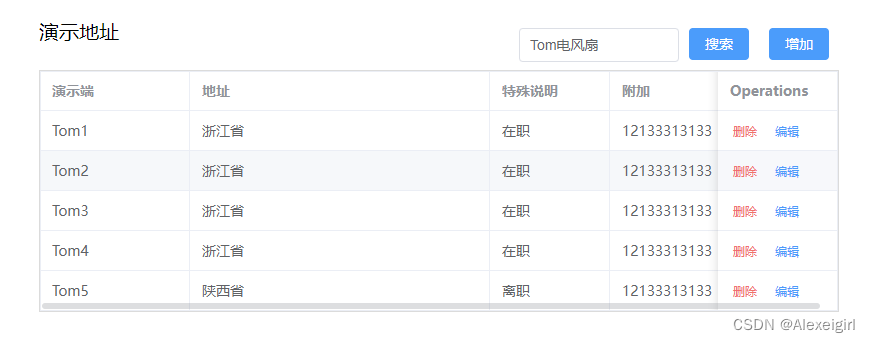
实现效果:
增删改查
test.vue文件源代码
<!-- test.vue -->
<template>
  <!-- 演示地址 -->
  <div class="dem-add">
    <!-- Search start -->
    <div class="dem-title">
      <p>演示地址</p>
      <el-input
        class="query-input"
        v-model="tableForm.name"
        placeholder="请输入姓名搜索"
      />
      <el-button type="primary" @click="handleQueryName">搜索</el-button>
      <el-button type="primary" @click="handleAdd">增加</el-button>
    </div>
    <!-- Search end -->
    <!-- Table start -->
    <div class="bs-page-table">
      <el-table
        :data="tableData"
        style="width: 100%"
        border
        ref="multipleTableRef"
      >
        <el-table-column prop="name" label="演示端" width="150" />
        <el-table-column prop="address" label="地址" width="300" />
        <el-table-column prop="state" label="特殊说明" width="120" />
        <el-table-column prop="plus" label="附加" width="120" />
        <el-table-column fixed="right" label="Operations" width="120">
          <template #default="scope">
            <el-button
              link
              type="primary"
              size="small"
              @click="handleRowDel(scope.row)"
              style="color: #f56c6c"
            >
              删除
            </el-button>
            <el-button
              link
              type="primary"
              size="small"
              @click="handleEdit(scope.row)"
              >编辑</el-button
            >
          </template>
        </el-table-column>
      </el-table>
      <el-dialog
        v-model="dialogFormVisible"
        :title="dialogType.name === 'add' ? '新增' : '编辑'"
        width="500"
      >
        <el-form :model="tableForm">
          <el-form-item label="演示端" :label-width="80">
            <el-input v-model="tableForm.name" autocomplete="off" />
          </el-form-item>
          <el-form-item label="地址" :label-width="80">
            <el-input v-model="tableForm.address" autocomplete="off" />
          </el-form-item>
          <el-form-item label="特殊说明" :label-width="80">
            <el-input v-model="tableForm.state" autocomplete="off" />
          </el-form-item>
          <el-form-item label="附加" :label-width="80">
            <el-input v-model="tableForm.plus" autocomplete="off" />
          </el-form-item>
        </el-form>
        <template #footer>
          <div class="dialog-footer">
            <el-button type="primary" @click="dialogConfirm"> 确认 </el-button>
          </div>
        </template>
      </el-dialog>
    </div>
    <!-- Table end -->
  </div>
</template>

<script lang="ts" setup >
import { reactive, ref, onMounted } from "vue";
import { get, post, del, put } from "/vue/inforce4/src/utils/request";

// 演示地址
// 默认对话框关闭状态
const dialogFormVisible = ref(false);
const tableForm = ref({
  name: "Tom3",
  address: "浙江省",
  state: "在职",
  plus: "12133313133",
});
// 定义对话框标题
const dialogType = ref({ name: "add" });
// 定义表单变量
let tableData = ref([]);
// 调用json数据在表单显示
async function port() {
  const res = await get("/api/demdata");
  tableData.value = res.data;
}
onMounted(() => {
  port();
});
// 搜索(通过name值查找)
const handleQueryName = async () => {
  const res = await get("/api/demdata");
  const result = res.data.filter(
    (item: any) => item.name === tableForm.value.name
  );
  // 将找到的数据返回给表单显示
  tableData.value = result;
};
// 新增
const handleAdd = async () => {
  // 打开新增对话框
  dialogFormVisible.value = true;
  dialogType.value.name = "add";
};
// 删除一条数据
const handleRowDel = async (y: any) => {
  // 找到要删除的json数据中对应的对象
  await del(`/api/demdata/${y.id}`);
  // 将表单中的该数据也删除
  tableData.value.splice(y, 1);
  // 重新从json中读取数据并返回给表单显示
  port();
};
// 编辑
const handleEdit = (row: any) => {
  // 打开编辑对话框
  dialogFormVisible.value = true;
  dialogType.value.name = "edit";
  // 将对话框中的数据返回给表单
  tableForm.value = { ...row };
};
// 确认
const dialogConfirm = async () => {
  // 判断是新增还是编辑
  if (dialogType.value.name === "add") {
    // 先把数据添加给json数据,JSON.stringify()将对象转化为数组
    await post("/api/demdata", JSON.stringify(tableForm.value));
    // 然后再关闭对话框
    dialogFormVisible.value = false;
    // 最后再返回给表单重新显示
    port();
  } else {
    await put(
      `/api/demdata/${tableForm.value.id}`,
      JSON.stringify(tableForm.value)
    );
    dialogFormVisible.value = false;
    port();
  }
};
</script>

<style scoped lang="scss">
p {
  color: #000;
  font-size: 20px;
}
// 演示地址
.dem-add {
  width: 800px;
  margin: 20px 600px;
  // 标签
  .dem-title {
    display: flex;
    p {
      float: left;
      width: 100px;
    }
    // 搜索框
    .query-input {
      width: 200px;
      margin-left: 400px;
      margin-top: 10px;
      height: 34px;
    }
    // 增加按钮
    .el-button {
      float: left;
      margin: 10px 10px;
    }
  }
  // 表格
  .bs-page-table {
    .el-table {
      border: 1px solid rgb(219, 219, 219);
    }
  }
}

</style>
json数据
{
"demdata": [
    {
      "id": "3",
      "name": "Tom1",
      "address": "浙江省",
      "state": "在职",
      "plus": "12133313133"
    },
    {
      "id": "520d",
      "name": "Tom2",
      "address": "浙江省",
      "state": "在职",
      "plus": "12133313133"
    },
    {
      "id": "ca3e",
      "name": "Tom3",
      "address": "浙江省",
      "state": "在职",
      "plus": "12133313133"
    },
    {
      "id": "1",
      "name": "Tom4",
      "address": "浙江省",
      "state": "在职",
      "plus": "12133313133"
    },
    {
      "id": "4eff",
      "name": "Tom5",
      "address": "陕西省",
      "state": "离职",
      "plus": "12133313133"
    }
  ]
 }
项目的相关配置详见:Vue3 + Vite + TS + Element-Plus + Pinia 项目准备(json-server模拟数据接口)#喂吃版

魔乐社区(Modelers.cn) 是一个中立、公益的人工智能社区,提供人工智能工具、模型、数据的托管、展示与应用协同服务,为人工智能开发及爱好者搭建开放的学习交流平台。社区通过理事会方式运作,由全产业链共同建设、共同运营、共同享有,推动国产AI生态繁荣发展。
更多推荐


 9
9 0
0- 0


 已为社区贡献2条内容

所有评论(0)