小白初识paddlepaddle的心得--mnist手写数字识别
·
现在在这些强大框架下,都是一套一套的,按步骤往上套就行了,小白接触paddlepaddle的这些天,看到的所有的大的小的项目都能按这步骤往上套。
paddlepaddle大概会成为深度学习方面的spring吧。
获取训练数据
这里的数据直接用了paddle的mnist,也不用去加载文件啊啥啥的了,小白超友好!
飞桨提供了多个封装好的数据集API,涵盖计算机视觉、自然语言处理、推荐系统等多个领域,帮助读者快速完成深度学习任务。这里直接通过paddle.dataset.mnist获取处理好的MNIST训练集、测试集。
import paddle
import paddle.fluid as fluid
import numpy as np

#获取训练数据
train_set=paddle.dataset.mnist.train()
train_reader=paddle.batch(train_set,batch_size=16)
#获取测试数据
test_set=paddle.dataset.mnist.test()
test_reader=paddle.batch(test_set,batch_size=32)
设计模型
import paddle.fluid as fluid
from paddle.fluid.dygraph import FC

class net(fluid.dygraph.Layer):
    def __init__(self,name_scope):
        super(net,self).__init__(name_scope)
        name_scope=self.full_name()
        #隐藏层1,全连接层,输出大小为100,激活函数为relu
        self.hidden1=FC(name_scope,size=100,act='relu')
        #隐藏层2,全连接层,输出大小为100,激活函数为relu
        self.hidden2=FC(name_scope,size=100,act='relu')
        #输出层,全连接层,输出大小为10,对应结果的十个类别,激活函数为softmax
        self.fc=FC(name_scope,size=10,act='softmax')

    def forward(self,x):
        x=self.hidden1(x)
        x=self.hidden2(x)
        y=self.fc(x)
        return y
模型训练与保存
迭代次数为2,训练的batch_size为16,测试的batch_size为32,优化器选取SGD,学习率为0.001
with fluid.dygraph.guard():
    model=net('mnist')#模型实例化
    model.train()#训练模式
    opt=fluid.optimizer.SGDOptimizer(learning_rate=0.001)#优化器选用SGD随机梯度下降,学习率为0.001
    epochs_num=2#迭代次数为2
    for pass_num in range(epochs_num):
        for batch_id,data in enumerate(train_reader()):
            images=np.array([x[0].reshape(1, 28, 28) for x in data],np.float32)
            labels=np.array([x[1] for x in data]).astype('int64').reshape(-1,1)

            # print(labels)
            image=fluid.dygraph.to_variable(images)
            label=fluid.dygraph.to_variable(labels)

            predict=model(image)#预测

            loss=fluid.layers.cross_entropy(predict,label)
            avg_loss=fluid.layers.mean(loss)#获取loss值

            acc=fluid.layers.accuracy(predict,label)#计算精度

            if batch_id!=0 and batch_id%1000==0:
                print("pass:{},batch_id:{},train_loss:{},train_acc:{}".format(pass_num,batch_id,avg_loss.numpy(),acc.numpy()))

            avg_loss.backward()
            opt.minimize(avg_loss)
            model.clear_gradients()
   	fluid.save_dygraph(model.state_dict(),'mnist')#保存模型
预测
加载待预测的图片进行预测
import paddle.fluid as fluid
from PIL import Image
import matplotlib.pyplot as plt
import numpy as np

def load_image(file):
    img=Image.open(file).convert('L')#以灰度图的方式读取待测图片
    img=img.resize((28,28),Image.ANTIALIAS)#调整大小
    img=np.array(img).reshape(1,1,28,28).astype('float32')
    img=img/255*2.0-1.0#归一化
    return img

infer_path_3='data/data1910/infer_3.png'#数字3
infer_path_9='data/data2195/infer_9.jpg'#数字9
#显示待预测的图片
image=Image.open(infer_path_3)
plt.imshow(image)
plt.show()

#构建预测动态图过程
with fluid.dygraph.guard():
    model=net('mnist')#模型实例化
    model_dict,_=fluid.load_dygraph('mnist')
    model.load_dict(model_dict)#加载模型参数
    model.eval()#评估模式
    img=load_image(infer_path_3)
    img=fluid.dygraph.to_variable(img)#将np数组转换为dygraph动态图的variable
    result=model(img)
    print('预测的结果是:{}'.format(np.argmax(result.numpy())))
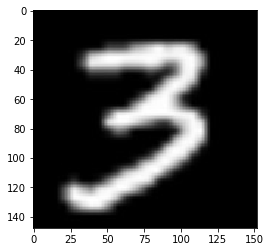
预测的结果是:3

魔乐社区(Modelers.cn) 是一个中立、公益的人工智能社区,提供人工智能工具、模型、数据的托管、展示与应用协同服务,为人工智能开发及爱好者搭建开放的学习交流平台。社区通过理事会方式运作,由全产业链共同建设、共同运营、共同享有,推动国产AI生态繁荣发展。
更多推荐


 0
0 0
0- 0


 已为社区贡献1条内容

所有评论(0)