使用深度学习(tensorflow)识别动物的简单案例(vgg16)包含数据集及代码——0基础版
1.Tensorflow 版本tensorflow的版本是1.12.0如何安装tensorflow1.12.0?首先使用conda创建python版本为3.6的虚拟环境,然后再在虚拟环境中使用命令conda install tensorflow==1.12.0安装tensorflow 1.12.0版本。具体过程请百度。2.VGG16模型权重数据集下载链接:https://pan.baidu.com
·
1.Tensorflow 版本
tensorflow的版本是
1.12.0
如何安装tensorflow1.12.0?首先使用conda创建python版本为3.6的虚拟环境,然后再在虚拟环境中使用命令conda install tensorflow==1.12.0安装tensorflow1.12.0版本。具体过程请百度。
2.VGG16模型权重数据集下载
链接:https://pan.baidu.com/s/1OBQUWafOF8LYY73-sW7SUw
提取码:xcmp
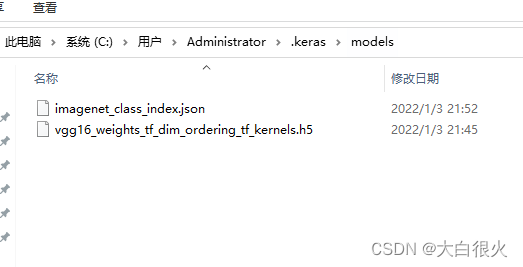
下载后的数据移动至目录:
C:\Users\Administrator\.keras\models(不同机器目录可能不同)
3.实现
from tensorflow.python.keras.applications.vgg16 import VGG16, preprocess_input, decode_predictions
from tensorflow.python.keras.preprocessing.image import load_img, img_to_array


def predict():
    model = VGG16()
    # print(model.summary())
    # !!!记得修改图片路径
    image = load_img("./image/i5.jpg", target_size=(224, 224))
    image = img_to_array(image)

    # 输入卷积中需要4维结构
    image = image.reshape((1, image.shape[0], image.shape[1], image.shape[2]))
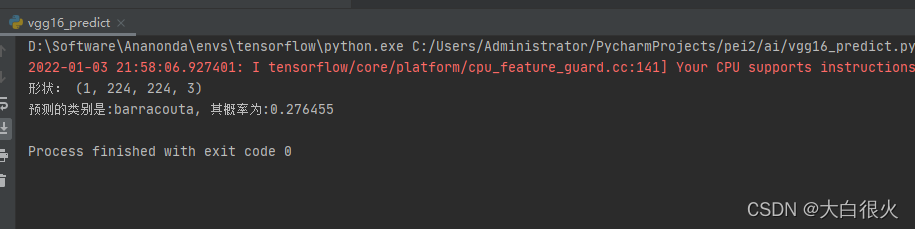
    print("形状:", image.shape)

    # 预测之前做图片的数据处理,归一化处理等
    image = preprocess_input(image)
    y_predictions = model.predict(image)

    # 对结果进行解码,按照降序排序结果
    label = decode_predictions(y_predictions)
    print("预测的类别是:%s, 其概率为:%f" % (label[0][0][1], label[0][0][2]))

    # 预测一张图的类别


if __name__ == '__main__':
    predict()

魔乐社区(Modelers.cn) 是一个中立、公益的人工智能社区,提供人工智能工具、模型、数据的托管、展示与应用协同服务,为人工智能开发及爱好者搭建开放的学习交流平台。社区通过理事会方式运作,由全产业链共同建设、共同运营、共同享有,推动国产AI生态繁荣发展。
更多推荐



 0
0 0
0- 0


 已为社区贡献6条内容

所有评论(0)