深度学习训练模型出现:RuntimeError: CUDA out of memory. 如何解决?
·
深度学习训练模型出现:RuntimeError: CUDA out of memory. 如何解决?
RuntimeError: CUDA out of memory. Tried to allocate 160.00 MiB (GPU 0; 23.65 GiB total capacity; 22.09 GiB already allocated; 108.44 MiB free; 22.24 GiB reserved in total by PyTorch) If reserved memory is >> allocated memory try setting max_split_size_mb to avoid fragmentation. See documentation for Memory Management and PYTORCH_CUDA_ALLOC_CONF
解释:
方法1:查看GPU是否被其他进程占用,更换GPU
先使用命令watch -n 0.5 nvidia-smi查看服务器的GPU使用情况
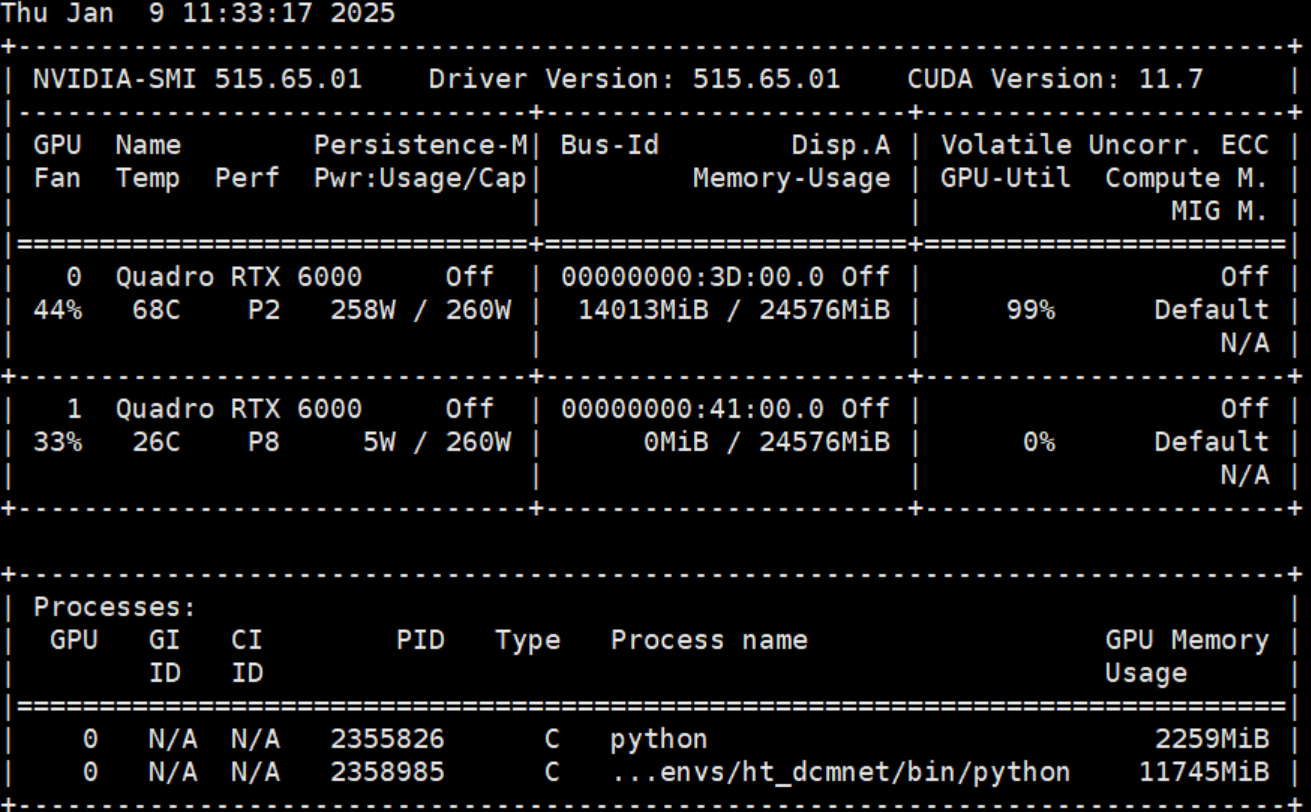
如图可知cuda:0被占用,那就用另外一张卡
在代码最前面中设置:
# 指定GPU
import os
os.environ['CUDA_VISIBLE_DEVICES'] = '1'
下面添加:
device = 'cuda' if torch.cuda.is_available() else 'cpu'

print(f"using  {device} device")#cuda

model = model.to(device)#将模型转移到gpu上
或者写成:
device = torch.device('cuda:0')
# 确保使用 'cuda:0',因为 'CUDA_VISIBLE_DEVICES' 将 GPU 1 映射为 0
但是不能写成:
device = torch.device('cuda:1')
会报错
RuntimeError: CUDA error: invalid device ordinal
CUDA kernel errors might be asynchronously reported at some other API call,so the stacktrace below might be incorrect.
For debugging consider passing CUDA_LAUNCH_BLOCKING=1.
方法2:减少batch-size的大小
将batch-size的大小逐渐减小,直到能跑通的最大数值,128->100->64->32->16->8->……
上述方法亲测有效,如果不行还可参考:
大概率(5重方法)解决RuntimeError: CUDA out of memory. Tried to allocate … MiB-阿里云开发者社区 (aliyun.com)

魔乐社区(Modelers.cn) 是一个中立、公益的人工智能社区,提供人工智能工具、模型、数据的托管、展示与应用协同服务,为人工智能开发及爱好者搭建开放的学习交流平台。社区通过理事会方式运作,由全产业链共同建设、共同运营、共同享有,推动国产AI生态繁荣发展。
更多推荐


 2
2 0
0- 0


 已为社区贡献3条内容

所有评论(0)