调用通义千问大模型Function Calling实现实时天气查询
OpenAI 在它的多个版本的模型里提供了一个非常有用的功能叫 Function Calling,就是你传递一些方法的信息给到大模型,大模型根据用户的提问选择合适的方法Function,然后输出给你,你再来决定是否执行。之所以需要Function Calling,通俗来讲就是大模型不具备实时性。因为模型是基于之前的数据训练出来的。而 Function Calling 具备实时性的优势,比如调用第三

OpenAI 在它的多个版本的模型里提供了一个非常有用的功能叫 Function Calling,就是你传递一些方法的信息给到大模型,大模型根据用户的提问选择合适的方法Function,然后输出给你,你再来决定是否执行。
之所以需要Function Calling,通俗来讲就是大模型不具备实时性。因为模型是基于之前的数据训练出来的。而 Function Calling 具备实时性的优势,比如调用第三方API、或者 Database 来获取实时数据。这样结合2者的优势就能给到用户最正确最合理的反馈结果。

Function Calling 流程
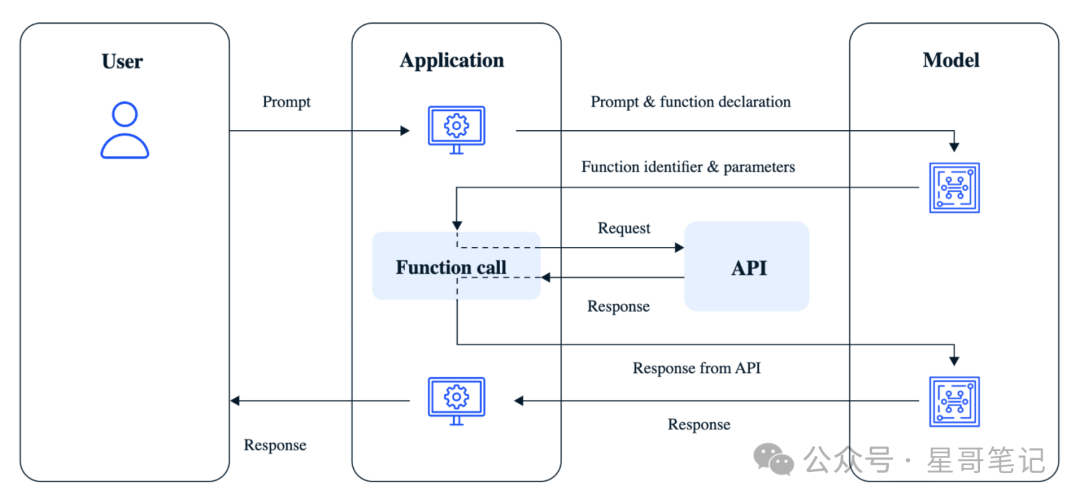
实现 Function Calling 需要以下几步:
-
预定义需要调用的Function函数
-
将定义好的Function以及需要的Parameter传入大模型
-
解析大模型返回结果,调用相应的Function获取实时结果
-
将Function返回的结果重新传给大模型,返回统一的NLG结果
具体的流程如下图所示:
接下来我们用查询实时天气为例,将这4步依次完成。

1. 定义获取实时天气Function
首先需要查询实时天气的接口API,我使用的是免费的 心知天气API ,返回的JSON合适如下:
{
    'results': [
            {
                'location': {
                'id': 'WTW3SJ5ZBJUY',
                'name': '上海',
                'country': 'CN',
                'path': '上海,上海,中国',
                'timezone': 'Asia/Shanghai',
                'timezone_offset': '+08:00'
            },
            'now': {
                 'text': '多云',
                 'code': '4',
                 'temperature': '22'
             }
         }
    ]
}
可以看出需要解析出 now 字段中的 text 和 temperature 值,具体实现代码如下:
import json
import requests


def get_current_weather(location):
    url = "https://api.seniverse.com/v3/weather/now.json?key=你的心知天气API Key&location=" + location + "&language=zh-Hans&unit=c"
    response = requests.get(url)
    if response.status_code == 200:
        data = response.json()
        weather = data['results'][0]['now']['text']
        temp = data['results'][0]['now']['temperature']
        return json.dumps({"location": location, "weather": weather, "temperature": temp})
    else:
        return json.dumps({"location": location, "error": "获取实时天气数据失败!"})
上述代码中的key需要使用你自己申请的API Key。

2. 将Function传入大模型
2.1 声明大模型 function list
功能函数Function定义好之后,就需要通过function list将其传给大模型。function list 的具体格式根据你所选择的大模型的不同,可能会有所差异。具体需要按照各自大模型的官方文档来集成。这篇文章我使用的是通义千问大模型,格式如下:
functions = [
    # 获取指定城市的天气
    {
        "type": "function",
        "function": {
            "name": "get_current_weather",
            "description": "当你想查询指定城市的天气时非常有用。",
            "parameters": {  # 查询天气时需要提供位置,因此参数设置为location
                "type": "object",
                "properties": {
                    "location": {
                        "type": "string",
                        "description": "城市或县区,比如北京市、杭州市、余杭区等。"
                    }
                }
            },
            "required": [
                "location"
            ]
        }
    }
]
上述代码中我们定义了一个 functions 数组,在这个数组中有一个结构体 type类型为 function。然后在这个 function 中有2项内容很重要:name 和 description。
name 代表函数Function的名字;description 是告诉大模型什么时候需要返回需要调用当前function的结果。
另外,因为我们定义的 get_current_weather 函数需要传入参数 location,所以在上述代码中我们还需要声明一下 parameters。这样大模型就可以根据上下文返回给调用方合理的参数。
2.2 声明大模型接口调用的函数
然后调用相应大模型的接口,传入上述格式代码。根据通义千问官方文档具体传入方式如下:
import dashscope
from dashscope import Generation
import json
import requests
# 调用通义千问接口
def query_from_qwen(messages):
    response = Generation.call(
        api_key="你的通义千问API Key",
        model='qwen-plus',
        messages=messages,
        tools=functions,
        seed=random.randint(1, 10000),  # 设置随机数种子seed,如果没有设置,则随机数种子默认为1234
        result_format='message'  # 将输出设置为message形式
    )
    return response
2.3 构建messages执行query_from_qwen
代码如下:
# 模拟用户输入:青岛天气
messages = [
    {"content": "青岛天气", "role": "user"}
]
# 执行query_from_qwen,打印结果
llm_response = query_from_qwen(messages)
print(llm_response)
大模型返回结果
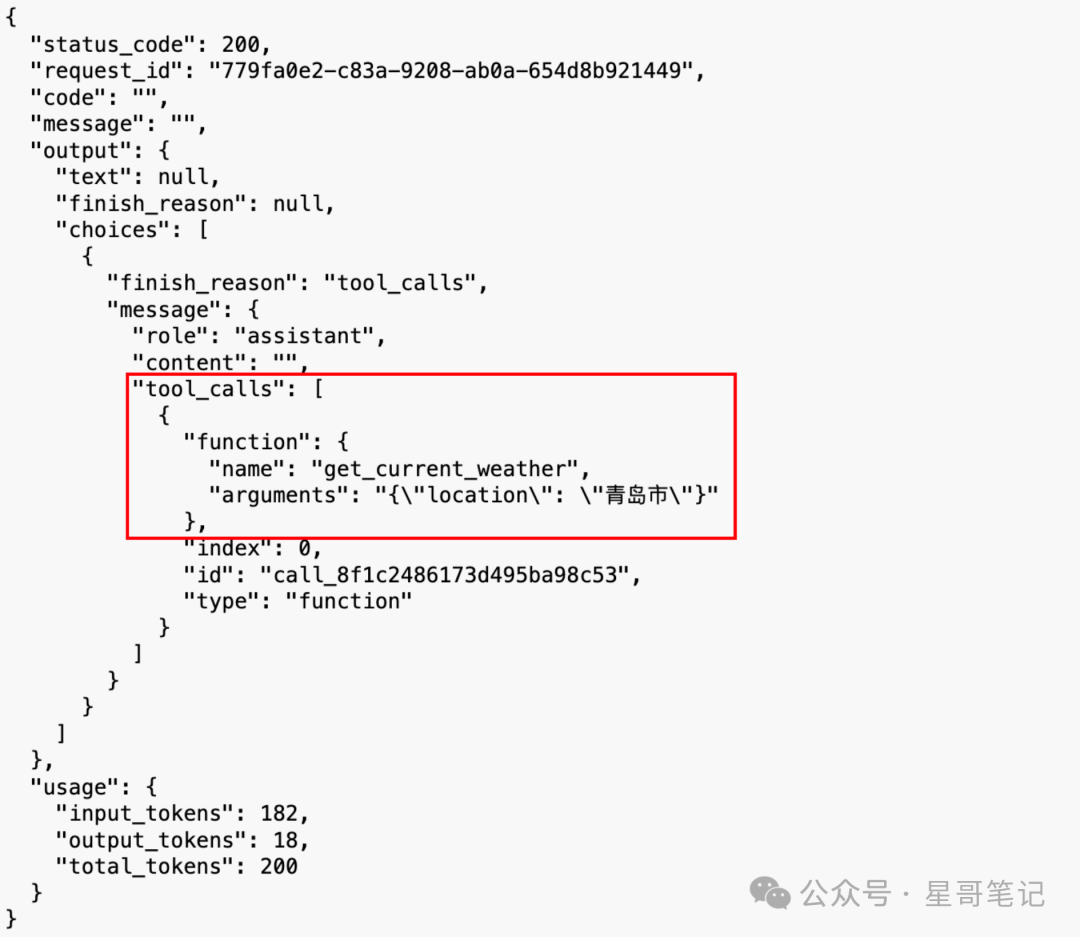
上图中可以看出,大模型返回了 tool_calls 字段。说明针对用户输入"青岛天气",已经正确理解出需要调用 get_current_weather function,并且正确提取出参数是 青岛市 。

3. 解析大模型结果调用Function
接下来就是解析上图中的 tool_calls 信息,并手动调用 get_current_weather 函数。
def parse_llm_response(llm_response):
    assistant_output = llm_response.output.choices[0].message
    if 'tool_calls' not in assistant_output:  # 如果模型判断无需调用工具,则将assistant的回复直接打印出来,无需进行模型的第二轮调用
        print(f"最终答案:{assistant_output.content}")
        return
    # 如果模型选择的工具是get_current_weather
    elif assistant_output.tool_calls[0]['function']['name'] == 'get_current_weather':
        tool_info = {"name": "get_current_weather", "role": "tool"}
        location = json.loads(assistant_output.tool_calls[0]['function']['arguments'])['location']
        tool_info['content'] = get_current_weather(location)
    return tool_info
将 get_current_weather 函数返回的数据包装到 tool_info 中,tool_info 结果如下:
{
  "name": "get_current_weather",
  "role": "tool",
  "content": {
    "location": "青岛",
    "weather": "多云",
    "temperature": "12"
}
最后一步就是将此 tool_info 重新返回给大模型,并返回最终结果。

4. 大模型返回最终NLG结果
将第 3 步返回的 tool_info 信息重新添加到 messages 中,并重新调用 query_from_qwen
messages.append(tool_info)
llm_final_response = query_from_qwen(messages)
print(f"\n大模型最终输出信息:{llm_final_response}\n")
最终打印结果如下:
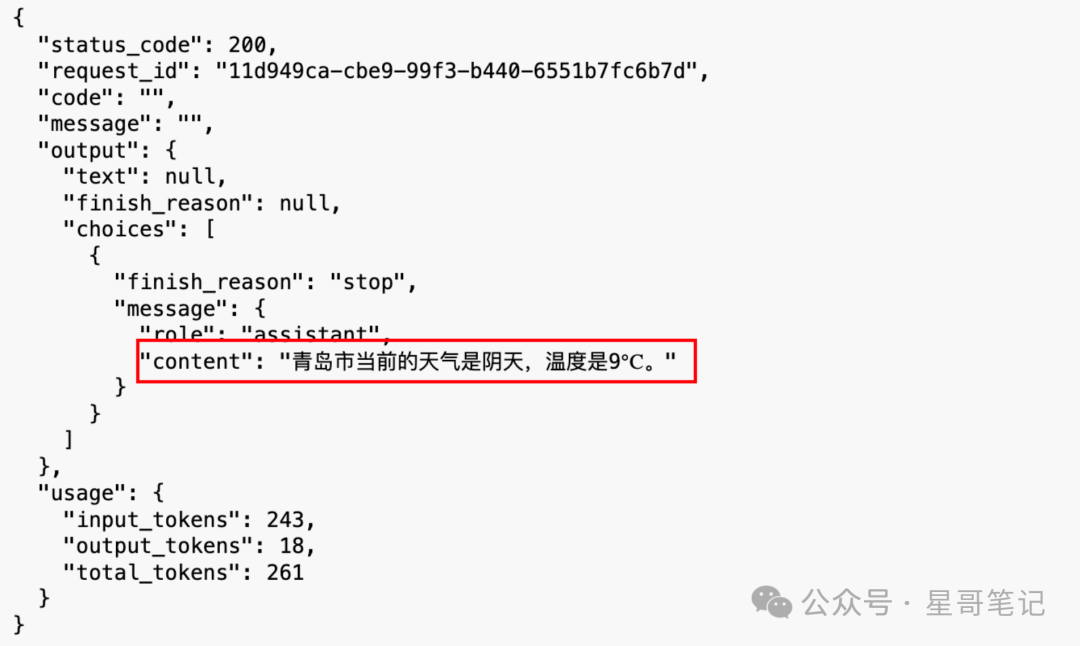
最终大模型根据上下文理解以及传入的天气信息,返回了最合适的NLG结果。只需要将output中的content值解析出来并反馈给用户即可。

如果你喜欢本文
长按二维码关注



魔乐社区(Modelers.cn) 是一个中立、公益的人工智能社区,提供人工智能工具、模型、数据的托管、展示与应用协同服务,为人工智能开发及爱好者搭建开放的学习交流平台。社区通过理事会方式运作,由全产业链共同建设、共同运营、共同享有,推动国产AI生态繁荣发展。
更多推荐


 16
16 0
0- 0


 已为社区贡献2条内容

所有评论(0)