Maven配置阿里云仓库支持https
2022年开始,阿里云对以前的maven仓库地址进行升级,由原来的http换成https,所以maven配置和IntelliJ IDEA需要进行对应的一些调整
·
2022年开始,阿里云对以前的maven仓库地址进行升级,由原来的http换成https,所以maven配置和IntelliJ IDEA需要进行对应的一些调整
原来链接:http://maven.aliyun.com/repository/public
现在链接:https://maven.aliyun.com/repository/public
maven settings.xml配置
maven settings.xml配置,先加上<mirror>
<mirrors>
	<mirror>
		<id>aliyunmaven</id>
		<mirrorOf>*</mirrorOf>
		<name>阿里云公共仓库</name>
		<url>https://maven.aliyun.com/repository/public</url>
	</mirror>
  </mirrors>
加上profile配置,在IDEA里才能进行profile的选择
<profiles>
	<profile>
            <id>aliyun</id>
            <repositories>
                <repository>
                    <id>aliyun</id>
                    <url>https://maven.aliyun.com/repository/public</url>
                    <releases>
                        <enabled>true</enabled>
                    </releases>
                    <snapshots>
                        <enabled>true</enabled>
                    </snapshots>
                </repository>
            </repositories>
            <pluginRepositories>
                <pluginRepository>
                    <id>aliyun</id>
                    <url>https://maven.aliyun.com/repository/public</url>
                    <releases>
                        <enabled>true</enabled>
                    </releases>
                    <snapshots>
                        <enabled>true</enabled>
                    </snapshots>
                </pluginRepository>
            </pluginRepositories>
        </profile>

  </profiles>
  <activeProfiles>
        <activeProfile>aliyun</activeProfile>
    </activeProfiles>
IDEA配置支持https
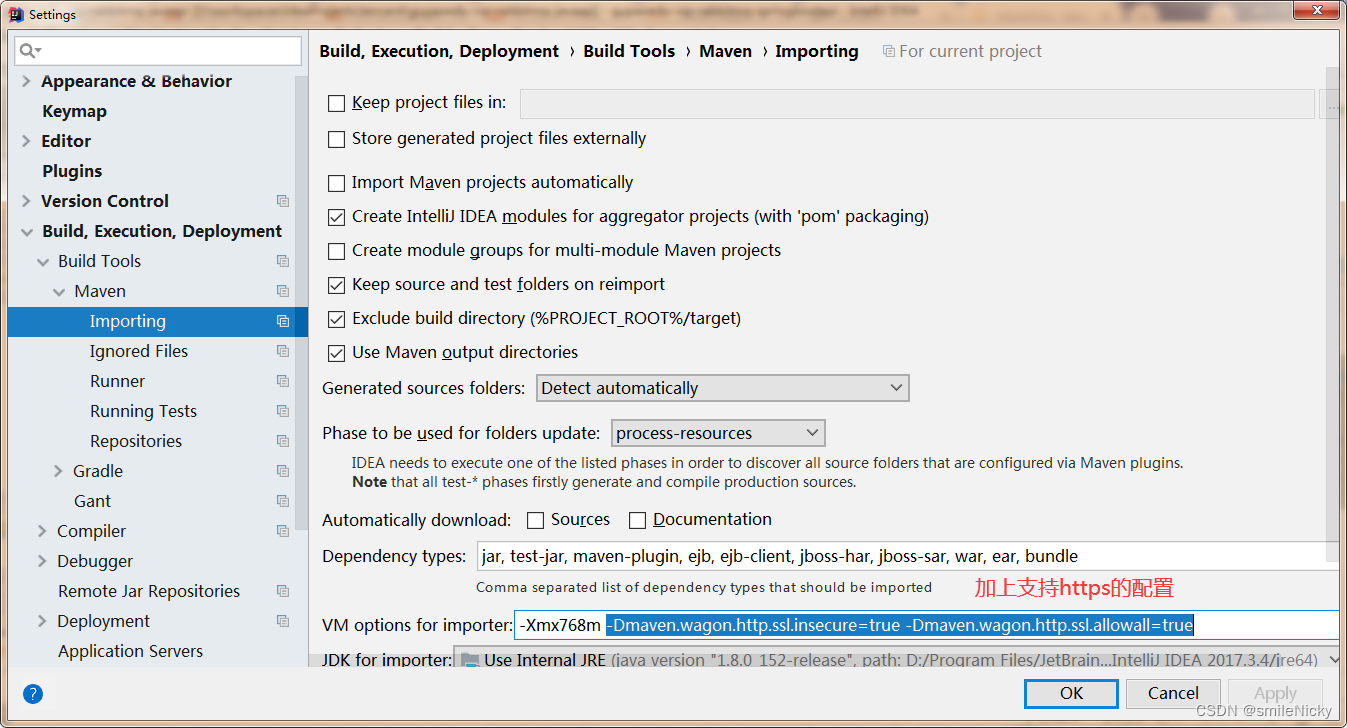
在上面的maven settings.xml配置好之后,为了使下载依赖更顺畅,需要在IDEA里,进行设置,选择File->Settings,如图所示,加上配置
-Dmaven.wagon.http.ssl.insecure=true -Dmaven.wagon.http.ssl.allowall=true
继续点击Maven–Runner ,在VM options 中加入配置
-Dmaven.wagon.http.ssl.insecure=true -Dmaven.wagon.http.ssl.allowall=true -Dmaven.wagon.http.ssl.ignore.validity.dates=true
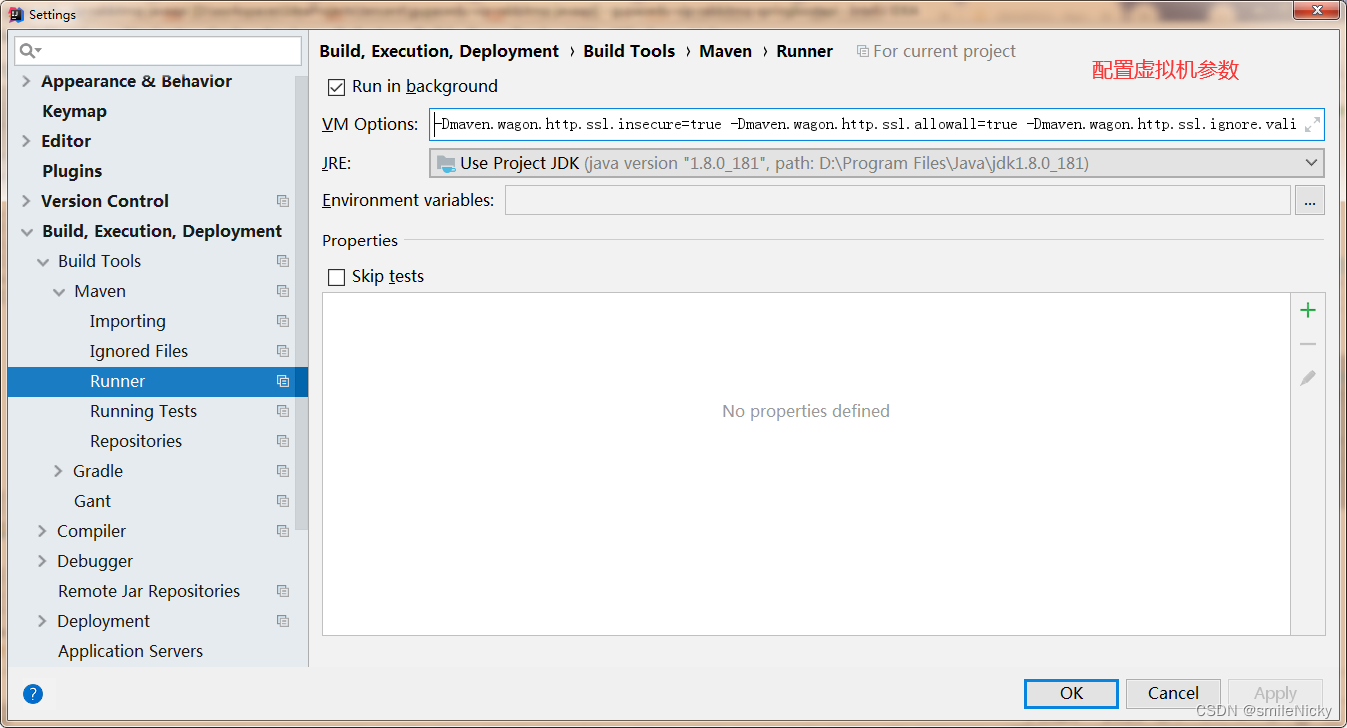
点击Apply,保存配置

魔乐社区(Modelers.cn) 是一个中立、公益的人工智能社区,提供人工智能工具、模型、数据的托管、展示与应用协同服务,为人工智能开发及爱好者搭建开放的学习交流平台。社区通过理事会方式运作,由全产业链共同建设、共同运营、共同享有,推动国产AI生态繁荣发展。
更多推荐



 2
2 0
0- 0


 已为社区贡献4条内容

所有评论(0)