嵌入式web -- CGI
·
前置:
BOA安装:嵌入式web – BOA的安装、配置与测试
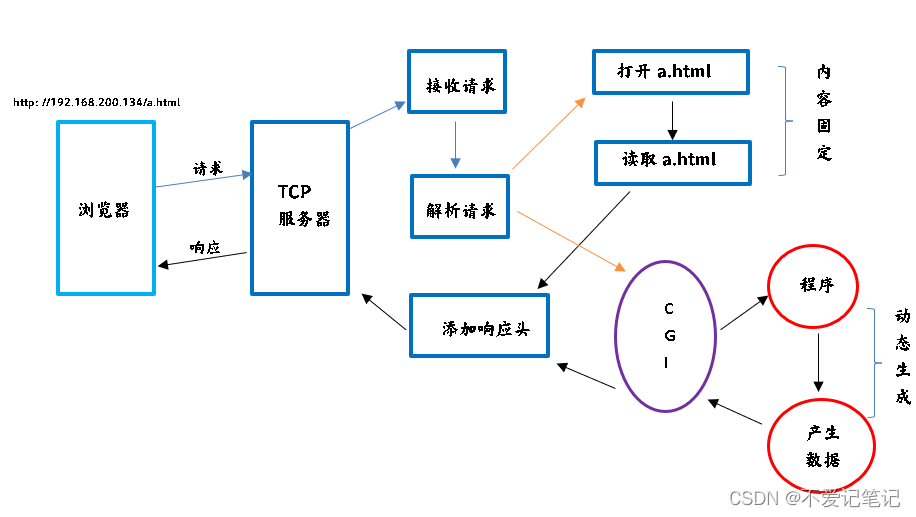
1、CGI工作原理
公共网关接口(Common Gateway Interface,CGI)
是连接 服务器 和 应用 程序 之间的一个通用接口
2、CGI简单测试
- 这里使用BOA服务器
- 编辑配置文件,改最后一行的路径(别忘加 /)
$ sudo vim /etc/boa/boa.conf
以后就可以访问你自定义的cgi目录 (cgi-bin 是一个虚拟路径)

2.1、shell案例
- 在自定义的cgi目录里操作
$ touch time
$ chmod +x time
$ vim time
#!/bin/sh
echo "Content-Type:text/html;charset=utf-8\r\n"

echo "<title>time</title>"
echo "<h1>`date '+%H:%M:%S'`</h1>"
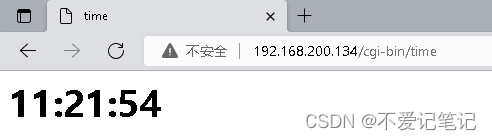
- 在浏览器测试
2.2、c语言案例
clion连接虚拟机的方法
为了以后方便,直接上流程
- 获取时间:get_time.c
#include <stdio.h>
#include <string.h>
#include "get_time.h"

char* GetTime(time_t now){
    struct tm *local;
    static char buf[15]; //记录时间xx-xx xx:xx:xx

    if(now <= 0){
        now = time(NULL);//获得当前的时间
    }

   local =  localtime(&now);
    if(local == NULL){
        perror("localtime error");
        return NULL;
    }

    snprintf(buf, sizeof(buf),"%02d-%02d %02d:%02d:%02d",
             local->tm_mon,local->tm_mday,local->tm_hour,local->tm_min,local->tm_sec);
    return buf;
}
- 头文件:get_time.h
#ifndef GET_TIME_H
#define GET_TIME_H

#include <time.h>

extern char *GetTime(time_t now);

#endif
- 主函数
#include <stdio.h>
#include "get_time.h"

int main() {
    printf("Content-Type:text/html;charset=utf-8\r\n");
    printf("\r\n");

    printf("<h1>CGI测试</h1>");
    printf("<h2>%s</h2>", GetTime(0));

    return 0;
}
- Makefile
TARGET := ctest

CROSS_COMPILE :=
CC = $(CROSS_COMPILE)gcc
LD = $(CROSS_COMPILE)ld

OBJS := main.o
OBJS += get_time.o

CFLAGS += -Wall -I./inc
LDFLAGS +=

OUTPUT_DIR = /home/venom/web_prj/jobs/cgi/

all:$(TARGET)
$(TARGET):$(OBJS)
	$(CC) $(LDFLAGS) $^ -o $@
	cp $@ $(OUTPUT_DIR)

%.o:%.c
	$(CC) $(CFLAGS) -c $^ -o $@

clean:
	rm -f $(TARGET) $(OBJS)

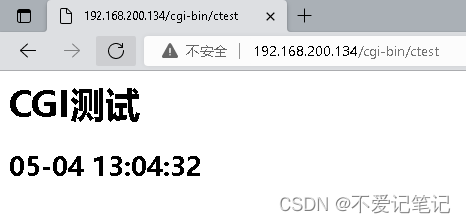
嫌麻烦直接用mian函数随便打印一个再编译就行,Makefile还有点小问题
不熟悉Makefile可参考:Makefile
后续:
前后端分离引入:嵌入式web – 前后端分离
CGI案例:嵌入式web – CGI案例
综合参考:嵌入式web – 综合参考案例

魔乐社区(Modelers.cn) 是一个中立、公益的人工智能社区,提供人工智能工具、模型、数据的托管、展示与应用协同服务,为人工智能开发及爱好者搭建开放的学习交流平台。社区通过理事会方式运作,由全产业链共同建设、共同运营、共同享有,推动国产AI生态繁荣发展。
更多推荐


 0
0 0
0- 0


 已为社区贡献4条内容

所有评论(0)