嵌入式web服务器goahead从移植到使用之文件上传
·
goahead的文件上传官方也已经提供了例程可以直接用,相关代码在test.c中,如下:
//绑定C函数uploadTest到action/uploadTest这个url
websDefineAction("uploadTest", uploadTest);

/*
    Dump the file upload details. Don't actually do anything with the uploaded file.
 */
static void uploadTest(Webs *wp)
{
    WebsKey         *s;
    WebsUpload      *up;
    char            *upfile;

    websSetStatus(wp, 200);
    websWriteHeaders(wp, -1, 0);
    websWriteHeader(wp, "Content-Type", "text/plain");
    websWriteEndHeaders(wp);
    if (scaselessmatch(wp->method, "POST")) {
        for (s = hashFirst(wp->files); s; s = hashNext(wp->files, s)) {
            up = s->content.value.symbol;
            websWrite(wp, "FILE: %s\r\n", s->name.value.string);
            //文件上传后会先存储到根目录下的tmp文件夹内,并以临时文件的形式存在
            websWrite(wp, "FILENAME=%s\r\n", up->filename);
            //clientFilename才是上传的文件名,是自动读取出来的
            websWrite(wp, "CLIENT=%s\r\n", up->clientFilename);
            //文件类型
            websWrite(wp, "TYPE=%s\r\n", up->contentType);
            //文件大小
            websWrite(wp, "SIZE=%d\r\n", up->size);
            //构造路径加文件名
            upfile = sfmt("%s/tmp/%s", websGetDocuments(), up->clientFilename);
            //将前面存储到tmp文件夹的临时文件重命名,并且放到web/tmp/目录下
            if (rename(up->filename, upfile) < 0) {
                error("Cannot rename uploaded file: %s to %s, errno %d", up->filename, upfile, errno);
            }
            wfree(upfile);
        }
        websWrite(wp, "\r\nVARS:\r\n");
        for (s = hashFirst(wp->vars); s; s = hashNext(wp->vars, s)) {
            websWrite(wp, "%s=%s\r\n", s->name.value.string, s->content.value.string);
        }
    }
    websDone(wp);
}
对应的web存放在test/web/upload/目录下,即upload.html,内容如下:
<html>
<head>
<meta charset="utf-8"/>
<title>Upload</title>
</head>
<body>
    <h2>File Upload to HTML</h2>
    <form method="post" action="/action/uploadTest" enctype="multipart/form-data">
        <input type="hidden" name="MAX_FILE_SIZE" value="30000">
        <table border="0">
            <tr><td>Name</td><td><input type="text" name="Name"></td></tr>
            <tr><td>Address</td><td><input type="text" name="Address"></td></tr>
            <tr><td>File:</td><td><input type="file" name="file"></td></tr>
        </table>
        <input type="submit" value="send">
        <input type="reset" value="cancel">
    </form>
</body>
</html>
在上传文件前,我们先要看一下,goahead服务器运行的根目录(注意这个根目录就是使用--home参数指定的目录)下是否有一个tmp文件夹,如果不存在则先创建一个tmp文件夹,这个文件夹就是用来临时存储服务器收到的文件,如果不想使用这个文件夹可以修改配置文件me.h中宏(ME_GOAHEAD_UPLOAD_DIR)定义的内容为你想要设置的目录;在上面uploadTest函数的第30行指定了将最终得到的文件放在哪儿,这里是web/tmp/目录下,所以还要看下web目录下是否有一个tmp文件夹,如果不存在则先创建一个。
前面的步骤做完后,就可以启动goahead服务器了,用以下命令启动goahead服务器:
./goahead-test -v --home ../../../test/ web
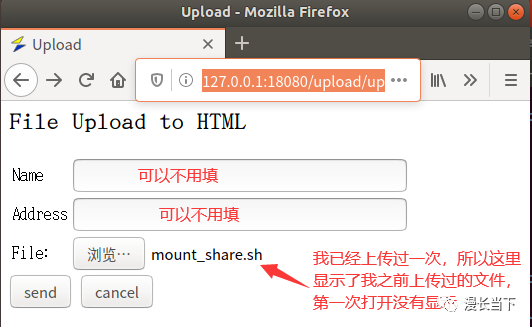
启动后,用浏览器打开http://127.0.0.1:18080/upload/upload.html这个网页,界面如下:
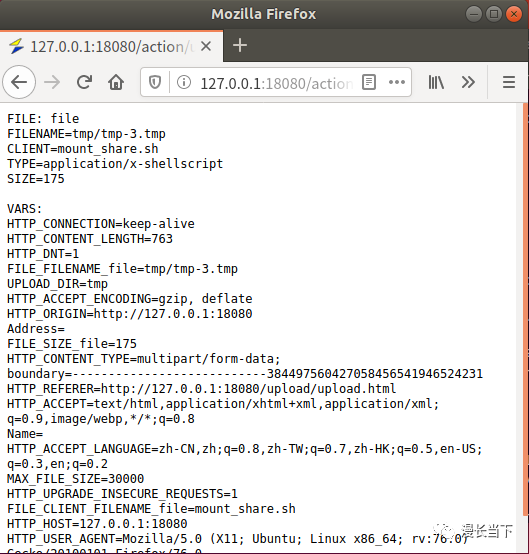
选择文件后点击send按钮,文件就上传成功了,并且页面显示了上传的文件详情:

魔乐社区(Modelers.cn) 是一个中立、公益的人工智能社区,提供人工智能工具、模型、数据的托管、展示与应用协同服务,为人工智能开发及爱好者搭建开放的学习交流平台。社区通过理事会方式运作,由全产业链共同建设、共同运营、共同享有,推动国产AI生态繁荣发展。
更多推荐


 0
0 0
0- 0


 已为社区贡献6条内容

所有评论(0)