大数据-玩转数据-Flink 自定义Sink(Mysql)
·
一、说明
如果Flink没有提供给我们可以直接使用的连接器,那我们如果想将数据存储到我们自己的存储设备中,mysql 的安装使用请参考
mysql-玩转数据-centos7下mysql的安装
创建表
CREATE TABLE `sensor` (
  `id` int(10)
) ENGINE=InnoDB DEFAULT CHARSET=utf8
二、pom.xml 导入驱动
<dependency>
    <groupId>mysql</groupId>
    <artifactId>mysql-connector-java</artifactId>
    <version>8.0.33</version>
</dependency>
三、编写程序
package com.lyh.flink06;

import org.apache.flink.api.java.functions.KeySelector;
import org.apache.flink.configuration.Configuration;
import org.apache.flink.streaming.api.datastream.DataStreamSource;
import org.apache.flink.streaming.api.datastream.KeyedStream;
import org.apache.flink.streaming.api.environment.StreamExecutionEnvironment;
import org.apache.flink.streaming.api.functions.sink.RichSinkFunction;
import org.apache.flink.streaming.api.functions.sink.SinkFunction;

import java.sql.Connection;
import java.sql.DriverManager;
import java.sql.PreparedStatement;

public class SinkMysql {
    public static void main(String[] args) throws Exception {
        StreamExecutionEnvironment env = StreamExecutionEnvironment.getExecutionEnvironment();
        env.setParallelism(2);
        DataStreamSource<Integer> dataStreamSource = env.fromElements(1, 2, 3, 4, 5, 6);
        KeyedStream<Integer, Integer> keyedStream = dataStreamSource.keyBy(new KeySelector<Integer, Integer>() {
            @Override
            public Integer getKey(Integer value) throws Exception {
                return value.intValue();
            }
        });
        keyedStream.addSink(new MysqlSink());
        env.execute();

    }
    public static class  MysqlSink extends RichSinkFunction<Integer>{

        private Connection sunbo;

        @Override
        public void open(Configuration parameters) throws Exception {
            Class.forName("com.mysql.cj.jdbc.Driver");
            sunbo = DriverManager.getConnection("jdbc:mysql://192.168.220.100:3306/test?useSSL=false", "sunbo", "Mysql123456#");

        }

        @Override
        public void close() throws Exception {
            if (sunbo != null) {
                sunbo.close();
            }
        }

        @Override
        public void invoke(Integer value, Context context) throws Exception {
            String sql = "insert into sensor(id)values(?)";
            PreparedStatement ps = sunbo.prepareStatement(sql);
            ps.setInt(1,value.intValue());
            ps.execute();
            ps.close();

        }
    }
}
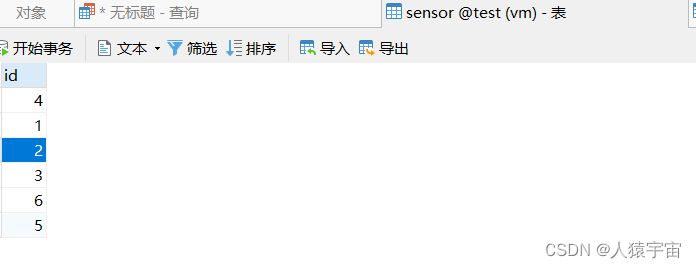
四、运行测试

魔乐社区(Modelers.cn) 是一个中立、公益的人工智能社区,提供人工智能工具、模型、数据的托管、展示与应用协同服务,为人工智能开发及爱好者搭建开放的学习交流平台。社区通过理事会方式运作,由全产业链共同建设、共同运营、共同享有,推动国产AI生态繁荣发展。
更多推荐


 0
0 0
0- 0


 已为社区贡献3条内容

所有评论(0)