从UNet训练到TensorRT部署:完整语义分割模型部署优化指南(windows版本)
本文详细介绍了从UNet模型训练到TensorRT部署的完整流程,涵盖了数据准备、模型训练、ONNX导出、TensorRT优化以及Python/C++推理实现等关键环节。通过TensorRT部署,我们能够显著提升模型的推理速度,满足实际生产环境对实时性的要求
1. 引言
语义分割是计算机视觉领域的重要任务,它要求对图像中的每个像素进行分类。UNet作为一种经典的语义分割网络架构,在医学影像、自动驾驶、遥感图像分析等领域有着广泛应用。然而,在实际生产环境中,我们往往需要将训练好的模型部署到边缘设备或服务器上,这就涉及到模型优化和加速的问题。
TensorRT是NVIDIA推出的高性能深度学习推理库,能够显著提升模型在NVIDIA GPU上的推理速度。本文将详细介绍从UNet模型训练到TensorRT部署的完整流程,包括环境配置、数据准备、模型训练、ONNX导出、TensorRT转换以及C++/Python推理实现。
2. 环境准备
2.1 基础环境安装
前置环境:vs2022社区版,可以自行安装
在开始之前,我们需要配置好基础环境:
2.1.1 推荐版本组合
(可以先用deepseek搜,不然中途容易出错不兼容)
| 组件 | 推荐版本 | 关键说明 |
|---|---|---|
| python | 3.10 | 兼容tensorRT,vit等,更新的版本目前tensoRT不兼容 |
| CUDA | 11.8 (主版本必须匹配) | TensorRT 8.6.0.12 官方明确支持 CUDA 11.8 |
| TensorRT | 8.6.0.12 | |
| cuDNN | 8.9.2.26 | TensorRT 8.6.x 依赖 cuDNN 8.9.x |
| PyTorch | 2.0.1+cu118 | PyTorch 官方为 CUDA 11.8 提供预编译包(从 2.0 开始支持) |
| ONNX | 1.14.0 | 兼容 PyTorch 2.0+ 和 TensorRT 8.6 |
| ONNX Runtime | 1.15.1 | 必须匹配 ONNX 版本 |
2.1.2 CUDA和cuDNN安装:
2.1.3 pytorch安装
pip install torch==2.0.1+cu118 torchvision==0.15.2+cu118 torchaudio==2.0.2+cu118 \
  -i https://mirrors.aliyun.com/pypi/simple/ \
  --trusted-host mirrors.aliyun.com
或者(更推荐)
pip install torch==2.0.1+cu118 torchvision==0.15.2+cu118 torchaudio==2.0.2+cu118 \
  -f https://mirrors.aliyun.com/pytorch-wheels/torch_stable.html
验证安装
import torch
print(torch.__version__)          # 应输出 2.0.1+cu118
print(torch.cuda.is_available())  # 应输出 True
print(torch.cuda.get_device_name(0))  # 显示GPU型号
2.1.4 ONNX 和 ONNX Runtime安装
pip install onnx==1.14.0 onnxruntime-gpu==1.15.1 -i https://mirrors.aliyun.com/pypi/simple/2.1.5 TensorRT 8.6.0.12 安装
详解Windows系统安装TensorRT_windows安装tensorrt-CSDN博客
注意最后要在python环境中安装whl来导入tensorRT,保证tensoRT的C++与Python环境一致
2.1.6 opencv安装
c++版本
https://blog.csdn.net/qq_41277822/article/details/104018866
https://blog.csdn.net/qq_27278957/article/details/108224325
python版本
pip install opencv-python==4.5.5.64 -i https://mirrors.aliyun.com/pypi/simple/2.2 python其他依赖库安装
pip install albumentations pandas scikit-learn labelme -i https://mirrors.aliyun.com/pypi/simple/
pip install segmentation-models-pytorch -i https://mirrors.aliyun.com/pypi/simple/
pip install tensorboardx timm tqdm wandb -i https://mirrors.aliyun.com/pypi/simple/
3. 数据准备与标注
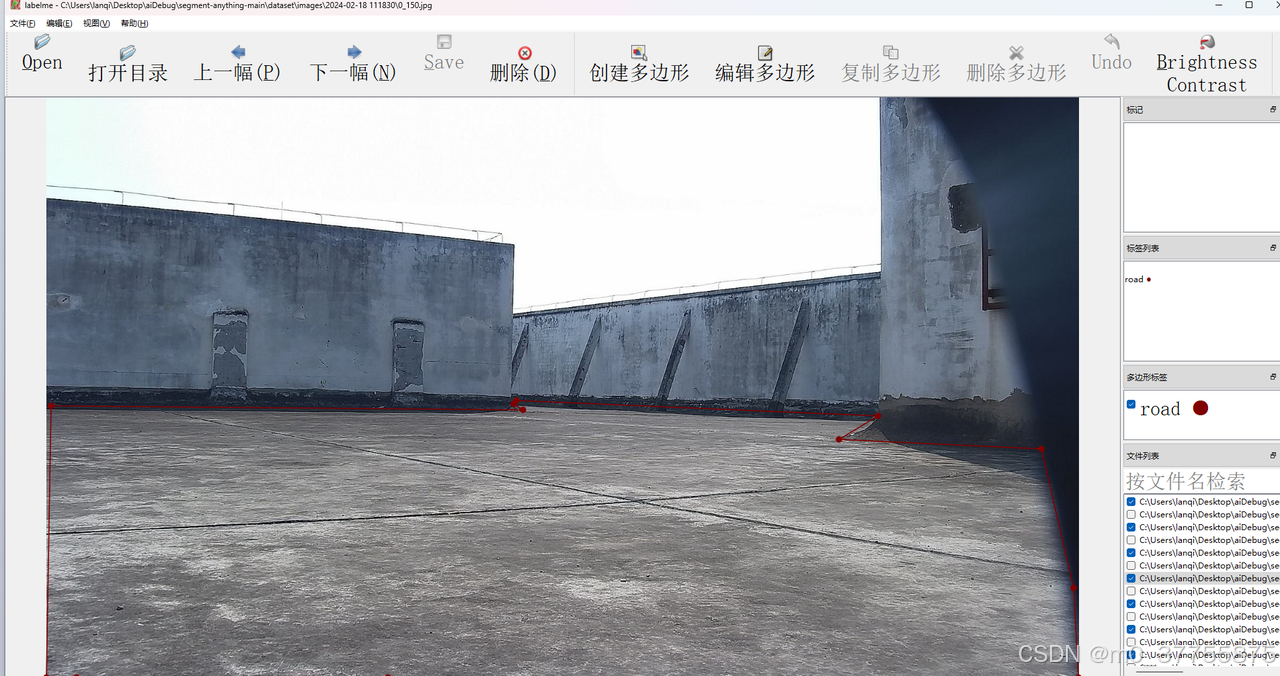
3.1 标注流程:
-
打开图像文件
-
使用多边形工具绘制目标区域
-
为每个区域指定类别标签
-
保存为JSON格式
{
  "version": "5.4.1",
  "flags": {},
  "shapes": [
    {
      "label": "road",
      "points": [
        [
          11.602409638554185,
          770.3949016703393
        ],
        [
          488.9156626506025,
          619.5180722891566
        ],
        [
          1858.7951807228915,
          652.0481927710844
        ],
        [
          1891.1204819277104,
          799.3105643209418
        ],
        [
          1919.0,
          1079.0
        ],
        [
          0.9999999999998863,
          1080.0
        ]
      ],
      "group_id": null,
      "description": null,
      "shape_type": "polygon",
      "flags": {},
      "mask": null
    }
  ],
  "imagePath": "0_0.jpg",
  "imageHeight": 1080,
  "imageWidth": 1920
}
3.2 JSON转Mask转换
LabelMe生成的JSON标注需要转换为二值Mask图像以供训练使用:
import json
import json
from PIL import Image, ImageDraw
import glob
import os

def points_to_mask(json_data, image_path):
    # 解析JSON数据
    data = json.loads(json_data)
    height = data["imageHeight"]
    width = data["imageWidth"]

    # 创建一个新的和原图同样大小的白色背景图像,用于存储mask
    mask = Image.new('1', (width, height), color=0)  # '1'表示1位像素(黑白)
    draw = ImageDraw.Draw(mask)

    # 遍历 shapes 中的多边形
    for shape in data["shapes"]:
        if shape["shape_type"] == "polygon":
            points = [(p[0], p[1]) for p in shape["points"]]
            draw.polygon(points, outline=1, fill=1)  # 填充前景为白色(值为1)

    # 将图像保存为二进制掩模文件(例如:a_mask.png)
    mask.save(f"{image_path.split('.')[0]}_mask.png", "PNG")


if __name__ == '__main__':
    directory = r"C:\Users\lanqi\Desktop\aiDebug\segment-anything-main\dataset\images"
    for root, dirs, files in os.walk(directory):
        # 仅处理.json文件
        for file in files:
            if file.endswith(".json"):
                # 构建完整文件路径
                file_path = os.path.join(root, file)

                # 打开并读取json文件
                with open(file_path, 'r', encoding='utf-8') as f:
                    data = json.load(f)

                height = data["imageHeight"]
                width = data["imageWidth"]

                # 创建一个新的和原图同样大小的白色背景图像,用于存储mask
                mask = Image.new('1', (width, height), color=0)  # '1'表示1位像素(黑白)
                draw = ImageDraw.Draw(mask)

                polyshape = data["shapes"]
                image_path = os.path.join(root, data["imagePath"])
                # 遍历 shapes 中的多边形

                for shape in data["shapes"]:
                    if shape["shape_type"] == "polygon":
                        points = [(p[0], p[1]) for p in shape["points"]]
                        draw.polygon(points, outline=1, fill=1)  # 填充前景为白色(值为1)

                # 将图像保存为二进制掩模文件(例如:a_mask.png)
                mask.save(f"{image_path.split('.')[0]}_mask.png", "PNG")

                # 处理数据(这里只是一个打印示例)
                print(f"Reading JSON file: {file_path}")
                # print(json.dumps(data, indent=2))

                # 在此处进行你对JSON数据的进一步处理或操作
4. UNet模型训练
4.1 模型架构定义
我们使用segmentation_models_pytorch库快速构建UNet模型:
model.py
import segmentation_models_pytorch as smp
from CFG import *
import torch

def build_model():
    model = smp.Unet(
        encoder_name=CFG.backbone,      # choose encoder, e.g. mobilenet_v2 or efficientnet-b7
        encoder_weights="imagenet",     # use `imagenet` pre-trained weights for encoder initialization
        in_channels=3,                  # model input channels (1 for gray-scale images, 3 for RGB, etc.)
        classes=CFG.num_classes,        # model output channels (number of classes in your dataset)
        activation=None,
    )
    model.to(CFG.device)
    return model

def load_model(path):
    model = build_model()
    model.load_state_dict(torch.load(path))
    model.eval()
    return model
4.2 训练配置
CFG.py
import torch
class CFG:
    seed          = 101
    debug         = False # set debug=False for Full Training
    exp_name      = '2.5D'
    comment       = 'unet-efficientnet_b0-160x192-ep=15'
    model_name    = 'Unet'
    backbone      = 'efficientnet-b0'
    train_bs      = 2
    valid_bs      = train_bs
    img_size      = [1088, 1920]

    epochs        = 15
    lr            = 2e-3
    scheduler     = 'CosineAnnealingLR'
    min_lr        = 1e-6
    T_max         = int(30000/train_bs*epochs)+50
    T_0           = 15
    warmup_epochs = 0
    wd            = 1e-6
    n_accumulate  = max(1, 32//train_bs)
    n_fold        = 5
    folds         = [0]
    num_classes   = 3
    device        = torch.device("cuda:0" if torch.cuda.is_available() else "cpu")
4.3 数据加载及训练和预测代码
from sklearn.model_selection import StratifiedKFold, KFold
import numpy as np
import pandas as pd
pd.options.plotting.backend = "plotly"
import random
from glob import glob
import os, shutil
from tqdm import tqdm
tqdm.pandas()
import time
import copy
import joblib
from collections import defaultdict
import gc
# from IPython import display as ipd
# visualization
import cv2
import matplotlib.pyplot as plt
from matplotlib.patches import Rectangle
from CFG  import *
# Sklearn

# PyTorch
import torch
import torch.nn as nn
import torch.optim as optim
from torch.optim import lr_scheduler
from torch.utils.data import Dataset, DataLoader
from torch.cuda import amp

# Albumentations for augmentations
import albumentations as A
from albumentations.pytorch import ToTensorV2

import rasterio
from joblib import Parallel, delayed
# For colored terminal text
from colorama import Fore, Back, Style
c_  = Fore.GREEN
sr_ = Style.RESET_ALL

import warnings
from loss import *
warnings.filterwarnings("ignore")

data_transforms = {
    "train": A.Compose([
        #         A.Resize(*CFG.img_size, interpolation=cv2.INTER_NEAREST),
        A.OneOf([
            A.HorizontalFlip(p=1),
            A.VerticalFlip(p=1),
        ], p=1),

        # A.RandomCrop(width=256, height=256),
        # A.Affine(scale=(0.9,1.1), rotate = (-15,15), shear = (-7,7), p = 0.5),

        A.RandomBrightnessContrast(brightness_limit=0.001, contrast_limit=0.001, p=0.5),

        A.GaussNoise(var_limit=0.00002, p=0.5),
        A.ShiftScaleRotate(shift_limit=0.0625, scale_limit=0.05, rotate_limit=10, p=0.5),
        A.OneOf([
            A.GridDistortion(num_steps=5, distort_limit=0.05, p=1.0),
            # #             A.OpticalDistortion(distort_limit=0.05, shift_limit=0.05, p=1.0),
            A.ElasticTransform(alpha=1, sigma=50, alpha_affine=50, p=1.0)
        ], p=0.25),

        A.CoarseDropout(max_holes=8, max_height=CFG.img_size[0] // 20, max_width=CFG.img_size[1] // 20,
                        min_holes=5, fill_value=0, mask_fill_value=0, p=0.5),

        A.CenterCrop(width=1920, height=992),
    ], p=1.0),

    "valid": A.Compose([
        #         A.Resize(*CFG.img_size, interpolation=cv2.INTER_NEAREST),
        A.CenterCrop(width=1920, height=992),
    ], p=1.0)
}

def set_seed(seed=42):
    '''Sets the seed of the entire notebook so results are the same every time we run.
    This is for REPRODUCIBILITY.'''
    np.random.seed(seed)
    random.seed(seed)
    torch.manual_seed(seed)
    torch.cuda.manual_seed(seed)
    # When running on the CuDNN backend, two further options must be set
    torch.backends.cudnn.deterministic = True
    torch.backends.cudnn.benchmark = False
    # Set a fixed value for the hash seed
    os.environ['PYTHONHASHSEED'] = str(seed)
    print('> SEEDING DONE')


# imgage
def load_img(path):
    img = cv2.imread(path)
    img = img.astype('float32')  # original is uint16
    if img is None:
        print(path)
    mx = np.max(img)
    if mx:
        img /= mx  # scale image to [0, 1]
    return img


def load_msk(path):
    msk = cv2.imread(path)
    msk = msk[:,:,0]
    if(msk is None):
        print(path)
    msk = msk.astype('float32')

    msk /= 255.0
    return msk


def show_img(img, mask=None):
    clahe = cv2.createCLAHE(clipLimit=2.0, tileGridSize=(8, 8))
    #     img = clahe.apply(img)
    #     plt.figure(figsize=(10,10))
    plt.imshow(img, cmap='bone')

    if mask is not None:
        # plt.imshow(np.ma.masked_where(mask!=1, mask), alpha=0.5, cmap='autumn')
        plt.imshow(mask, alpha=0.5)
        handles = [Rectangle((0, 0), 1, 1, color=_c) for _c in
                   [(0.667, 0.0, 0.0), (0.0, 0.667, 0.0), (0.0, 0.0, 0.667)]]
        labels = ["Large Bowel", "Small Bowel", "Stomach"]
        plt.legend(handles, labels)
    plt.axis('off')


# rle
# ref: https://www.kaggle.com/paulorzp/run-length-encode-and-decode
def rle_decode(mask_rle, shape):
    '''
    mask_rle: run-length as string formated (start length)
    shape: (height,width) of array to return
    Returns numpy array, 1 - mask, 0 - background

    '''
    s = mask_rle.split()
    starts, lengths = [np.asarray(x, dtype=int) for x in (s[0:][::2], s[1:][::2])]
    starts -= 1
    ends = starts + lengths
    img = np.zeros(shape[0] * shape[1], dtype=np.uint8)
    for lo, hi in zip(starts, ends):
        img[lo:hi] = 1
    return img.reshape(shape)  # Needed to align to RLE direction


# dataset


class BuildDataset(torch.utils.data.Dataset):
    def __init__(self,df, label=True, transforms=None):
        self.label = label
        self.img_paths = df["imgpath"]
        self.mask_paths = df["maskpath"]
        # for path in self.img_paths :
        #     new_path = path.replace(".jpg", "_mask.png")
        #     self.mask_paths.append(new_path)

        self.transforms = transforms

    def __len__(self):
        return len(self.img_paths)

    def __getitem__(self, index):
        img_path = self.img_paths[index]

        img = load_img(img_path)

        if self.label:
            msk_path = self.mask_paths[index]
            msk = load_msk(msk_path)
            if self.transforms:
                data = self.transforms(image=img, mask=msk)
                img = data['image']
                msk = data['mask']
            img = np.transpose(img, (2, 0, 1))
            msk = np.transpose(msk, (2, 0, 1))
            return torch.tensor(img), torch.tensor(msk)
        else:
            if self.transforms:
                data = self.transforms(image=img)
                img = data['image']
            img = np.transpose(img, (2, 0, 1))
            return torch.tensor(img)


# train function
def train_one_epoch(model, optimizer, scheduler, dataloader, device, epoch):
    model.train()
    scaler = amp.GradScaler()

    dataset_size = 0
    running_loss = 0.0

    pbar = tqdm(enumerate(dataloader), total=len(dataloader), desc='Train ')
    for step, (images, masks) in pbar:
        images = images.to(device, dtype=torch.float)
        masks = masks.to(device, dtype=torch.float)

        batch_size = images.size(0)

        with amp.autocast(enabled=True):
            y_pred = model(images)
            loss = criterion(y_pred, masks)
            loss = loss / CFG.n_accumulate

        scaler.scale(loss).backward()

        if (step + 1) % CFG.n_accumulate == 0:
            scaler.step(optimizer)
            scaler.update()

            # zero the parameter gradients
            optimizer.zero_grad()

            if scheduler is not None:
                scheduler.step()

        running_loss += (loss.item() * batch_size)
        dataset_size += batch_size

        epoch_loss = running_loss / dataset_size

        mem = torch.cuda.memory_reserved() / 1E9 if torch.cuda.is_available() else 0
        current_lr = optimizer.param_groups[0]['lr']
        pbar.set_postfix(train_loss=f'{epoch_loss:0.4f}',
                         lr=f'{current_lr:0.5f}',
                         gpu_mem=f'{mem:0.2f} GB')
        torch.cuda.empty_cache()
        gc.collect()

    return epoch_loss


# valid

@torch.no_grad()
def valid_one_epoch(model, dataloader, device, optimizer,epoch):
    model.eval()

    dataset_size = 0
    running_loss = 0.0

    val_scores = []

    pbar = tqdm(enumerate(dataloader), total=len(dataloader), desc='Valid ')
    for step, (images, masks) in pbar:
        images = images.to(device, dtype=torch.float)
        masks = masks.to(device, dtype=torch.float)

        batch_size = images.size(0)

        y_pred = model(images)
        loss = criterion(y_pred, masks)

        running_loss += (loss.item() * batch_size)
        dataset_size += batch_size

        epoch_loss = running_loss / dataset_size

        y_pred = nn.Sigmoid()(y_pred)
        val_dice = dice_coef(masks, y_pred).cpu().detach().numpy()
        val_jaccard = iou_coef(masks, y_pred).cpu().detach().numpy()
        val_scores.append([val_dice, val_jaccard])

        mem = torch.cuda.memory_reserved() / 1E9 if torch.cuda.is_available() else 0
        current_lr = optimizer.param_groups[0]['lr']
        pbar.set_postfix(valid_loss=f'{epoch_loss:0.4f}',
                         lr=f'{current_lr:0.5f}',
                         gpu_memory=f'{mem:0.2f} GB')
    val_scores = np.mean(val_scores, axis=0)
    torch.cuda.empty_cache()
    gc.collect()

    return epoch_loss, val_scores


def run_training(model, optimizer, scheduler, device, num_epochs,train_loader,valid_loader):
    # To automatically log gradients


    if torch.cuda.is_available():
        print("cuda: {}\n".format(torch.cuda.get_device_name()))

    start = time.time()
    best_model_wts = copy.deepcopy(model.state_dict())
    best_dice = -np.inf
    best_epoch = -1
    history = defaultdict(list)

    for epoch in range(1, num_epochs + 1):
        gc.collect()
        print(f'Epoch {epoch}/{num_epochs}', end='')
        train_loss = train_one_epoch(model, optimizer, scheduler,
                                     dataloader=train_loader,
                                     device=CFG.device, epoch=epoch)

        val_loss, val_scores = valid_one_epoch(model, valid_loader,
                                               device=CFG.device,
                                               optimizer=optimizer,
                                               epoch=epoch)
        val_dice, val_jaccard = val_scores

        history['Train Loss'].append(train_loss)
        history['Valid Loss'].append(val_loss)
        history['Valid Dice'].append(val_dice)
        history['Valid Jaccard'].append(val_jaccard)

        # Log the metrics

        print(f'Valid Dice: {val_dice:0.4f} | Valid Jaccard: {val_jaccard:0.4f}')

        # deep copy the model
        if val_dice >= best_dice:
            print(f"{c_}Valid Score Improved ({best_dice:0.4f} ---> {val_dice:0.4f})")
            best_dice = val_dice
            best_jaccard = val_jaccard
            best_epoch = epoch

            best_model_wts = copy.deepcopy(model.state_dict())
            PATH = f"best_epoch-{0:02d}.bin"
            torch.save(model.state_dict(), PATH)
            # Save a model file from the current directory
            print(f"Model Saved{sr_}")

        last_model_wts = copy.deepcopy(model.state_dict())
        PATH = f"last_epoch-{0:02d}.bin"
        torch.save(model.state_dict(), PATH)

    end = time.time()
    time_elapsed = end - start
    print('Training complete in {:.0f}h {:.0f}m {:.0f}s'.format(
        time_elapsed // 3600, (time_elapsed % 3600) // 60, (time_elapsed % 3600) % 60))
    print("Best Score: {:.4f}".format(best_jaccard))

    # load best model weights
    model.load_state_dict(best_model_wts)

    return model, history


def fetch_scheduler(optimizer):
    if CFG.scheduler == 'CosineAnnealingLR':
        scheduler = lr_scheduler.CosineAnnealingLR(optimizer, T_max=CFG.T_max,
                                                   eta_min=CFG.min_lr)
    elif CFG.scheduler == 'CosineAnnealingWarmRestarts':
        scheduler = lr_scheduler.CosineAnnealingWarmRestarts(optimizer, T_0=CFG.T_0,
                                                             eta_min=CFG.min_lr)
    elif CFG.scheduler == 'ReduceLROnPlateau':
        scheduler = lr_scheduler.ReduceLROnPlateau(optimizer,
                                                   mode='min',
                                                   factor=0.1,
                                                   patience=7,
                                                   threshold=0.0001,
                                                   min_lr=CFG.min_lr, )
    elif CFG.scheduer == 'ExponentialLR':
        scheduler = lr_scheduler.ExponentialLR(optimizer, gamma=0.85)
    elif CFG.scheduler == None:
        return None

    return scheduler

def get_jpg_files(rootdir, format='.jpg'):
    jpg_files = []
    for root, dirs, files in os.walk(rootdir):
        for file in files:
            if file.endswith(format):
                jpg_files.append(os.path.join(root, file))

    return jpg_files
def prepare_loaders(train_df,valid_df, debug=False):

    train_dataset = BuildDataset(train_df, transforms=data_transforms['train'])
    valid_dataset = BuildDataset(valid_df, transforms=data_transforms['valid'])

    train_loader = DataLoader(train_dataset, batch_size=CFG.train_bs if not debug else 20,
                              num_workers=8, shuffle=True, pin_memory=True, drop_last=False)
    valid_loader = DataLoader(valid_dataset, batch_size=CFG.valid_bs if not debug else 20,
                              num_workers=8, shuffle=False, pin_memory=True)

    return train_loader, valid_loader
4.4 训练主循环
from segFunct import  *
from CFG import *
from model import *


if __name__ == '__main__':

    model = build_model()
    optimizer = optim.Adam(model.parameters(), lr=CFG.lr, weight_decay=CFG.wd)
    scheduler = fetch_scheduler(optimizer)

    imageList = get_jpg_files(r"C:\Users\lanqi\Desktop\aiDebug\segment-anything-main\dataset\images")
    maskList = []
    for path in imageList :
        new_path = path.replace(".jpg", "_mask.png")
        maskList.append(new_path)

    train_df={}
    valid_df={}
    datasize =len(imageList)
    train_size = int(datasize*0.9)
    train_df["imgpath"] = imageList[0:train_size]
    train_df["maskpath"] = maskList[0:train_size]
    valid_df["imgpath"] = imageList[train_size:]
    valid_df["maskpath"] = maskList[train_size:]


    for fold in CFG.folds:

        train_loader, valid_loader = prepare_loaders(train_df, valid_df, debug=CFG.debug)
        model     = build_model()
        optimizer = optim.Adam(model.parameters(), lr=CFG.lr, weight_decay=CFG.wd)
        scheduler = fetch_scheduler(optimizer)
        model, history = run_training(model, optimizer, scheduler,
                                      device=CFG.device,
                                      num_epochs=CFG.epochs,
                                      train_loader=train_loader,
                                      valid_loader=valid_loader)


        # run.finish()
        # display(ipd.IFrame(run.url, width=1000, height=720))
5 模型推理和部署
5.1 Pytorch推理
import torch
import cv2
import numpy as np
from  segFunct import load_img,data_transforms
from model import  build_model
import time

if __name__ == '__main__':
    # img = cv2.imread(r"C:\Users\lanqi\Desktop\aiDebug\segment-anything-main\Back\2\2024-02-18 162918\0_40.jpg")
    img_copy = cv2.imread(r"C:\Users\lanqi\Desktop\aiDebug\segment-anything-main\Back\2\2024-02-18 162918\0_40.jpg")
    img_copy = data_transforms['valid'](image=img_copy)['image']
    img = load_img(r"C:\Users\lanqi\Desktop\aiDebug\segment-anything-main\Back\2\2024-02-18 162918\0_40.jpg")
    img = data_transforms['valid'](image=img)
    img = img['image']
    img = np.transpose(img, (2, 0, 1))
    img = torch.tensor(img)
    img = torch.unsqueeze(img,dim = 0)
    img = img.cuda()
    model = build_model()
    model.eval()
    PATH = 'best_epoch-00.bin'
    start_time = time.time()
    # 使用torch.load()函数加载模型权重数据
    state_dict = torch.load(PATH, map_location='cuda:0')  # device可以是'cpu'或cuda:0等设备标识符
    # 加载模型权重
    model.load_state_dict(state_dict)
    # 将模型设置为评估模式(如果需要进行预测或者评估)
    with torch.no_grad():
        y_pred = model(img)
    numpy_array = y_pred.cpu().numpy()
    numpy_array = np.squeeze(numpy_array)
    image_hwc = numpy_array.transpose(1, 2, 0)
    image_hwc = np.mean(image_hwc,axis=2,keepdims=True)
    image_hwc = np.where(image_hwc > 0.5, 1, 0.3)
    image_hwc = (img_copy * image_hwc).astype(np.uint8)
    cv2.imwrite("abc.png",image_hwc)
    end_time = time.time()
    execution_time = end_time - start_time
    print(f"Your function executed in: {execution_time} seconds")
分割结果

推理时间

5.2 PyTorch转ONNX
import torch.nn as nn
import cv2
import torch.nn.functional as F
import numpy as np
import onnx
from model import *
class Preprocess(nn.Module):
    def __init__(self,path= 'best_epoch-00.bin'):
        super().__init__()
        self.mean = 1
        self.var = 1
        self.model =     smp.Unet(
        encoder_name=CFG.backbone,      # choose encoder, e.g. mobilenet_v2 or efficientnet-b7
        encoder_weights="imagenet",     # use `imagenet` pre-trained weights for encoder initialization
        in_channels=3,                  # model input channels (1 for gray-scale images, 3 for RGB, etc.)
        classes=CFG.num_classes,        # model output channels (number of classes in your dataset)
        activation=None,
        )
        self.model.to(torch.device("cpu"))
        state_dict = torch.load(path, map_location='cpu')  # device可以是'cpu'或cuda:0等设备标识符
        # 加载模型权重
        self.model.load_state_dict(state_dict)


    def forward(self,x):

        x = x.to(torch.float32)
        mx = torch.max(x)
        x /= mx  # scale image to [0, 1]
        x = F.pad(x, pad=(0,0, 0, 0,4,4), mode='constant', value=0.0)
        x =  x.permute(2, 0, 1)
        x = torch.unsqueeze(x, dim=0)
        x = self.model(x)
        x = torch.squeeze(x)
        x = x.permute(1, 2, 0)
        x = torch.mean(x, dim=2, keepdims=True)
        return x

if __name__ == '__main__':
    img= cv2.imread(r"C:\Users\lanqi\Desktop\aiDebug\segment-anything-main\Back\2\2024-02-18 162918\0_40.jpg")
    img_copy = img.copy()
    img = img.astype(np.float32)
    img = torch.from_numpy(img)#1080 1920 3,uint8
    preMode = Preprocess()
    # with torch.no_grad():
    #     img = preMode(img)
    #
    #
    # numpy_array =img.numpy()
    #
    # image_hwc = np.where(numpy_array > 0.5, 1, 0.3)
    #
    # image_hwc = image_hwc[4:-4,:,:]
    # image_hwc = (img_copy * image_hwc).astype(np.uint8)
    #
    # cv2.imwrite("abcd.png",image_hwc)

    torch.onnx.export(
        preMode,
        # 这里的args,是指输入给model的参数,需要传递tuple,因此用括号
        (img,),
        # 储存的文件路径
        "Preprocess.onnx",
        # 打印详细信息
        verbose=True,
        # 为输入和输出节点指定名称,方便后面查看或者操作
        input_names=["image"],
        output_names=["model_input"],
        # 这里的opset,指,各类算子以何种方式导出,对应于symbolic_opset11
        opset_version=11,

    )
注意:模型导出时并不是直接导出模型,而是进行了输入输出封装,以简化tensor推理在C++的前处理和后处理流程,另外涉及到一些并行运算,也可以提高处理速度
onnx运行验证
import onnx
import cv2
import numpy as np
import onnxruntime

if __name__ == '__main__':
    img= cv2.imread(r"C:\Users\lanqi\Desktop\aiDebug\segment-anything-main\Back\2\2024-02-18 162918\0_40.jpg")
    img = img.astype(np.float32)
    ort_session = onnxruntime.InferenceSession("Preprocess.onnx")
    input_name = ort_session.get_inputs()[0].name  # 获取模型输入名
    img_input =aimg  # 调整维度到CHW(如果需要的话)
    model_output = ort_session.run(None, {input_name: img_input})[0]
    image_hwc = np.where(model_output > 0.5, 1, 0.3)
    image_hwc = image_hwc[4:-4,:,:]
    image_hwc = (img * image_hwc).astype(np.uint8)
    cv2.imwrite("abcde.png",image_hwc)
    a = 0
运行结果

5.3 TensorRT引擎生成和推理
可参考:https://blog.csdn.net/weixin_42492254/article/details/126028199
5.3.1 使用trtexec工具将ONNX转换为TensorRT引擎:
trtexec.exe --onnx=model.onnx --saveEngine=model.trt --fp165.3.2 Python tensorRT运行推理
import tensorrt as trt
import pycuda.driver as cuda
import pycuda.autoinit
import numpy as np
import cv2
import time
# 设置TensorRT日志级别
TRT_LOGGER = trt.Logger()


def get_engine(engine_path):
    """
    从文件加载序列化的TensorRT引擎
    """
    print(f"从文件 {engine_path} 加载引擎")
    with open(engine_path, "rb") as f, trt.Runtime(TRT_LOGGER) as runtime:
        return runtime.deserialize_cuda_engine(f.read())


# 加载模型引擎(此处替换为实际的.engine文件路径)
engine = get_engine("model.trt")

# 打印引擎信息及输入输出绑定的相关数据
for binding in engine:
    # 计算当前绑定的内存大小(volume)并获取维度信息
    size = trt.volume(engine.get_binding_shape(binding)) * 1
    dims = engine.get_binding_shape(binding)
    print(size)
    print(dims)
    print(binding)
    # 检查当前binding是否为输入
    print(engine.binding_is_input(binding))
    # 设定输入输出数据类型(假设为float32)
    dtype = np.float32
    print(f"data type: {dtype}")

# 创建执行上下文
context = engine.create_execution_context()


# def preprocess_image(image_path):
#     """
#     预处理图像,将其转换为适合模型输入的格式
#     """
#     img = cv2.imread(image_path)
#     # 这里可能需要对图像进行缩放、归一化等预处理操作以适应模型要求
#     # 示例中未提供具体的预处理步骤,请根据模型需求自行添加
#     return img


def get_landmarks(image):
    """
    使用TensorRT引擎进行推理,并返回预测结果
    """
    # 将输入图像转换为浮点型numpy数组,并准备CUDA pinned内存
    img_in = image
    h_input = cuda.pagelocked_empty(trt.volume(context.get_binding_shape(0)), dtype=np.float32)

    # 分配GPU内存并创建CUDA流
    d_input = cuda.mem_alloc(h_input.nbytes)
    stream = cuda.Stream()

    # 将输入数据复制到CUDA pinned内存
    np.copyto(h_input, img_in.ravel())

    # 异步将输入数据从CPU拷贝到GPU
    cuda.memcpy_htod_async(d_input, h_input, stream)

    # 准备GPU内存用于存储输出结果
    h_output = cuda.pagelocked_empty(trt.volume(context.get_binding_shape(1)), dtype=np.float32)
    d_output = cuda.mem_alloc(h_output.nbytes)

    # 执行推理
    bindings = [int(d_input), int(d_output)]
    context.execute_async_v2(bindings=bindings, stream_handle=stream.handle)

    # 异步将输出数据从GPU拷贝回CPU
    cuda.memcpy_dtoh_async(h_output, d_output, stream)

    # 等待所有CUDA操作完成
    stream.synchronize()

    # 返回处理后的输出结果
    return h_output.reshape(1088, 1920, 1)


# 测试函数性能
for i in range(0, 1000):
    start_time = time.time()
    img1 = cv2.imread(r"C:\Users\lanqi\Desktop\aiDebug\segment-anything-main\Back\2\2024-02-18 162918\0_40.jpg")
    output = get_landmarks(img1)

    # 对输出结果进行后处理(这里仅为示例,具体逻辑请按实际情况调整)
    image_hwc = np.where(output > 0.5, 1, 0.3)
    image_hwc = image_hwc[4:-4, :]
    image_hwc = (img1 * image_hwc).astype(np.uint8)

    end_time = time.time()
    execution_time = end_time - start_time
    cv2.imwrite("trt.png", image_hwc)
    print(f"您的函数执行耗时: {execution_time} 秒")
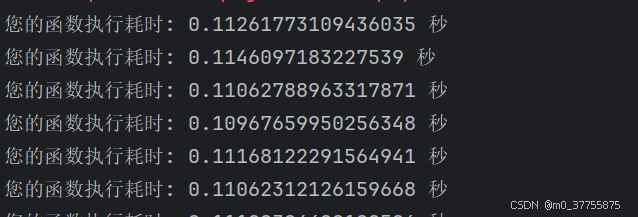
运行结果

推理时间
5.4 C++ tensorRT运行推理
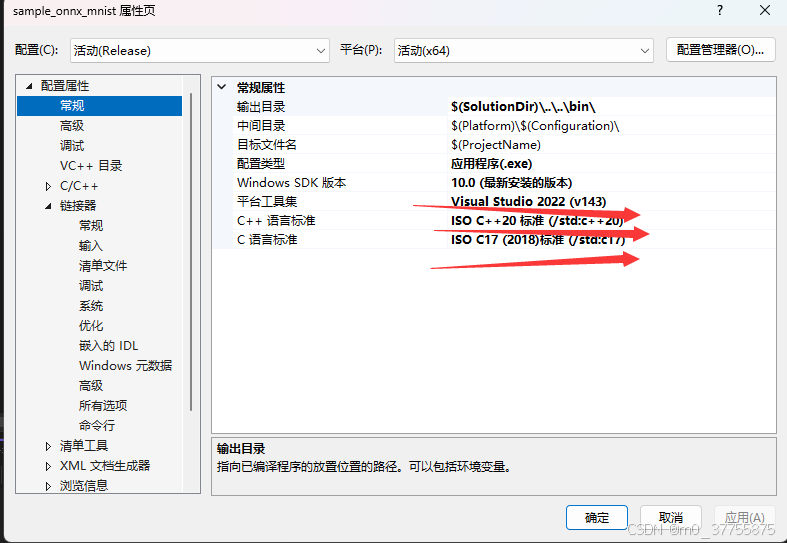
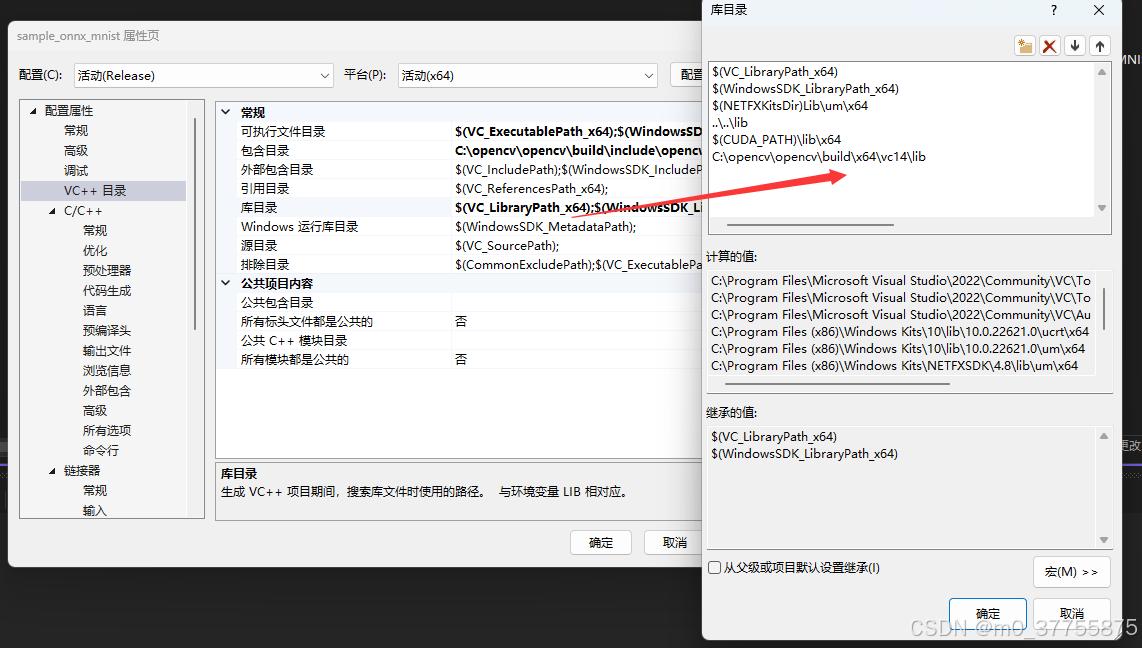
5.4.1 Visual studio 配置

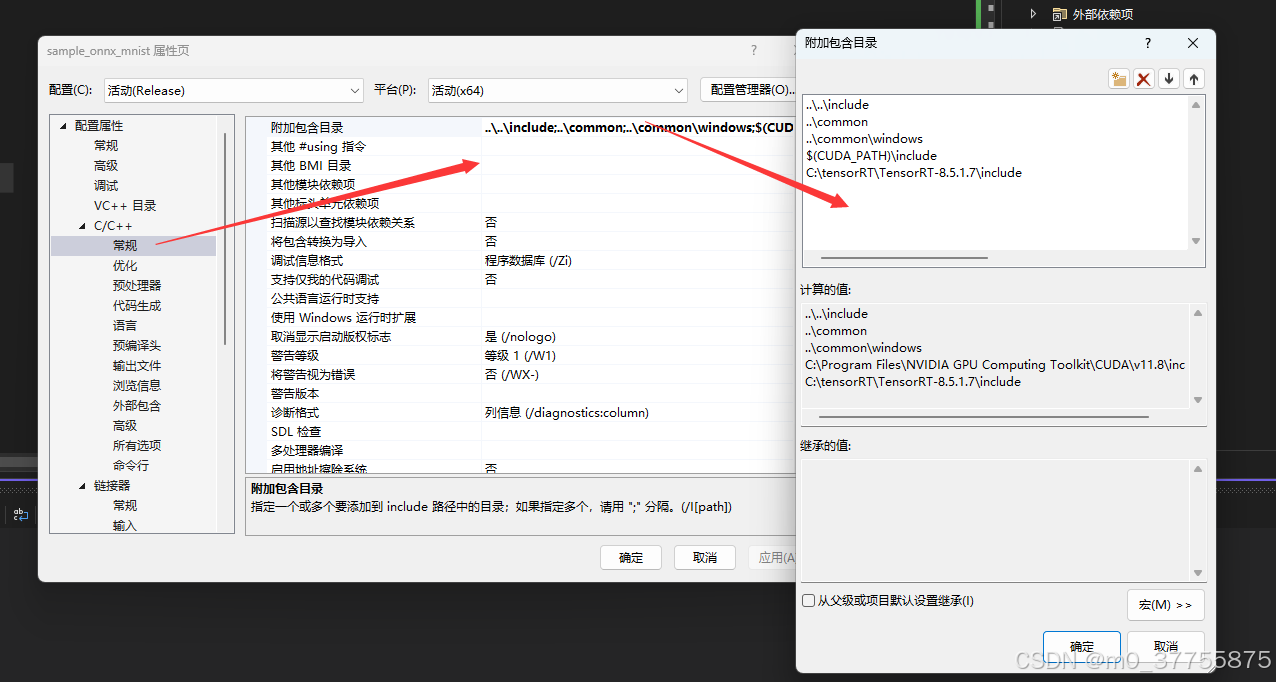
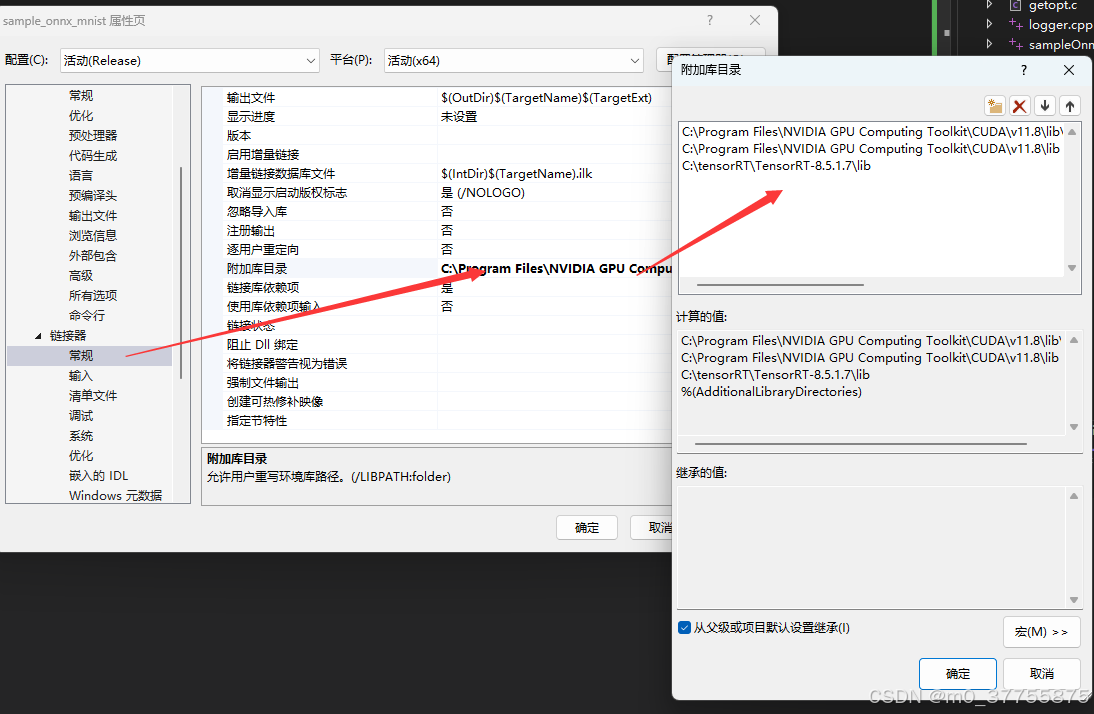
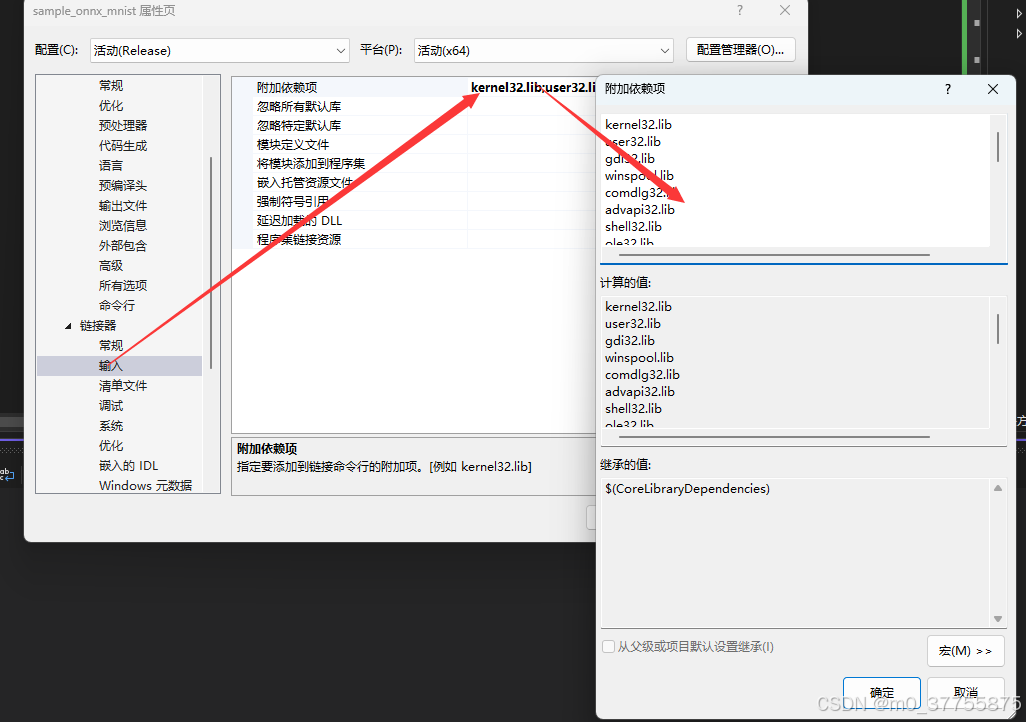
kernel32.lib
user32.lib
gdi32.lib
winspool.lib
comdlg32.lib
advapi32.lib
shell32.lib
ole32.lib
oleaut32.lib
uuid.lib
odbc32.lib
odbccp32.lib
%(AdditionalDependencies)
nvinfer.lib
nvinfer_plugin.lib
nvonnxparser.lib
nvparsers.lib
cudnn.lib
cublas.lib
cudart.lib
C:\Program Files\NVIDIA GPU Computing Toolkit\CUDA\v11.8\lib\x64\*.lib
C:\tensorRT\TensorRT-8.5.1.7\lib\*.lib
opencv_world3410.lib
5.4.2 C++代码
#include <fstream>
#include <iostream>

#include <NvInfer.h>
#include "logger.h"
#include <opencv2/core/core.hpp>
#include <opencv2/highgui/highgui.hpp>
#include <opencv2/imgproc.hpp>
#include <chrono>
#define CHECK(status) do{auto ret = (status); if (ret != 0){std::cerr << "Cuda failure: " << ret << std::endl; abort(); }} while (0)

using namespace nvinfer1;
using namespace sample;
using namespace std;
const char* IN_NAME = "image";
const char* OUT_NAME = "model_input";
static const int IN_H = 1080;
static const int IN_W = 1920;
static const int BATCH_SIZE = 1;
static const int EXPLICIT_BATCH = 1 << (int)(NetworkDefinitionCreationFlag::kEXPLICIT_BATCH);

class MyLogger : public nvinfer1::ILogger
{
public:
    void log(Severity severity, const char* msg) noexcept override
    {
        // You can add your custom logging or store the error message in a variable.
        if (severity == nvinfer1::ILogger::Severity::kERROR)
        {
            std::cerr << "TensorRT Error: " << msg << std::endl;
            // Store the error message in a variable if needed.
        }
    }
};


void doInference(IExecutionContext & context, float* input, float* output, int batchSize)
{

    const ICudaEngine& engine = context.getEngine();

    // Pointers to input and output device buffers to pass to engine.
    // Engine requires exactly IEngine::getNbBindings() number of buffers.
    assert(engine.getNbBindings() == 2);
    void* buffers[2];

    // In order to bind the buffers, we need to know the names of the input and output tensors.
    // Note that indices are guaranteed to be less than IEngine::getNbBindings()
    const int inputIndex = engine.getBindingIndex(IN_NAME);
    const int outputIndex = engine.getBindingIndex(OUT_NAME);


    // Create stream
    cudaStream_t stream;
    CHECK(cudaStreamCreate(&stream));
    // Create GPU buffers on device
    CHECK(cudaMalloc(&buffers[inputIndex],  3 * IN_H * IN_W * sizeof(float)));
    CHECK(cudaMalloc(&buffers[outputIndex], 1088 * IN_W * sizeof(float)));
    // DMA input batch data to device, infer on the batch asynchronously, and DMA output back to host


    if (cudaMemcpyAsync(buffers[inputIndex], input, 3 * IN_H * IN_W * sizeof(float), cudaMemcpyHostToDevice, stream) != cudaSuccess)
    {
        std::cerr << "cudaMemcpyAsync from host to device failed: " << cudaGetErrorString(cudaGetLastError()) << std::endl;

        // Proper error handling and cleanup
        cudaFree(buffers[inputIndex]);
        cudaFree(buffers[outputIndex]);
        cudaStreamDestroy(stream);
        abort();
    }

    // Synchronize stream to ensure input data transfer is complete
    cudaStreamSynchronize(stream);

    // Run inference
    context.enqueue(batchSize, buffers, stream, nullptr);

    // Copy output data to host
    if (cudaMemcpyAsync(output, buffers[outputIndex], 1088 * IN_W * sizeof(float), cudaMemcpyDeviceToHost, stream) != cudaSuccess)
    {
        std::cerr << "cudaMemcpyAsync from device to host failed: " << cudaGetErrorString(cudaGetLastError()) << std::endl;

        // Proper error handling and cleanup
        cudaFree(buffers[inputIndex]);
        cudaFree(buffers[outputIndex]);
        cudaStreamDestroy(stream);
        abort();
    }

    // Synchronize stream to ensure output data transfer is complete
    cudaStreamSynchronize(stream);

    // Release stream and buffers
    cudaStreamDestroy(stream);
    cudaFree(buffers[inputIndex]);
    cudaFree(buffers[outputIndex]);

};
int main()
{
    MyLogger m_logger;
    IExecutionContext* context = NULL;
    ICudaEngine* engine = NULL;
    IRuntime* runtime = NULL;
    char* trtModelStream{ nullptr };
    try {
        // create a model using the API directly and serialize it to a stream

        size_t size{ 0 };

        std::ifstream file("model.trt", std::ios::binary);
        if (file.good()) {
            file.seekg(0, file.end);
            size = file.tellg();
            file.seekg(0, file.beg);
            trtModelStream = new char[size];
            assert(trtModelStream);
            file.read(trtModelStream, size);
            file.close();
        }


        runtime = createInferRuntime(m_logger);
        assert(runtime != nullptr);


        engine = runtime->deserializeCudaEngine(trtModelStream, size, nullptr);

        if (!engine)
        {
            throw std::runtime_error("Failed to create TensorRT engine.");
        }

        context = engine->createExecutionContext();
        if (!context)
        {
            throw std::runtime_error("Failed to create TensorRT execution context.");
        }

        // generate input data
       // float data[BATCH_SIZE * 3 * IN_H * IN_W];
       //很重要,分配堆空间,不要在栈空间
        float* data = new float[BATCH_SIZE * 3 * IN_H * IN_W];
        float* prob = new float[1088 * IN_W];

        for(int i = 0;i<100;i++)
          {
            auto start_time = std::chrono::high_resolution_clock::now();
            cv::Mat img = cv::imread("0_40.jpg");

            if (img.empty())
            {
                throw std::runtime_error("Failed to read image.");
            }

            img.convertTo(img, CV_32FC3); // 将图像转换为float32并归一化

            // cv::Mat img_float32_flat;

            memcpy(data, img.data, sizeof(float) * IN_H * IN_W * 3);

            // Run inference

            doInference(*context, data, prob, BATCH_SIZE);

            // Post-processing...
            cv::Mat output_mat(1088, IN_W, CV_32FC1, prob);
            cv::Mat binary_image;
            cv::threshold(output_mat, binary_image, 0.5, 1.0, cv::THRESH_BINARY);

            cv::Mat cropped_binary_image = binary_image(cv::Rect(0, 4, IN_W, 1080));

            cv::Mat img1_float32 = img; // 已经读取并转换为float32类型的图像
            cv::Mat cropped_color_image;
            cv::cvtColor(cropped_binary_image, cropped_color_image, cv::COLOR_GRAY2BGR);

            cv::Mat processed_img;

            cv::multiply(img1_float32, cropped_color_image, processed_img);
            processed_img.convertTo(processed_img, CV_8UC3);
            cv::imwrite("trt.png", processed_img);
            auto end_time = std::chrono::high_resolution_clock::now();

            auto duration = std::chrono::duration_cast<std::chrono::milliseconds>(end_time - start_time);

            // 输出程序运行时间
            std::cout << "程序运行时间: " << duration.count() << " 毫秒" << std::endl;
        }

        delete[] prob;
        delete[] data;
    }
    catch (const std::exception& e)
    {
        std::cerr << "Caught exception: " << e.what() << std::endl;
        return 1;
    }

    // Destroy the engine
    if (context)
    {
        context->destroy();
    }
    if (engine)
    {
        engine->destroy();
    }
    if (runtime)
    {
        runtime->destroy();
    }

    if (trtModelStream)
    {
        delete[] trtModelStream;
    }
    getchar();
    return 0;
}
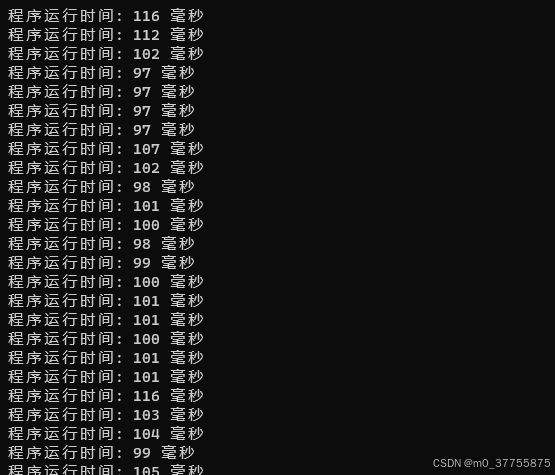
5.4.3 推理结果
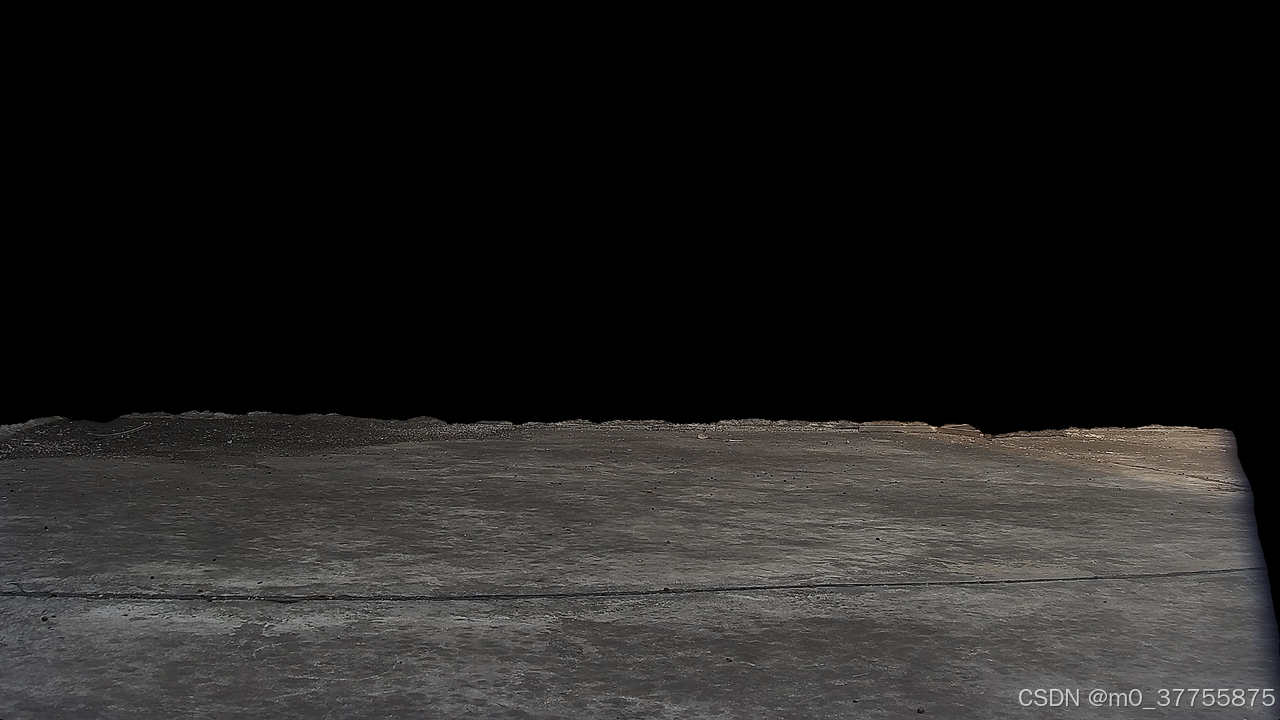
时间
6. 结论
本文详细介绍了从UNet模型训练到TensorRT部署的完整流程,涵盖了数据准备、模型训练、ONNX导出、TensorRT优化以及Python/C++推理实现等关键环节。通过TensorRT部署,我们能够显著提升模型的推理速度,满足实际生产环境对实时性的要求。
在实际应用中,还需要根据具体场景进行调整和优化,例如:
-
针对特定硬件平台进行调优
-
平衡精度和速度的关系
-
实现高效的流水线处理
希望本文能够为读者提供一条清晰的模型部署路径,帮助大家将训练好的语义分割模型高效地部署到生产环境中。

魔乐社区(Modelers.cn) 是一个中立、公益的人工智能社区,提供人工智能工具、模型、数据的托管、展示与应用协同服务,为人工智能开发及爱好者搭建开放的学习交流平台。社区通过理事会方式运作,由全产业链共同建设、共同运营、共同享有,推动国产AI生态繁荣发展。
更多推荐


 24
24 0
0- 0


 已为社区贡献7条内容

所有评论(0)