Ubuntu18.04安装opencv-python
·
首先检查下Python版本号:
Python 2.7.17 (default, Mar  8 2023, 18:40:28)
[GCC 7.5.0] on linux2
Type "help", "copyright", "credits" or "license" for more information.
>>> exit()
当然我也是有Python 3.6.9的。但是默认是Python2.7.17。
使用下列语句删除Python2.7及其依赖:
sudo apt-get remove --auto-remove python2.7
随后使用命令:
pip3 install opencv-python -i https://pypi.tuna.tsinghua.edu.cn/simple
但很快就报错了:
    An error occurred while building with CMake.
      Command:
        /usr/bin/cmake --build . --target install --config Release --
      Install target:
        install
      Source directory:
        /tmp/pip-build-py740pz7/opencv-python
      Working directory:
        /tmp/pip-build-py740pz7/opencv-python/_skbuild/linux-x86_64-3.6/cmake-build
    Please check the install target is valid and see CMake's output for more information.

    ----------------------------------------
Command "/usr/bin/python3 -u -c "import setuptools, tokenize;__file__='/tmp/pip-build-py740pz7/opencv-python/setup.py';f=getattr(tokenize, 'open', open)(__file__);code=f.read().replace('\r\n', '\n');f.close();exec(compile(code, __file__, 'exec'))" install --record /tmp/pip-nxf__mn5-record/install-record.txt --single-version-externally-managed --compile --user --prefix=" failed with error code 1 in /tmp/pip-build-py740pz7/opencv-python/
可以试试这个:
sudo -H pip3 install --upgrade pip
之后再次执行下载:
pip3 install opencv-python -i https://pypi.tuna.tsinghua.edu.cn/simple
但很快又出现了新的问题:
ERROR: Could not install packages due to an OSError: [Errno 28] No space left on device
参考:Cannot install pip module because there is ‘no space’ left on device
使用命令:
TMPDIR=/home/user/tmp/ python3 -m pip install a_package
但还是这样:
ERROR: Could not install packages due to an OSError: [Errno 28] No space left on device
参考: 安装pytorch时出现了[errno 28] no space left on device.使用如下命令清理文件系统:
sudo apt autoremove --purge snapd
之后执行:
python3 -m pip install opencv-python -i https://pypi.tuna.tsinghua.edu.cn/simple
但又再次出现:
ERROR: Could not build wheels for opencv-python, which is required to install pyproject.toml-based projects
前面提到我的Ubuntu中有Python 3.6.9版本,在已解决python安装opencv报错ERROR: Could not build wheels for opencv-python中作者是这么说的:
在使用命令pip install opencv-python安装的是最新版本,我用的python3.6版本,查了下,不支持3.6版本。我就去找了个支持的如opencv-python==4.3.0.38。
查看链接: Links for opencv-python
上面查看python版本和opencv版本的对应关系,如图,红框内是python版本,绿框内是opencv版本:
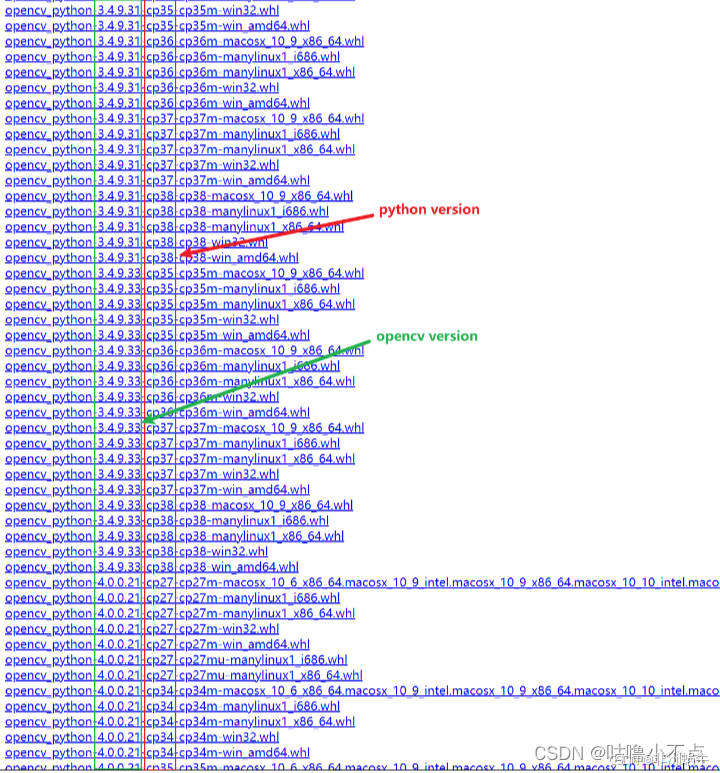
试试这个:
pip3 install -i https://pypi.tuna.tsinghua.edu.cn/simple opencv-python==3.4.10.35
安装成功!

魔乐社区(Modelers.cn) 是一个中立、公益的人工智能社区,提供人工智能工具、模型、数据的托管、展示与应用协同服务,为人工智能开发及爱好者搭建开放的学习交流平台。社区通过理事会方式运作,由全产业链共同建设、共同运营、共同享有,推动国产AI生态繁荣发展。
更多推荐


 0
0 0
0- 0


 已为社区贡献2条内容

所有评论(0)