vue3 ---- element-plus el-table+el-table-infinite-scroll 实现大数据量滚动-渲染加载-触底加载table 组件化
·
效果:这里总共24条数据 分10个10个的触底渲染:可以看到滚动条一开始很长 触底之后滚动条就变短了
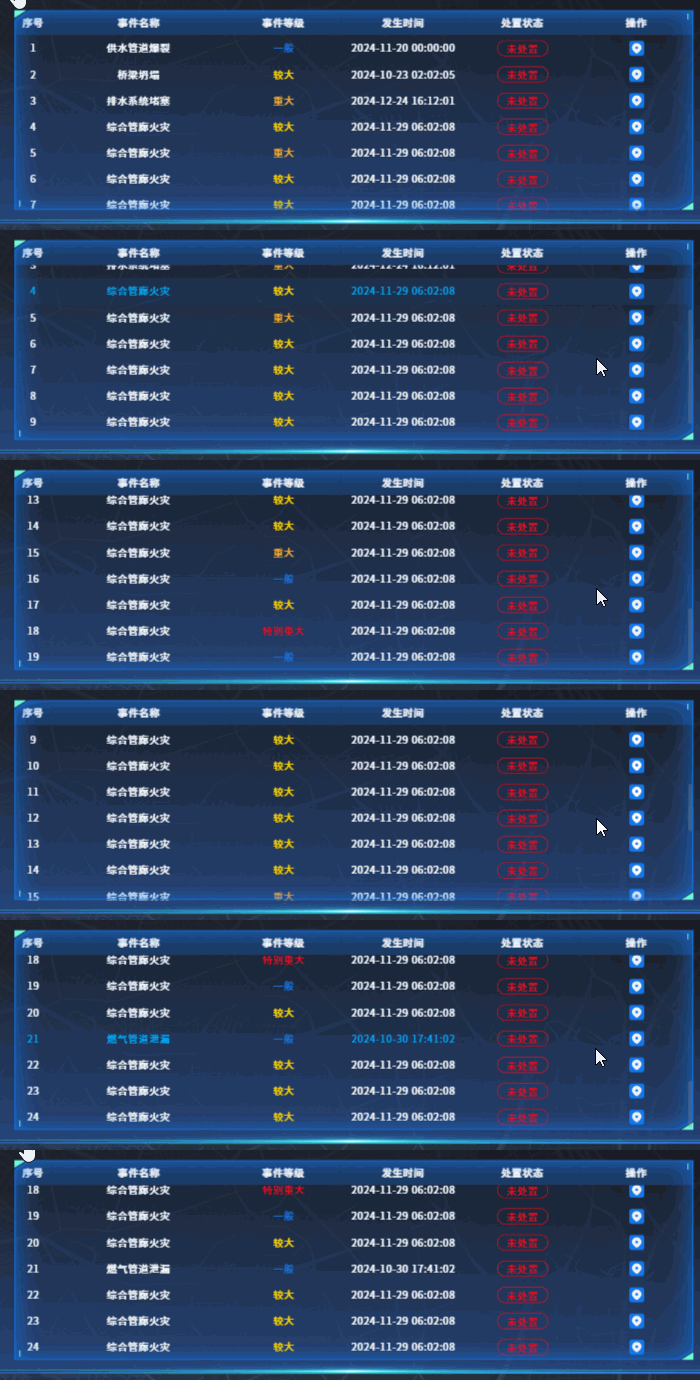
这里使用的插件是:el-table-infinite-scroll
这里我用的是vue3的版本:
"el-table-infinite-scroll": "^3.0.6",
其他相关配置请移步此插件官网查看详细信息:
//main.js文件配置
// el-table 滚动
import ElTableInfiniteScroll from "el-table-infinite-scroll";


app.use(ElTableInfiniteScroll)
.vue代码
<template>
  <div class="result-table">
    <el-table
      v-el-table-infinite-scroll="loadData"
      v-loading="loading"
      element-loading-background="rgba(0, 0, 0, 0.2)"
      :data="tableData"
      :height="height"
    >
      <el-table-column
        v-if="indexShow"
        type="index"
        align="center"
        label="序号"
        width="60px"
      ></el-table-column>
      <el-table-column
        :show-overflow-tooltip="item.tooltip ? item.tooltip : false"
        :align="item.align ? item.align : 'center'"
        :label="item.label"
        :width="item.width"
        :prop="item.key"
        v-for="(item, index) in tableHeader"
        :key="index"
      >
        <template v-slot="scope" v-if="item.slot">
          <slot :name="item.slot" :row="scope.row" />
        </template>
      </el-table-column>
    </el-table>
  </div>
</template>

<script setup>
import { watch } from "vue";
const props = defineProps({
  tbHeader: {
    type: Array,
    required: false,
  },
  tbData: {
    type: Array,
    required: false,
  },
  height: {
    type: String,
    required: false,
  },
  indexShow: {
    type: Boolean,
    default: true,
  },
});
let loading = ref(false);
let height = props.height;
let tableHeader = props.tbHeader;
let tableData = ref([]);
tableData.value = props.tbData;
let allTableData = ref([]);
watch(
  () => props.tbData,
  (val) => {
    // 初始加载10条
    if (val.length >= 10) {
      allTableData.value = JSON.parse(JSON.stringify(val));
      tableData.value = val.slice(0, 10);
    } else {
      tableData.value = val;
    }
  },
  { deep: true }
);
let index = ref(0);
function loadData() {
  // 触底加载剩下的n-10条
  let newTableData = allTableData.value.slice(
    index.value * 10,
    index.value * 10 + 9
  );
  tableData.value = tableData.value.concat(newTableData);
  index.value++
}
</script>

<style lang="scss" scoped>
.result-table {
  ::v-deep {
    .el-table {
      color: #ffffff;
      background-color: transparent !important;
    }

    .el-table tr {
      background: rgba(27, 60, 104, 0.2) !important;
    }

    // .el-table tr:nth-child(2n) {
    //   background: rgba(33, 78, 137, 0.3) !important;
    // }

    .el-table th.el-table__cell {
      font-size: 16px;
      font-weight: 600;
      color: #fff;
      background: rgba(27, 60, 104, 1) !important;
      border-bottom: none !important;
    }

    .el-table td.el-table__cell {
      font-size: 16px;
      color: #fff;
      border-bottom: none !important;
    }

    .el-table tr:hover td.el-table__cell {
      border-bottom: none !important;
      color: #00aefb;
      background: rgba(32, 57, 94, 0.5) !important;
    }

    .el-table--border .el-table__inner-wrapper::after,
    .el-table--border::after,
    .el-table--border::before,
    .el-table__inner-wrapper::before {
      display: none;
    }
  }
}
</style>
使用:
        <LyTable :tbData="tbData" :tbHeader="tbHeader" :height="height">
          <template v-slot:operate="data">
            <div class="l-flex1 l-jc-c">
              <img
                src="@/assets/images/yjzy/position.png"
                class="position l-cur"
                alt=""
              />
            </div>
          </template>
        </LyTable>


let tbHeader = ref([
  {
    key: "eventTitle",
    label: "事件名称",
    width: "280",
    tooltip: true,
  },
  {
    key: "eventLevel",
    label: "事件等级",
    width: "",
    slot: "level",
  },
  {
    key: "occurrenceTime",
    label: "发生时间",
    width: "200",
  },
  {
    key: "dealState",
    label: "处置状态",
    width: "",
    slot: "typeBtn",
  },
  {
    key: "operate",
    label: "操作",
    width: "",
    slot: "operate",
  },
]);
let height = ref("321px");
let tbData = ref([
  {
    eventTitle: "突发事件",
    occurrenceTime: "2024-12-20 14:35:50",
    eventLevel: "1",
    dealState: "1",
  }
]);

魔乐社区(Modelers.cn) 是一个中立、公益的人工智能社区,提供人工智能工具、模型、数据的托管、展示与应用协同服务,为人工智能开发及爱好者搭建开放的学习交流平台。社区通过理事会方式运作,由全产业链共同建设、共同运营、共同享有,推动国产AI生态繁荣发展。
更多推荐


 4
4 0
0- 0


 已为社区贡献1条内容

所有评论(0)