linux ubuntu 实现腾讯云 IPV6 动态域名解析
背景:由于IPV6的特殊性质,设备每隔几天就会自动更换一个IPV6地址,这会导致当设备作为服务器时,客户端的连接是很麻烦的一件事,当IPV6的地址发生变化时,客户端连接服务器的地址也要跟着变化。这是我们不想见到的。因此IPV6的动态域名解析的需求就因此诞生出来了
目录
一、生成DNSPod token 的ID和Token
1.需要有一个属于自己的域名
如果没有的自行购买,去注册一个域名
https://console.dnspod.cn/2.进入腾讯云DNSPod token
https://console.dnspod.cn/account/token/token3.创建密钥,并记住这个ID和Token
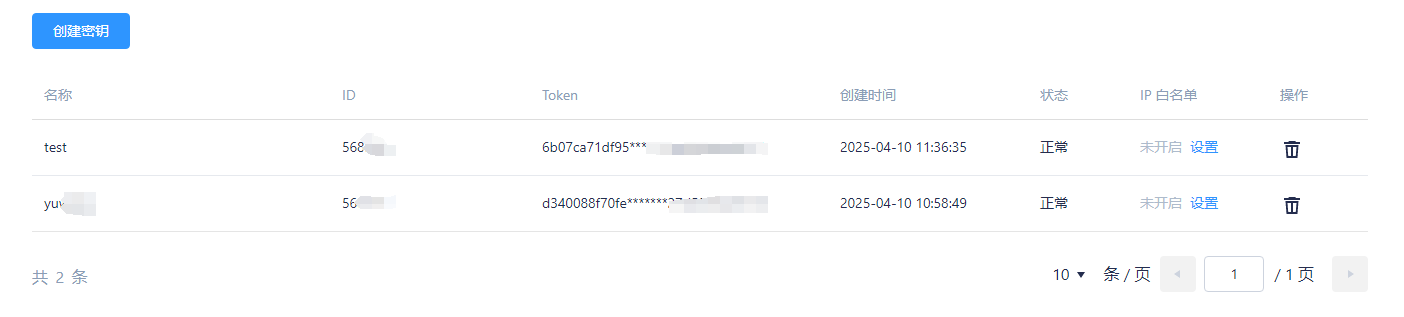
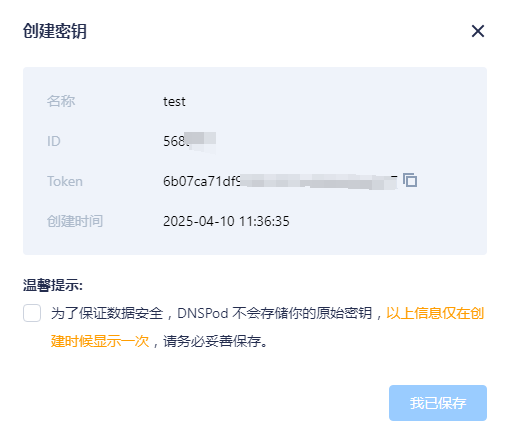
二、域名配置
1.前往域名控制台-我的域名
https://console.dnspod.cn/dns/list2.添加已购买的域名
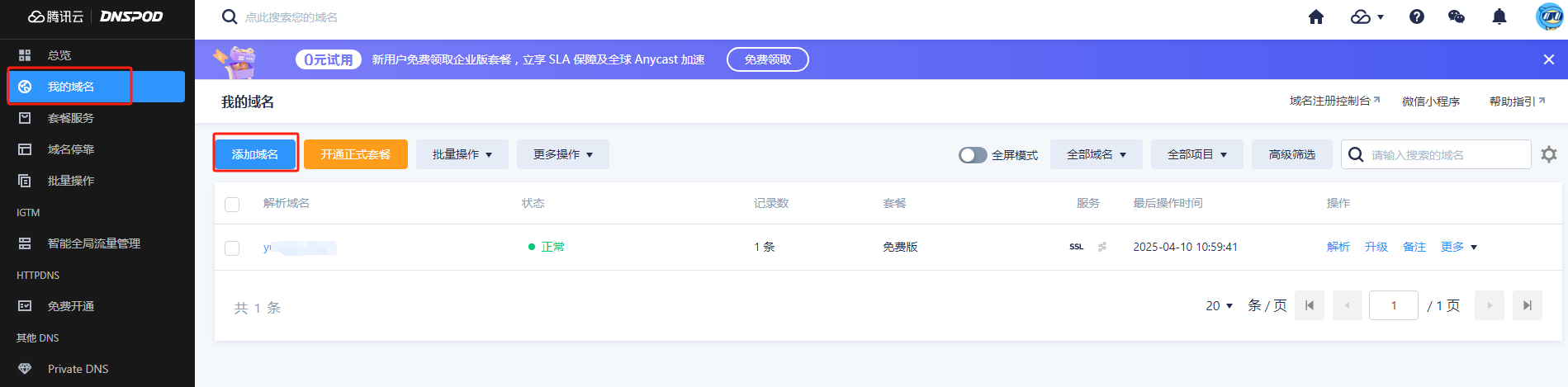
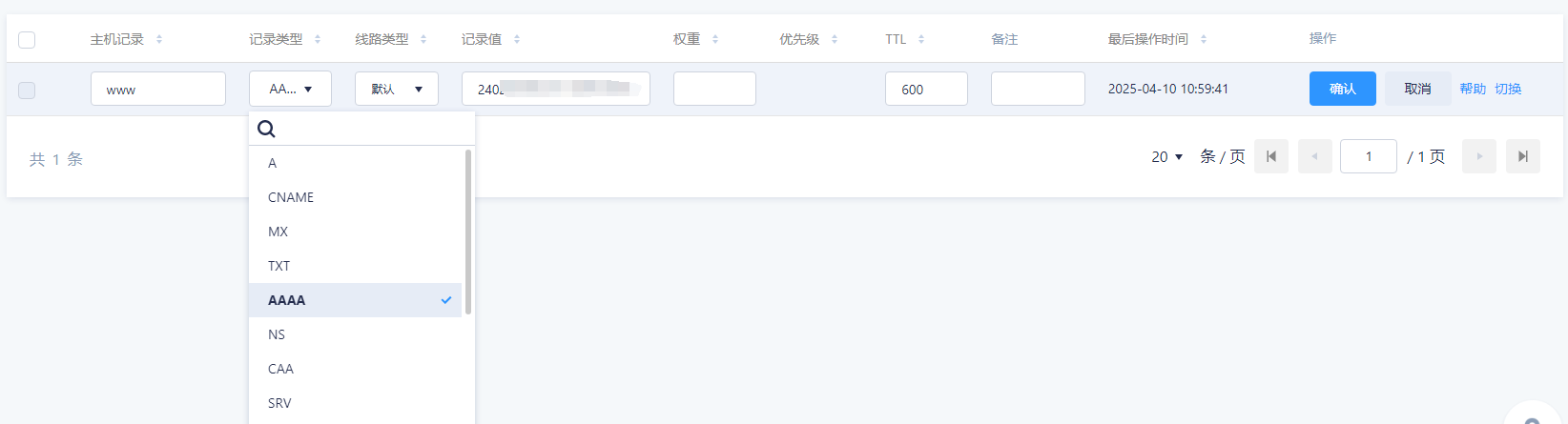
3.点击解析 --- 修改域名参数
a.要解析IPV6则记录类型需要改为AAAA
b.这里的www为二级域名
c.如果你购买的域名为test.com
则进行访问时应为:www.test.com
三、ubuntu 操作部分
1.创建文件
sudo touch my_auto_dns.sh2.修改文件权限
sudo chmod 777 my_aoto_dns.sh3.打开文件进行修改
sudo vi my_aoto_dns.sh注意:
1.按ESC进入命令行操作
2.按i进行文本修改
3.按: 用于命令行命令的输入
命令行输入部分
输入: wq 表示保存并推出
输入:wq! 表示强制保存并推出
4.代码
注意:
这里你只需要将
API_KEY_ID 替换为 生成DNSPod token 的ID
API_KEY_TOKEN 替换为 生成DNSPod token 的Token
dnspod_ddnsipv6_domain='替换自己所购买的域名'
dnspod_ddnsipv6_subdomain='替换为想要的名字'
local_net="eth0"
通过sudo ifconfig 可以知道IPV6地址是否为eth0
#!/usr/bin/bash
dnspod_ddnsipv6_id="API_KEY_ID" #【API_id】将引号内容修改为获取的API的ID
dnspod_ddnsipv6_token="API_KEY_TOKEN" #【API_token】将引号内容修改为获取的API的token
dnspod_ddnsipv6_ttl="600" # 【ttl时间】解析记录在 DNS 服务器缓存的生存时间,默认600(s/秒)
dnspod_ddnsipv6_domain='替换自己所购买的域名' #【已注册域名】引号里改成自己注册的域名
dnspod_ddnsipv6_subdomain='替换为想要的名字' #【二级域名】将引号内容修改为自己想要的名字,需要符合域名规范,附常用的规范
local_net="eth0" # 【网络适配器】 默认为eth0,如果你的公网ipv6地址不在eth0上,需要修改为对应的网络适配器
# 常用的规范【二级域名】
# 【www】 常见主机记录,将域名解析为 www.test.com
# 【@】   直接解析主域名 test.com
# 【*】   泛解析,匹配其他所有域名 *.test.com

# 举例
# 在腾讯云注册域名,登陆DNSPOD,在【我的账号】的【账号中心】中,有【密钥管理】
# 点击创建密钥即可创建一个API
# 如果你在腾讯云注册域名叫【test.com】
# 那么【dnspod_ddnsipv6_domain】后面就填【test.com】
# 然后根据常用的规范/自己想要的名字在【dnspod_ddnsipv6_subdomain】填入自己需要的名字
# 现假设为【file】,那么你的访问地址为【file.test.com】
if [ "$dnspod_ddnsipv6_record" = "@" ]
then
  dnspod_ddnsipv6_name=$dnspod_ddnsipv6_domain
else
  dnspod_ddnsipv6_name=$dnspod_ddnsipv6_subdomain.$dnspod_ddnsipv6_domain
fi

die () {
    echo "Error: unable to find [public IPv6 address], please use the 'ip addr' command or query the network panel of the system to check the network card, and fill in the name of the network card with the IPv6 address in the 'local_net' position in the command file." >&2
    echo "IP地址提取错误: 在指定的网络适配器上[$local_net]找不到<公网IPv6地址>(不是fe80开头),请使用'ip addr'命令或在系统的网络面板查询有公网IP的网络适配器,然后在脚本的[local_net]中用填写网络适配器的名称。" >&2
    exit
}

ipv6_list=`ip addr show $local_net | grep "inet6.*global" | awk '{print $2}' | awk -F"/" '{print $1}'` || die

for ipv6 in ${ipv6_list[@]}
do
    if [[ "$ipv6" =~ ^fe80.* ]]
    then
        continue
    else
        echo select IP: $ipv6 >&1
        break
    fi
done

if [ "$ipv6" == "" ] || [[ "$ipv6" =~ ^fe80.* ]]
then
    die
fi

dns_server_info=`nslookup -query=AAAA $dnspod_ddnsipv6_name 2>&1`

dns_server_ipv6=`echo "$dns_server_info" | grep 'address ' | awk '{print $NF}'`
if [ "$dns_server_ipv6" = "" ]
then
    dns_server_ipv6=`echo "$dns_server_info" | grep 'Address: ' | awk '{print $NF}'`
fi

if [ "$?" -eq "0" ]
then
    echo "DNS server IP: $dns_server_ipv6" >&1

    if [ "$ipv6" = "$dns_server_ipv6" ]
    then
        echo "The address is the same as the DNS server." >&1
    fi
    unset dnspod_ddnsipv6_record_id
else
    dnspod_ddnsipv6_record_id="1"
fi

send_request() {
    local type="$1"
    local data="login_token=$dnspod_ddnsipv6_id,$dnspod_ddnsipv6_token&domain=$dnspod_ddnsipv6_domain&sub_domain=$dnspod_ddnsipv6_subdomain$2"
    return_info=`curl -X POST "https://dnsapi.cn/$type" -d "$data" 2> /dev/null`
}

query_recordid() {
    send_request "Record.List" ""
}

update_record() {
    send_request "Record.Modify" "&record_type=AAAA&record_line=默认&ttl=$dnspod_ddnsipv6_ttl&value=$ipv6&record_id=$dnspod_ddnsipv6_record_id"
}

add_record() {
    send_request "Record.Create" "&record_type=AAAA&record_line=默认&ttl=$dnspod_ddnsipv6_ttl&value=$ipv6"
}

if [ "$dnspod_ddnsipv6_record_id" = "" ]
then
    echo "seem exists, try update." >&1
    query_recordid
    code=`echo $return_info  | awk -F \"code\":\" '{print $2}' | awk -F \",\"message\" '{print $1}'`
    echo "return code $code" >&1
    if [ "$code" = "1" ]
    then
        dnspod_ddnsipv6_record_id=`echo $return_info | awk -F \"records\":.{\"id\":\" '{print $2}' | awk -F \",\"ttl\" '{print $1}'`
        update_record
        echo "update sucessful" >&1
    else
        echo "error code return, domain not exists, try add." >&1
        add_record
        echo "add sucessful." >&1
    fi
else
    echo "domain not exists, try add."
    add_record
    echo "add sucessful" >&1
fi
5.运行
sudo ./my_aoto_dns.sh6.成功标志
select IP: 24xx:xxxx:xxx:xxxx:xxx:xxx:xx:x
DNS server IP: 24xx:xxxx:xxx:xxxx:xxx:xxx:xx:x
seem exists, try update.
return code 1
update sucessful

魔乐社区(Modelers.cn) 是一个中立、公益的人工智能社区,提供人工智能工具、模型、数据的托管、展示与应用协同服务,为人工智能开发及爱好者搭建开放的学习交流平台。社区通过理事会方式运作,由全产业链共同建设、共同运营、共同享有,推动国产AI生态繁荣发展。
更多推荐


 19
19 0
0- 0


 已为社区贡献1条内容

所有评论(0)