ViSP学习笔记(二十二):目标检测和定位
·
开发环境:Ubuntu 18.04 LTS + ROS Melodic + ViSP 3.3.1
文章内容主要参考ViSP官方教学文档:https://visp-doc.inria.fr/doxygen/visp-daily/tutorial_mainpage.html
本文主要介绍了如何使用ViSP实现目标检测和定位,实现过程分为两步,第一步在参考图像中检测并提取目标物体表面的关键点,并保存其对应的三维坐标,第二步在当前图像中寻找匹配对的关键点,并根据目标物体的CAD模型信息和关键点坐标估计目标物体的位置姿态。本文主要参考了detection/object中的 tutorial-detection-object-mbt.cpp例程。首先要获取这个例程文件并编译它
svn export https://github.com/lagadic/visp.git/trunk/tutorial/detection/object
cd object/
mkdir build
cd build
cmake .. -DCMAKE_BUILD_TYPE=Release -DVISP_DIR=$VISP_WS/visp-build
make
执行例程,查看效果
./tutorial-detection-object-mbt
根据示意图中的顺序,依次点击参考图像中对应的位置,选择出目标物体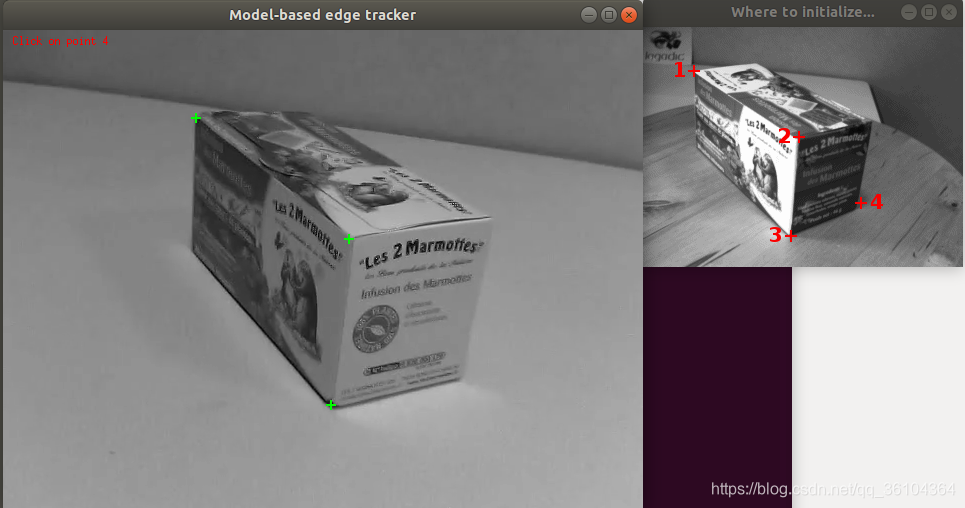
点击左键提取表面关键点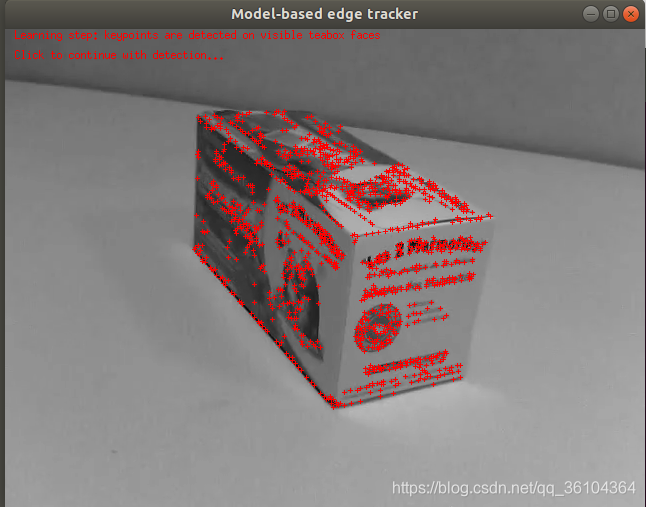
点击左键实现目标检测和位姿估计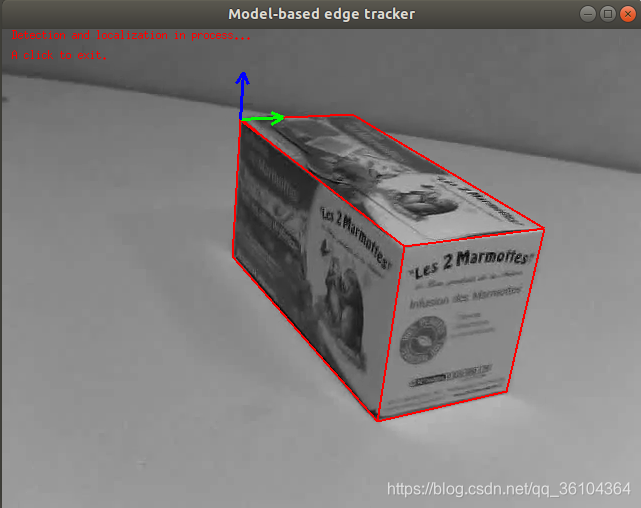
下面介绍一下代码实现过程
#include <visp3/core/vpConfig.h>
#include <visp3/core/vpIoTools.h>
#include <visp3/gui/vpDisplayGDI.h>
#include <visp3/gui/vpDisplayOpenCV.h>
#include <visp3/gui/vpDisplayX.h>
#include <visp3/io/vpVideoReader.h>
#include <visp3/mbt/vpMbGenericTracker.h>
#include <visp3/vision/vpKeyPoint.h>
int main(int argc, char **argv)
{
#if (VISP_HAVE_OPENCV_VERSION >= 0x020400)
  try {
    std::string videoname = "teabox.mp4";
    for (int i = 0; i < argc; i++) {
      if (std::string(argv[i]) == "--name")
        videoname = std::string(argv[i + 1]);
      else if (std::string(argv[i]) == "--help" || std::string(argv[i]) == "-h") {
        std::cout << "\nUsage: " << argv[0] << " [--name <video name>] [--help] [-h]\n" << std::endl;
        return 0;
      }
    }
    std::string parentname = vpIoTools::getParent(videoname);
    std::string objectname = vpIoTools::getNameWE(videoname);
    if (!parentname.empty())
      objectname = parentname + "/" + objectname;
    std::cout << "Video name: " << videoname << std::endl;
    std::cout << "Tracker requested config files: " << objectname << ".[init,"
              << "xml,"
              << "cao or wrl]" << std::endl;
    std::cout << "Tracker optional config files: " << objectname << ".[ppm]" << std::endl;
    vpImage<unsigned char> I;
    vpCameraParameters cam;
    vpHomogeneousMatrix cMo;
    vpVideoReader g;
    g.setFileName(videoname);
    g.open(I);
#if defined(VISP_HAVE_X11)
    vpDisplayX display;
#elif defined(VISP_HAVE_GDI)
    vpDisplayGDI display;
#elif defined(VISP_HAVE_OPENCV)
    vpDisplayOpenCV display;
#else
    std::cout << "No image viewer is available..." << std::endl;
    return 0;
#endif
    display.init(I, 100, 100, "Model-based edge tracker");
    vpMbGenericTracker tracker(vpMbGenericTracker::EDGE_TRACKER);//创建一个跟踪器
    bool usexml = false;
    if (vpIoTools::checkFilename(objectname + ".xml")) {
      tracker.loadConfigFile(objectname + ".xml");//通过xml文件加载配置参数
      tracker.getCameraParameters(cam);//获取相机参数
      usexml = true;
    }
    if (!usexml) {
      vpMe me;
      //手动配置跟踪器参数
      me.setMaskSize(5);
      me.setMaskNumber(180);
      me.setRange(8);
      me.setThreshold(10000);
      me.setMu1(0.5);
      me.setMu2(0.5);
      me.setSampleStep(4);
      me.setNbTotalSample(250);
      tracker.setMovingEdge(me);
      cam.initPersProjWithoutDistortion(839, 839, 325, 243);
      tracker.setCameraParameters(cam);
      tracker.setAngleAppear(vpMath::rad(70));
      tracker.setAngleDisappear(vpMath::rad(80));
      tracker.setNearClippingDistance(0.1);
      tracker.setFarClippingDistance(100.0);
      tracker.setClipping(tracker.getClipping() | vpMbtPolygon::FOV_CLIPPING);
    }
    tracker.setOgreVisibilityTest(false);
    //加载目标CAD模型
    if (vpIoTools::checkFilename(objectname + ".cao"))
      tracker.loadModel(objectname + ".cao");
    else if (vpIoTools::checkFilename(objectname + ".wrl"))
      tracker.loadModel(objectname + ".wrl");
    tracker.setDisplayFeatures(true);
    tracker.initClick(I, objectname + ".init", true);
    tracker.track(I);
#if (defined(VISP_HAVE_OPENCV_NONFREE) || defined(VISP_HAVE_OPENCV_XFEATURES2D)) || \
    (VISP_HAVE_OPENCV_VERSION >= 0x030411 && CV_MAJOR_VERSION < 4) || (VISP_HAVE_OPENCV_VERSION >= 0x040400)
    std::string detectorName = "SIFT";//设置SIFT关键点检测器
    std::string extractorName = "SIFT";//设置SIFT特征提取器
    std::string matcherName = "BruteForce";//设置BruteForce匹配算法
    std::string configurationFile = "detection-config-SIFT.xml";//设置检测器参数文件
#else
    std::string detectorName = "FAST";
    std::string extractorName = "ORB";
    std::string matcherName = "BruteForce-Hamming";
    std::string configurationFile = "detection-config.xml";
#endif
    vpKeyPoint keypoint_learning;
    if (usexml) {
      keypoint_learning.loadConfigFile(configurationFile);//加载检测器参数文件
    } else {
    //手动配置检测器参数
      keypoint_learning.setDetector(detectorName);
      keypoint_learning.setExtractor(extractorName);
      keypoint_learning.setMatcher(matcherName);
    }
    std::vector<cv::KeyPoint> trainKeyPoints;
    double elapsedTime;
    keypoint_learning.detect(I, trainKeyPoints, elapsedTime);//检测关键点
    std::vector<vpPolygon> polygons;
    std::vector<std::vector<vpPoint> > roisPt;
    std::pair<std::vector<vpPolygon>, std::vector<std::vector<vpPoint> > > pair = tracker.getPolygonFaces(false);//获取物体表面
    polygons = pair.first;//保存物体各个表面的多边形信息
    roisPt = pair.second;//保存物体各个表面的角点信息
    std::vector<cv::Point3f> points3f;
    tracker.getPose(cMo);
    vpKeyPoint::compute3DForPointsInPolygons(cMo, cam, trainKeyPoints, polygons, roisPt, points3f);//计算表面点的三维坐标
    keypoint_learning.buildReference(I, trainKeyPoints, points3f);//构建参考关键点
    keypoint_learning.saveLearningData("teabox_learning_data.bin", true);//保存关键点的描述和坐标信息
    vpDisplay::display(I);
    for (std::vector<cv::KeyPoint>::const_iterator it = trainKeyPoints.begin(); it != trainKeyPoints.end(); ++it) {
      vpDisplay::displayCross(I, (int)it->pt.y, (int)it->pt.x, 4, vpColor::red);
    }
    vpDisplay::displayText(I, 10, 10, "Learning step: keypoints are detected on visible teabox faces", vpColor::red);
    vpDisplay::displayText(I, 30, 10, "Click to continue with detection...", vpColor::red);
    vpDisplay::flush(I);
    vpDisplay::getClick(I, true);
    vpKeyPoint keypoint_detection;
    if (usexml) {
      keypoint_detection.loadConfigFile(configurationFile);
    } else {
      keypoint_detection.setDetector(detectorName);
      keypoint_detection.setExtractor(extractorName);
      keypoint_detection.setMatcher(matcherName);
      keypoint_detection.setFilterMatchingType(vpKeyPoint::ratioDistanceThreshold);
      keypoint_detection.setMatchingRatioThreshold(0.8);
      keypoint_detection.setUseRansacVVS(true);
      keypoint_detection.setUseRansacConsensusPercentage(true);
      keypoint_detection.setRansacConsensusPercentage(20.0);
      keypoint_detection.setRansacIteration(200);
      keypoint_detection.setRansacThreshold(0.005);
    }
    keypoint_detection.loadLearningData("teabox_learning_data.bin", true);//加载参考关键点的描述和坐标信息
    double error;
    bool click_done = false;
    while (!g.end()) {
      g.acquire(I);
      vpDisplay::display(I);
      vpDisplay::displayText(I, 10, 10, "Detection and localization in process...", vpColor::red);
      //从当前的视频图像中匹配关键点并估计位姿
      if (keypoint_detection.matchPoint(I, cam, cMo, error, elapsedTime)) {
        tracker.setPose(I, cMo);
        tracker.display(I, cMo, cam, vpColor::red, 2);
        vpDisplay::displayFrame(I, cMo, cam, 0.025, vpColor::none, 3);
      }
      vpDisplay::displayText(I, 30, 10, "A click to exit.", vpColor::red);
      vpDisplay::flush(I);
      if (vpDisplay::getClick(I, false)) {
        click_done = true;
        break;
      }
    }
    if (!click_done)
      vpDisplay::getClick(I);
  } catch (const vpException &e) {
    std::cout << "Catch an exception: " << e << std::endl;
  }
#else
  (void)argc;
  (void)argv;
  std::cout << "Install OpenCV and rebuild ViSP to use this example." << std::endl;
#endif
  return 0;
}
如果大家对于深度学习与计算机视觉领域感兴趣,希望获得更多的知识分享与最新的论文解读,欢迎关注我的个人公众号“深视”。

魔乐社区(Modelers.cn) 是一个中立、公益的人工智能社区,提供人工智能工具、模型、数据的托管、展示与应用协同服务,为人工智能开发及爱好者搭建开放的学习交流平台。社区通过理事会方式运作,由全产业链共同建设、共同运营、共同享有,推动国产AI生态繁荣发展。
更多推荐


 0
0 0
0- 0


 已为社区贡献10条内容

所有评论(0)