使用阿里云镜像的maven打包jar报错BUILD FAILURE
背景
springboot项目需要打jar包,通常右键项目->run as分别点击maven clean和maven install就可以打包成功了,这次遇到了问题,找了两天,都是用IDEA配置忽略证书的解决办法,而本人用的是eclipse,找不到配置忽略证书的地方,今天终于找到了解决办法。
下面先列出报错的内容,然后把使用IDEA和eclipse开发工具的解决方法都列出来。
报错内容
1.执行mvn -e报错:
[ERROR] No goals have been specified for this build. You must specify a valid lifecycle phase or a goal in the format : or :[:]:. Available lifecycle phases are: validate, initialize, generate-sources, process-sources, generate-resources, process-resources, compile, process-classes, generate-test-sources, process-test-sources, generate-test-resources, process-test-resources, test-compile, process-test-classes, test, prepare-package, package, pre-integration-test, integration-test, post-integration-test, verify, install, deploy, pre-clean, clean, post-clean, pre-site, site, post-site, site-deploy. -> [Help 1]
2.maven clean和mvn install报错:
Plugin org.apache.maven.plugins:maven-clean-plugin:3.1.0 or one of its dependencies could not be resolved: Failed to read artifact descriptor for org.apache.maven.plugins:maven-clean-plugin:jar:3.1.0: Could not transfer artifact org.apache.maven.plugins:maven-clean-plugin:pom:3.1.0 from/to alimaven (http://maven.aliyun.com/nexus/content/groups/public/): Transfer failed for http://maven.aliyun.com/nexus/content/groups/public/org/apache/maven/plugins/maven-clean-plugin/3.1.0/maven-clean-plugin-3.1.0.pom: java.security.NoSuchAlgorithmException: Error constructing implementation (algorithm: Default, provider: SunJSSE, class: sun.security.ssl.SSLContextImpl$DefaultSSLContext): jks not found: jks KeyStore not available -> [Help 1]
报错原因
HTTPS的SSL证书验证引起的,导致无法在仓库下载到需要的*.pom文件。
报错解决
解决方式一(使用IDEA开发时)
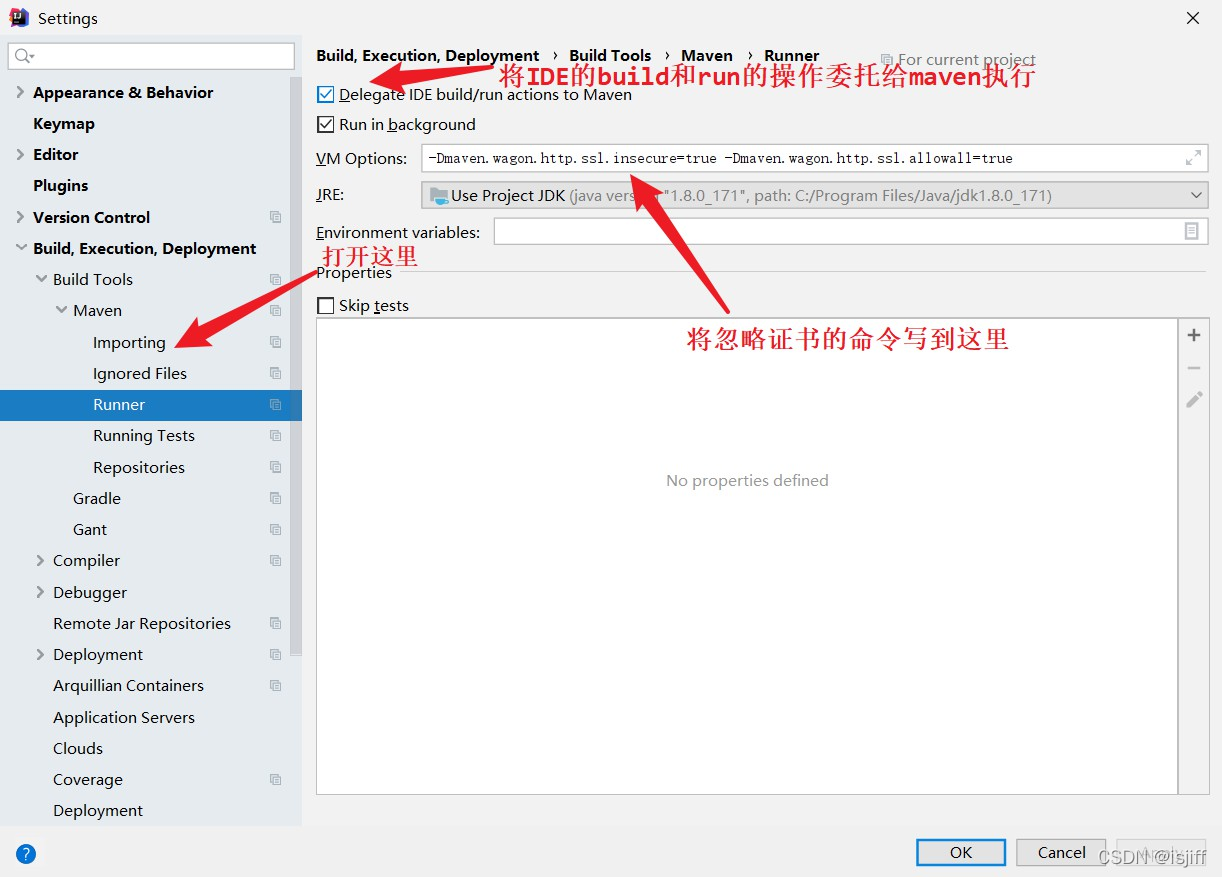
在IDEA的setting窗口中配置如下内容即可:
-Dmaven.wagon.http.ssl.insecure=true -Dmaven.wagon.http.ssl.allowall=true
示例图如下:
解决方式二(使用eclipse开发时)
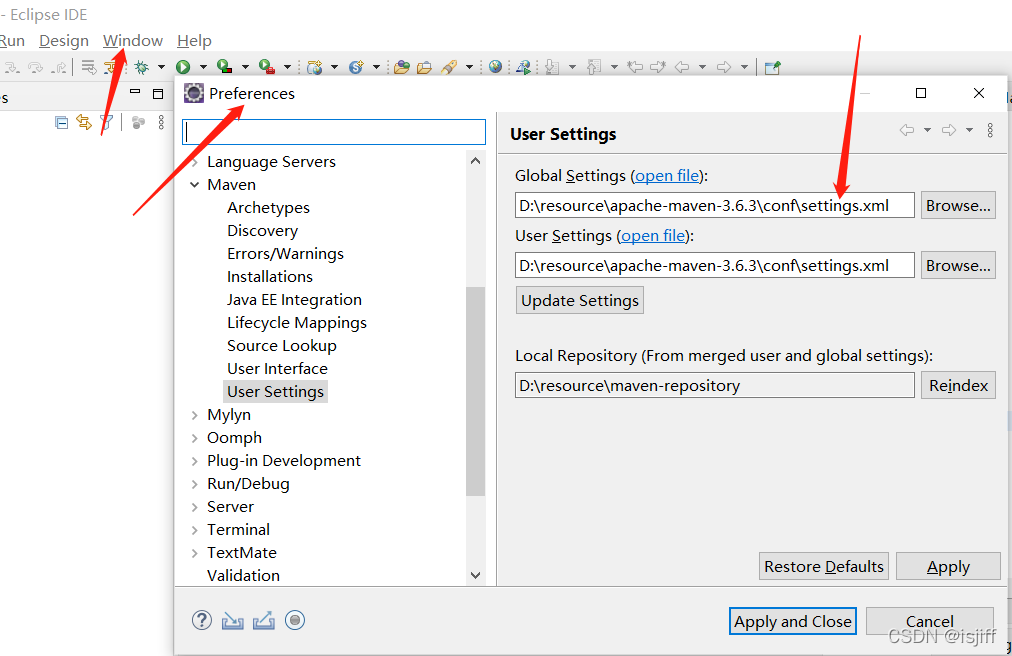
1.找到maven的setting.xml文件,要找该文件路径可参考下图去找:
2.打开setting.xml文件,修改中央仓库,我之前是阿里云仓库,打包时把配置的阿里云仓库对应的mirror代码块注释掉,换成下面这个仓库。
	<mirror>
        <id>repo1</id>
        <mirrorOf>central</mirrorOf>
        <name>Human Readable Name for this Mirror.</name>
        <url>http://insecure.repo1.maven.org/maven2/</url>
    </mirror>
3.修改后就可以再次打包了,初次换成这个中央仓库打包会比较慢一点,因为会把pom.xml中的依赖都跑一遍(之前下载好的依赖不会重新下载),之后就正常了。
总结
用IDEA在配置中忽略ssl证书就没问题了,比较简单;用eclipse的话每次打包时都得替换一下setting.xml文件中的中央仓库(如果打包后要换回阿里云仓库的话),就麻烦一点,暂时也没有更好的办法了。
针对eclipse如果各位有更好的办法,欢迎私信评论赐教,感激不尽。

魔乐社区(Modelers.cn) 是一个中立、公益的人工智能社区,提供人工智能工具、模型、数据的托管、展示与应用协同服务,为人工智能开发及爱好者搭建开放的学习交流平台。社区通过理事会方式运作,由全产业链共同建设、共同运营、共同享有,推动国产AI生态繁荣发展。
更多推荐


 0
0 0
0- 0


 已为社区贡献2条内容

所有评论(0)