ruoyi 若依 Excel导入图片 支持WPS嵌入式
背景
EXCEL导入时,若文件中含有嵌入式图片,使用poi自带读取图片方法获取图片失败。
当Excel中使用的图片是嵌入式图片时,导入数据写入数据库中数据变成了excel函数=DISPIMG(“ID_52896892776A4E68B6F11189E703C07B”,1)
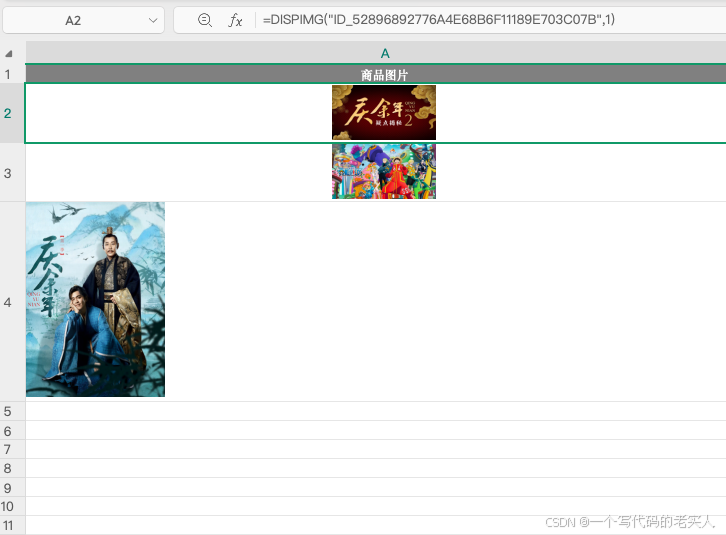
实现思路
通过Excel中图片单元格中函数匹配到对应的图片,将图片上传至服务器,返回图片地址进行保存,从而完成WPS嵌入式图片导入功能
将excel文件后缀名改为zip压缩包,解压后得到如下文件

查询网上资料发现,根据excel图片单元格中函数ID定位到对应关系文件在xl/cellimages.xml和xl/_rels/cellimages.xml.rels这两个文件中
首先我们看到cellimages.xml这个文件中包含了第一段关系
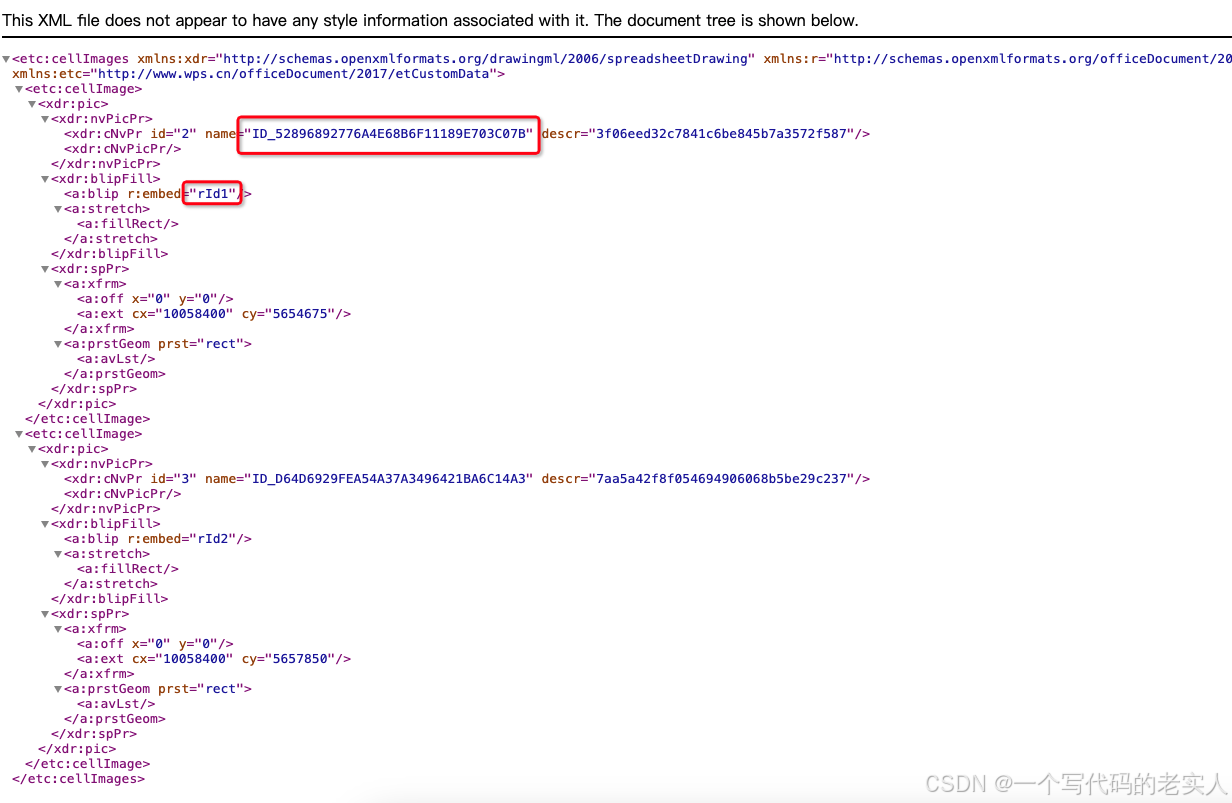
然后我们看到cellimages.xml.rels这这个文件中包含了第二段关系
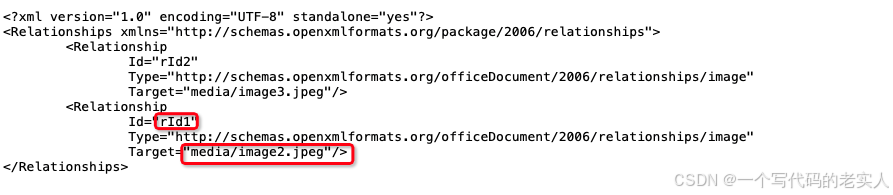
根据这两段关系,我们可以通过excel单元格中函数ID值获取到图片信息。至此,前期逻辑梳理完成,接下来就是代码实现。
代码实现
ExcelUtil工具类中添加wps嵌入式图片解析逻辑
下面展示一些 核心代码。
第一步:申明变量,用于存放excel文件和图片关系信息
    /**
     * 文件对象
     */
    private File file;

    /**
     * key 函数ID value Rid
     */
    private Map<String, String> imageIdMappingMap = new HashMap<>();

    /**
     * key :Rid value 图片信息
     */
    private Map<String, String> imageMap = new HashMap<>();
第二步:处理函数和rid对应关系和处理rid和图片信息关系方法准备
    /**
     * @description: 解析cellimages.xml文件中excel中单元格函数ID对应的RID对应关系
     * @author:
     * @date: 2025/2/8 11:30
     * @param: []
     * @return: void
     **/
    private void ridWithIDRelationShip() throws IOException {
        InputStream inputStream = null;
        try {
            //读取关系xml文件
            inputStream = openFile("xl/cellimages.xml");
            // 创建SAXReader对象
            SAXReader reader = new SAXReader();
            // 加载xml文件
            Document dc = reader.read(inputStream);
            // 获取根节点
            Element rootElement = dc.getRootElement();
            //获取子节点 每一个图片节点
            List<Element> cellImageList = rootElement.elements();

            //循环处理每一个图片
            for (Element cellImage : cellImageList) {
                Element pic = cellImage.element("pic");
                Element nvPicPr = pic.element("nvPicPr");
                Element cNvPr = nvPicPr.element("cNvPr");
                //图片id
                String imageId = cNvPr.attribute("name").getValue().replace("ID_", "");
                Element blipFill = pic.element("blipFill");
                Element blip = blipFill.element("blip");
                //图片Rid
                String imageRid = blip.attribute("embed").getValue();
                //存入map中
                imageIdMappingMap.put(imageId, imageRid);
            }

        } catch (Exception e) {
            log.error("解析cellimages.xml文件中excel中单元格函数ID对应的RID对应关系失败", e);
        } finally {
            if (inputStream != null) {
                inputStream.close();
            }
        }
    }
    /**
     * @description:解析cellimages.xml.rels文件中cellimages.xml文件中的RID对应图片信息对应关系
     * @author:
     * @date: 2025/2/8 11:31
     * @param: []
     * @return: void
     **/
    private void ridWithImagePathRelationShip() throws IOException {
        InputStream inputStream = null;
        try {
            //读取关系文件
            inputStream = openFile("xl/_rels/cellimages.xml.rels");
            // 创建SAXReader对象
            SAXReader reader = new SAXReader();
            // 加载xml文件
            Document dc = reader.read(inputStream);
            // 获取根节点
            Element rootElement = dc.getRootElement();
            List<Element> imageRelationshipList = rootElement.elements();
            //处理每个关系
            for (Element imageRelationship : imageRelationshipList) {
                String imageRid = imageRelationship.attribute("Id").getValue();
                String imagePath = imageRelationship.attribute("Target").getValue();
                this.imageMap.put(imageRid, imagePath);
            }
        } catch (Exception e) {
            log.error("处理xml中rid和图片路径映射关系失败",e);
        } finally {
            if (inputStream != null) {
                inputStream.close();
            }
        }
    }
    /**
     * @description:打开文件转换为zip流,获取zip中对应关系文件
     * @author:
     * @date: 2025/2/8 11:33
     * @param: [filePath]
     * @return: java.io.InputStream
     **/
    private InputStream openFile(String filePath) {
        try {
            ZipFile zipFile = new ZipFile(this.file);
            ZipInputStream zipInputStream = new ZipInputStream(new FileInputStream(this.file));

            ZipEntry nextEntry = null;
            while ((nextEntry = zipInputStream.getNextEntry()) != null) {
                String name = nextEntry.getName();
                if (name.equalsIgnoreCase(filePath)) {
                    return zipFile.getInputStream(nextEntry);
                }
            }
        } catch (Exception e) {
            log.error("解析文件失败", e);
        }
        return null;
    }
第三步: importExcel方法中解析文件,将关系写入申明的变量中
		/**
     * 对excel表单指定表格索引名转换成list
     *
     * @param sheetName 表格索引名
     * @param titleNum  标题占用行数
     * @param is        输入流
     * @return 转换后集合
     */
    public List<T> importExcel(String sheetName, InputStream is, int titleNum) throws Exception {
        this.type = Type.IMPORT;
        // 将excel流转换为文件
        this.file = new File(VasConfig.getImportPath() + "/" + IdUtils.fastUUID() + ".xlsx");
        /*将excel写入创建的文件中 inputStreamToFile方法中使用方法如下Files.copy(in, file.toPath(), StandardCopyOption.REPLACE_EXISTING);*/
        FileUtils.inputStreamToFile(is, this.file);
        // 解析cellimages.xml文件中excel中单元格函数ID对应的RID对应关系
        ridWithIDRelationShip();
        // 解析cellimages.xml.rels文件中cellimages.xml文件中的RID对应图片信息对应关系
        ridWithImagePathRelationShip();
        this.wb = WorkbookFactory.create(new FileInputStream(this.file));
        List<T> list = new ArrayList<T>();
        // 如果指定sheet名,则取指定sheet中的内容 否则默认指向第1个sheet
        Sheet sheet = StringUtils.isNotEmpty(sheetName) ? wb.getSheet(sheetName) : wb.getSheetAt(0);
        if (sheet == null) {
            throw new IOException("文件sheet不存在");
        }
        ......后续逻辑不变......
  }
第四步: importExcel方法中处理每个单元格数据,但单元格对应字段类型为图片时,根据单元格中函数ID匹配到对应图片写入文件,并返回文件路径
else if (ColumnType.IMAGE == attr.cellType())
{
       if(StringUtils.isNotEmpty(pictures)){
            PictureData image = pictures.get(row.getRowNum() + "_" + entry.getKey());
            if (image != null)
            {
                byte[] data = image.getData();
                val = FileUtils.writeImportBytes(data);
            }
        }
        if(val.toString().contains("DISPIMG")){
             String imageId = subImageId(val.toString());
             String picPath = getImplantPicById(imageId);
             InputStream picInputStream = openFile("xl/" + picPath);
             val = FileUtils.writeImportBytes(IOUtils.toByteArray(picInputStream));
         }
 }
根据单元格函数ID获取图片信息
    private String subImageId(String imageId) {
        return imageId.substring(imageId.indexOf("ID_") + 3, imageId.lastIndexOf("\""));
    }
    private String getImplantPicById(String imageId) throws IOException {
        String imageRid = imageIdMappingMap.get(imageId);
        String imagePath = imageMap.get(imageRid);
        return imagePath;
    }
ps:以上只粘贴了嵌入式图片处理逻辑实现代码,不包含完整代码,需要完整代码的小伙伴们可以自行参考若依框架中自带的excel导入工具,也可以评论区留言私信我
小结
以上是处理嵌入式图片的一种方法,在调试过程中我发现poi工具针对excel解析的流中也包含了zip压缩文件以及relationship等信息,但碍于时间关系,没有深入了解,再次希望有小伙伴可以提供出更好的处理方式分享给大家。
参考引用
java读取Excel,(支持WPS嵌入式图片) https://blog.csdn.net/maudboy/article/details/133145278 实现思路以及核心逻辑参考的都是这位大哥的博客,小弟只是把核心处理代码整合补缺到若依框架中。

魔乐社区(Modelers.cn) 是一个中立、公益的人工智能社区,提供人工智能工具、模型、数据的托管、展示与应用协同服务,为人工智能开发及爱好者搭建开放的学习交流平台。社区通过理事会方式运作,由全产业链共同建设、共同运营、共同享有,推动国产AI生态繁荣发展。
更多推荐


 7
7 0
0- 0


 已为社区贡献1条内容

所有评论(0)