使用pytorch的预训练模型fasterrcnn实现目标检测
前言
学习记录的。pytorch 使用预训练模型实现目标检测。本文使用pytorch 预训练的fasterrcnn_resnet50_fpn 来进行目标检测。
结果展示
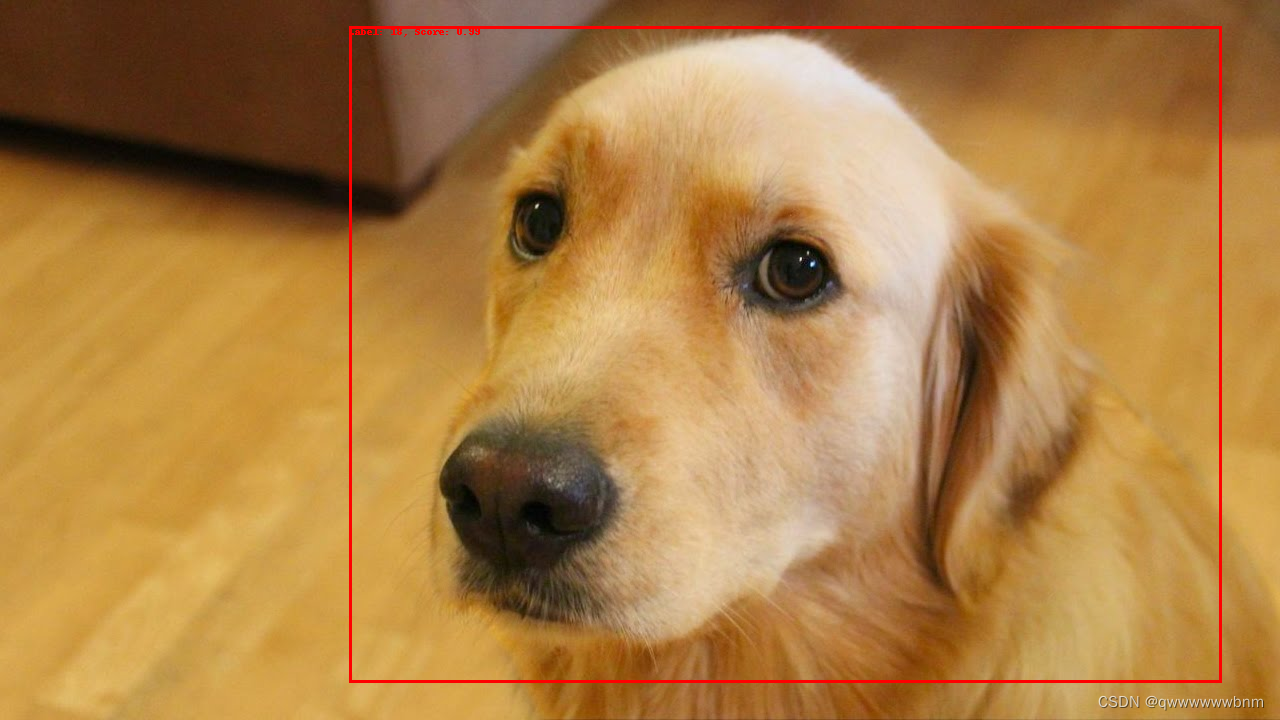
实现过程
1.加载库
import torch
from torchvision.models.detection import fasterrcnn_resnet50_fpn
from torchvision.transforms import functional as F
from torchvision import datasets, transforms
from PIL import Image, ImageDraw
导入了 PyTorch、Torchvision 中的 Faster R-CNN 模型 fasterrcnn_resnet50_fpn,以及一些相关的模块和库(例如transforms和Image)。
2.加载预训练模型和类
model = fasterrcnn_resnet50_fpn(pretrained=True)
model.eval()
COCO_CLASSES = [
    'person', 'bicycle', 'car', 'motorcycle', 'airplane', 'bus', 'train', 'truck',
    'boat', 'traffic light', 'fire hydrant', 'stop sign', 'parking meter', 'bench',
    'bird', 'cat', 'dog', 'horse', 'sheep', 'cow', 'elephant', 'bear', 'zebra',
    'giraffe', 'backpack', 'umbrella', 'handbag', 'tie', 'suitcase', 'frisbee',
    'skis', 'snowboard', 'sports ball', 'kite', 'baseball bat', 'baseball glove',
    'skateboard', 'surfboard', 'tennis racket', 'bottle', 'wine glass', 'cup',
    'fork', 'knife', 'spoon', 'bowl', 'banana', 'apple', 'sandwich', 'orange',
    'broccoli', 'carrot', 'hot dog', 'pizza', 'donut', 'cake', 'chair', 'couch',
    'potted plant', 'bed', 'dining table', 'toilet', 'tv', 'laptop', 'mouse',
    'remote', 'keyboard', 'cell phone', 'microwave', 'oven', 'toaster', 'sink',
    'refrigerator', 'book', 'clock', 'vase', 'scissors', 'teddy bear', 'hair drier',
    'toothbrush'
]
这段代码首先导入了一个 Faster R-CNN 模型,该模型是使用 ResNet-50 和 Feature Pyramid Network 架构进行预训练的。接着,通过将模型设置为评估模式,确保了模型在推断(预测)时不会更新权重。最后,定义了 COCO 数据集中的类别列表,其中包含了该模型可以检测的不同物体类别。这些类别包括人、自行车、汽车、飞机、公交车等。在使用该模型进行推断时,它将尝试识别图像中存在的这些物体,并返回相应的边界框和类别信息。
3.图像和结果的处理
def preprocess_image(image_path):
    # 打开图像文件并转换为RGB格式
    image = Image.open(image_path).convert("RGB")

    # 使用 torchvision 中的 to_tensor 函数将图像转换为张量
    image_tensor = F.to_tensor(image)

    # 在第0维上添加一个维度,以创建批次维度,因为模型通常期望输入为批次
    return image_tensor.unsqueeze(0)

def postprocess_result(outputs, threshold=0.5):
    # 从模型输出中提取边界框、类别和置信度得分
    boxes = outputs[0]['boxes']
    labels = outputs[0]['labels']
    scores = outputs[0]['scores']

    # 使用置信度阈值过滤掉低置信度的检测结果
    mask = scores >= threshold
    boxes = boxes[mask]
    labels = labels[mask]
    scores = scores[mask]

    # 返回过滤后的结果
    return boxes, labels, scores
preprocess_image 函数接受一个图像文件路径,使用PIL库打开图像,然后将其转换为RGB格式。接着,使用 torchvision 的 to_tensor 函数将图像转换为张量,并通过 unsqueeze(0) 添加一个维度,以创建批次维度。这是因为深度学习模型通常期望输入为批次,即使批次大小为1。
postprocess_result 函数接受模型输出(通常是 Faster R-CNN 模型的预测结果),提取边界框、类别和置信度得分。然后,通过指定的置信度阈值,过滤掉置信度得分低于阈值的检测结果。最后,返回过滤后的边界框、类别和置信度得分。
4.应用预训练模型
image_path = "image.jpg"
image_tensor = preprocess_image(image_path)

with torch.no_grad():
    outputs = model(image_tensor)

boxes, labels, scores = postprocess_result(outputs, threshold=0.5)
image = Image.open(image_path).convert("RGB")
draw = ImageDraw.Draw(image)

for box, label, score in zip(boxes, labels, scores):
    label_name = COCO_CLASSES[label-1]
    draw.rectangle([(box[0], box[1]), (box[2], box[3])], outline="red", width=3)
    draw.text((box[0], box[1]), f"Label: {label_name}, Score: {score:.2f}", fill="red")

image.show()
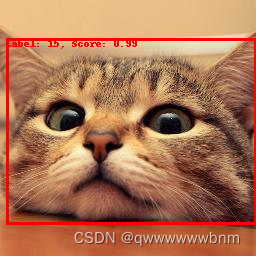
这段代码首先对输入图像进行了预处理,然后使用预训练的 Faster R-CNN 模型进行推断,得到检测结果。接着,通过 postprocess_result 函数过滤掉低置信度的检测结果。最后,使用 PIL 库的 ImageDraw 模块在原始图像上绘制边界框和标签信息,然后显示带有检测结果的图像。
zip(boxes, labels, scores) 是一个内置函数 zip 的使用,它将传递给它的每个可迭代对象的对应元素打包成一个元组,然后返回一个由这些元组组成的迭代器。在这个上下文中,zip(boxes, labels, scores) 用于同时遍历三个列表(boxes、labels 和 scores)的元素。
结果展示
完整代码
import torch
from torchvision.models.detection import fasterrcnn_resnet50_fpn
from torchvision.transforms import functional as F
from torchvision import datasets, transforms
from PIL import Image, ImageDraw
model = fasterrcnn_resnet50_fpn(pretrained=True)
model.eval()
COCO_CLASSES = [
    'person', 'bicycle', 'car', 'motorcycle', 'airplane', 'bus', 'train', 'truck',
    'boat', 'traffic light', 'fire hydrant', 'stop sign', 'parking meter', 'bench',
    'bird', 'cat', 'dog', 'horse', 'sheep', 'cow', 'elephant', 'bear', 'zebra',
    'giraffe', 'backpack', 'umbrella', 'handbag', 'tie', 'suitcase', 'frisbee',
    'skis', 'snowboard', 'sports ball', 'kite', 'baseball bat', 'baseball glove',
    'skateboard', 'surfboard', 'tennis racket', 'bottle', 'wine glass', 'cup',
    'fork', 'knife', 'spoon', 'bowl', 'banana', 'apple', 'sandwich', 'orange',
    'broccoli', 'carrot', 'hot dog', 'pizza', 'donut', 'cake', 'chair', 'couch',
    'potted plant', 'bed', 'dining table', 'toilet', 'tv', 'laptop', 'mouse',
    'remote', 'keyboard', 'cell phone', 'microwave', 'oven', 'toaster', 'sink',
    'refrigerator', 'book', 'clock', 'vase', 'scissors', 'teddy bear', 'hair drier',
    'toothbrush'
]

def preprocess_image(image_path):
    image = Image.open(image_path).convert("RGB")
    image_tensor = F.to_tensor(image)
    return image_tensor.unsqueeze(0)

def postprocess_result(outputs, threshold=0.5):
    boxes = outputs[0]['boxes']
    labels = outputs[0]['labels']
    scores = outputs[0]['scores']

    # Filter out detections with low confidence
    mask = scores >= threshold
    boxes = boxes[mask]
    labels = labels[mask]
    scores = scores[mask]

    return boxes, labels, scores
image_path = "image.jpg"
image_tensor = preprocess_image(image_path)

with torch.no_grad():
    outputs = model(image_tensor)

boxes, labels, scores = postprocess_result(outputs, threshold=0.5)
image = Image.open(image_path).convert("RGB")
draw = ImageDraw.Draw(image)

for box, label, score in zip(boxes, labels, scores):
    label_name = COCO_CLASSES[label-1]
    draw.rectangle([(box[0], box[1]), (box[2], box[3])], outline="red", width=3)
    draw.text((box[0], box[1]), f"Label: {label_name}, Score: {score:.2f}", fill="red")

image.show()

魔乐社区(Modelers.cn) 是一个中立、公益的人工智能社区,提供人工智能工具、模型、数据的托管、展示与应用协同服务,为人工智能开发及爱好者搭建开放的学习交流平台。社区通过理事会方式运作,由全产业链共同建设、共同运营、共同享有,推动国产AI生态繁荣发展。
更多推荐


 9
9 0
0- 0


 已为社区贡献1条内容

所有评论(0)