python messagebox弹窗退出_Python之tkinter.messagebox弹窗
messagebox:tkinter的消息框、对话框
一、messagebox.showinfo(title='提示', message='错误')
1 from tkinter import *
2 from tkinter importmessagebox3 root =Tk()# 初始化4
5 width = 380
6 height = 300
7 #获取屏幕尺寸以计算布局参数,使窗口居屏幕中央
8 screenwidth =root.winfo_screenwidth()9 screenheight =root.winfo_screenheight()10 alignstr = '%dx%d+%d+%d' % (width, height, (screenwidth - width) / 2, (screenheight - height) / 2)11 root.geometry(alignstr)12 frame =Frame(root)13 frame.pack()14 defhit_me():
15 messagebox.showinfo(title='提示', message='错误')16 button = Button(frame, text='点我', command=hit_me)17 button.pack()18 mainloop()
效果:

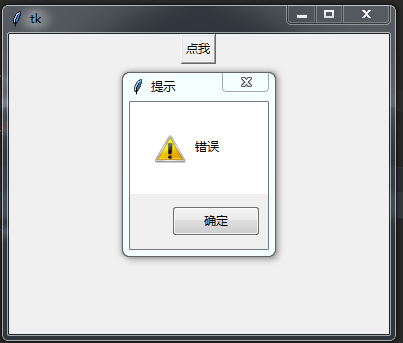
二、tkinter.messagebox.showwarning(title,message)
from tkinter import *
from tkinter importmessagebox
root=Tk()
width= 380height= 300
#获取屏幕尺寸以计算布局参数,使窗口居屏幕中央
screenwidth =root.winfo_screenwidth()
screenheight=root.winfo_screenheight()
alignstr= '%dx%d+%d+%d' % (width, height, (screenwidth - width) / 2, (screenheight - height) / 2)
root.geometry(alignstr)
frame=Frame(root)
frame.pack()defhit_me():#messagebox.showinfo(title='提示', message='错误')
messagebox.showwarning(title='提示', message='错误')
button= Button(frame, text='点我', command=hit_me)
button.pack()
mainloop()
效果:
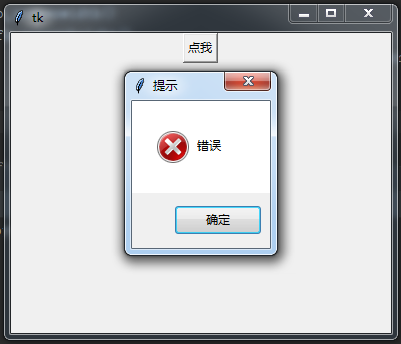
三、tkinter.messagebox.showinfo(title,message)
from tkinter import *
from tkinter importmessagebox
root=Tk()
width= 380height= 300
#获取屏幕尺寸以计算布局参数,使窗口居屏幕中央
screenwidth =root.winfo_screenwidth()
screenheight=root.winfo_screenheight()
alignstr= '%dx%d+%d+%d' % (width, height, (screenwidth - width) / 2, (screenheight - height) / 2)
root.geometry(alignstr)
frame=Frame(root)
frame.pack()defhit_me():#messagebox.showinfo(title='提示', message='错误')
#messagebox.showwarning(title='提示', message='错误')
messagebox.showerror(title='提示',message='错误')
button= Button(frame, text='点我', command=hit_me)
button.pack()
mainloop()
效果:
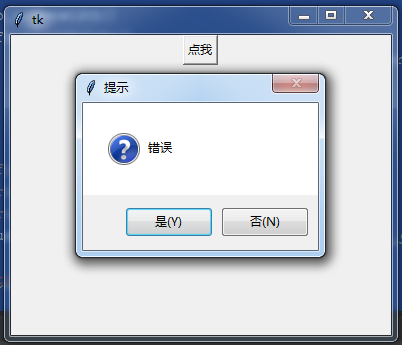
四、messagebox.askquestion(title='提示',message='错误') #resurn 'yes' or 'no'
from tkinter import *
from tkinter importmessagebox
root=Tk()
width= 380height= 300
#获取屏幕尺寸以计算布局参数,使窗口居屏幕中央
screenwidth =root.winfo_screenwidth()
screenheight=root.winfo_screenheight()
alignstr= '%dx%d+%d+%d' % (width, height, (screenwidth - width) / 2, (screenheight - height) / 2)
root.geometry(alignstr)
frame=Frame(root)
frame.pack()defhit_me():#messagebox.showinfo(title='提示', message='错误')
#messagebox.showwarning(title='提示', message='错误')
#messagebox.showerror(title='提示',message='错误')
Q = messagebox.askquestion(title='提示',message='错误') #resurn 'yes' or 'no'
print(Q)
button= Button(frame, text='点我', command=hit_me)
button.pack()
mainloop()
效果:(说明:按下是或否会返回yes或no)
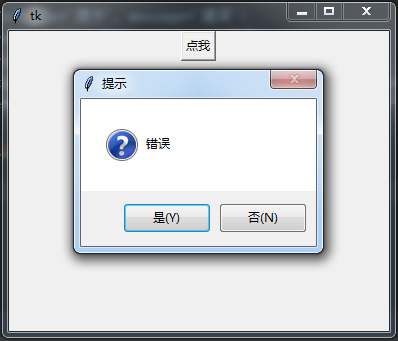
五、messagebox.askyesno(title='提示', message='错误') # resurn 'True' or 'False'
Q = messagebox.askyesno(title='提示', message='错误') #resurn 'True' or 'False'
效果:(说明:按下是或否会返回True或False)
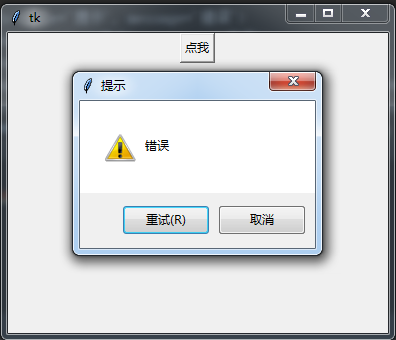
六、messagebox.askretrycancel(title='提示', message='错误') # resurn 'True' or 'False'
Q = messagebox.askretrycancel(title='提示', message='错误') #resurn 'True' or 'False'
效果:(说明:按下是或否会返回True或False)
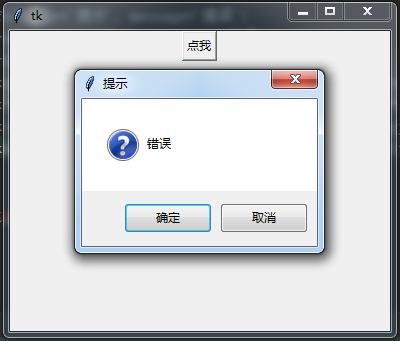
七、messagebox.askokcancel(title='提示', message='错误') # resurn 'True' or 'False'
Q = messagebox.askokcancel(title='提示', message='错误') #resurn 'True' or 'False'
效果:(说明:按下是或否会返回True或False)

魔乐社区(Modelers.cn) 是一个中立、公益的人工智能社区,提供人工智能工具、模型、数据的托管、展示与应用协同服务,为人工智能开发及爱好者搭建开放的学习交流平台。社区通过理事会方式运作,由全产业链共同建设、共同运营、共同享有,推动国产AI生态繁荣发展。
更多推荐


 0
0 0
0- 0


 已为社区贡献6条内容

所有评论(0)