python:mysql创建数据库
·

接下来。装逼开始....
命令行创建数据库
示例1:创建数据库testing
root@7c6316b19d80:/# mysql -u root -p
Enter password:
Welcome to the MySQL monitor.  Commands end with ; or \g.
Your MySQL connection id is 16
Server version: 5.6.51 MySQL Community Server (GPL)

mysql> create database testing;
Query OK, 1 row affected (0.00 sec)

mysql>
注意点:在命令行里执行sql语句,一定不要忘了语句后面加“ ; ”,不然就会报错,执行不成功
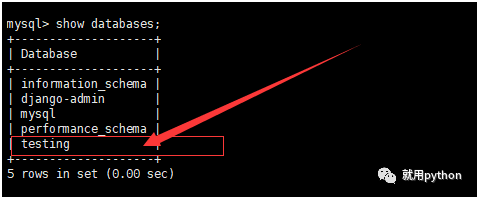
数据库 testing 已经创建成功......
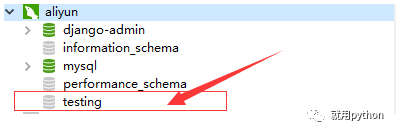
navicate中也显示了刚才创建的testing数据库......
利用python创建数据库
示例2:创建已存在的数据库 testing
import pymysql

# 连接数据库
conn = pymysql.connect(host="localhost", user="root", password="123456",
                       cursorclass=pymysql.cursors.DictCursor)

try:
    # 创建游标
    cur = conn.cursor()
    # 执行sql查询语句

    cur.execute("create database testing")

    # 关闭游标
    cur.close()
    # 关闭数据库连接
    conn.close()
except pymysql.err.MySQLError as _error:
    raise _error
Traceback (most recent call last):
File "F:/project_gitee/Test/pythonScripts/python_mysql.py", line 12, in <module>
cur.execute("create database testing")
File "D:\Python\Python37\lib\site-packages\pymysql\cursors.py", line 170, in execute
result = self._query(query)
File "D:\Python\Python37\lib\site-packages\pymysql\cursors.py", line 328, in _query
conn.query(q)
File "D:\Python\Python37\lib\site-packages\pymysql\connections.py", line 517, in query
self._affected_rows = self._read_query_result(unbuffered=unbuffered)
File "D:\Python\Python37\lib\site-packages\pymysql\connections.py", line 732, in _read_query_result
result.read()
File "D:\Python\Python37\lib\site-packages\pymysql\connections.py", line 1075, in read
first_packet = self.connection._read_packet()
File "D:\Python\Python37\lib\site-packages\pymysql\connections.py", line 684, in _read_packet
packet.check_error()
File "D:\Python\Python37\lib\site-packages\pymysql\protocol.py", line 220, in check_error
err.raise_mysql_exception(self._data)
File "D:\Python\Python37\lib\site-packages\pymysql\err.py", line 109, in raise_mysql_exception
raise errorclass(errno, errval)
pymysql.err.ProgrammingError: (1007, "Can't create database 'testing'; database exists")可以明显的看到pymysql有自己的抛错信息......
1007, "Can't create database 'testing'; database exists"翻译过来就是:无法创建数据库'testing';数据库存在
这个捕获与不捕获可以,因为pymysql只要是这个错误,都会抛出准确问题定位......
pymysql不支持数据库名称带横线,会报语法错误......
cur.execute("create database python-testing")pymysql.err.ProgrammingError: (1064, "You have an error in your SQL syntax; check the manual that corresponds to your MySQL server version for the right syntax to use near '-testing' at line 1")
示例3:创建新的数据库 pythonTest
import pymysql

# 连接数据库
conn = pymysql.connect(host="localhost", user="root", password="123456",
                       cursorclass=pymysql.cursors.DictCursor)

try:
    # 创建游标
    cur = conn.cursor()
    # 执行sql查询语句

    cur.execute("create database pythonTest")
    print('数据库创建成功')
    # 关闭游标
    cur.close()
    # 关闭数据库连接
    conn.close()
except pymysql.err.MySQLError as _error:
    print('数据库创建失败')
    raise _error
数据库创建成功
Process finished with exit code 0至此,mysql数据库创建完成......

以上总结或许能帮助到你,或许帮助不到你,但还是希望能帮助到你,如有疑问、歧义,评论区留言会及时修正发布,谢谢!
未完,待续…
一直都在努力,希望您也是!
微信搜索公众号:就用python


魔乐社区(Modelers.cn) 是一个中立、公益的人工智能社区,提供人工智能工具、模型、数据的托管、展示与应用协同服务,为人工智能开发及爱好者搭建开放的学习交流平台。社区通过理事会方式运作,由全产业链共同建设、共同运营、共同享有,推动国产AI生态繁荣发展。
更多推荐


 3
3 0
0- 0


 已为社区贡献6条内容

所有评论(0)