mysql_native_password' failed_uthentication to host '10.0.1.33' for user 'root' using method 'mysql_...
string conDBstring = "Server=" + server + ";Uid=" + userName + ";Pwd=" + passWord + ";Database=test_db";
MySqlConnection con= newMySqlConnection(conDBstring);
con.Open();
连接mysql数据时,本机Server写localhost或10.0.1.33都可以连上,但是局域网其他电脑填10.0.1.33正确的用户名密码就报标题中的错误
需要给当前数据库开启远程权限才行,命令如下:
grant all privileges on *.* to 'root'@'%' identified by 'YourPassword' with grant option;
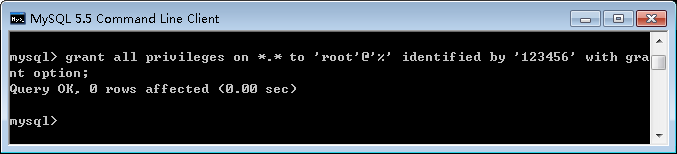
在MySQL 5.5.62里按上图输入没问题,但是后来在MySQL 8.0.18里输入上面命令会报错

GRANT ALL PRIVILEGES ON *.* TO 'root'@'%' IDENTIFIED BY '123456'WITH GRANT OPTION;
ERROR1064 (42000): You have an error in your SQL syntax; check the manual that corresponds to your MySQL server version
for the right syntax to use near 'IDENTIFIED BY'123456'WITH GRANT OPTION' at line 1
此时用C# MySqlConnection连接,会报错:
Authentication method 'caching_sha2_password' is not supported.
原因:mysql版本身份验证引起的,
官网解释:https://dev.mysql.com/doc/refman/8.0/en/caching-sha2-pluggable-authentication.html
解决方法:
mysql安装目录下修改my.ini文件(如果没有就新建一个my.ini),设置mysql_native_password为默认身份验证方式
[mysqld]
default_authentication_plugin=mysql_native_password
其他设置项可参考官方文档
参考:

魔乐社区(Modelers.cn) 是一个中立、公益的人工智能社区,提供人工智能工具、模型、数据的托管、展示与应用协同服务,为人工智能开发及爱好者搭建开放的学习交流平台。社区通过理事会方式运作,由全产业链共同建设、共同运营、共同享有,推动国产AI生态繁荣发展。
更多推荐


 0
0 0
0- 0


 已为社区贡献6条内容

所有评论(0)