.net framework data provider for mysql_如何添加".Net Framework Data Provider for MySQL"配置信息到目标主机中?...
在使用Entity Framework开发数据业务系统时,使用了MySQL数据库,ADO.NET driver for MySQL使用官网http://www.mysql.com/downloads/connector/net/中下载的提供程序,在开发环境中安装该提供程序后,该安装程序将修改系统配置文件“C:\Windows\Microsoft.NET\Framework\v2.0.50727\C
在使用Entity Framework开发数据业务系统时,使用了MySQL数据库,ADO.NET driver for MySQL使用官网http://www.mysql.com/downloads/connector/net/中下载的提供程序,在开发环境中安装该提供程序后,该安装程序将修改系统配置文件“C:\Windows\Microsoft.NET\Framework\v2.0.50727\CONFIG\machine.config”,修改后的文件段如下:
隐藏行号 复制代码 ?这是一段程序代码。
配置节”
当发布程序到目标主机时,没有该配置节时,应用程序将弹出异常,所以我们需要想办法修改目标主机上的配置将上面的配置节添加进去,可行的办法有一下几种:
1、在可执行程序的配置文件中添加该配置段。
此方法带来的后果是,在开发主机上调试程序变得非常不方便,因为该配置信息在系统中只能出现一次,如果配置文件加载配置是发现有两个相同段的配置(一个位于上文提到的machine.config中,一个位于你要调试的程序demo.exe.config中),程序将发生异常无法调试,有解决方法就是在调试时将该该配置段暂时注释,发布时取消注释,但是这样的反复操作太令人痛苦了,所以此方法建议不采用。
2、程序启动时修改“machine.config”配置文件,添加配置段。
此方法经验证部分可行,因为程序要修改该的配置文件存在于系统路径下,有文件保护,需要有授权才能访问并修改该文件,而授权又是相当繁琐的过程。所以此方法建议不采用。
3、在安装程序中自定义安装过程,在该过程中修改“machine.config”配置文件。
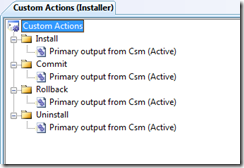
此方法屏蔽了方法2的授权过程,因为安装程序自身有权限修改任何文件,所以此方法为最佳方法。实现步骤如下,在主输出项目中添加一个继承自“Installer”类的子类,重载方法“ public override void Commit(IDictionary savedState)”,在该方法体内实现将配置节添加到“machine.config”配置文件中,然后在安装项目中自定义安装过程。
自定义安装类:
隐藏行号 复制代码 ?这是一段程序代码。
usingSystem;
usingSystem.Collections;
usingSystem.ComponentModel;
usingSystem.Configuration.Install;
usingSystem.IO;
usingSystem.Linq;
usingSystem.Reflection;
usingSystem.Xml.Linq;
usingSystem.Diagnostics;
usingSystem.Windows.Forms;
namespaceFreemansoft.Csm
{
///
///自定义安装。
///
[RunInstaller(true)]
public partial classCsmInstaller: Installer
{
///
///构造方法。
///
publicCsmInstaller()
{
InitializeComponent();
}
///
///重载提交。
///
public override voidCommit(IDictionarysavedState)
{
base.Commit(savedState);
CreateUnInstallBat();
CreateMySQLProviderSection();
}
///
///创建“MySQL数据库”数据提供程序配置段。
///
private static voidCreateMySQLProviderSection()
{
stringinvarientValue = "MySql.Data.MySqlClient";
stringmachineCfgFileName = @"C:\Windows\Microsoft.NET\Framework\v2.0.50727\CONFIG\machine.config";
stringname = "MySQL Data Provider";
stringdescription = ".Net Framework Data Provider for MySQL";
stringtype = "MySql.Data.MySqlClient.MySqlClientFactory, MySql.Data, Version=6.2.4.0, Culture=neutral, PublicKeyToken=c5687fc88969c44d";
XDocumentdocument = XDocument.Load(machineCfgFileName);
if(document != null)
{
XElementelement = document.Root.Element("system.data");
if(element != null)
{
element = element.Element("DbProviderFactories");
if(element != null)
{
if(element.Elements().FirstOrDefault(a =>
a.Attribute("invariant").Value == invarientValue) == null)
{
element.Add(newXElement("add",
newXAttribute("name", name),
newXAttribute("invariant", invarientValue),
newXAttribute("description", description),
newXAttribute("type", type)));
document.Save(machineCfgFileName);
Logging.Logger.Inform("Add the mysql data provider configuration to the "+ machineCfgFileName);
}
}
}
}
}
///
///创建卸载批处理文件。
///
protected voidCreateUnInstallBat()
{
stringdir = GetTargetDirectory();
FileStreamfs = newFileStream(dir + "UnInstall.bat", FileMode.Create);
StreamWritersw = newStreamWriter(fs);
sw.WriteLine("@echo off");
sw.WriteLine(@"C:\Windows\Microsoft.NET\Framework\v2.0.50727\InstallUtil.exe -u "+ Path.Combine(GetTargetDirectory(), "DbSynchronization.exe"));
sw.WriteLine(string.Format("start /normal %windir%\\system32\\msiexec /x {0}", base.Context.Parameters["productCode"].ToString()));
sw.WriteLine("exit");
sw.Flush();
sw.Close();
fs.Close();
}
///
///获取安装目标目录。
///
protected stringGetTargetDirectory()
{
stringdirectory = Path.GetDirectoryName(base.Context.Parameters["assemblypath"].ToString());
if(directory[directory.Length - 1] != Path.DirectorySeparatorChar)
{
directory += Path.DirectorySeparatorChar;
}
returndirectory;
}
}
}
安装项目自定义过程:

魔乐社区(Modelers.cn) 是一个中立、公益的人工智能社区,提供人工智能工具、模型、数据的托管、展示与应用协同服务,为人工智能开发及爱好者搭建开放的学习交流平台。社区通过理事会方式运作,由全产业链共同建设、共同运营、共同享有,推动国产AI生态繁荣发展。
更多推荐


 0
0 0
0- 0


 已为社区贡献5条内容

所有评论(0)