android绿豆通讯录xml,绿豆通讯录 (用SQLite数据库完成数据处理)
工具:Android Studioactivity_main.xmlxmlns:app="http://schemas.android.com/apk/res-auto"xmlns:tools="http://schemas.android.com/tools"android:layout_width="match_parent"android:layout_height="match_paren

工具:Android Studio
activity_main.xml
xmlns:app="http://schemas.android.com/apk/res-auto"
xmlns:tools="http://schemas.android.com/tools"
android:layout_width="match_parent"
android:layout_height="match_parent"
android:background="@drawable/bg"
android:paddingBottom="16dp"
android:paddingLeft="16dp"
android:paddingRight="16dp"
android:paddingTop="16dp"
tools:context=".MainActivity">
android:layout_width="match_parent"
android:layout_height="wrap_content"
android:id="@+id/ll_name"
android:layout_above="@+id/ll_phone"
android:layout_alignLeft="@+id/ll_btn"
android:layout_alignStart="@+id/ll_btn">
android:layout_width="wrap_content"
android:layout_height="wrap_content"
android:textSize="18sp"
android:hint="姓 名:"/>
android:layout_width="match_parent"
android:layout_height="wrap_content"
android:id="@+id/et_name"
android:textSize="16sp"
android:hint="请输入姓名:"/>
android:layout_width="match_parent"
android:layout_height="wrap_content"
android:id="@+id/ll_phone"
android:layout_marginBottom="10dp"
android:layout_above="@+id/ll_btn"
android:layout_alignLeft="@id/ll_name"
android:layout_alignStart="@id/ll_name">
android:layout_width="wrap_content"
android:layout_height="wrap_content"
android:textSize="18sp"
android:text="电 话:"/>
android:layout_width="match_parent"
android:layout_height="wrap_content"
android:id="@+id/et_phone"
android:textSize="16sp"
android:hint="请输入手机号码"/>
android:layout_width="match_parent"
android:layout_height="wrap_content"
android:id="@+id/ll_btn"
android:layout_centerVertical="true">
android:layout_width="0dp"
android:layout_height="wrap_content"
android:id="@+id/btn_add"
android:layout_weight="1"
android:textSize="18sp"
android:background="#DCB5FF"
android:layout_marginRight="2dp"
android:text="添加"/>
android:layout_width="0dp"
android:layout_height="wrap_content"
android:id="@+id/btn_update"
android:layout_weight="1"
android:textSize="18sp"
android:background="#E6CAFF"
android:layout_marginRight="2dp"
android:text="修改"/>
android:layout_width="0dp"
android:layout_height="wrap_content"
android:id="@+id/btn_delete"
android:layout_weight="1"
android:textSize="18sp"
android:background="#ACD6FF"
android:layout_marginRight="2dp"
android:text="删除"/>
android:layout_width="0dp"
android:layout_height="wrap_content"
android:id="@+id/btn_query"
android:layout_weight="1"
android:textSize="18sp"
android:background="#DCB5FF"
android:layout_marginRight="2dp"
android:text="查询"/>
android:layout_width="match_parent"
android:layout_height="wrap_content"
android:id="@+id/tv_show"
android:layout_marginTop="25dp"
android:layout_below="@id/ll_btn"
android:textSize="20sp"/>
MainActivity.java
package cn.itcast.directory;
import androidx.appcompat.app.AppCompatActivity;
import android.content.ContentValues;
import android.content.Context;
import android.database.Cursor;
import android.database.sqlite.SQLiteDatabase;
import android.database.sqlite.SQLiteOpenHelper;
import android.view.View;
import android.widget.EditText;
import android.widget.Button;
import android.widget.TextView;
import android.widget.Toast;
import android.os.Bundle;
public class MainActivity extends AppCompatActivity implements View.OnClickListener{
MyHelper myHelper;
private EditText mEtName;
private EditText mEtPhone;
private TextView mTvShow;
private Button mBtnAdd;
private Button mBtnQuery;
private Button mBtnUpdate;
private Button mBtnDelete;
@Override
protected void onCreate(Bundle savedInstanceState) {
super.onCreate(savedInstanceState);
setContentView(R.layout.activity_main);
myHelper = new MyHelper(this);
init();
private void init(){
mEtName = (EditText) findViewById(R.id.et_name);
mEtPhone = (EditText) findViewById(R.id.et_phone);
mTvShow = (TextView) findViewById(R.id.tv_show);
mBtnAdd = (Button) findViewById(R.id.btn_add);
mBtnQuery = (Button) findViewById(R.id.btn_query);
mBtnUpdate = (Button) findViewById(R.id.btn_update);
mBtnDelete = (Button) findViewById(R.id.btn_delete);
mBtnAdd.setOnClickListener(this);
mBtnQuery.setOnClickListener(this);
mBtnUpdate.setOnClickListener(this);
mBtnDelete.setOnClickListener(this);
}
@Override
public void onClick(View v){
String name;
String phone;
SQLiteDatabase db;
ContentValues values;
switch (v.getId()){
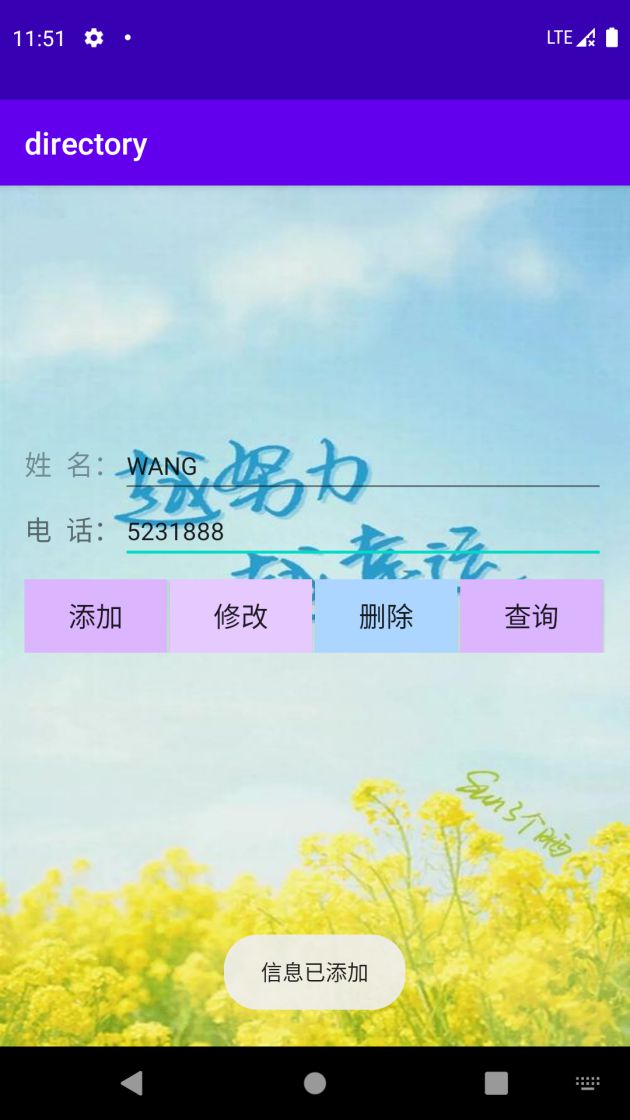
case R.id.btn_add:
name = mEtName.getText().toString();
phone = mEtPhone.getText().toString();
db = myHelper.getWritableDatabase();
values = new ContentValues();
values.put("name",name);
values.put("phone",phone);
db.insert("information",null,values);
Toast.makeText(this,"信息已添加",Toast.LENGTH_SHORT).show();
db.close();
break;
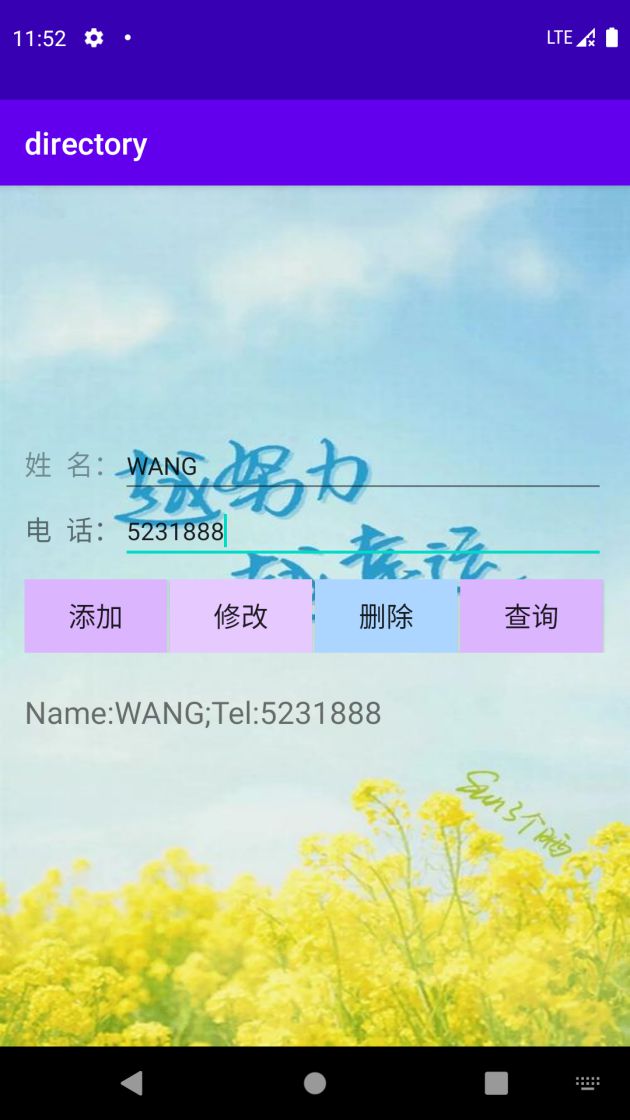
case R.id.btn_query:
db = myHelper.getReadableDatabase();
Cursor cursor = db.query("information",null,null,null,null,null,null);
if(cursor.getCount() == 0){
mTvShow.setText("");
Toast.makeText(this,"没有数据",Toast.LENGTH_SHORT).show();
}else{
cursor.moveToFirst();
mTvShow.setText("Name:"+cursor.getString(1)+";Tel:"+cursor.getString(2));
}
while(cursor.moveToNext()){
mTvShow.append("\n"+"Name:"+cursor.getString(1)+";Tel:"+cursor.getString(2));
}
cursor.close();
db.close();
break;
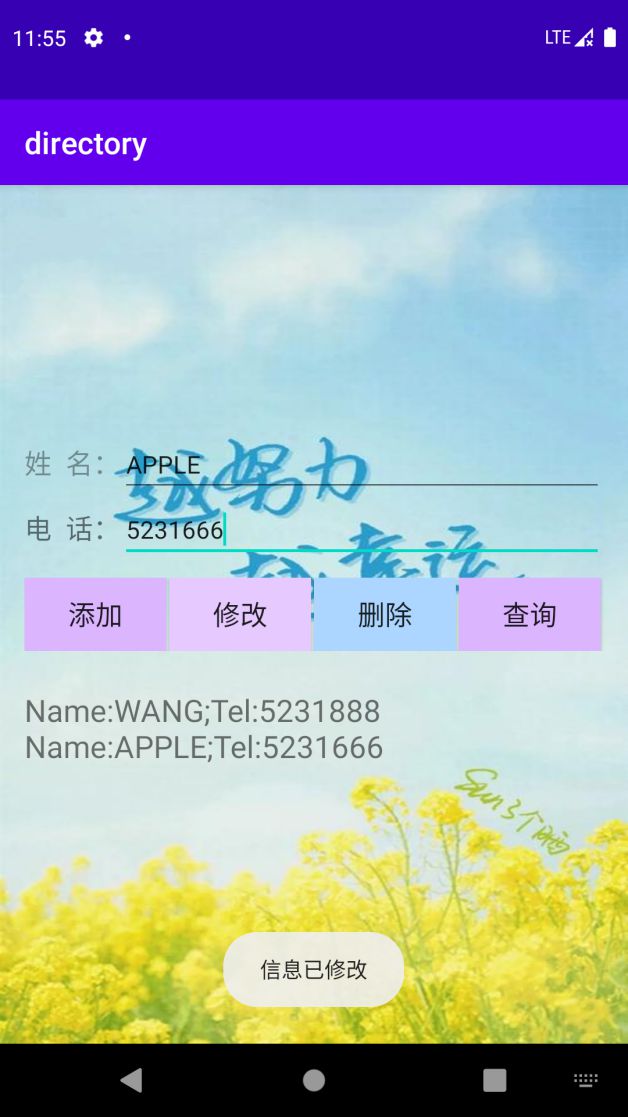
case R.id.btn_update:
db = myHelper.getWritableDatabase();
values = new ContentValues();
values.put("phone",phone = mEtPhone.getText().toString());
db.update("information",values,"name=?",new String[]{mEtName.getText().toString()});
Toast.makeText(this,"信息已修改",Toast.LENGTH_SHORT).show();
db.close();
break;
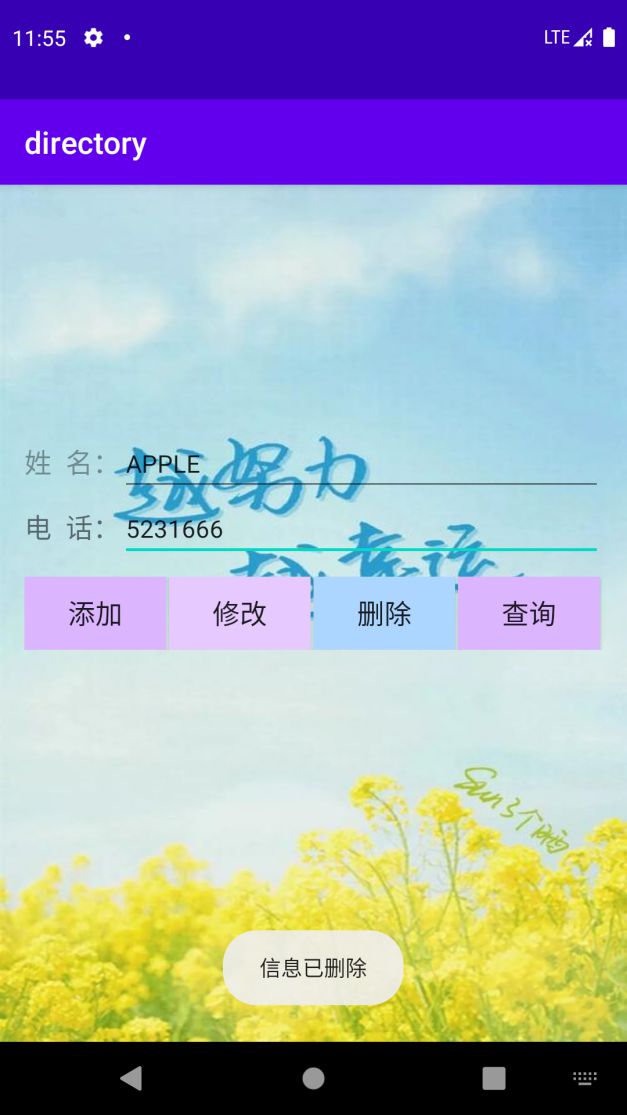
case R.id.btn_delete:
db = myHelper.getWritableDatabase();
db.delete("information",null,null);
Toast.makeText(this,"信息已删除",Toast.LENGTH_SHORT).show();
mTvShow.setText("");
db.close();
break;
}
}
class MyHelper extends SQLiteOpenHelper{
public MyHelper(Context context){
super(context,"example.db",null,1);
}
@Override
public void onCreate(SQLiteDatabase db){
db.execSQL("CREATE TABLE information(_id INTEGER PRIMARY KEY AUTOINCREMENT,name VARCHAR(20),phone VARCHAR(20))");
}
@Override
public void onUpgrade(SQLiteDatabase db,int oldVersion,int newVersion){
}
}
}

魔乐社区(Modelers.cn) 是一个中立、公益的人工智能社区,提供人工智能工具、模型、数据的托管、展示与应用协同服务,为人工智能开发及爱好者搭建开放的学习交流平台。社区通过理事会方式运作,由全产业链共同建设、共同运营、共同享有,推动国产AI生态繁荣发展。
更多推荐



 0
0 0
0- 0


 已为社区贡献4条内容

所有评论(0)