python调用pypandoc库报错问题
·
报错问题
No pandoc was found: either install pandoc and add it to your PATH or or call pypandoc.download_pandoc(...) or install pypandoc wheels with included pandoc
解决办法1:
####参考链接:关于python用pypandoc问题(python3)(探索ing)
windows:本地进入pypandoc的init包里将stdout.decode(‘utf-8’)改为stdout
linux:pip show pypandoc 查找一下包的路径,我这里是
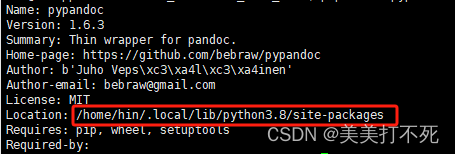
然后将pypandoc的init包里将stdout.decode(‘utf-8’)改为stdout
解决办法2:
安装pandoc
sudo apt install pandoc (输入pandoc没报错即安装成功)
然后 whereis pandoc (我的是/usr/bin/pandoc)
进入bin目录:cd /usr/bin
给权限:sudo chmod 755 pandoc(sudo chmod +X pandoc)[ps:我是用这个方法解决的]

魔乐社区(Modelers.cn) 是一个中立、公益的人工智能社区,提供人工智能工具、模型、数据的托管、展示与应用协同服务,为人工智能开发及爱好者搭建开放的学习交流平台。社区通过理事会方式运作,由全产业链共同建设、共同运营、共同享有,推动国产AI生态繁荣发展。
更多推荐


 0
0 0
0- 0


 已为社区贡献5条内容

所有评论(0)